[Plugin] RichSection V0.5.8 UPDATED march 2015
-
Here is my model,wish you could solve all problems...
This model is made by Max,then it is transformed by 3DS format to SK,big software produce big models

-
quote="ladcwei"]Here is my model,wish you could solve all problems...
This model is made by Max,then it is transformed by 3DS format to SK,big software produce big models
[/quote]Hi ladcwei,
Big sofware, big problems... .... after conversion to SKP.
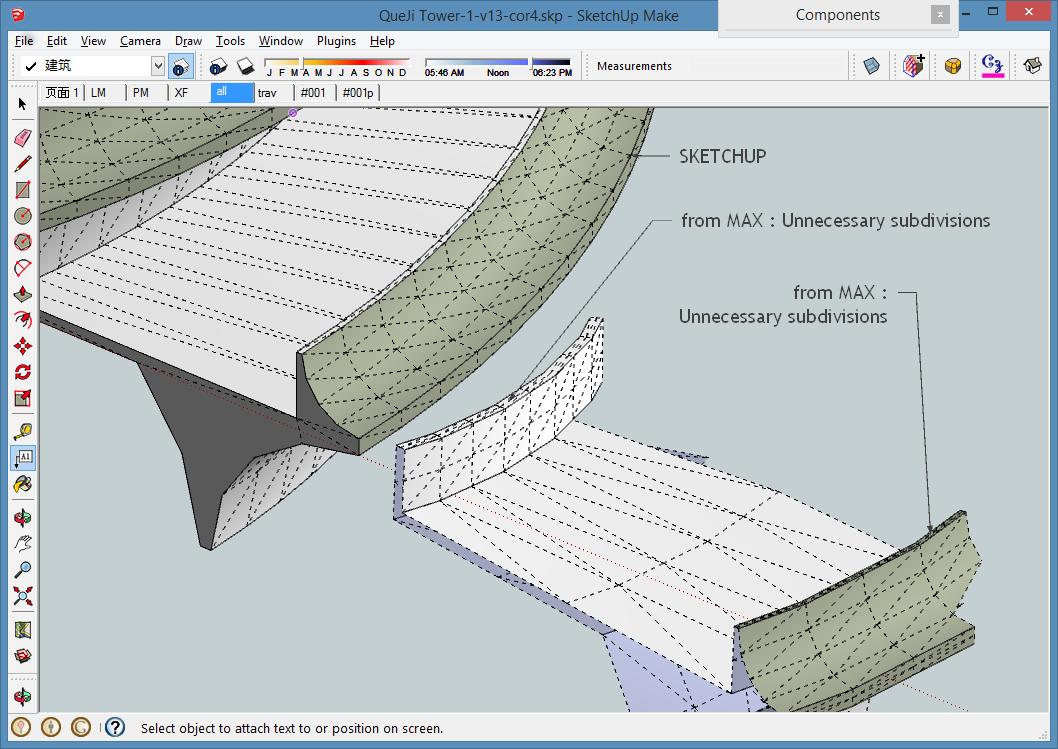
The problem is not the complexity. Even with a small part or the Max model, no intersection will be generated. It could be that adjacent faces dont share the same edge. Some faces have superposed edges.There are lot of coplanar faces subdivided without any reason. I tried to clean-up (plugins, by hand...).... no change,,,,
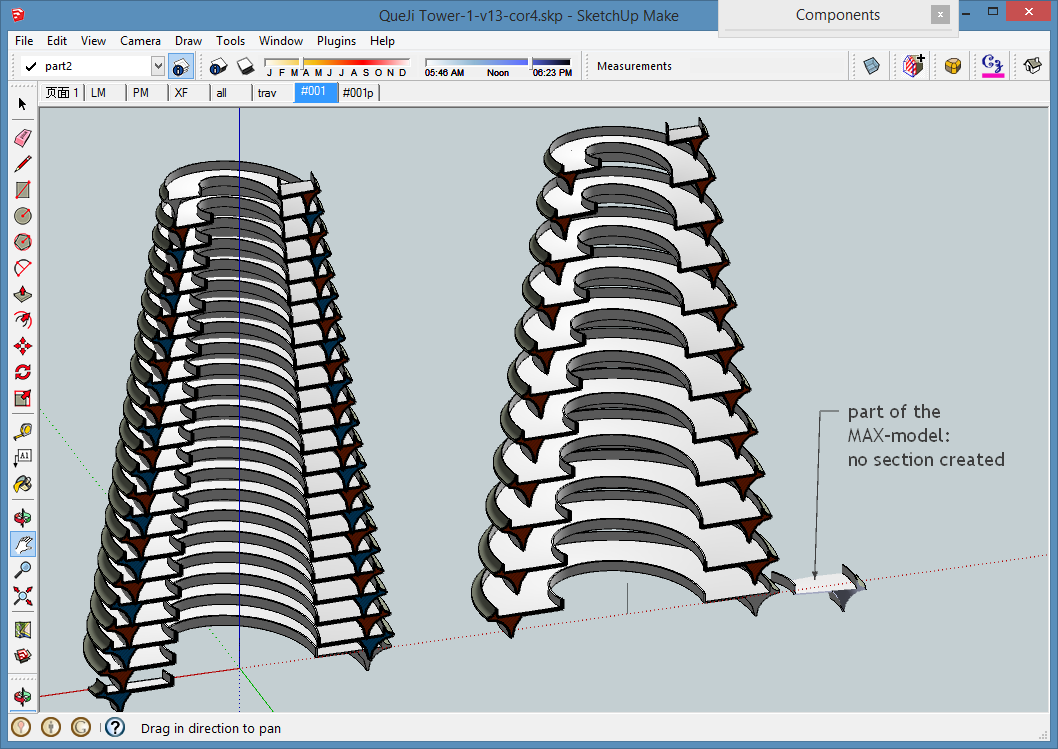
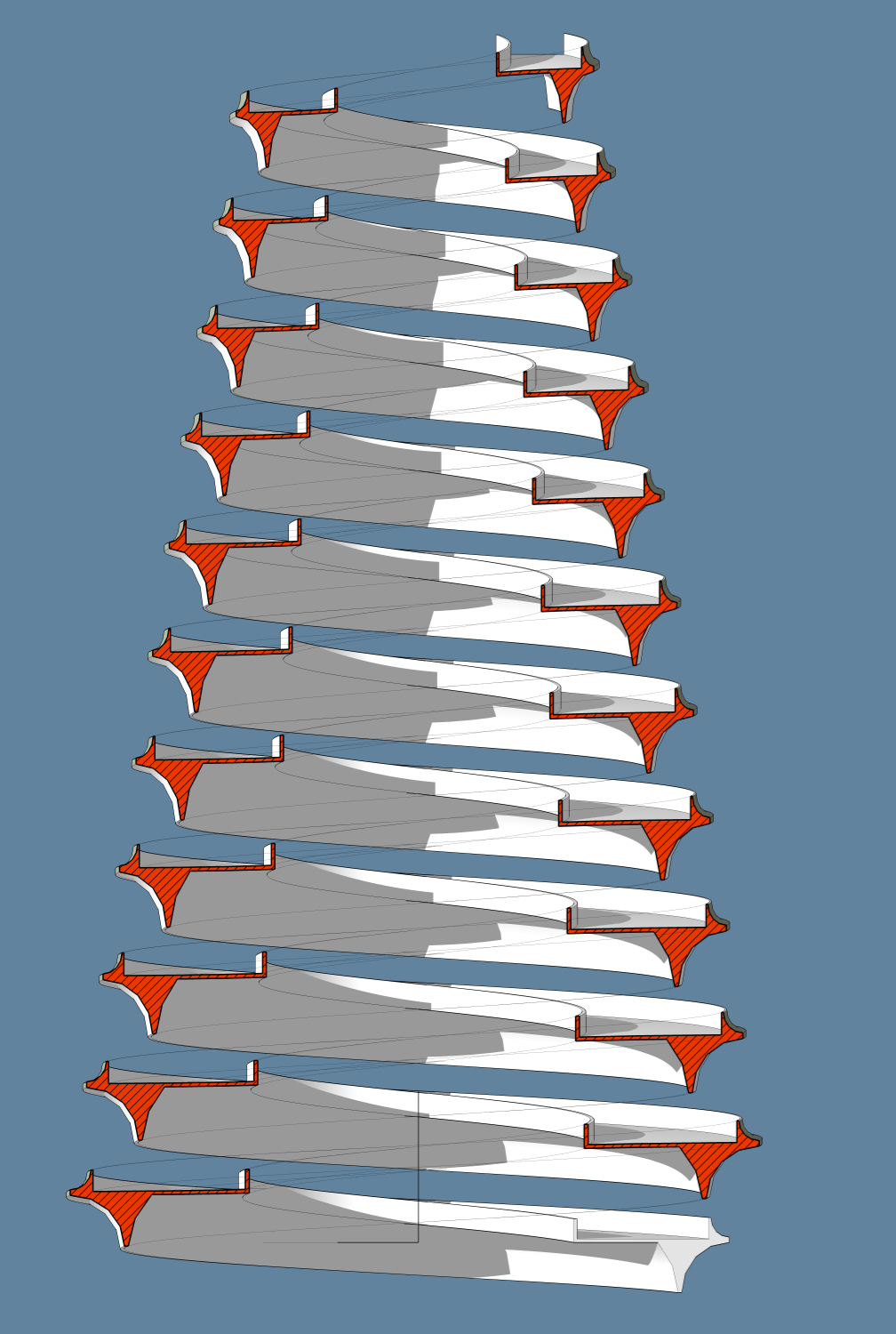
I’ve built in SU a model with the same complexity (not as beautiful as yours),
I used two excellent plugins : drawhelix14 from JIM and Extrusion-tools from TIG,
The section shown below (without projection) is generated in 3 seconds (For_ladcwei-02.png)
This image with projection, but les faces, was generated in 3,8 seconds, (For_ladcwei-03r.png)
PS : I only could read the first skp file the second is corrupted (tried to download 3 times...)

My SKP-file
QueJi Tower SKP SU2013 -
@pgarmyn said:
Do you use components or groups? Are they closed in the sectionplan?
Test it with a Solid without changing any parameter in the dialog box?Is there any error on the Ruby panel?
I tried it with a solid group, still no result.
There is an error reported in Ruby panel. It goes;"Error: #<TypeError: reference to deleted DrawingElement>
(eval):2134:inlayer=' (eval):2134:inprocesRS'
(eval):1456:inupdateRichSection1' (eval):1373:increateRichSection'
(eval):1318:intoolRScreate_part2' (eval):97:inonElementAdded'
(eval):2134"BTW I updated RichSection to the latest version.
-
@takesh h said:
I tried it with a solid group, still no result.
There is an error reported in Ruby panel. It goes;"Error: #<TypeError: reference to deleted DrawingElement>...
BTW I updated RichSection to the latest version.Thanks for the errordump. I will look this evening ....
If you have Sketchucation tools .... Can you try running the plugin alone, after switching off other plugins (+ restart SU)?
Let me know if that makes the difference .....
-
@pgarmyn said:
Can you try running the plugin alone, after switching off other plugins (+ restart SU)?
Let me know if that makes the difference .....If RichSection is running alone, it works.
Then I added "offset.rb" which I no longer needed back to Plugins folder, RichSection stopped working. So I figured it was "offset.rb", I erased it from Plugins folder and put everything else back in. Then RichSection stopped working again and I got the error message:
"Error: #<TypeError: reference to deleted DrawingElement>
(eval):2134:inlayer=' (eval):2134:inprocesRS'
(eval):1456:inupdateRichSection1' (eval):1373:increateRichSection'
(eval):1318:intoolRScreate_part2' (eval):97:inonElementAdded'
(eval):2415"Hmmm, there must be a bad guy hidden inside my Plugins folder. I have something like 200 plugins, where should I start...
-
pgarmyn,
I thought this might be getting nowhere with 200+ plugins, so I did a big cleanup of my Plugins folder for the first time in 10years, cut them down to around 100.
Those are indispensable 100s, so I was really nervous when re-starting SU... Voila! your RS worked (so did everything else)!
Thank you for the wonderful plugin, now I have to taste a dip of it. -
If I'm in a minority who is having trouble using RichSection, it must be because of something esoteric in my Plugins folder... a recent plugin, not a kind that everybody installs...
@pgarmyn said:
In 'procesRS' I have only twice 'layer='
It can't be the first:Layer? layer... Let me check, I'm not a "layer" person, I'm rather a "group" person, I don't have many layer-oriented plugins. In fact, I have only one: Layers Panel.
http://sketchucation.com/forums/viewtopic.php?f=323%26amp;t=52225I reinstalled Layers panel and then tried RS, it doesn't work.
I uninstalled Layers panels and tried RS again, it works. Gotcha. -
-
I'll take a look myself when I got time. Don't hesitate to PM me, pgarmyn.
-
I will soon release a fix for Layers Panel.
I tested and it does not work with the current 0.9 version. But since this one I rewirted a whole bunch of code to avoid nested operations. I tested with this new version and it works fine. So it's probably relatedYou should thank TT who pushed me to get rid of nested operations.
-
-
@jiminy-billy-bob said:
I will soon release a fix for Layers Panel. I tested and it does not work with the current 0.9 version. But since this one I rewirted a whole bunch of code to avoid nested operations. I tested with this new version and it works fine. So it's probably related
You should thank TT who pushed me to get rid of nested operations.THANK YOU. jiminy-billy-bob
THANK YOU TT
-
Awesome plugin pgarmin. It is exactly what i've been looking for as an automated approach to the methodology in my book "Construction Documents Using SketchUp Pro & LayOut". There are one or two small refinements I would like to see that will really make this singPlease email me: paul @ viewsion.ie to let me know if you're interested in co-authoring a publication. Thanks.

-
@fionmacool said:
Awesome plugin pgarmin. It is exactly what i've been looking for as an automated approach to the methodology in my book "Construction Documents Using SketchUp Pro & LayOut". There are one or two small refinements I would like to see ..... interested in co-authoring a publication. Thanks.
I'm still working on the 'refinements' but i don't have much time.
Co-authoring... : As you may have noticed, English is not my native language. Making a good tutoral is not evident. A small video can be very efficient .... .
I must say that there are some very good tutolals on this forum.Good luck with your book.
-
@takesh h
+200 plugins : could you find your way ?
Let me know if - after installing the other plugins - you have again problems.....In 'procesRS' I have only twice 'layer='
It can't be the first:
%(#0000FF)[grp_section.name="Section_Grp"
grp_section.**layer=**section_layer]because if grp_section doesn't exist, the error should be in the line 'grp_section.name='
It must be in these lines :
%(#0000FF)[grp_sectionplan = grp_section.entities.add_group
f = grp_sectionplan.entities.add_face sectionplanepoints
f.hidden=true
grp_sectionplan.hidden=true
grp_sectionplan.entities.each{|ent| ent.layer= section_layer}]The freshly created group (grp_sectionplan) contains only 4 edges and a face; but one of them (ent) doesn't exist any more, 5 lines after the creation:
Error: #<TypeError: reference to deleted DrawingElement .
I can't see why. Mystery
I will put a some errorhandling these lines...
Thanks
-
To all,
Having some problems installing this extension & getting it to work for some reason, any assistance would be greatly appreciated.
Question, as I'm using SU Pro 2013, I see the Plugin rbz file seems to be a non zipped file. Is it a case of just downloading this file to your PC to a folder of choice & then use the SU pull down menu "window" then "preferences" then install extension..??
I also see the zipped SU file 2008 version has another folder inside called recourses & two other files, .rbs & .rb. I assume these are the hatch pattern fills..?? So are there any fills for the SU Pro 2013 .rbz file..??
Over & out,
Clayton -
@clayton49 said:
To all,
.............Having some problems installing this extension & getting it to work for some reason, any assistance would be greatly appreciated..............
Panic over, all now installed & working o.k.

Most of the first set of settings on the menu with regards to hatch/fill types can be figured out. However the fill names won't mean anything until a few experiments & perhaps re-name to ones own personal library, although all can be seen in the materials SU menu & edited/renamed from this location.
I'll have to have another look a the vid's for other menu settings....I'll have to also look out for a help file, I'm sure there's one somewhere..!!!
In conclusion, this extension is great & will help me ton's with building plans & sections.
Another obvious missing tool that SU HQ should have in the box. Over & out,
Clayton -
@clayton49 said:
...
Panic over, all now installed & working o.k.
...... the fill names won't mean anything until a few experiments & perhaps re-name ..... own personal library, although all can be seen in the materials SU menu & edited/renamed from this location. I'll have to have another look a the vid's for other menu settings....I'll have to also look out for a help file, I'm sure there's one somewhere..!!! In conclusion, this extension is great & will help me ton'..... Over & out,
ClaytonThe most practical way to install and update plugins is the Sketchucation pluginstore (also called 'Sketchucation Tools') from Rich O Brien. Just one click to install or update any plugin ( for SU-2013 and the last versions of SU-8)
About all the options: i will make more videos. All the existing videos are in this post. You can alse read the posts above (27 nov 2013 ...).
I'm glad my plugin is usefull. I'm still working on it. So keep an eye on this post. -
@mladen90 said:
This is unbelivable! Thank you soo much pgarmyn for sharing this.
It is just what i have been searching for for years. Now sketchup could be finally used as a proper drawing tool, without worrying are cetions up to date, visible to other scenes etc.I downloaded it yesterday via sketchucation plugin manager and it says it's expired back in march 2014?.
https://dl.dropboxusercontent.com/u/35033714/expired.jpgI thought i should report this.
Thank you again pgarmyn!I am having the same problem - "This plug in has expired"
I am using Sketchup Pro 2013 on Mac OSX, I haven't changed the date or any settingsany help would great,
this is a great plugin - should be a paid pluginthanks,
Gary -
@garyion
There have been 2 updates since mladen90 reported that bug?
Are you using the latest version : V0.0.3. ?
It will mark “Version: V00.03-2013.12.04-20:00 DEMO” in menu>Plugins>RichSection>About RichSection.
I suggest to install with PluginStore.with PluginStore.
http://sketchucation.com/pluginstore?pln=SketchUcationTools
Before installing plugins, you will need full access to the plugins folder.
Select 'pgarmyn' for 'Authors' in the pluginstore and you will find the latest update.
Let me know if this lost your problem






Advertisement