sketchucation logo sketchucation
    • 登入
    Oops, your profile's looking a bit empty! To help us tailor your experience, please fill in key details like your SketchUp version, skill level, operating system, and more. Update and save your info on your profile page today!
    ⚠️ Important | Libfredo 15.6b introduces important bugfixes for Fredo's Extensions Update

    Aparently not a solid form?

    已排程 已置頂 已鎖定 已移動 Newbie Forum
    sketchup
    46 貼文 7 Posters 2.2k 瀏覽 7 Watching
    正在載入更多貼文
    • 從舊到新
    • 從新到舊
    • 最多點贊
    回覆
    • 在新貼文中回覆
    登入後回覆
    此主題已被刪除。只有擁有主題管理權限的使用者可以查看。
    • Dave RD 離線
      Dave R
      最後由 編輯

      What did I lose you on? The copied component thing?

      Here I made a ruler component full sized (the little one), made a copy and scaled the copy up (the large one) The large copy is open for editing.
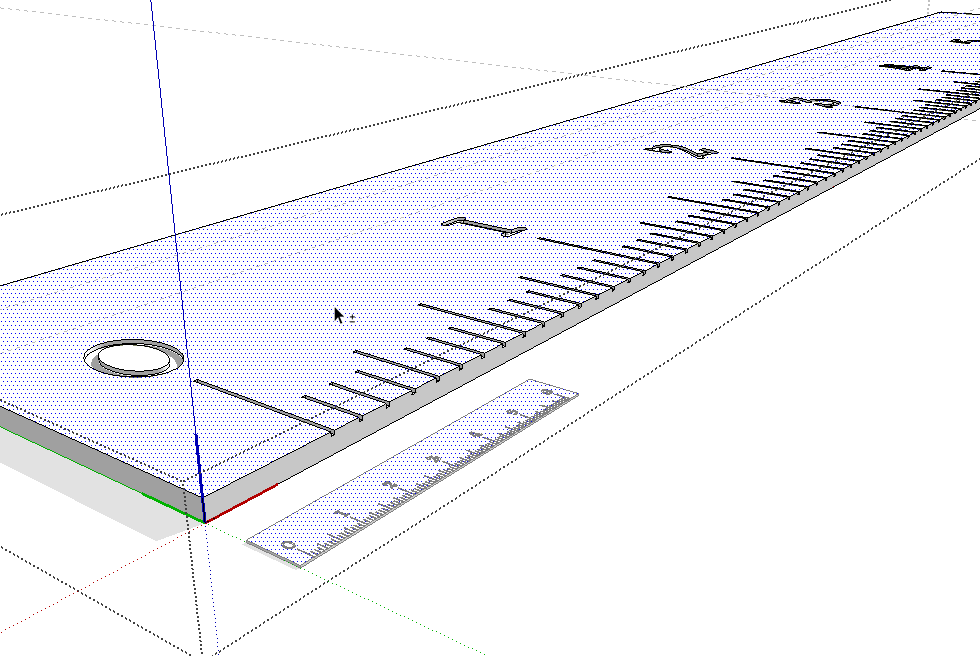
      2013-11-05_13-05-35.png

      After adding the 3D text for the company name, you can see it also appears on the original copy as well.
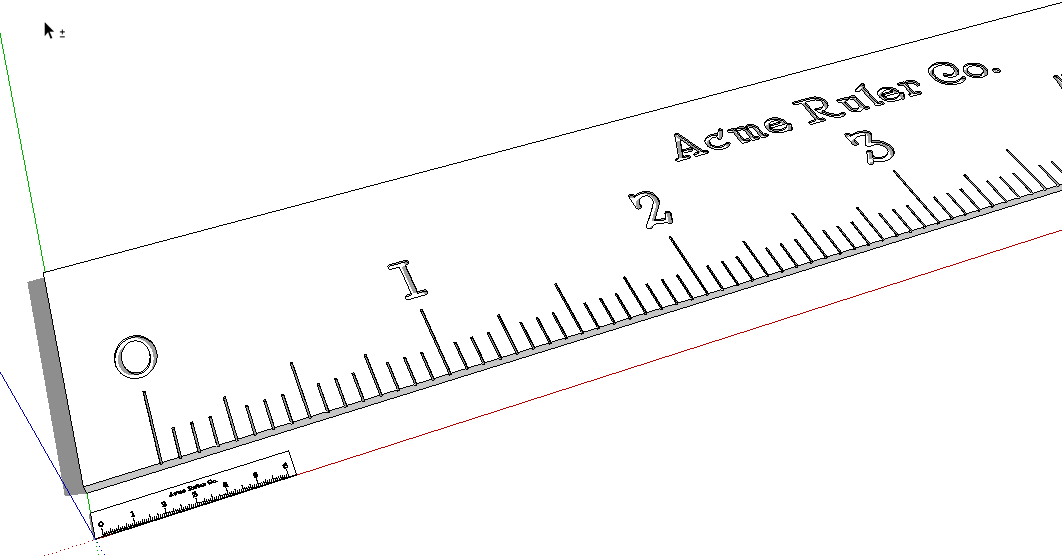
      2013-11-05_13-10-09.png

      After closing the large one to get out of edit mode and deleting it, Zoom Extents takes us back down to the original one.
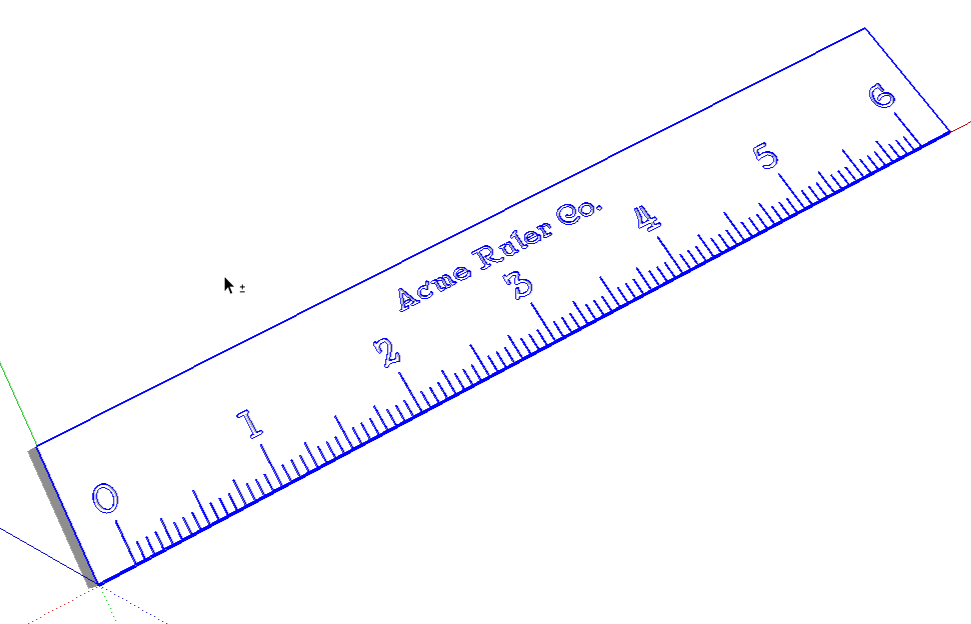
      2013-11-05_13-13-55.png

      You didn't need to redo the numbers. Just finish the job. 😉

      Etaoin Shrdlu

      %

      (THERE'S NO PLACE LIKE)

      G28 X0.0 Y0.0 Z0.0

      M30

      %

      1 條回覆 最後回覆 回覆 引用 0
      • P 離線
        Polynechramorph
        最後由 編輯

        Oh very clever indeed...
        I didn't know that original components mirrored their copies.
        very helpful.
        I guess the obvious solution to avoiding that would be to explode the copy and re-component it under a different name?

        I'm sure I'm doing a lot of things the long way round but these little tips are very helpful.

        😄

        1 條回覆 最後回覆 回覆 引用 0
        • gillesG 離線
          gilles
          最後由 編輯

          @polynechramorph said:

          Oh very clever indeed...
          I didn't know that original components mirrored their copies.
          very helpful.
          I guess the obvious solution to avoiding that would be to explode the copy and re-component it under a different name?

          I'm sure I'm doing a lot of things the long way round but these little tips are very helpful.

          😄

          No, just right-click the instance then make unique.

          " c'est curieux chez les marins ce besoin de faire des phrases "

          1 條回覆 最後回覆 回覆 引用 0
          • Dave RD 離線
            Dave R
            最後由 編輯

            @polynechramorph said:

            Oh very clever indeed...
            I didn't know that original components mirrored their copies.
            very helpful.
            I guess the obvious solution to avoiding that would be to explode the copy and re-component it under a different name?

            I'm sure I'm doing a lot of things the long way round but these little tips are very helpful.

            😄

            I draw a lot of small things and leverage this behavior all the time. It even useful in many cases without the scaling bit.

            Gilles is right. Don't explode and re-component. Just right click and choose Make Unique.

            I was having a little play with my ruler and ended up with this. There are a lot of tiny faces in it that SketchUp wouldn't have created if I'd tried to draw them at 1:1.
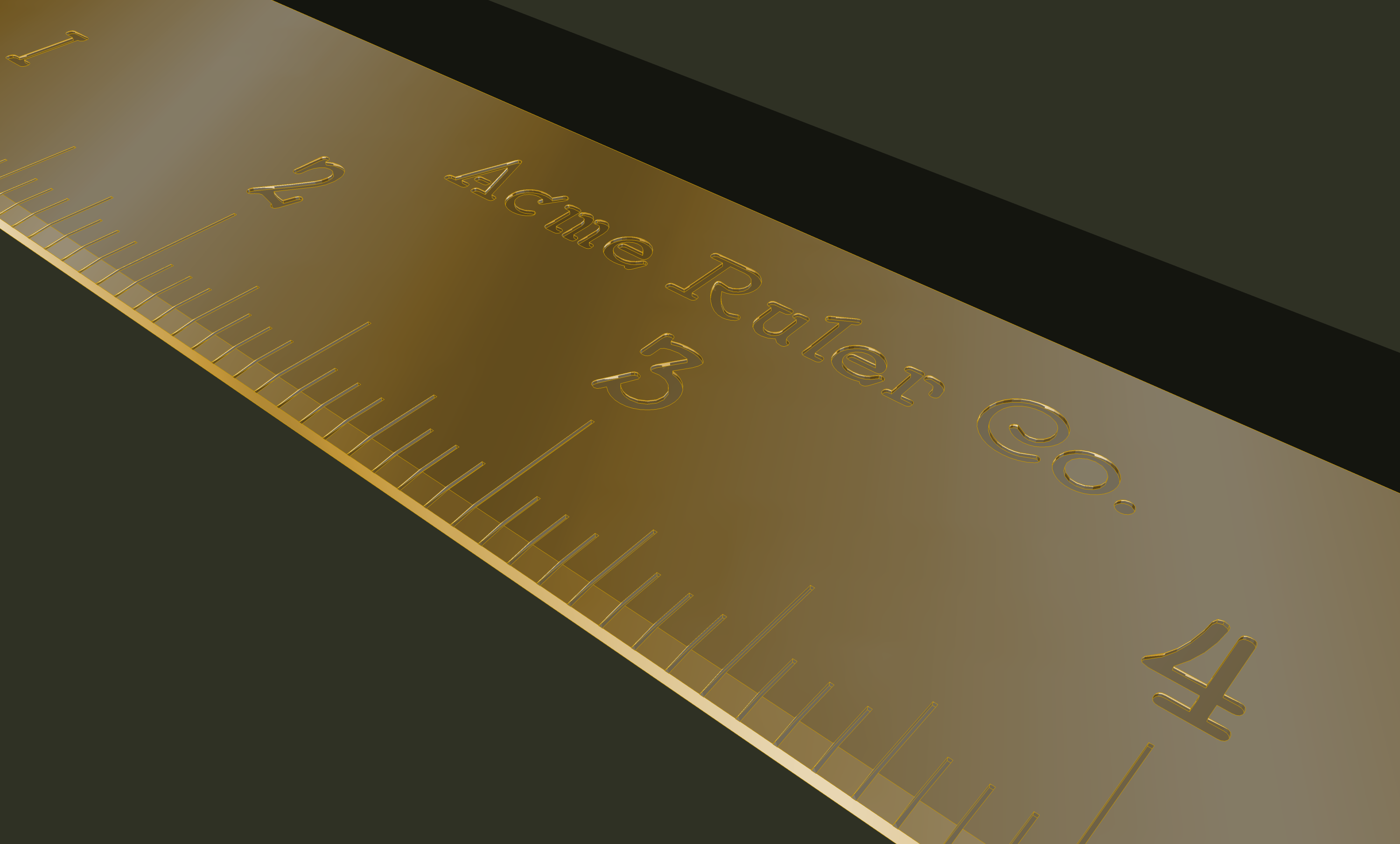
            6 in rule cu2.png

            Etaoin Shrdlu

            %

            (THERE'S NO PLACE LIKE)

            G28 X0.0 Y0.0 Z0.0

            M30

            %

            1 條回覆 最後回覆 回覆 引用 0
            • P 離線
              Polynechramorph
              最後由 編輯

              Thanks again!
              I've exported to .igs file but I don't have a program to test the results.
              Could one of you have a look at it?

              1 條回覆 最後回覆 回覆 引用 0
              • P 離線
                Polynechramorph
                最後由 編輯

                Oh...
                Now I've added some new features and my exporter says "model contains non-solid elements"
                but now I'm completely at a los as to why.
                there are no imbedded objects or components.
                and solid inspector can't find anything. 😞

                1 條回覆 最後回覆 回覆 引用 0
                • BoxB 離線
                  Box
                  最後由 編輯

                  Can you see that bit just there...no no, next to the other bit..back a bit and round to the left....yep you got it, good, now fix that and it should be fine.

                  1 條回覆 最後回覆 回覆 引用 0
                  • P 離線
                    Polynechramorph
                    最後由 編輯

                    Nope, been there, done that, skipped on the t-shirt though. 😄

                    I've checked everything from every possible angle, yes just a little more to the left and so on and so on... 😒
                    Truly inexplicable from my limited knowledge of this program.

                    Thanks for the constructive advice. I think I'll wait for something truly clever though. 😄

                    1 條回覆 最後回覆 回覆 引用 0
                    • gillesG 離線
                      gilles
                      最後由 編輯

                      Could you share the model in V8?

                      " c'est curieux chez les marins ce besoin de faire des phrases "

                      1 條回覆 最後回覆 回覆 引用 0
                      • Dave RD 離線
                        Dave R
                        最後由 編輯

                        What are you using to export the IGS file? What are you using to check it? I wonder if it's the exporter that is causing your problem.

                        Etaoin Shrdlu

                        %

                        (THERE'S NO PLACE LIKE)

                        G28 X0.0 Y0.0 Z0.0

                        M30

                        %

                        1 條回覆 最後回覆 回覆 引用 0
                        • BoxB 離線
                          Box
                          最後由 編輯

                          @polynechramorph said:

                          I think I'll wait for something truly clever though. 😄

                          Truly clever would be posting the model or, at the very least, an image so we have some semblance of chance of seeing what is wrong. 😲

                          1 條回覆 最後回覆 回覆 引用 0
                          • P 離線
                            Polynechramorph
                            最後由 編輯

                            OK found it. although only by chance. It seemed to be a microscopic tear in the sketch time continuum. Something on the surface that was there but at the same time not there. Possibly a previously unknown spontaneous transitioning sketch-quantum particle.

                            1 條回覆 最後回覆 回覆 引用 0
                            • P 離線
                              Polynechramorph
                              最後由 編輯

                              I can export it through a plug in I got here off the forum iges_export.rb
                              I downloaded a trial version of Autodesk Maya 2014 but I can't see a damn thing when I open the file and the program is well... massive ,new and overwhelming quite frankly. 😕
                              The iges_export seemed to export without any errors and the file size would indicate that there is a substantial file there (9mb) too big for here. I could scale down and re-export it and see how small I can get the file...

                              1 條回覆 最後回覆 回覆 引用 0
                              • P 離線
                                Polynechramorph
                                最後由 編輯

                                rescaling seems to have no effect on the resulting exported .igs file size. I've gone down by a factor of 1000 now and no difference.

                                1 條回覆 最後回覆 回覆 引用 0
                                • Dave RD 離線
                                  Dave R
                                  最後由 編輯

                                  I wouldn't expect scaling the model to reduce the file size because scaling doesn't reduce the number of entities (edges and faces) in the model.

                                  Etaoin Shrdlu

                                  %

                                  (THERE'S NO PLACE LIKE)

                                  G28 X0.0 Y0.0 Z0.0

                                  M30

                                  %

                                  1 條回覆 最後回覆 回覆 引用 0
                                  • BoxB 離線
                                    Box
                                    最後由 編輯

                                    9meg is probably about right. You could zip it and post it or PM it.

                                    You might find the a simple .igs viewer more useful. such as http://igsviewer.com/

                                    1 條回覆 最後回覆 回覆 引用 0
                                    • BoxB 離線
                                      Box
                                      最後由 編輯

                                      I just noticed the reason you can't see a damn thing in maya, as you put it, might be because in the file you posted earlier the calipers are 28m from the origin, so when you open it it is probably tiny and way off to the side somewhere.

                                      Always model close to the global origin.

                                      1 條回覆 最後回覆 回覆 引用 0
                                      • Dave RD 離線
                                        Dave R
                                        最後由 編輯

                                        It's likely that the model wound up 28m from the origin due to scaling up to work on tiny geometry and back down again. If you do that using the Scale tool, use the same handle for both scaling up and back down. As I wrote about in an earlier post, I leave the original component where it sits and scale up a copy. Once finished editing the enlarged copy, I get out of edit mode and delete the big one. This leaves the original small component in place near the origin with all of the editing done.

                                        An alternative method of scaling up and back down is via the Tape Measure tool. Measure a known length making sure to click at each end. Type a new, larger length and hit Enter. When you are ready to scale back down, measure the same distance and type the correct distance. Hit Enter. The model will get scaled up and back down maintaining the same position relative to the axes. and origin.

                                        Etaoin Shrdlu

                                        %

                                        (THERE'S NO PLACE LIKE)

                                        G28 X0.0 Y0.0 Z0.0

                                        M30

                                        %

                                        1 條回覆 最後回覆 回覆 引用 0
                                        • P 離線
                                          Polynechramorph
                                          最後由 編輯

                                          I keep getting an error from the IGS viewer and it freezes up but only when I try to open this one file. If I make a simple shape and export it to the viewer it works fine (thanks for that tip 😄 ).
                                          Here is a copy of my .skp file which doesn't seem to want to export properly. I'm at my wits end 😞
                                          The model had been moved back to the planar center several days ago when I was made aware of the scaling mistake I had made.
                                          Any help would be very appreciated.

                                          I suspect something has gone wrong with the surface of the main calliper piece as is exhibits strange characteristics when I try to alter it in any way.

                                          I tried making engraved (extruded) lines on the surface but this just caused a whole mess of errors that when auto-corrected always resulted in the top surface being deleted and the ends of the tiny engraved "ditches" to be deleted as well. Very strange. The simple pattern I've now successfully placed on the surface was very tedious. The lines kept drawing not directly on the surface so that I had to draw almost all of them individually. Copying sections of them produced thousands of tiny mistakes in the solid inspector.

                                          Thanks for any help.


                                          1ccallipersScale1a3.skp

                                          1 條回覆 最後回覆 回覆 引用 0
                                          • gillesG 離線
                                            gilles
                                            最後由 編輯

                                            Please, post the model in V8.

                                            " c'est curieux chez les marins ce besoin de faire des phrases "

                                            1 條回覆 最後回覆 回覆 引用 0
                                            • 1
                                            • 2
                                            • 3
                                            • 2 / 3
                                            • 第一個貼文
                                              最後的貼文
                                            Buy SketchPlus
                                            Buy SUbD
                                            Buy WrapR
                                            Buy eBook
                                            Buy Modelur
                                            Buy Vertex Tools
                                            Buy SketchCuisine
                                            Buy FormFonts

                                            Advertisement


