Shortcut Keys
-
Hi,
I set up some shortcut keys for the different camera views (alt-t = top, alt-r = right and so on).
I also set up alt-i for isometric but it does not work at all. The other shortcut keys work fine but not this one.
Is it possible to set up a shortcut key for the isometric view?
Also is it possible to set up the keypad for shortcut keys? it does not look like you can but maybe someone knows a way around this
thank you
-
You're right, Option (Alt)-I on the Mac doesn't work as a keyboard shortcut. You could use Command-I, however.
If you assign shortcuts to the number keys on the keypad you'll cause yourself no end of problems because you won't be able to type in distances or other values.
-
Thanks Dave
I have set up Alt-xx where xx is the number on the keypad. I am used to using 0 for top plan, 4 for left, 6 for right etc. So the keypad numbers surround the object which would be 5
Is it possible to set up iso views and save them to shortcut keys?
thanks again
-
I set up Command-I as a keyboard shortcut for Camera/Standard Views/Iso and that worked fine. There's really only one Iso view. The camera moves to the nearest position to provide the iso view when selected.
-
Thanks Dave
I am setting up my shortcuts to try to mirror (as much as possible) the other application I use (Vectorworks).
thanks for the help
-
@susteve said:
Hi,
I set up some shortcut keys for the different camera views (alt-t = top, alt-r = right and so on).
I also set up alt-i for isometric but it does not work at all. The other shortcut keys work fine but not this one.
Is it possible to set up a shortcut key for the isometric view?
Also is it possible to set up the keypad for shortcut keys? it does not look like you can but maybe someone knows a way around this
thank you
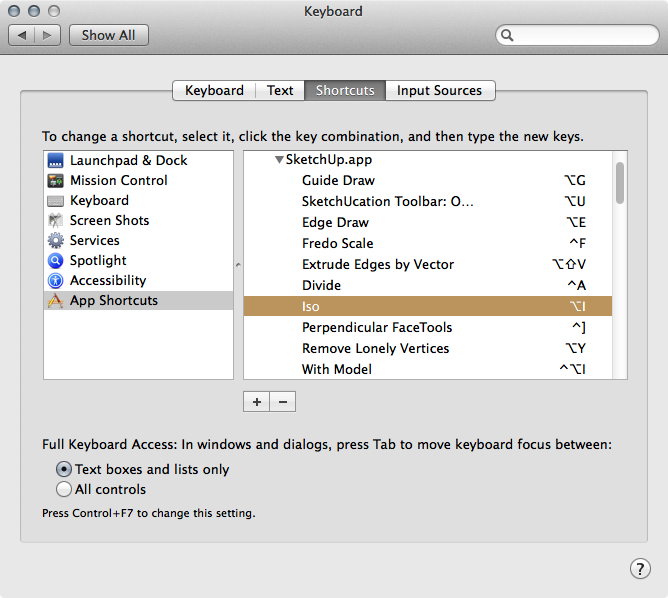
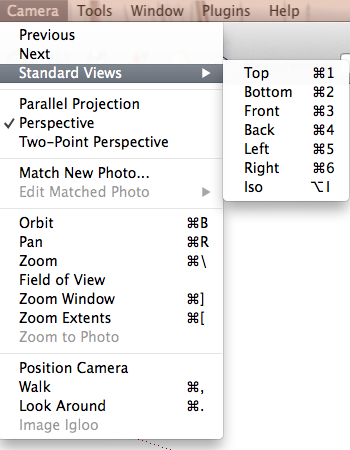
In SketchUp ⌥-i always works as a shortcut for me if set up in System Preferences rather than inside SU.
Overriides Iso default shortcut of ⌘-7. Reflects in the menu and is functional. If you remove shortcut will revert back to ⌘-7.
.
-
thank you for that. I did not know it was possible



Hello! It looks like you're interested in this conversation, but you don't have an account yet.
Getting fed up of having to scroll through the same posts each visit? When you register for an account, you'll always come back to exactly where you were before, and choose to be notified of new replies (either via email, or push notification). You'll also be able to save bookmarks and upvote posts to show your appreciation to other community members.
With your input, this post could be even better 💗
Register Login


Advertisement