sketchucation logo sketchucation
    • 登入
    Oops, your profile's looking a bit empty! To help us tailor your experience, please fill in key details like your SketchUp version, skill level, operating system, and more. Update and save your info on your profile page today!
    🔌 Smart Spline | Fluid way to handle splines for furniture design and complex structures. Download

    Schedules in Layout

    已排程 已置頂 已鎖定 已移動 LayOut Discussions
    layout
    23 貼文 6 Posters 4.4k 瀏覽 6 Watching
    正在載入更多貼文
    • 從舊到新
    • 從新到舊
    • 最多點贊
    回覆
    • 在新貼文中回覆
    登入後回覆
    此主題已被刪除。只有擁有主題管理權限的使用者可以查看。
    • M 離線
      mk11
      最後由 編輯

      All;
      I'm curious how most people who use Layout for CD's do schedules. I have found and read the suggestion about creating the schedule in word/excel and then exporting to rtf but that doesn't work great for me - formatting is screwed up. I was thinking about creating a schedule as a scrapbook for re-use. How are you guys doing this?

      Thx in advance. 👍

      Marc Kleinmann
      SU Pro 2015
      Mac & Win

      1 條回覆 最後回覆 回覆 引用 0
      • FrederikF 離線
        Frederik
        最後由 編輯

        Not sure what you mean about schedules... 😕
        Is it a table you mean...?

        Cheers
        Kim Frederik

        1 條回覆 最後回覆 回覆 引用 0
        • M 離線
          mk11
          最後由 編輯

          @frederik said:

          Not sure what you mean about schedules... 😕
          Is it a table you mean...?

          Yes - Finish, window and door schedules.

          Marc Kleinmann
          SU Pro 2015
          Mac & Win

          1 條回覆 最後回覆 回覆 引用 0
          • KrisidiousK 離線
            Krisidious
            最後由 編輯

            Here are a few people talking about their methods, including mine.

            http://sketchucation.com/forums/viewtopic.php?f=12&t=52664&hilit=+schedule

            By: Kristoff Rand
            Home DesignerUnique House Plans

            1 條回覆 最後回覆 回覆 引用 0
            • M 離線
              mk11
              最後由 編輯

              Thx Kris - checked out the thread... great idea for window and door schedules, will most definitely try this workflow. Won't work for my finish schedules though... I'm attaching a pic of what I'm trying to accomplish. I'm having the same issues as mentioned in that thread with the import .rtf method.
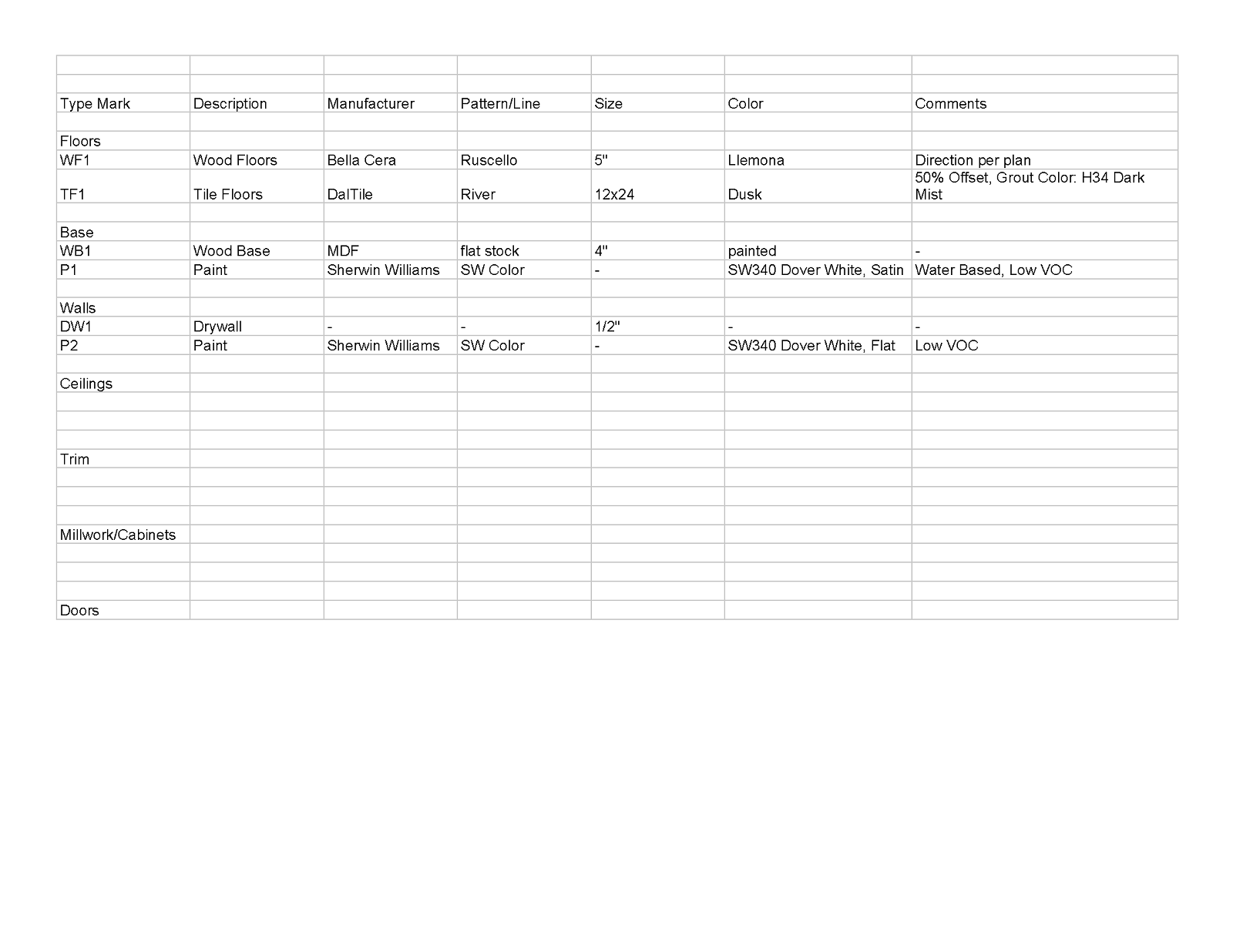

              Finish Schedule Template - Sheet1.png

              Marc Kleinmann
              SU Pro 2015
              Mac & Win

              1 條回覆 最後回覆 回覆 引用 0
              • KrisidiousK 離線
                Krisidious
                最後由 編輯

                You can just copy and paste that table into layout.

                By: Kristoff Rand
                Home DesignerUnique House Plans

                1 條回覆 最後回覆 回覆 引用 0
                • Dave RD 離線
                  Dave R
                  最後由 編輯

                  Why doesn't an RTF file work for you?

                  Etaoin Shrdlu

                  %

                  (THERE'S NO PLACE LIKE)

                  G28 X0.0 Y0.0 Z0.0

                  M30

                  %

                  1 條回覆 最後回覆 回覆 引用 0
                  • FrederikF 離線
                    Frederik
                    最後由 編輯

                    @dave r said:

                    Why doesn't an RTF file work for you?

                    Don't know the answer to this - it works fine for me...
                    Nevertheless, I'm sure we can all agree that the best option would be to have a native tool, enabling the user to create tables...
                    The RTF solution is a workaround, which really isn't optimum IMO...

                    Cheers
                    Kim Frederik

                    1 條回覆 最後回覆 回覆 引用 0
                    • Dave RD 離線
                      Dave R
                      最後由 編輯

                      Yes, Kim, I agree, it would be nice to be able to create tables directly in LO but I don't have any trouble with RTF files either. I use tables in the majority of my LO projects and as long as I don't try to edit the table in LO, they are fine.

                      Etaoin Shrdlu

                      %

                      (THERE'S NO PLACE LIKE)

                      G28 X0.0 Y0.0 Z0.0

                      M30

                      %

                      1 條回覆 最後回覆 回覆 引用 0
                      • KrisidiousK 離線
                        Krisidious
                        最後由 編輯

                        I can just copy and paste out of excel and it brings the table with it.

                        By: Kristoff Rand
                        Home DesignerUnique House Plans

                        1 條回覆 最後回覆 回覆 引用 0
                        • Dave RD 離線
                          Dave R
                          最後由 編輯

                          If you do that, though, can you edit the table in Excel and update in LO (in the same way you can edit a sketchUp model and update the viewport? If you import the table as an RTF file, you can go back to the text editor, edit, save and the text is updated in LO.

                          Etaoin Shrdlu

                          %

                          (THERE'S NO PLACE LIKE)

                          G28 X0.0 Y0.0 Z0.0

                          M30

                          %

                          1 條回覆 最後回覆 回覆 引用 0
                          • M 離線
                            MendoWill
                            最後由 編輯

                            @dave r said:

                            ... If you import the table as an RTF file, you can go back to the text editor, edit, save and the text is updated in LO.

                            This is where I'm having a problem, my table won't update in Layout. I created it in Word, saved it as an .rtf file, and successfully inserted it into Layout. The formatting was funny, but I was able to correct it easily.

                            I still can't update the table in Layout. My method is to edit the Word document, save it, overwrite the .rtf file, and then update the document reference in Layout. Layout will show the reference as "old", then show it as "current" afterwards, but the table itself does not actually change. I've also noticed that if I click "purge" the .rtf reference will disappear from my Document Setup window list, as if my inserted .rtf file is not actively linked to the document reference...

                            Any insight would be greatly appreciated, and a solution will be rewarded with beer when you visit my town.

                            Thanks!

                            1 條回覆 最後回覆 回覆 引用 0
                            • M 離線
                              MendoWill
                              最後由 編輯

                              Just did some testing, the problem I describe above only arises after I edit the .rtf inserted table.

                              For example, if I insert a .rtf table, it will update as expected for a Layout document reference. But as soon as I give it a fill or "stroke" border it behaves like an independent shape and will not update with its reference document.

                              I cannot simply leave it in raw form without giving it a fill, it is ineligible.

                              1 條回覆 最後回覆 回覆 引用 0
                              • Dave RD 離線
                                Dave R
                                最後由 編輯

                                Yes. This is the case. If you do anything to the text box in LO, (except resizing it with the handles) it disconnects from the original RTF file. Requests have been made to maintain the connection so borders and such can be added but that change hasn't been implemented yet.

                                If it's just a fill or a border, consider using a rectangle with fill and stroke placed under the text box. You could also create a grid under the text box if you need. I'd put them on separate layers, too.

                                @unknownuser said:

                                I cannot simply leave it in raw form without giving it a fill, it is ineligible.

                                why does no fill make it ineligible? Inelgible for what?

                                Do you mean illegible? If so, why is that? What is behind the text box that makes it impossible to read the text?

                                Etaoin Shrdlu

                                %

                                (THERE'S NO PLACE LIKE)

                                G28 X0.0 Y0.0 Z0.0

                                M30

                                %

                                1 條回覆 最後回覆 回覆 引用 0
                                • pbacotP 離線
                                  pbacot
                                  最後由 編輯

                                  I'd rather that excel "print areas" are referenced in LO just like graphic files, rather than doing the tables in LO. Use the best tool for the job instead of trying to cram the program with more half-assed tools.

                                  MacOSX MojaveSketchUp Pro v19 Twilight v2 Thea v3 PowerCADD

                                  1 條回覆 最後回覆 回覆 引用 0
                                  • Dave RD 離線
                                    Dave R
                                    最後由 編輯

                                    I agree to a point. I really don't have any problem importing RTF files into LayOut. I don't like grid lines, though and prefer to do the major formatting in Word or another text editor instead of Excel. I expect the new Tables feature in LO2017 is sort of the tip of the iceberg. I wouldn't be surprised if they are able to add a bunch of features that make use of auto text and direct links to the SketchUp model much like Labels can now.

                                    Etaoin Shrdlu

                                    %

                                    (THERE'S NO PLACE LIKE)

                                    G28 X0.0 Y0.0 Z0.0

                                    M30

                                    %

                                    1 條回覆 最後回覆 回覆 引用 0
                                    • pbacotP 離線
                                      pbacot
                                      最後由 編輯

                                      Actually I don't know how to make RTF from Excel. I would just print a pdf and reference that in LO, if I needed to.

                                      MacOSX MojaveSketchUp Pro v19 Twilight v2 Thea v3 PowerCADD

                                      1 條回覆 最後回覆 回覆 引用 0
                                      • Dave RD 離線
                                        Dave R
                                        最後由 編輯

                                        Copy it over to Word and use File>Save as...

                                        At least with the RTF, you can go back to the RTF in Word and edit it to make changes. It's like modifying a SketchUp file or an image you might have in the LO file.

                                        Etaoin Shrdlu

                                        %

                                        (THERE'S NO PLACE LIKE)

                                        G28 X0.0 Y0.0 Z0.0

                                        M30

                                        %

                                        1 條回覆 最後回覆 回覆 引用 0
                                        • pbacotP 離線
                                          pbacot
                                          最後由 編輯

                                          Right. But there's still a disconnect from the best source, the Excel file. My method is similar. You still have to output from Excel but it just prints to the same pdf which is linked. In word you still have to open and save the rtf. Almost the same.

                                          MacOSX MojaveSketchUp Pro v19 Twilight v2 Thea v3 PowerCADD

                                          1 條回覆 最後回覆 回覆 引用 0
                                          • Dave RD 離線
                                            Dave R
                                            最後由 編輯

                                            Yeah. But since you can't import a PDF in the Windows version...

                                            FWIW, you can insert an .xlsx, .csv, or .tsv file in LO2017.

                                            Etaoin Shrdlu

                                            %

                                            (THERE'S NO PLACE LIKE)

                                            G28 X0.0 Y0.0 Z0.0

                                            M30

                                            %

                                            1 條回覆 最後回覆 回覆 引用 0
                                            • 1
                                            • 2
                                            • 1 / 2
                                            • 第一個貼文
                                              最後的貼文
                                            Buy SketchPlus
                                            Buy SUbD
                                            Buy WrapR
                                            Buy eBook
                                            Buy Modelur
                                            Buy Vertex Tools
                                            Buy SketchCuisine
                                            Buy FormFonts

                                            Advertisement

