[Plugin] SketchUcation Tools
-
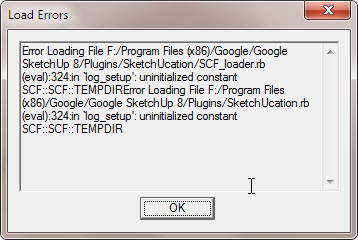
Another message appeared after changing the folder permission
-
By default, Windows limits the permissions to all folders/subfolders/files within the 'Program Files' folder tree - including SketchUp's.
Even if you are an admin you still get these permissions, preset.
They can be changed manually to FULL [provided you have admin-powers].
These changes should trickle down to all subfolders/files within the re-permissioned subfolder.
[On Pc, but the older MAC versions there's a optional 'toggle' setting to do that trickle-down]To avoid this, since v2014 the Plugins folder was relocated into the User's AppData folder tree.
Here you automatically have FULL rights.If you want to add/change ANY files in ANY other subfolders which are in ANY of the SketchUp 'Program Files' folder tree, then you'll need to fix their subfolder's permissions too [ typically these might be the Components, Materials or Styles subfolders ? ]
This weird error which affects some pre v2014 users [like your v8] is fixable by installing this alternative loader-file...
Download the attached RBZ, install it, and then restart SketchUp.
There is a modified loader RB file that side steps the errors - BUT DO NOT use in in any SketchUp versions >=v2014.
Report back if it doesn't fix the issue...
-
Thank you, Sir.
Will see.Edit:
It stops the Error message. But still showing the "will be updated..." message. -
With FULL permissions set for ALL, for SketchUp's Plugins subfolder ?
-
@tig said:
With FULL permissions set for ALL, for SketchUp's Plugins subfolder ?
Yes, Sir. Even for "User(s)" account. Not just for Admin(n).
-
I now suspect that your earlier issues - caused by the limited-permission - prevented some clean-up operations during the initial installation.
Which we are still seeing manifested now.
I suspect these an additional file left behind which gets loaded - and of course it should not - that error message is only used in the latest file-set, after it's tried to delete it.Please do these steps...
- Switch off SketchUp.
- Make use you Edit the Plugins folder's Security permissions for ALL those listed in the Properties > Security pane to FULL [read/write/modify]. This should auto-trickle down to affect ALL files and subfolders in the Plugins folder.
- Look in the Plugins folder and if there is a file named "!SketchUcation_loader.rb" delete it.
- Restart SketchUp and see if the error message is stopped.
- If so, all is good.
There are two reasons for this exact error message:
i) An obsolete "!SketchUcation_loader.rb" file is found in the Plugins folder - the newly installed and updated files will try to delete it, and you are then prompt to restart afterwards, because it's contents would have been loaded beforehand - but with restricted permissions it might not be successfully deleted - hence the repeated message after the restart. Manually deleting it should fix it, but its seemingly enduring presence suggest some permissions issues still persist ??
ii) The ".strings" file has not [yet] defined the RESTARTx Constant which forms that error-message.
To check that this, in the Ruby Console + <enter> should generate the same text string:
SCF::RESTARTxSketchUcation Toolset: After the Installation... You MUST Restart SketchUp to Complete this Update...
If not, then something is still adrift with the installation, and I recommend that you manually remove the SketchUcation subfolder and SketchUcation.rb from Plugins, and then reinstall the SCF toolset from its RBZ, from scratch.
Remember also to reinstall the RBZ with the _loader-fix for very old versions of SketchUp, which I posted a few days ago...
After a restart the SCF toolset should be brand new and error free...Report back...
-
Still does not work, Sir.
-
Your statement is not clear.
I assume you still get the 'restart' message.
I still think you have not properly Edited [as an admin] the Properties > Security of the Plugins folder to allow ALL those listed FULL permissions [to read/write/modify/delete files etc].
Otherwise the obsolete files would not be found and a 'restart' message would not appear.Please check for the existence of the following files.
Remove them manually if they exist.
../Plugins/!SketchUcation_loader.rb ../Plugins/SketchUcation/Upload2sketchUview.rb ../Plugins/SketchUcation/sketchUcloud.rb ../Plugins/SketchUcation/Data.txtAnother thought...
Have you by any chance got this toolset installed into duplicate 'Plugins' folders, and so a second one is also loading and causes issues ?
Do you have an additional plugins folder set up ?
Please type this in the Ruby Console + <enter> and post the resultant text.$:OR does it actually load OK...
After all, it should load OK, even if it oddly has these 'restart' message as it loads.
This message only appears if old obsolete files are found and deleted, and then SketchUp needs to be restarted to complete the full set up process - but it should still work !So...
Do you see an Extension named "SketchUcation" ?
If so, then is it activated [ticked] under Preferences > Extensions ?
If so, then is there a Toolbar of the same name available in the list ?
If so, then activate that.
Also is there a submenu of the same name under the 'Plugins' menu [for other readers - this menu has been renamed 'Extensions' in some newer SketchUp versions]Also, have you tried selecting the main 'SketchUp.exe' icon in the main 'SketchUp' folder and used the context-menu to change its Properties, so its Compatibility has the 'always run as administrator' option checked [or something similar] near the bottom of that page.
-
hi,
i have problems with the latest extension (3.0.4) store plugin under sketchup 2017 pro (mac).
the problem:
i have more marked than 80 favourites in the plugin, if i click the heart symbol (bottom line) an
got to the favourites section, i can see 20 loved plugins, but no more!
where are my other 60 beloved ones?the favourites section has no option for more than one page with 20 plugins.
can you please overhaul this part of the plugin?thnx in advance.
-
hi
I've just updated from v2 to v3.
What a mistake. This new version is absolutly horrible. The old version was simple, efficient and 100 better. I really don't understand the new version. Very disapointed
-
@hgdar said:
I really don't understand the new version.
This is the key to your problem...
You don't understand it - yet...
Once you do, you'll appreciate it and think of previous versions as toys... -
Good day to install this plugin to install plug-ins in 2017. SU, nothing happens when you click download. What is the reason? sorry for his English.
-
v3.0.5 is now available in the PluginStore.
It fixes a longstanding issue with some users who have accents in their PC user-name, getting file-path encoding errors...
http://sketchucation.com/pluginstore?pln=SketchUcationTools -
I just installed SU2017 Pro on a user's machine. And then installed (via the Extension Manager) SketchUcationTools_v3.0.5.rbz
This error message appears in the Ruby console on SketchUp start up:
Error: #<LoadError: cannot load such file -- zip>
C:/Program Files/SketchUp/SketchUp 2017/Tools/RubyStdLib/rubygems/core_ext/kernel_require.rb:54:inrequire' C:/Program Files/SketchUp/SketchUp 2017/Tools/RubyStdLib/rubygems/core_ext/kernel_require.rb:54:inrequire'
c:/users/justin.stichter/appdata/roaming/sketchup/sketchup 2017/sketchup/plugins/sketchucation/scf-rbztools.rbs:186:in<module:RBZtool>' c:/users/justin.stichter/appdata/roaming/sketchup/sketchup 2017/sketchup/plugins/sketchucation/scf-rbztools.rbs:157:in<main>'
c:/users/justin.stichter/appdata/roaming/sketchup/sketchup 2017/sketchup/plugins/sketchucation/scf_loader.rbs:36:ineval' c:/users/justin.stichter/appdata/roaming/sketchup/sketchup 2017/sketchup/plugins/sketchucation/scf_loader.rbs:36:inrequire'
c:/users/justin.stichter/appdata/roaming/sketchup/sketchup 2017/sketchup/plugins/sketchucation/scf_loader.rbs:36:inloadRBS' c:/users/justin.stichter/appdata/roaming/sketchup/sketchup 2017/sketchup/plugins/sketchucation/scf_loader.rbs:63:inblock in <main>'
c:/users/justin.stichter/appdata/roaming/sketchup/sketchup 2017/sketchup/plugins/sketchucation/scf_loader.rbs:52:ineach' c:/users/justin.stichter/appdata/roaming/sketchup/sketchup 2017/sketchup/plugins/sketchucation/scf_loader.rbs:52:in<main>'
C:/Program Files/SketchUp/SketchUp 2017/Tools/extensions.rb:197:ineval' C:/Program Files/SketchUp/SketchUp 2017/Tools/extensions.rb:197:inrequire'
C:/Program Files/SketchUp/SketchUp 2017/Tools/extensions.rb:197:inload' C:/Users/justin.stichter/AppData/Roaming/SketchUp/SketchUp 2017/SketchUp/Plugins/SketchUcation.rb:207:inregister_extension'
C:/Users/justin.stichter/AppData/Roaming/SketchUp/SketchUp 2017/SketchUp/Plugins/SketchUcation.rb:207:in<module:SCF>' C:/Users/justin.stichter/AppData/Roaming/SketchUp/SketchUp 2017/SketchUp/Plugins/SketchUcation.rb:16:in<top (required)>'Anyone have an idea about what's going on? He has FULL permissions to all the SketchUp folders.
Suggestions? Thoughts?
Please help...
Dave. -
Sorry my mistake.
New version in progress ! -
Here's v3.0.6 http://sketchucation.com/pluginstore?pln=SketchUcationTools It fixes my [stupid] typo which broke the unzipping process...

Please reinstall and feedback...
-
Tig,
That FIXED the error messages on opening SketchUp. Thank you! But here's the next issue:
When he opens the SketchUcation Extension Store, the dialogue box appears collapsed. It can't be expanded by dragging the corner out, or maximized on the screen.
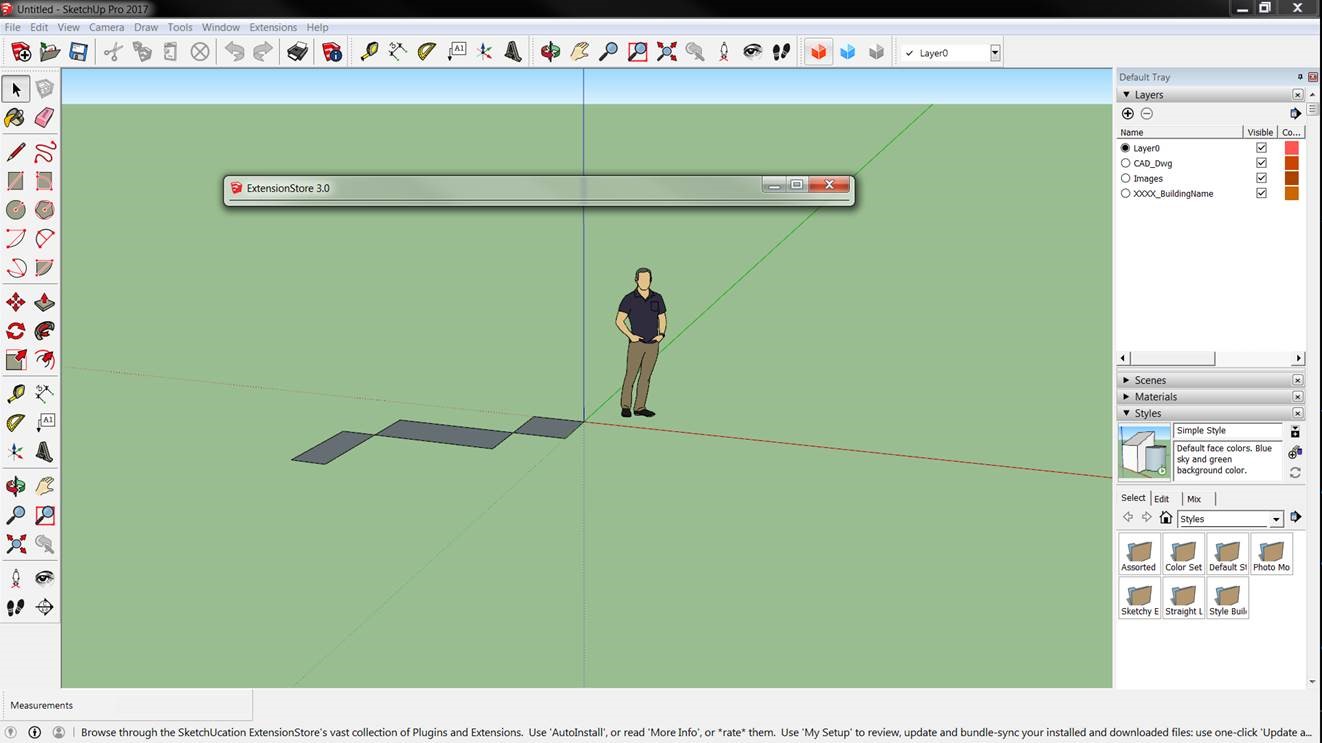
It happens any way he opens the store...through the menu, or through the Red Cube Button.
The Blue Cube and the Gray Cube both open their related dialogue boxes fine.
Any suggestions for this one??
Dave. -
That's a problem that was fixed a while back.
Now to check for possible reversions...

-
Here's v3.0.7 http://sketchucation.com/pluginstore?pln=SketchUcationTools It fixes the retrograde issue with the v2017 ExtensionStore³ dialog's unchangeable minimal-height, which was experienced by only a few users [and which is still not explained
 ].
].
Although this issue was fixed previously it reappeared in the previous update !
But this latest version should address it, yet again...Please test and feedback...
-
YEP! That did it!
Thanks.
Keep up the great work with your amazing extensions.
Dave.





Advertisement