sketchucation logo sketchucation
    • 登入
    Oops, your profile's looking a bit empty! To help us tailor your experience, please fill in key details like your SketchUp version, skill level, operating system, and more. Update and save your info on your profile page today!
    🔌 Smart Spline | Fluid way to handle splines for furniture design and complex structures. Download

    Can one use the orbit tool with precision?

    已排程 已置頂 已鎖定 已移動 Newbie Forum
    sketchup
    28 貼文 7 Posters 4.4k 瀏覽 7 Watching
    正在載入更多貼文
    • 從舊到新
    • 從新到舊
    • 最多點贊
    回覆
    • 在新貼文中回覆
    登入後回覆
    此主題已被刪除。只有擁有主題管理權限的使用者可以查看。
    • S 離線
      slbaumgartner
      最後由 編輯

      Drag exactly horizontally.

      1 條回覆 最後回覆 回覆 引用 0
      • BoxB 離線
        Box
        最後由 編輯

        My first gif shows me simply using orbit with the the middle mouse button. No tricks or fancy hardware. Just click and drag horizontally.

        1 條回覆 最後回覆 回覆 引用 0
        • D 離線
          djh
          最後由 編輯

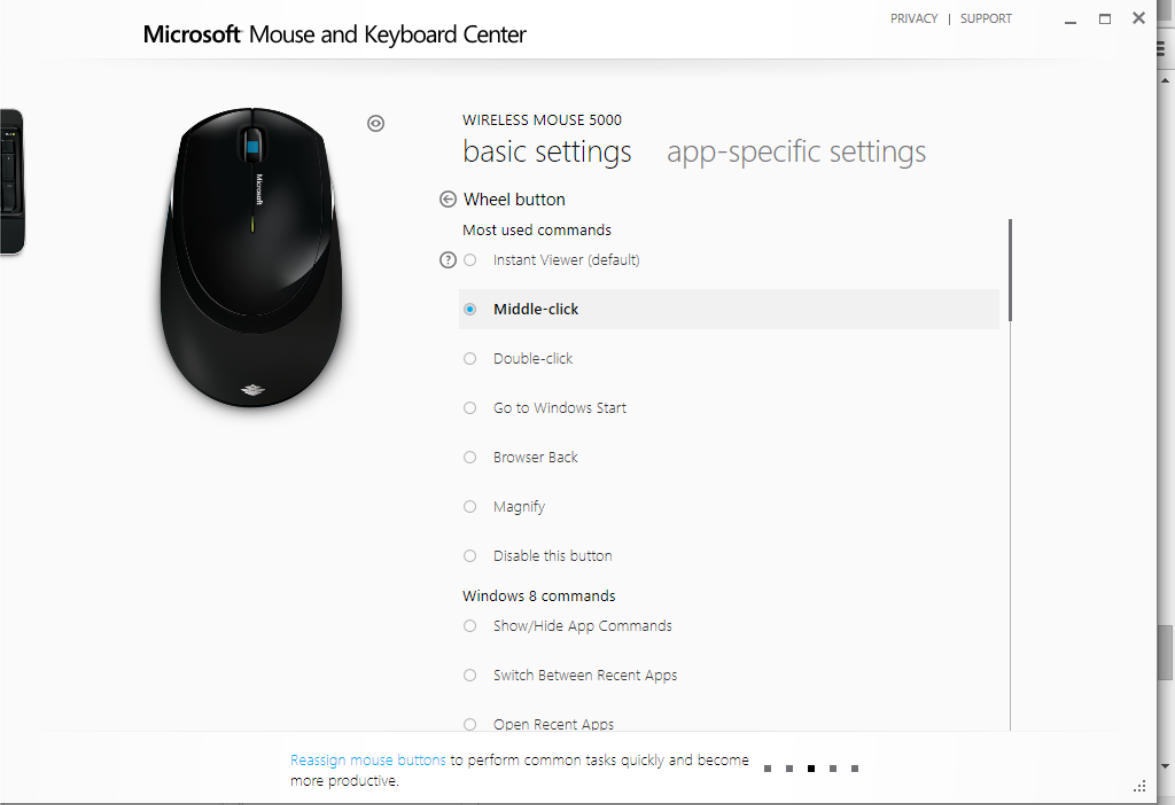
          Box, I have a Microsoft Wireless Mouse 5000. The middle wheel button doesn't do anything. I suppose that I need to get a different mouse. Thank you for your advice.

          1 條回覆 最後回覆 回覆 引用 0
          • BoxB 離線
            Box
            最後由 編輯

            That begs the question, how long have you been using SU without a working navigation system.
            You may only need to adjust the mouse settings. Find the settings for the mouse and set the wheel to Middle Mouse click or equivalent.

            1 條回覆 最後回覆 回覆 引用 0
            • D 離線
              djh
              最後由 編輯

              I don't know. It still doesn't work for me. See attached.

              Mouse.png

              1 條回覆 最後回覆 回覆 引用 0
              • Dave RD 離線
                Dave R
                最後由 編輯

                Can you make the middle button do anything? Even in a different application? A while back I taught a SketchUp class in a school where they provided the computer. The Microsoft mouse they had required an awful lot of pressure to get that button to work. I wound up bringing in my own wireless mouse and using it instead.

                Etaoin Shrdlu

                %

                (THERE'S NO PLACE LIKE)

                G28 X0.0 Y0.0 Z0.0

                M30

                %

                1 條回覆 最後回覆 回覆 引用 0
                • D 離線
                  djh
                  最後由 編輯

                  What mouse do you use?

                  1 條回覆 最後回覆 回覆 引用 0
                  • Dave RD 離線
                    Dave R
                    最後由 編輯

                    I use Logitech mice on both my Mac and PC. Different models neither of which I can remember. The one I use on the Mac was the least expensive wireless Logitech mouse I could get locally. The other came with a wireless keyboard.

                    Etaoin Shrdlu

                    %

                    (THERE'S NO PLACE LIKE)

                    G28 X0.0 Y0.0 Z0.0

                    M30

                    %

                    1 條回覆 最後回覆 回覆 引用 0
                    • BoxB 離線
                      Box
                      最後由 編輯

                      Generally the cheapest simple three button scroll wheel mouse possible.
                      The more you pay the more the drivers can screw things up. The more the ergonomics can set the scroll wheel too far down to be an easy orbit without hitting the other buttons etc etc

                      1 條回覆 最後回覆 回覆 引用 0
                      • Jean LemireJ 離線
                        Jean Lemire
                        最後由 編輯

                        Hi folks.

                        I use a Logitech wireless mouse on my Mac. I did not install the driver that came with it. The Mac OS Mouse driver does the job very well.

                        If you use a driver, usually, you assign the scroll wheel as button 3.

                        Just ideas.

                        Jean (Johnny) Lemire from Repentigny, Quebec, Canada.

                        1 條回覆 最後回覆 回覆 引用 0
                        • D 離線
                          djh
                          最後由 編輯

                          @box said:

                          I guess it'll be two years again for the next installment.

                          Box, I got a new mouse. The middle button works, but I can't orbit precisely.

                          1 條回覆 最後回覆 回覆 引用 0
                          • D 離線
                            djh
                            最後由 編輯

                            @box said:

                            My first gif shows me simply using orbit with the the middle mouse button. No tricks or fancy hardware. Just click and drag horizontally.

                            ?Just click the left button,the right button, or the middle button?

                            1 條回覆 最後回覆 回覆 引用 0
                            • D 離線
                              djh
                              最後由 編輯

                              @djh said:

                              @box said:

                              My first gif shows me simply using orbit with the the middle mouse button. No tricks or fancy hardware. Just click and drag horizontally.

                              ?Just click the left button,the right button, or the middle button?

                              When I click using the middle button, it is not constrained. I can't keep the blue axis line at 12:00 6:00. I have a new mouse.

                              1 條回覆 最後回覆 回覆 引用 0
                              • Dave RD 離線
                                Dave R
                                最後由 編輯

                                @djh said:

                                @box said:

                                My first gif shows me simply using orbit with the the middle mouse button. No tricks or fancy hardware. Just click and drag horizontally.

                                ?Just click the left button,the right button, or the middle button?

                                Box wrote "the middle button".

                                @djh said:

                                When I click using the middle button, it is not constrained. I can't keep the blue axis line at 12:00 6:00. I have a new mouse.

                                It'll be as constrained as your mouse movement is. There is no option to constrain orbit such that the vertical axis remains oriented at 12 and 6.

                                Why is that important? The blue axis could only be oriented vertically on the screen if the camera is positioned so it is centered on the height of the model and the horizon line cuts across the screen dead center or if the camera is setting to Parallel Projection.

                                Etaoin Shrdlu

                                %

                                (THERE'S NO PLACE LIKE)

                                G28 X0.0 Y0.0 Z0.0

                                M30

                                %

                                1 條回覆 最後回覆 回覆 引用 0
                                • D 離線
                                  djh
                                  最後由 編輯

                                  Thank you Dave R and Box.

                                  In Coreldraw, one may constrain the vertical or horizontal movement by pressing Ctrl and dragging the mouse. Now, I realize that it's not really possible in SU. Though, one may approximate it if he has a very steady hand and by using the axis.

                                  1 條回覆 最後回覆 回覆 引用 0
                                  • S 離線
                                    slbaumgartner
                                    最後由 編輯

                                    That's because CorelDraw is 2D! SketchUp is 3D. Orientation of axes is a whole different game when you are viewing a 3D space, especially when perspective camera is on.


                                    1 條回覆 最後回覆 回覆 引用 0
                                    • 1
                                    • 2
                                    • 2 / 2
                                    • 第一個貼文
                                      最後的貼文
                                    Buy SketchPlus
                                    Buy SUbD
                                    Buy WrapR
                                    Buy eBook
                                    Buy Modelur
                                    Buy Vertex Tools
                                    Buy SketchCuisine
                                    Buy FormFonts

                                    Advertisement