sketchucation logo sketchucation
    • Login
    Oops, your profile's looking a bit empty! To help us tailor your experience, please fill in key details like your SketchUp version, skill level, operating system, and more. Update and save your info on your profile page today!
    ⚠️ Update | Sketchucation Tools 5.0.8 released with licensing improvements and bugfixes Download

    Can one use the orbit tool with precision?

    Scheduled Pinned Locked Moved Newbie Forum
    sketchup
    28 Posts 7 Posters 5.5k Views 7 Watching
    Loading More Posts
    • Oldest to Newest
    • Newest to Oldest
    • Most Votes
    Reply
    • Reply as topic
    Log in to reply
    This topic has been deleted. Only users with topic management privileges can see it.
    • D
      djh
      last edited by

      I don't know. It still doesn't work for me. See attached.
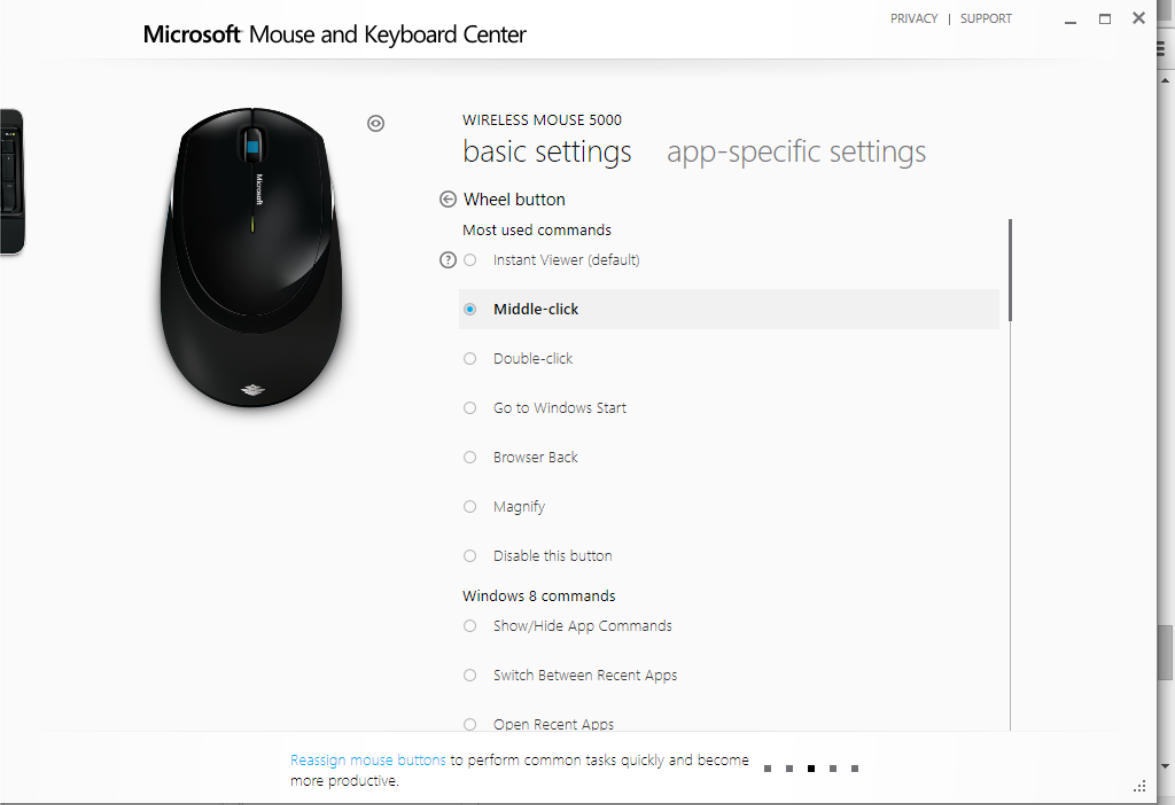

      Mouse.png

      1 Reply Last reply
      Reply Quote 0
      • Dave RD
        Dave R
        last edited by

        Can you make the middle button do anything? Even in a different application? A while back I taught a SketchUp class in a school where they provided the computer. The Microsoft mouse they had required an awful lot of pressure to get that button to work. I wound up bringing in my own wireless mouse and using it instead.

        Etaoin Shrdlu

        %

        (THERE'S NO PLACE LIKE)

        G28 X0.0 Y0.0 Z0.0

        M30

        %

        1 Reply Last reply
        Reply Quote 0
        • D
          djh
          last edited by

          What mouse do you use?

          1 Reply Last reply
          Reply Quote 0
          • Dave RD
            Dave R
            last edited by

            I use Logitech mice on both my Mac and PC. Different models neither of which I can remember. The one I use on the Mac was the least expensive wireless Logitech mouse I could get locally. The other came with a wireless keyboard.

            Etaoin Shrdlu

            %

            (THERE'S NO PLACE LIKE)

            G28 X0.0 Y0.0 Z0.0

            M30

            %

            1 Reply Last reply
            Reply Quote 0
            • BoxB
              Box
              last edited by

              Generally the cheapest simple three button scroll wheel mouse possible.
              The more you pay the more the drivers can screw things up. The more the ergonomics can set the scroll wheel too far down to be an easy orbit without hitting the other buttons etc etc

              1 Reply Last reply
              Reply Quote 0
              • Jean LemireJ
                Jean Lemire
                last edited by

                Hi folks.

                I use a Logitech wireless mouse on my Mac. I did not install the driver that came with it. The Mac OS Mouse driver does the job very well.

                If you use a driver, usually, you assign the scroll wheel as button 3.

                Just ideas.

                Jean (Johnny) Lemire from Repentigny, Quebec, Canada.

                1 Reply Last reply
                Reply Quote 0
                • D
                  djh
                  last edited by

                  @box said:

                  I guess it'll be two years again for the next installment.

                  Box, I got a new mouse. The middle button works, but I can't orbit precisely.

                  1 Reply Last reply
                  Reply Quote 0
                  • D
                    djh
                    last edited by

                    @box said:

                    My first gif shows me simply using orbit with the the middle mouse button. No tricks or fancy hardware. Just click and drag horizontally.

                    ?Just click the left button,the right button, or the middle button?

                    1 Reply Last reply
                    Reply Quote 0
                    • D
                      djh
                      last edited by

                      @djh said:

                      @box said:

                      My first gif shows me simply using orbit with the the middle mouse button. No tricks or fancy hardware. Just click and drag horizontally.

                      ?Just click the left button,the right button, or the middle button?

                      When I click using the middle button, it is not constrained. I can't keep the blue axis line at 12:00 6:00. I have a new mouse.

                      1 Reply Last reply
                      Reply Quote 0
                      • Dave RD
                        Dave R
                        last edited by

                        @djh said:

                        @box said:

                        My first gif shows me simply using orbit with the the middle mouse button. No tricks or fancy hardware. Just click and drag horizontally.

                        ?Just click the left button,the right button, or the middle button?

                        Box wrote "the middle button".

                        @djh said:

                        When I click using the middle button, it is not constrained. I can't keep the blue axis line at 12:00 6:00. I have a new mouse.

                        It'll be as constrained as your mouse movement is. There is no option to constrain orbit such that the vertical axis remains oriented at 12 and 6.

                        Why is that important? The blue axis could only be oriented vertically on the screen if the camera is positioned so it is centered on the height of the model and the horizon line cuts across the screen dead center or if the camera is setting to Parallel Projection.

                        Etaoin Shrdlu

                        %

                        (THERE'S NO PLACE LIKE)

                        G28 X0.0 Y0.0 Z0.0

                        M30

                        %

                        1 Reply Last reply
                        Reply Quote 0
                        • D
                          djh
                          last edited by

                          Thank you Dave R and Box.

                          In Coreldraw, one may constrain the vertical or horizontal movement by pressing Ctrl and dragging the mouse. Now, I realize that it's not really possible in SU. Though, one may approximate it if he has a very steady hand and by using the axis.

                          1 Reply Last reply
                          Reply Quote 0
                          • S
                            slbaumgartner
                            last edited by

                            That's because CorelDraw is 2D! SketchUp is 3D. Orientation of axes is a whole different game when you are viewing a 3D space, especially when perspective camera is on.


                            1 Reply Last reply
                            Reply Quote 0

                            Hello! It looks like you're interested in this conversation, but you don't have an account yet.

                            Getting fed up of having to scroll through the same posts each visit? When you register for an account, you'll always come back to exactly where you were before, and choose to be notified of new replies (either via email, or push notification). You'll also be able to save bookmarks and upvote posts to show your appreciation to other community members.

                            With your input, this post could be even better 💗

                            Register Login
                            • 1
                            • 2
                            • 2 / 2
                            • First post
                              Last post
                            Buy SketchPlus
                            Buy SUbD
                            Buy WrapR
                            Buy eBook
                            Buy Modelur
                            Buy Vertex Tools
                            Buy SketchCuisine
                            Buy FormFonts

                            Advertisement