[Plugin] 3D Parametric Shapes - makes placeable components
-
most likely suspect is ö in the path...
TT posted a workaround in the dev forum, search for force_encoding...
it was along the lines of
file__ = __FILE__ file__ = file__.force_encoding("UTF-8") if defined?(Encoding)@emre, do any plugins load? if so which ones?
john
-
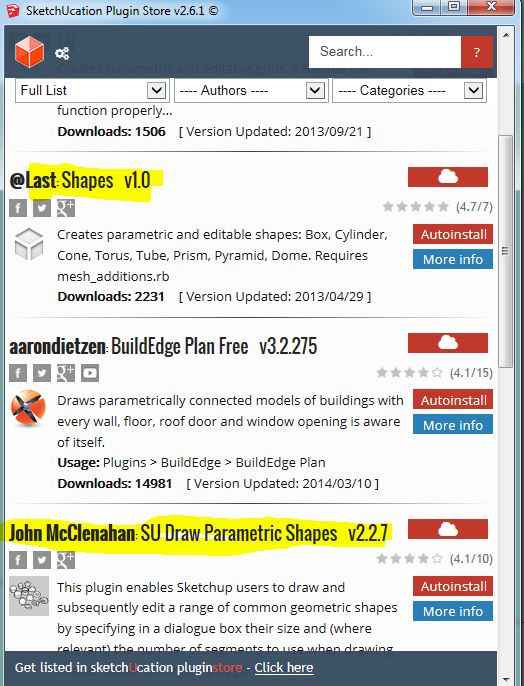
It's worth pointing out here that the version of this that is in the plugin store, simply called shapes, doesn't work with SU2014.
The RBZ above does work and it's a different version.So Emre you linked to the plugin store one as the one you had downloaded in another thread, Is that the case? have you tried with this one? Or the newer version also in the store?
John, you might want to see about updating or removing the earlier one in the store.
-
Edit: I see you've edited and understood while I was writing this. I'll leave it here anyway as a visual for Emre as I get a similar error message if I install the old Shapes version.
I think there is just a bit of confusion going on because of the similarity of a couple of plugins.
I think Emre has tried the one called Shape and not the one in this thread. I don't know if shape is your but the wording makes it look like it could be.
-
The @Last version really ought to be removed from this Plugin store - the Google Sketchup team did an update of it several years ago, and mine/Trimble's was originally based on the previous SU Team version. However, with the advent of SU2014, the code was extended by me, then the code was updated to work with the new Ruby version, and Thomas Thomasson of the Trimble team helped me extensively to clean up the code. Trimble then chose to make it the first Community/Open Source SU plugin.
-
Feature Request- I would like to see a modification that would allow you to specify where the 3D shape is drawn. I currently is always drawn at 0,0,0. While the shape is added to your model as a group which allows you to easily move it, there could be times when that space is occupied and you would have trouble getting to the shape just added. It would be good if you could click the spot where you want the shape added before adding it.
This was discussed in another thread and it was suggested that I add it as a request in this thread........
-
I have looked at doing this, but found it too difficult for me. Sorry - I did try!
I did produce some code that would read the pick point (there are other plugins that I was able to adapt this from).
But I couldn't see how to incorporate that into saving the parameters of the object, or even how to draw it at the picked point. My Ruby coding skills aren't good enough, I'm afraid.
But I'd be very happy to have someone else edit the code to do this if they know how!
Even if they can't do that, it would be very good if the parametric.rb code could be modified to save and list the object parameters IN ORDER - at the moment, they are stored as a hash, which has no intrinsic order, and doesn't list in the order of entry, or necessarily even the same order on different uses. (Again, I'm not a good enough Ruby programmer to know how to do that).
-
What if you used Components instead of Groups, then simply attached the Component to the mouse cursor for placement using Model#place_component()?
-
I'll see if I can work out how to convert the Group into a Component without losing the parametric properties of the Shape. I think I tried it a while ago, but if I remember correctly, the parametric properties don't survive the conversion from Group to Component, and I couldn't (at the time, anyway) see how to fix that.
It won't be soon, though - I haven't much time spare from other non-SU projects at the moment.
-
@johnwmcc said:
I'll see if I can work out how to convert the Group into a Component without losing the parametric properties of the Shape. I think I tried it a while ago, but if I remember correctly, the parametric properties don't survive the conversion from Group to Component, and I couldn't (at the time, anyway) see how to fix that.
It won't be soon, though - I haven't much time spare from other non-SU projects at the moment.
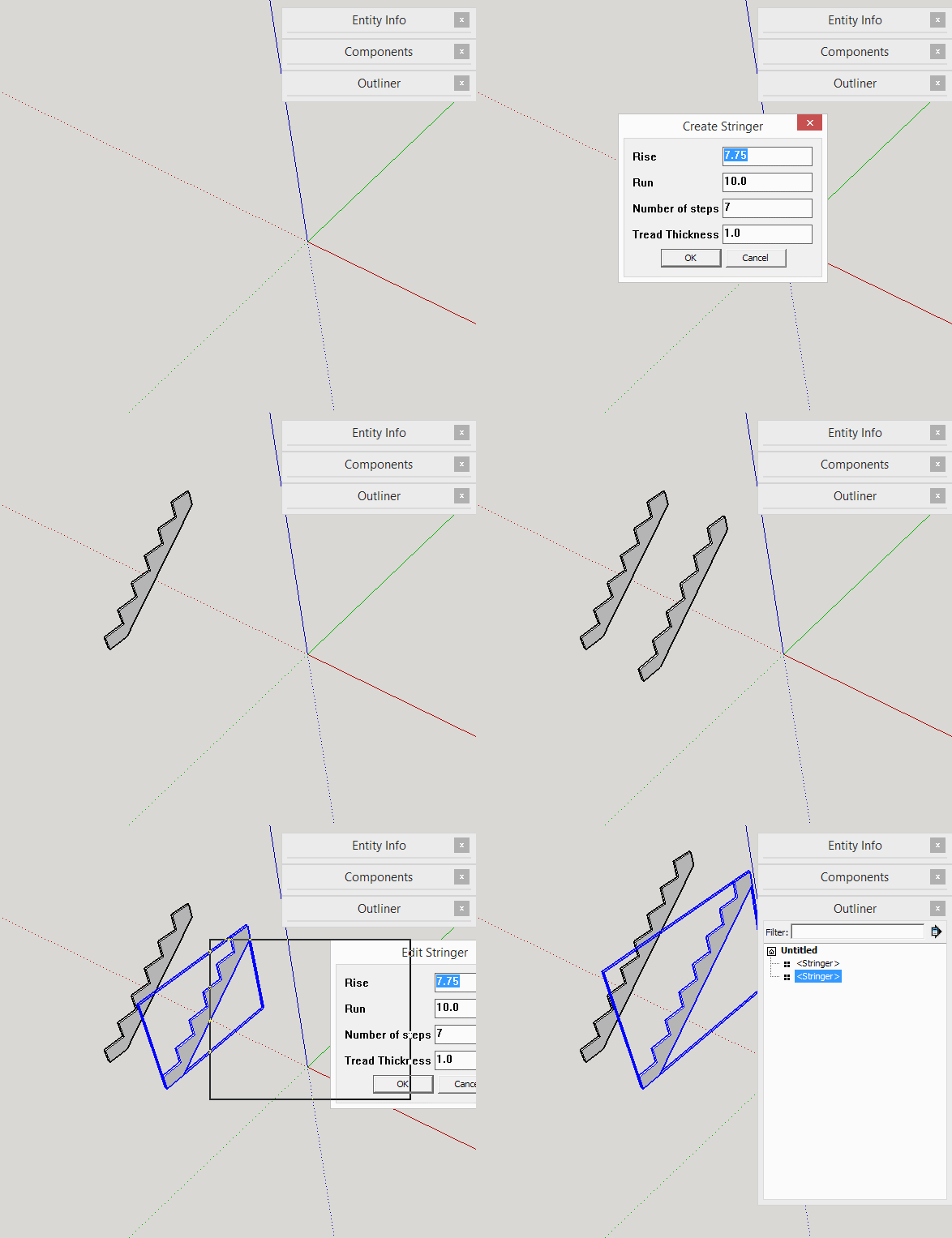
You wouldn't convert the Group to a Component. You would add a ComponentDefinition then add the geometry to the definition. Then call Model.place_component with the new definition.
parametric.rb will work with the instances. All instances will be updated when edited. I made a quick example using someone's stringer-drawing code.
-
The issue that was raised in another recent thread was that, although the jwm version and the Trimble su_ EWH version are different toolsets with different modules, methods etc, they both ill-advisedly share the same Extension name.
This means that the first RB to load 'jwm' lays claim to that Extension and loads its code - when the 'su_' version comes along it does not load as it thinks its Extension is already loaded [which it is, at least going 'by-name'].
So if both Plugins' RB files are installed only the 'jwm' version will loads and appear in the menu !This was confusing users who expected them both to load separately.
Naming one of their Extensions slightly differently would be helpful.In passing: the oldie @Last 'shapes.rb' version is only provided in the SCF Plugin store as legacy code [I'll add a note to its entry...]
-
Many thanks for the guidance and example, Jim.
I'll see what I can make of it, but not quickly I'm afraid.
As to the naming, I'm happy to change the name to avoid conflict betwwen the Trimble EW hosted and SketchUcation versions.
Thought the name change might take a while to get right, but it was a quick set of internal name changes, and I've tested that the new rbz file loads in Windows 7, SU2014 and SU2015 (the latter, in the 64 bit version).
Modification now done in downloadable v2.2.8 rbz file in original post at top of this thread.
Will update the Plugin Store by this weekend.
-
You can just change your Extension name to say 'JWM Shapes' or 'Shapes Tool [JWM]' - such names won't clash with the su_ one of 'Shapes Tool' !
You both already separate your code inside your own modules and methods, so no issues there...
I have added a note to the oldie @Last legacy version in the PluginStore, redirecting to your newer/better version...

-
Thank you TIG. I've done pretty much what you suggest in the renaming - the module is now JWMShapes, and the .rb file name is jwm_shapes.rb, whereas before both just said Shapes or shapes.rb. The menu label now says 3D Shapes (JWM) instead of just 3D Shapes.
-
The version in the PluginStore is already named "jwm_shapes" [.rb & subfile]

It is unwise to rename loading RB files as any older ones will still get loaded too !
But no issues as it still has the same name ??Your module inside the subfolder's 'shapes.rb' was named 'JWM', so it didn't need changing either, as that already separated it from other versions...
The Extension name was the only real issue as it was shared by the su_ version !
Therefore your version took precedence as it loaded in alphanumeric order before the su_ one and claimed the one available slot. -
Added missing validation checks in v2.2.9 to require minumum of 3 segments or sides for Tube, Pyramid and Torus.
Uploaded latest v2.2.9 to Plugin Store, and updated Basic Info version number, Quick Start, and Documentation.
-
There is an EXTREMELY old version of Shapes in the Plugin Store, by @Last: Shapes v1.0.
The current one is authored by me and Trimble, and is found under the name "SU Draw Parametric Shapes v2.2.7"
The version number currently in the Plugin Store is the same as the RBZ here (v2.2.7) - and has been for many months (I haven't updated it recently, and have no current plans for enhancements).
I had wondered myself about the o umlaut in the folder name, but have no direct experience of using non-ASCII characters in Windows folder structures, though I do know they can cause problems.
I don't think I know how to suggest anything further to help - I don't know of anything specific to this plugin that might cause the problem Emre has reported.
-
v2.5 changes the drawn shapes from groups to components, and allows the user to place them at any pickable point, not just insert them at the world origin.
Thanks to Jim Foltz for providing sample code which I was able to adapt.
See Plugin Store, or the first post in this thread, for the latest v2.5
-
John - the plugin did not get published. It has disappeared. I would guess there is a 'publish' button that needs clicked.
-
I've published it for you [v2.5].

http://sketchucation.com/pluginstore?pln=jwm_shapes
Remember that when you edit the file set in your plugin it is automatically set to be "Unpublished" ['red' button] - this is so there is never a half-baked set of data in the public arena.
Click the 'red' button when you are done, and it goes 'green' = "Published" - the public can see you plugin again.
In other tabs, remember to click the 'orange' button to confirm edited text etc, otherwise those edits are lost when you leave the tab... -
Sorry about that - I hope I saved all the edits then - will check later today.
Many thanks, TIG, for fixing my mistakes.





Advertisement