Locked folder not visible
-
Hi all,
I have a folder available to me via SU8 that I am saving components to, but it has a padlock symbol on it.
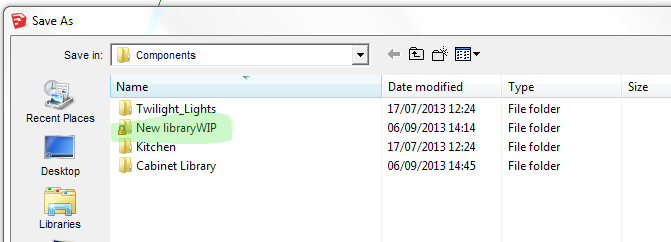
However this folder does not show up via windows explorer under the components folder.
I have checked online for a solution by changing permissions, but the solutions I have found relate to removing the padlock from a visible folder. I can't even see it to try to edit it.
Any ideas?Thanks
-
You need Admin powers. so check you have those in the Users Control-Panel...
Next...
- Click Start menu button.
- In the box type 'cmd' and press <enter>.
- In the 'command' window type the following two commands, pressing <enter> after each one.
Note: It assumes the folder that is mis-hidden is named
"New libraryWIP"
and it is inside a folder named
"C:\Program Files\Google\Google SketchUp 8\Components"` cd "C:\Program Files\Google\Google SketchUp 8\Components"
attrib -H "New libraryWIP/*" /S /D`
This should remove its incorrectly set 'hidden' attribute...
The /* ensures that all of its contents are also unhidden...Tips: You can copy the folder's path etc and then in the command window a right-click will paste the clipboards contents.
Also note the "" around paths/names containing a <space>...Note: This kind of weird behavior can sometimes indicate a virus0infection - don't panic... but have you run your system-virus-checker recently ?
-
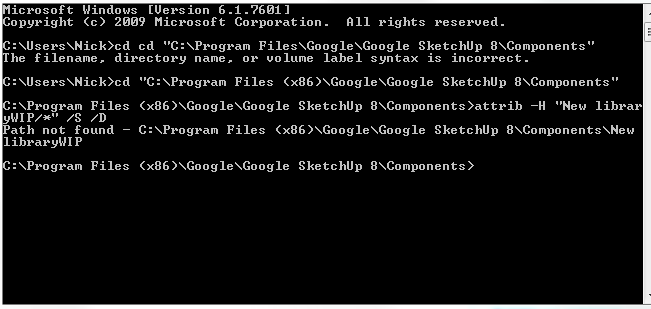
TIG, thanks for that but it hasn't worked. This is the result. I had to add the (x86) to the pathname. The file is still hidden.
I ran a quick virus scan which was clear but will run a full scan later. -
Is that named folder actually in the Components directory ?
After you do thecdtypedirand see the list of subfolders <DIR>.
To find the status of "New libraryWIP" type:
attrib "New libraryWIP"
it should return something like:
H New libraryWIP
to show it has a hidden attribute set.
To unset it type:
attrib -H "New libraryWIP"
It should now be visible as normal.
To unset the hidden attribute for all of its contents, type:
attrib -H "New libraryWIP/*"I think there was some confusion over the
/*wildcard...
It works for me... -
OK,I will try that when I get back to the office. Is it possible to do this via windows explorer or is using the command line more certain? I did wonder if SU locates components in other places, but I have searched for the folder and can't find it anywhere else. Of course that might be because it's hidden.
-
You can set your WEx Folder Options to show your hidden files and then try to change the selected hidden folder/file's Properties and un-tick Hidden...
You need to be an Admin... -
I have tried finding the attribute of the folder as you outlined but it reports 'file not found'. I had a similar issue with Twilight Render, where it used a second path to load materials, but I cannot find any trace of one in SU preferences. I'm stumped. BTW I have Admin rights
-
http://www.windows8downloads.com/win8-winmend-folder-hidden-uvjmptac/ is a free Win8 utilty to hide/unhide folders - maybe this will help ?
Or this?
http://www.wikihow.com/Lock-Your-Files-and-Folders-in-Windows-8-Using-Folder-Lock
or this??
http://superuser.com/questions/598584/cant-unlock-the-folders-that-i-locked-with-folder-lock-program -
Thanks TIG, but none of those will work because I can't even locate the folder. I think it is to do with regitstry virtualisation and Windows has redirected the file elsewhere (e.g. AppData or Roaming)
Still digging. -
This is weird...
Is there a 'Compatibility Files...' link button in the top Windows Explorer bar when you open the ..SketchUp..Components folder ?Look in your 'VirtualStore'...
C:/Users/YOURNAME/AppData/Local/VirtualStore/...You could do a search, starting there, looking for that 'locked' folder-name ?
-
Managed to retrieve it thanks, although I don't have a 'virtual store' as such, but I looked in AppData and searched the folders there.
Still strange though, as to why it had been placed there. I have created other component folders since and they all appear. My understanding is that Windows uses virtualisation when the software creating the file is deemed to be not up to par?

Hello! It looks like you're interested in this conversation, but you don't have an account yet.
Getting fed up of having to scroll through the same posts each visit? When you register for an account, you'll always come back to exactly where you were before, and choose to be notified of new replies (either via email, or push notification). You'll also be able to save bookmarks and upvote posts to show your appreciation to other community members.
With your input, this post could be even better 💗
Register Login


Advertisement