sketchucation logo sketchucation
    • 登入
    Oops, your profile's looking a bit empty! To help us tailor your experience, please fill in key details like your SketchUp version, skill level, operating system, and more. Update and save your info on your profile page today!
    🔌 Smart Spline | Fluid way to handle splines for furniture design and complex structures. Download

    Layout 2013 Issues

    已排程 已置頂 已鎖定 已移動 LayOut Discussions
    layout
    42 貼文 11 Posters 3.7k 瀏覽 11 Watching
    正在載入更多貼文
    • 從舊到新
    • 從新到舊
    • 最多點贊
    回覆
    • 在新貼文中回覆
    登入後回覆
    此主題已被刪除。只有擁有主題管理權限的使用者可以查看。
    • Dave RD 離線
      Dave R
      最後由 編輯

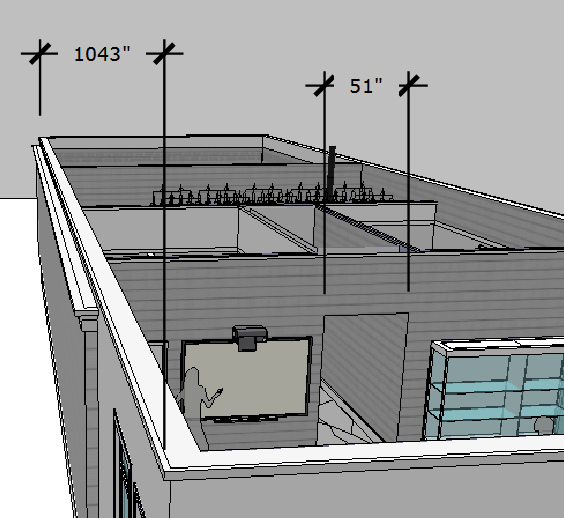
      That particular thing has been that way since dimensions were first introduced. It might help to understand that a dimension is a sort of group with some different lines and a text box.

      Etaoin Shrdlu

      %

      (THERE'S NO PLACE LIKE)

      G28 X0.0 Y0.0 Z0.0

      M30

      %

      1 條回覆 最後回覆 回覆 引用 0
      • KrisidiousK 離線
        Krisidious
        最後由 編輯

        except constraints don't work inside of it...

        By: Kristoff Rand
        Home DesignerUnique House Plans

        1 條回覆 最後回覆 回覆 引用 0
        • Dave RD 離線
          Dave R
          最後由 編輯

          As I said, "sort of a group."

          My point is that just like a group, all of the elements can be edited.

          If I'd known this was such an unknown thing, I guess I'd have made a post about it a long time ago.

          Etaoin Shrdlu

          %

          (THERE'S NO PLACE LIKE)

          G28 X0.0 Y0.0 Z0.0

          M30

          %

          1 條回覆 最後回覆 回覆 引用 0
          • KrisidiousK 離線
            Krisidious
            最後由 編輯

            I doubt many people using Layout know it. Well worth a tut or post.

            By: Kristoff Rand
            Home DesignerUnique House Plans

            1 條回覆 最後回覆 回覆 引用 0
            • GaieusG 離線
              Gaieus
              最後由 編輯

              @krisidious said:

              I doubt many people using Layout know it. Well worth a tut or post.

              Well noted! ☀

              Gai...

              1 條回覆 最後回覆 回覆 引用 0
              • KrisidiousK 離線
                Krisidious
                最後由 編輯

                can anyone else confirm that copy geometry from sketchup and paste into layout does not work now?

                By: Kristoff Rand
                Home DesignerUnique House Plans

                1 條回覆 最後回覆 回覆 引用 0
                • T 離線
                  timzy
                  最後由 編輯

                  "Why is it that if I have a dimensioned model instance and I copy and paste it to another page that all the dimensions revert to page dimensions."

                  For this very reason I abandoned the Auto Scale feature. I always set the scale manually, and proceed to dimension the view. Not only does this allow copy/paste but dimensions can be grouped / nudged / resized / ctr copied and so on. I guess the new array copy could be used as well. You can also use a group of dimensions on a differently scaled view and set the scale on the whole group in one click - good if you have parts with a similar relationship but different sizes.

                  "Or, if I stick with dimensioning in layout, it would be nice to force it to dimension at a particular plane so you don't have to spend so much time generating vector linework to snap to without getting weird dimensions due to height differences of geometry. Is it too much to ask that if you are in parallel projection that layout can only give dimensions as if the geometry was all in the same plane?"

                  Weird... I stopped dimensioning in Sketchup primarily because of the non-ortho behavior and have never experienced it in Layout. In fact I seem unable to reproduce the issue.

                  "I do tons of perspective dimensioning for intricate timber and steel configurations. Sure would be nice to be able to do that in Layout."

                  Curious... I just tested this and using the Auto Scale feature and it worked but nothing can be adjusted or it reverts to page scale. Could be exploded I guess.ScreenShot00082.jpg

                  Not using 2013 yet - will be very annoyed if the paste geometry feature is gone.

                  1 條回覆 最後回覆 回覆 引用 0
                  • KrisidiousK 離線
                    Krisidious
                    最後由 編輯

                    • precision is strange. When drawing in layout, typing in measurements gets mixed results.

                    • constraints don't seem to lock with shift.

                    • 45 degree perpendicular constraint just does not work, shows purple guide but line snaps to 90 degrees.

                    • no offset tool

                    • no trim tool

                    • unable to move by snap or grip... snaps are limited in copy/movement to certain circumstances.

                    • needs continuous dimensioning.

                    • has groups... needs components.

                    • My toolbars still float around from session to session. Actually I guess they are Trays.

                    • copy geometry from sketchup and paste into layout does not work now?

                    • constraints don't work inside of dimensions.

                    • when drawing linework, beginning a new line atop an old end point converts line to a curve.

                    • unable to edit, cut, glue inside of a group.

                    By: Kristoff Rand
                    Home DesignerUnique House Plans

                    1 條回覆 最後回覆 回覆 引用 0
                    • J 離線
                      JuanV.Soler
                      最後由 編輯

                      @krisidious said:

                      can anyone else confirm that copy geometry from sketchup and paste into layout does not work now?

                      correct , it does not work here either

                      ,))),

                      1 條回覆 最後回覆 回覆 引用 0
                      • KrisidiousK 離線
                        Krisidious
                        最後由 編輯

                        damnit... Who the hell is responsible for this? They obviously didn't watch Nick Sonder's Tutorial.

                        By: Kristoff Rand
                        Home DesignerUnique House Plans

                        1 條回覆 最後回覆 回覆 引用 0
                        • O 離線
                          otb designworks
                          最後由 編輯

                          @dave r said:

                          You're right. Selecting the eye dropper allows you to sample an entity and apply it's style, font, etc. to other existing entities. How about using Tools/Style which on my Mac has B set as the default shortcut.

                          Excellent, that's the one. Thanks, Dave

                          Cheers, Chuck

                          OTB Designworks is on Youtube

                          6 core nMP, 32 gig RAM, (2) D700 GPU's, dual monitors

                          1 條回覆 最後回覆 回覆 引用 0
                          • M 離線
                            marcdurant
                            最後由 編輯

                            Hi all-

                            The "copy from SketchUp and paste in LayOut" bug was introduced by some of the major refactoring in SketchUp. A fix for this is in QA as we speak and should be available soon.

                            thanks,
                            Marc

                            1 條回覆 最後回覆 回覆 引用 0
                            • O 離線
                              otb designworks
                              最後由 編輯

                              great news, Marc, thanks

                              Cheers, Chuck

                              OTB Designworks is on Youtube

                              6 core nMP, 32 gig RAM, (2) D700 GPU's, dual monitors

                              1 條回覆 最後回覆 回覆 引用 0
                              • T 離線
                                timzy
                                最後由 編輯

                                Nope to the copy paste.

                                It does paste in a square. If you try it and check the references it seems to think there is an embedded model. and... try it and then apply a new style to the blank square and it will accept the style. also It seems I can double click into a 3D orbit - just no geometry made it through. If exploded the references get updated with an invisible square png.

                                Definitely broken but seems to be trying.... maybe there is still hope.

                                I thought the "send to layout" from Sketchup might be it but it opens a whole new layout document and adds in the whole model.

                                1 條回覆 最後回覆 回覆 引用 0
                                • T 離線
                                  timzy
                                  最後由 編輯

                                  Ohhh- I type too slow.

                                  Great news!

                                  1 條回覆 最後回覆 回覆 引用 0
                                  • KrisidiousK 離線
                                    Krisidious
                                    最後由 編輯

                                    yes, that's good news Marc.

                                    By: Kristoff Rand
                                    Home DesignerUnique House Plans

                                    1 條回覆 最後回覆 回覆 引用 0
                                    • S 離線
                                      sonder
                                      最後由 編輯

                                      Yes, thanks Marc. Fixing that bug is huge for me. I use that process quite a bit.

                                      1 條回覆 最後回覆 回覆 引用 0
                                      • KrisidiousK 離線
                                        Krisidious
                                        最後由 編輯

                                        @unknownuser said:

                                        Yes, thanks Marc. Fixing that bug is huge for me. I use that process quite a bit.

                                        Yes you do... and I liked it quite a bit when I saw you use it. It's not good for changes down the road, but it's nice when you just want some linework transferred over.

                                        By: Kristoff Rand
                                        Home DesignerUnique House Plans

                                        1 條回覆 最後回覆 回覆 引用 0
                                        • A 離線
                                          ArCAD-UK
                                          最後由 編輯

                                          I've noticed that in LO below ~140% zoom the linetypes rescale on screen so at 100% there is a discrepancy in presentation from the exported PDF. I'd expect wysiwyg at any zoom where linetypes are concerned.

                                          I've also found the pattern export quality to be underwhelming. The lineweights of the patterns just aren't heavy enough at 100%. I've found them almost invisible until you zoom at least 200%. In most cases the patterns are too big at 1x so I need to set them at 0.5x which makes the visibility even worse because they are bitmaps.

                                          Surely TSU check the quality of hatch output in the industry standard Adobe Reader using real world objects e.g. 4"/100mm bricks or a 6"/150mm concrete slab at 1:50 or 1/4":1' scale?

                                          1 條回覆 最後回覆 回覆 引用 0
                                          • S 離線
                                            sonder
                                            最後由 編輯

                                            @krisidious said:

                                            @unknownuser said:

                                            Yes, thanks Marc. Fixing that bug is huge for me. I use that process quite a bit.

                                            Yes you do... and I liked it quite a bit when I saw you use it. It's not good for changes down the road, but it's nice when you just want some linework transferred over.

                                            I now only use it for things I know won't change - like property lines, setbacks, easements, existing topography. I can still do it via saving scenes, but I like to have the option of copy / paste between the two.


                                            1 條回覆 最後回覆 回覆 引用 0
                                            • 1
                                            • 2
                                            • 3
                                            • 3 / 3
                                            • 第一個貼文
                                              最後的貼文
                                            Buy SketchPlus
                                            Buy SUbD
                                            Buy WrapR
                                            Buy eBook
                                            Buy Modelur
                                            Buy Vertex Tools
                                            Buy SketchCuisine
                                            Buy FormFonts

                                            Advertisement