[Plugin][$] 3D Tree Maker - New version 1.10.14
-
QUESTION:
How can I include my own trees in the drop-down menu library?
-
@albertoricordi said:
QUESTION:
How can I include my own trees in the drop-down menu library?
Right click on a tree, then "Save as template..."
choose a different file name that the one proposed if you do not want to overwrite existing template. You can also create the preview image (that is displayed when this tree will be selected in the new list)
Yours
Pascal -
@noicrilo said:
Hi,
this plugin is really awesome, thanks of sharing your work.
I notice on mac OS and sketchup 2014 that the tree bar (with the 4 icons) is always reloaded when program opens,
it is very annoying, can you fix this bug? I’m working with all other features and it seems all fantastic and useful
I'm not sure to understand, or maybe its not working the same way on Mac.
On PC, View>Toolbars> uncheck 3DArcStudio Tree Maker. Does this menu exists on mac ? -
@alan fraser said:
Brilliant plugin, Pascal...and very configurable...both during and post production.

The tree on the left is a default Olive...but with simplified leaf geometry (down to 3 faces per leaf). It is now down to only 21,000 faces.
The tree on the right is another default Olive, but with even simpler leaves (1 face) but double the number of leaves; and minus all the small twigs. This is down to only 12,000 faces. It was only 7000 before I doubled the leaf count (by simply selecting the foliage group, duplicating and rotating it.)Hi Alan,
Great your Olive tree,
I'm struggling much, because of too much slowness of the Pc, to obtain a similar one. Too much to ask if you could give me directions on the values that you used?
obtain a so Olive tree with only 12000 faces really could help much.
thanks in any case -
@menes said:
I'm struggling much, because of too much slowness of the Pc, to obtain a similar one. Too much to ask if you could give me directions on the values that you used?
obtain a so Olive tree with only 12000 faces really could help much.
thanks in any caseHere are few tips to improve performance and reduce size of trees with this plugin :
Tips to reduce tree size :
-
Reduce the number of faces and segments of the tree. It may change a little bit the way the tree looks like, but generaly you will be able to keep the same global look without loosing much quality. Only 3 or even 2 faces are often enough for small branches (branches level 2 or 3).
-
Use leaves with lower number of faces (as the “square” face for example, one quad face = 2 triangle faces only with 4 vertices) and apply png texture
-
You can create you own leaves/flowers with lower number of faces. To do this, draw a tree, open window components, add a leaf from the component list, edit it and change it. (show the hidden geometry if you want to see all the edges of the leaf faces). Hide/soften the edges. This is not mandatory but it gives a better look. Hide also outer loop edges. Save it with a new filename in the subdirectory “leaves” of the tree plugin. You can now use it within your trees
Tips to improve performance issues
- Disable shadows, fog, profiles of edge styles and complex styles
- Close the outliner window (do not ask me why, but its true!)
- Disable plugins that add component or entities observers (they will add additional time at every tree draw). It s for example the case for the Eneroth railroad. (do not remove the plugin, I’m a big fan of it, just turn it off when drawing the trees)
- Use the proxies features :
- Turn all trees to proxies before saving your model, you will drastically reduce the Sketchup file size.
- Work with trees in proxy mode when you are working on other parts of your model
- Turn all trees to full draw only when you need to render or capture your final image
Hope this helps.
Yours
Pascal -
-
superb plugin, is there a guide for it at all?
also with the model im working on at the moment whenever i try to render the leaves disapear and ive no idea why, any help would be great
Ian
-
@ijmccoy said:
is there a guide for it at all?
Not yet, but I'm working on it... will publish it as soon as available.
@ijmccoy said:
whenever i try to render the leaves disapear and ive no idea why, any help would be great
Which render do you use ?
i've made tests with Octane, Thea, Kerkytea. I could try with your render with evaluation version.
I know some issues with the renders I tested but with good results.yours
Pascal -
Hi Pascal! I'm an architecture visualizer and I really really think your plugin is wonderful! Finally a serious and versatile tree generator inside SketchUp!
I especially like the "render proxy" feature: extremely useful when working with big and complex scenes.
Speaking of which, I have a little request for you: I work with Indigo Renderer, and it also supports a proxy system to substitute complex models with lighter ones. You only need to apply the suffix "_dummy" to the desired proxy which will be exported and rendered as the original component (eg. "tree" and corresponding proxy "tree_dummy").
So first thing I did was checking the components window and see what happens when I convert one of your trees to a proxy: I saw nothing happens.The thing I'd like to ask you is if it's possible for you to add an option to save the dummy proxy to the components list, and maybe name it automatically "name"_dummy so that Indigo Renderer can recognize and export the complex tree model without having to re-render it (and make the SU scene heavy).
Thank you very much in advance!
-
@ppoublan said:
@ijmccoy said:
is there a guide for it at all?
Not yet, but I'm working on it... will publish it as soon as available.
@ijmccoy said:
whenever i try to render the leaves disapear and ive no idea why, any help would be great
Which render do you use ?
i've made tests with Octane, Thea, Kerkytea. I could try with your render with evaluation version.
I know some issues with the renders I tested but with good results.yours
Pascalusing vray for sketchup. if i put a single tree in a model on its own it renders with the leaves but in the model ive just added trees to, they all render without leaves
-
@ijmccoy said:
using vray for sketchup. if i put a single tree in a model on its own it renders with the leaves but in the model ive just added trees to, they all render without leaves
Hi,
Does this only appears with some trees ? in this case which one ? Could you post one example.
In any case there are two issues I know with many renders :- incorrect handling of colorized textures
- incorrect handling of UVs textures when material is applied to a parent group, not to the faces.
Here is an example :
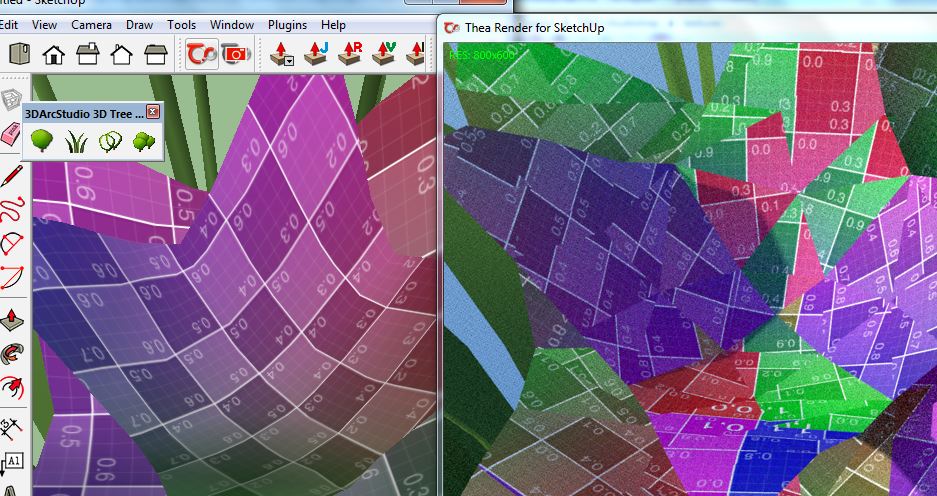
I'm not sure if you are in this case, but if you used trees with PNG textures, due to the render error on UVs, leaves may disappear because of the transparency part of their texture is not correctly placed.
So I made a small script to fix it for trees.
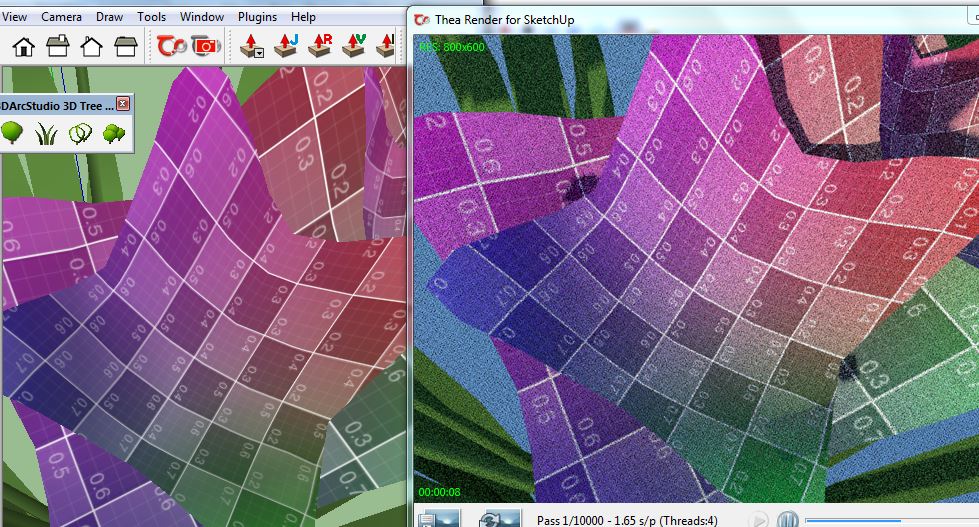
Could you test it and let me know if it works in your case.
3darcstudiotools.rbz
install the extension
before rendering : use the menu 3DArcStudio>Tools>Fix Leaves textures...Yours
Pascal -
@pibuz said:
Speaking of which, I have a little request for you: I work with Indigo Renderer, and it also supports a proxy system to substitute complex models with lighter ones. You only need to apply the suffix "_dummy" to the desired proxy which will be exported and rendered as the original component (eg. "tree" and corresponding proxy "tree_dummy").
So first thing I did was checking the components window and see what happens when I convert one of your trees to a proxy: I saw nothing happens.The thing I'd like to ask you is if it's possible for you to add an option to save the dummy proxy to the components list, and maybe name it automatically "name"_dummy so that Indigo Renderer can recognize and export the complex tree model without having to re-render it (and make the SU scene heavy).
As there is no standard method defined within Sketchup to manage proxies/ghosts, each plugin and render defined its own method. So the problem is they are not designed to interoperate

By the way this is maybe a good idea for a future Sketchup version to have a standard proxy/ghost management integrated. Maybe Chriss Fullmer is listening
 ?
?In this particular case, from what you say, this could be the way to achieve it :
- Create a tree, displayed in full mode
- Add a second tree of the same type
- You will be asked by TreeMaker if you want to add copies of existing tree or create a new component : answer No to create a new component
You now have two trees that looks the same but each has its own component definition.
Take one of them, rename its definition name to “…_dummy”.
You can now convert it to proxy (right click, change to proxy), and let the other one with full draw.
Place some copies of the _dummy in the model
Hide the other one in order for it not being rendered.Test the render.
Let me know if it works. If yes I can see how to integrate this operation into the code to ease the process.
Yours
Pascal -
Hi Pascal,
I use Thea4SU plugin and the problem with the leaves textures exists ( bad UVs leaves in renders) but I have installed the Tools Script and the problem is fixed now.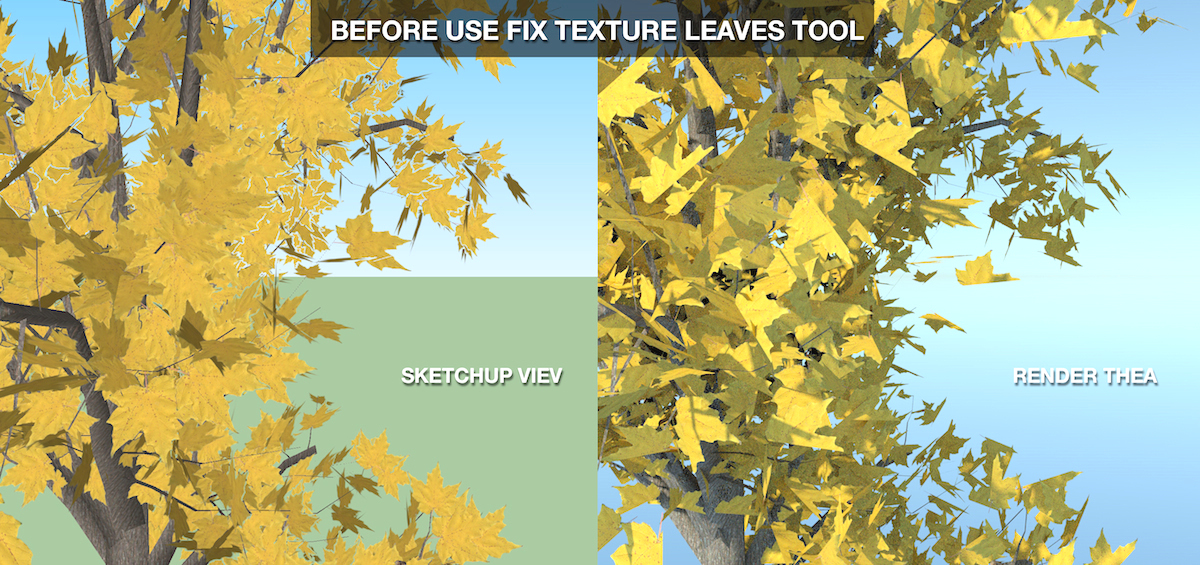
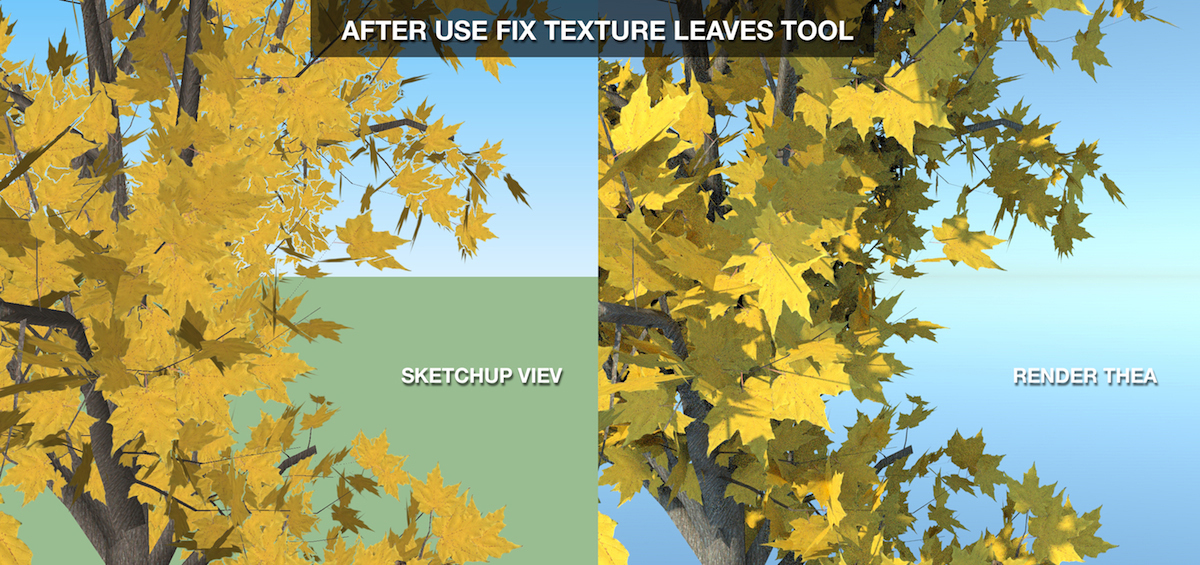
Another question, when I create a tree in a blank sketchup file, new components appear in the Componentes Window, see the image below:
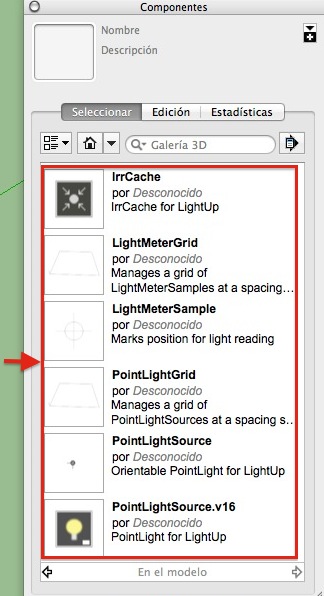
but when I use Fix Texture Leaves Tool those components disappear, is that correct?
-
@ppoublan said:
@ijmccoy said:
using vray for sketchup. if i put a single tree in a model on its own it renders with the leaves but in the model ive just added trees to, they all render without leaves
Hi,
Does this only appears with some trees ? in this case which one ? Could you post one example.
In any case there are two issues I know with many renders :- incorrect handling of colorized textures
- incorrect handling of UVs textures when material is applied to a parent group, not to the faces.
Here is an example :
[attachment=2:27t53w9y]<!-- ia2 -->uvfix_avant.jpg<!-- ia2 -->[/attachment:27t53w9y]
I'm not sure if you are in this case, but if you used trees with PNG textures, due to the render error on UVs, leaves may disappear because of the transparency part of their texture is not correctly placed.
So I made a small script to fix it for trees.
[attachment=1:27t53w9y]<!-- ia1 -->uvfix_apres.jpg<!-- ia1 -->[/attachment:27t53w9y]
Could you test it and let me know if it works in your case.
[attachment=0:27t53w9y]<!-- ia0 -->3darcstudiotools.rbz<!-- ia0 -->[/attachment:27t53w9y]
install the extension
before rendering : use the menu 3DArcStudio>Tools>Fix Leaves textures...Yours
PascalTried the above but still coming out the same, really dont understand it as it works if i start a new sketchup file. Its the same for all trees as well not just 1 type
-
I tested the tool too, and I confirm that this fixed the error (rendering with Indigo Renderer). In sketchUp - like Oxer - I never had any texture issues, BTW.
-
@oxer said:
Hi Pascal,
Another question, when I create a tree in a blank sketchup file, new components appear in the Componentes Window, see the image below:
[attachment=0:2zktr2wd]<!-- ia0 -->New Components.jpg<!-- ia0 -->[/attachment:2zktr2wd]
but when I use Fix Texture Leaves Tool those components disappear, is that correct?Hi oxer,
From what I can see I think all these components are created or loaded by LightUp for Sketchup.
I think it adds them to the model when a tree is drawn just bucause this plugin adds model or components or materials observers and add its own component when one of this list is changed.They disappears because in Tree Maker and I purge unused materials and unused components.
Yours
pascal -
@pibuz said:
I tested the tool too, and I confirm that this fixed the error (rendering with Indigo Renderer). In sketchUp - like Oxer - I never had any texture issues, BTW.
Did you try the proposed method to render proxies with Indigo ? Let me know if it works, so I can see how to make it "scripted automaticaly" into the plugin.
pascal -
@ijmccoy said:
it works if i start a new sketchup file. Its the same for all trees as well not just 1 type
Made some tests with vRay without pb. I dont know much about how vray is working. If the problem occurs only on existing SU file, there maybe an issue with cache. Found this option you could try : "Clear folder texture cache"
-
@ppoublan said:
Hi oxer,
From what I can see I think all these components are created or loaded by LightUp for Sketchup.
I think it adds them to the model when a tree is drawn just bucause this plugin adds model or components or materials observers and add its own component when one of this list is changed.They disappears because in Tree Maker and I purge unused materials and unused components.
Yours
pascalThe the funny thing is that I haven't installed LightUp, for this reason I don't know why these components are created when you place a new tree, perhaps another plugin is the guilty.

EDIT: I have seen in Components Window >Edition the path for these Components --> C:/Program Files/SketchUp/SketchUp 2014/Tools/lightup/components/pointlight-v1.6.skp
I work on Mac and this path in OS X doesn't exist. -
@oxer said:
The the funny thing is that I haven't installed LightUp, for this reason I don't know why these components are created when you place a new tree, perhaps another plugin is the guilty.
EDIT: I have seen in Components Window >Edition the path for these Components --> C:/Program Files/SketchUp/SketchUp 2014/Tools/lightup/components/pointlight-v1.6.skp
I work on Mac and this path in OS X doesn't exist.Sketchup UFO mysteries
Maybe I left some unpurged components with some leaves components definitions. Need to load all one by one to test... -
@ppoublan said:
Sketchup UFO mysteries
Maybe I left some unpurged components with some leaves components definitions. Need to load all one by one to test... Yes, that is the error, leaves components files unpurged



Advertisement