sketchucation logo sketchucation
    • 登入
    Oops, your profile's looking a bit empty! To help us tailor your experience, please fill in key details like your SketchUp version, skill level, operating system, and more. Update and save your info on your profile page today!
    ⚠️ Important | Libfredo 15.6b introduces important bugfixes for Fredo's Extensions Update

    Don't remember of the box...

    已排程 已置頂 已鎖定 已移動 Plugins
    28 貼文 9 Posters 1.2k 瀏覽 9 Watching
    正在載入更多貼文
    • 從舊到新
    • 從新到舊
    • 最多點贊
    回覆
    • 在新貼文中回覆
    登入後回覆
    此主題已被刪除。只有擁有主題管理權限的使用者可以查看。
    • KrisidiousK 離線
      Krisidious
      最後由 編輯

      Fredo Scale I think is what you want.

      http://sketchucation.com/forums/viewtopic.php?t=17948

      or just edit the axis.

      By: Kristoff Rand
      Home DesignerUnique House Plans

      1 條回覆 最後回覆 回覆 引用 0
      • pilouP 離線
        pilou
        最後由 編輯

        @Krisidious
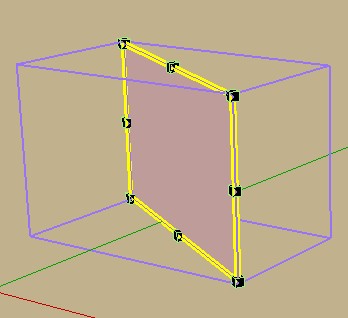
        Alas FredScale draw the good "box scaling" wished but just for showing the action and don't transform the "box"! 😉
        Of course I can move the axe by hand but I have thousand of different faces!!!
        box1.jpg

        Frenchy Pilou
        Is beautiful that please without concept!
        My Little site :)

        1 條回覆 最後回覆 回覆 引用 0
        • KrisidiousK 離線
          Krisidious
          最後由 編輯

          Ahhh I see your problem. I don't know a plugin that does that.

          By: Kristoff Rand
          Home DesignerUnique House Plans

          1 條回覆 最後回覆 回覆 引用 0
          • thomthomT 離線
            thomthom
            最後由 編輯

            Why do you need a plugin for this? I mean, there is the Change Axis function in SketchUp...

            Thomas Thomassen — SketchUp Monkey & Coding addict
            List of my plugins and link to the CookieWare fund

            1 條回覆 最後回覆 回覆 引用 0
            • R 離線
              rv1974
              最後由 編輯

              Pilou, what happened there in France? Pigments shortage? Why those printscreens weren't painted randomly in your 'eyes blowing' way? 😕

              1 條回覆 最後回覆 回覆 引用 0
              • thomthomT 離線
                thomthom
                最後由 編輯

                😆

                Thomas Thomassen — SketchUp Monkey & Coding addict
                List of my plugins and link to the CookieWare fund

                1 條回覆 最後回覆 回覆 引用 0
                • R 離線
                  rv1974
                  最後由 編輯

                  oh no

                  http://24.media.tumblr.com/tumblr_m9zpf8rEQ11rzsuf4o1_400.png

                  1 條回覆 最後回覆 回覆 引用 0
                  • mitcorbM 離線
                    mitcorb
                    最後由 編輯

                    I think what is wanted is a script that inspects all groups/comps and, while ignoring global and local axes, makes the minimum bounding box for each in one operation. Honoluludesktop had a thread related to this, but not necessarily one that acted on a large selection. I searched the string "sketchup adjust bounding box" but did not find anything specific.

                    EDIT: Ah, Pilou, you posted just as I was writing this comment.

                    I take the slow, deliberate approach in my aimless wandering.

                    1 條回覆 最後回覆 回覆 引用 0
                    • pilouP 離線
                      pilou
                      最後由 編輯

                      @unknownuser said:

                      minimum bounding box

                      YES! ☀ (Fredo6 has calculated it for his Fredo Scale but...

                      Frenchy Pilou
                      Is beautiful that please without concept!
                      My Little site :)

                      1 條回覆 最後回覆 回覆 引用 0
                      • pilouP 離線
                        pilou
                        最後由 編輯

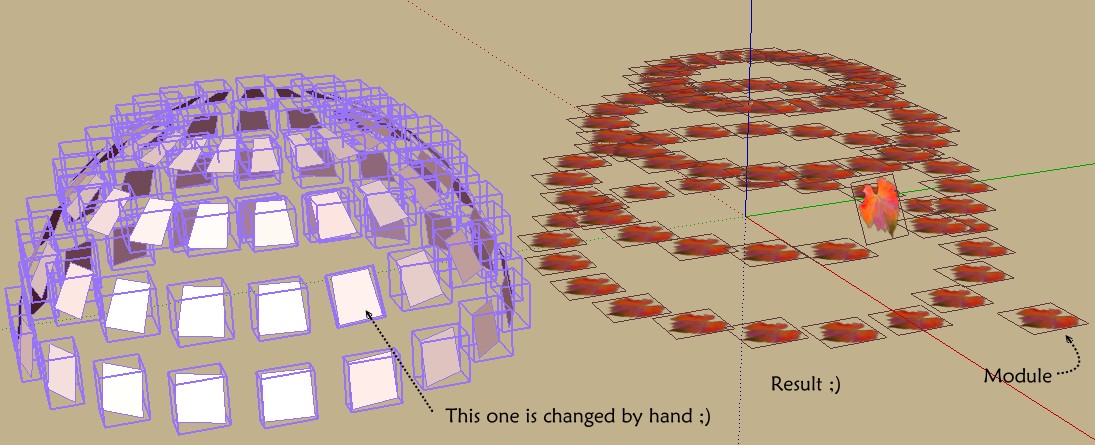
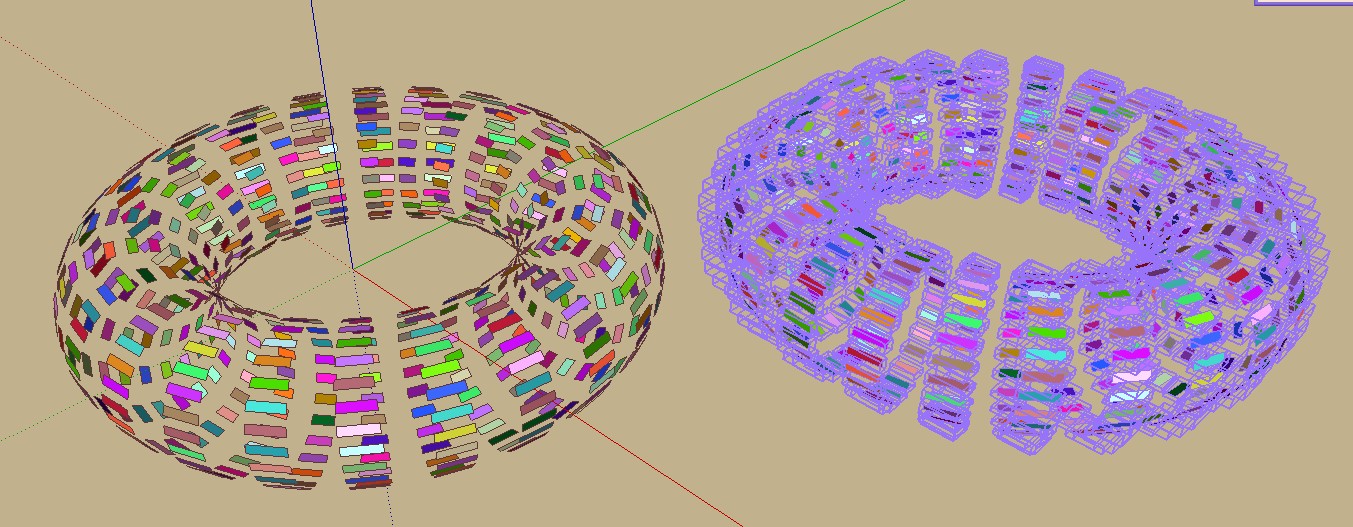
                        Say I have a volume , I explode it , I want each facet is a group or a component for some actions 😉 (I have that 😄 but not the "flat box" because the facets are inclined! 😞

                        Say give some images with transparent background to these facets so orientation to these target facets must have a "flat box" and not these volumetric bounding boxes!
                        box2.jpg

                        Frenchy Pilou
                        Is beautiful that please without concept!
                        My Little site :)

                        1 條回覆 最後回覆 回覆 引用 0
                        • fredo6F 離線
                          fredo6
                          最後由 編輯

                          @unknownuser said:

                          @unknownuser said:

                          minimum bounding box

                          YES! ☀ (Fredo6 has calculated it for his Fredo Scale but...

                          Pilou,

                          This is an interesting idea: align axis on the minimum bounding box.
                          That would be a separate plugin because FredoScale operates only on a selection.

                          Fredo

                          1 條回覆 最後回覆 回覆 引用 0
                          • pilouP 離線
                            pilou
                            最後由 編輯

                            Cool, so I wait and see! 😄

                            Frenchy Pilou
                            Is beautiful that please without concept!
                            My Little site :)

                            1 條回覆 最後回覆 回覆 引用 0
                            • PixeroP 離線
                              Pixero
                              最後由 編輯

                              Oh, yes pleeease!!! That would be great Fredo.
                              And maybe some kind of additional tool to flip between the respective axises.

                              1 條回覆 最後回覆 回覆 引用 0
                              • pilouP 離線
                                pilou
                                最後由 編輯

                                More clear ? 😄

                                more_ clear.jpg

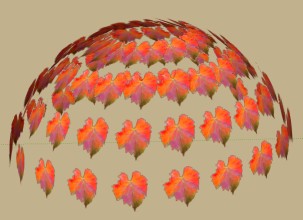
                                Component onto face by Chris Fullmer gives a sort of good result or the tricky Component Dropper by Thomthom (it adapt the the size of the Source to the Target! ) but i don't want use these plugins because they use just one component as source! 😉
                                more_ clear1.jpg

                                I want to use Random Component replacement by Sdmitch for have any number of components so I need the "minimum bounding box" 😉

                                Frenchy Pilou
                                Is beautiful that please without concept!
                                My Little site :)

                                1 條回覆 最後回覆 回覆 引用 0
                                • E 離線
                                  eco
                                  最後由 編輯

                                  ...yes- it would be a very nice piece of script 😄

                                  1 條回覆 最後回覆 回覆 引用 0
                                  • pilouP 離線
                                    pilou
                                    最後由 編輯

                                    Why? 😲
                                    @unknownuser said:

                                    it would be a very nice piece of script

                                    It is a very nice piece of script! 😎

                                    Frenchy Pilou
                                    Is beautiful that please without concept!
                                    My Little site :)

                                    1 條回覆 最後回覆 回覆 引用 0
                                    • E 離線
                                      eco
                                      最後由 編輯

                                      Maybe it just me but i can't find option to create components from groups with axis set to minimal bounding box for each of new components...?

                                      1 條回覆 最後回覆 回覆 引用 0
                                      • pilouP 離線
                                        pilou
                                        最後由 編輯

                                        Fredo6 said that he want to make it but seems he has forgotten! 😉

                                        Frenchy Pilou
                                        Is beautiful that please without concept!
                                        My Little site :)

                                        1 條回覆 最後回覆 回覆 引用 0
                                        • pilouP 離線
                                          pilou
                                          最後由 編輯

                                          But Sdmitch made it! ☀

                                          Frenchy Pilou
                                          Is beautiful that please without concept!
                                          My Little site :)

                                          1 條回覆 最後回覆 回覆 引用 0
                                          • pilouP 離線
                                            pilou
                                            最後由 編輯

                                            We can use with profit
                                            Axes Tool by Thomthom
                                            who align axes of Component (s) following several options! 😉

                                            http://s6.postimg.org/mm4ubljv5/feuilles1.jpg

                                            Frenchy Pilou
                                            Is beautiful that please without concept!
                                            My Little site :)

                                            1 條回覆 最後回覆 回覆 引用 0
                                            • 1
                                            • 2
                                            • 2 / 2
                                            • 第一個貼文
                                              最後的貼文
                                            Buy SketchPlus
                                            Buy SUbD
                                            Buy WrapR
                                            Buy eBook
                                            Buy Modelur
                                            Buy Vertex Tools
                                            Buy SketchCuisine
                                            Buy FormFonts

                                            Advertisement