Shortcut.plist
-
Shortcut issues,
OS: Mac OSX Mountain Lion
Sketchup 8I cannot find the shortcut.plist file on my Mac.
But I have no problem setting the shortcut key. It works and saved perfectly. I just wanna copy the Shortcut.plist to my notebook so I don't have to set it up all over again.
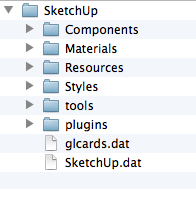
I looked all over the place including, Library/Application Support/Google Sketchup 8/Sketchup/*
I have no idea what is going on, but it is incredibly annoying.
Any help would be appreciated.
Thanks,
-
The plist is under ~Users/.../Library/Preferences...
-
I figured it out. It's because the Library folder in Users is hidden by default in Finder. I just have to ShowAllFiles or find it using Terminal. Thanks for your help.

Hello! It looks like you're interested in this conversation, but you don't have an account yet.
Getting fed up of having to scroll through the same posts each visit? When you register for an account, you'll always come back to exactly where you were before, and choose to be notified of new replies (either via email, or push notification). You'll also be able to save bookmarks and upvote posts to show your appreciation to other community members.
With your input, this post could be even better 💗
Register Login


Advertisement