sketchucation logo sketchucation
    • 登入
    Oops, your profile's looking a bit empty! To help us tailor your experience, please fill in key details like your SketchUp version, skill level, operating system, and more. Update and save your info on your profile page today!
    ⚠️ Important | Libfredo 15.6b introduces important bugfixes for Fredo's Extensions Update

    Grey Out Issue is back

    已排程 已置頂 已鎖定 已移動 Developers' Forum
    30 貼文 6 Posters 813 瀏覽 6 Watching
    正在載入更多貼文
    • 從舊到新
    • 從新到舊
    • 最多點贊
    回覆
    • 在新貼文中回覆
    登入後回覆
    此主題已被刪除。只有擁有主題管理權限的使用者可以查看。
    • Rich O BrienR 離線
      Rich O Brien Moderator
      最後由 編輯

      Image 3.png

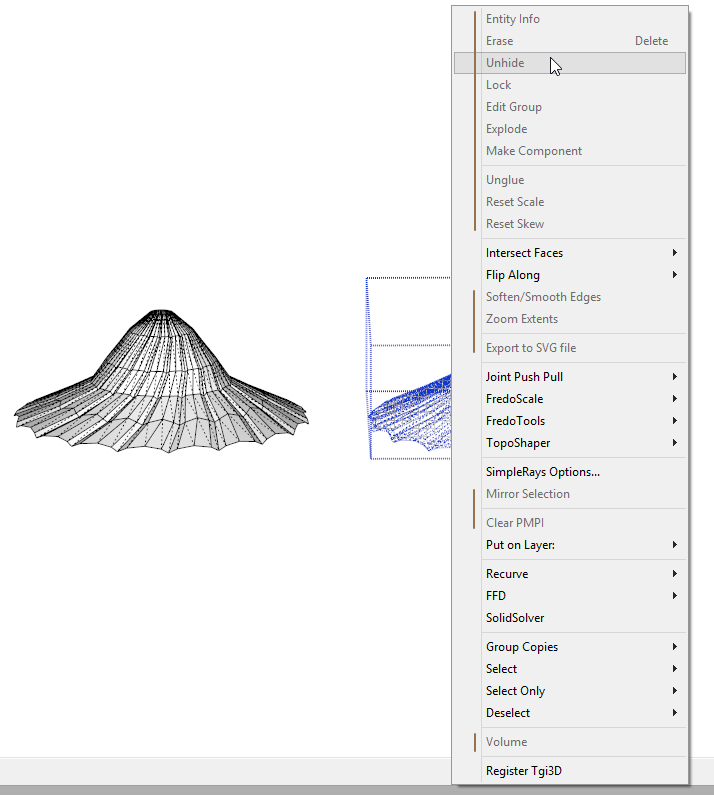
      Anyone else getting grey-out?

      Download the free D'oh Book for SketchUp 📖

      1 條回覆 最後回覆 回覆 引用 0
      • soloS 離線
        solo
        最後由 編輯

        I am also getting it recently.

        http://www.solos-art.com

        If you see a toilet in your dreams do not use it.

        1 條回覆 最後回覆 回覆 引用 0
        • BoxB 離線
          Box
          最後由 編輯

          Me too but thought it was just me or something to do with my recent addition of twilight. Save and reopen fixes it but it is annoying.

          1 條回覆 最後回覆 回覆 引用 0
          • thomthomT 離線
            thomthom
            最後由 編輯

            :s

            Uh... I thought it was fixed... 😞 I've not seen this - so far...

            Thomas Thomassen — SketchUp Monkey & Coding addict
            List of my plugins and link to the CookieWare fund

            1 條回覆 最後回覆 回覆 引用 0
            • Rich O BrienR 離線
              Rich O Brien Moderator
              最後由 編輯

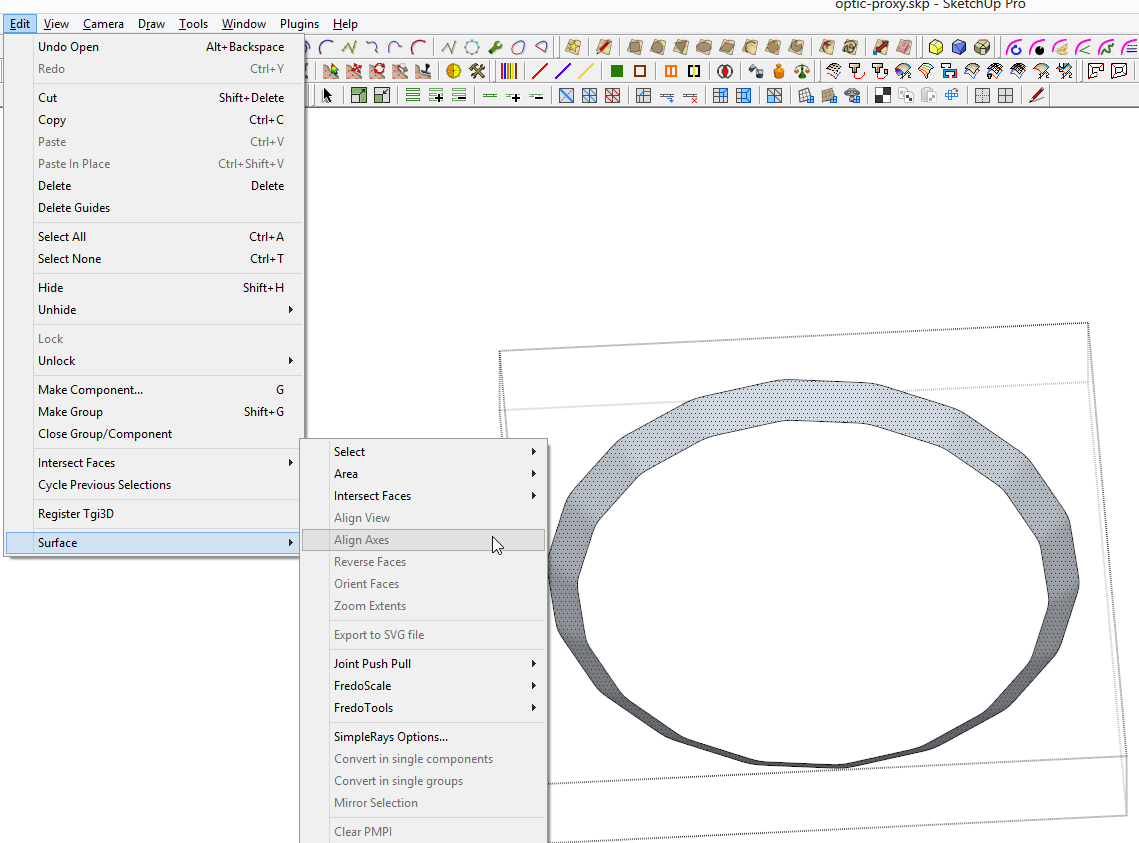
              It even greys the menu item.

              Image 4.png

              Never paid much attention to the old grey-out dilemma much but did it affect the menu entries also?

              Download the free D'oh Book for SketchUp 📖

              1 條回覆 最後回覆 回覆 引用 0
              • thomthomT 離線
                thomthom
                最後由 編輯

                Yup.

                Thomas Thomassen — SketchUp Monkey & Coding addict
                List of my plugins and link to the CookieWare fund

                1 條回覆 最後回覆 回覆 引用 0
                • TIGT 離線
                  TIG Moderator
                  最後由 編輯

                  I'm not seeing it but I don't have 'every plugin under the sun' auto-loading...
                  The outbreak of multi-downloading from the Plugins Store etc might result in too many plugins loading and making too many commands.

                  They did up the command limit which fixed it last time.

                  A slow startup is an indicator of having too many plugins auto-loading...

                  Another cause that makes multiple-commands and thereby eats up the available command-quota was found during the last great gray-out débâcle...

                  Fredo [and perhaps a few others ?] had some tools that made a new command every time the tool was used - the old command was no longer used but it couldn't be 'unloaded' - so SketchUp itself started to dump commands to keep the total used number within its limits.
                  Once this was realized Fredo et al changed their code, so that the one command used for the context-menu/menu/toolbar was made just once, as the tool loaded, and thus the number of commands was minimized...

                  There have been a number of new scripters turn up here lately and I just wonder if one or two of them has accidentally made the same error - i.e. having a tool that makes a command as it is used and not as it is initially loaded.
                  I hope it's not me 😒

                  Didn't Fredo make a code snippet to see what commands, by name, were getting made/loaded ?
                  This could expose the multi-loading issue...
                  😕

                  TIG

                  1 條回覆 最後回覆 回覆 引用 0
                  • Rich O BrienR 離線
                    Rich O Brien Moderator
                    最後由 編輯

                    http://sketchucation.com/forums/viewtopic.php?p=399439#p399439

                    Can you check this?

                    Download the free D'oh Book for SketchUp 📖

                    1 條回覆 最後回覆 回覆 引用 0
                    • TIGT 離線
                      TIG Moderator
                      最後由 編輯

                      As a tool it's relatively useless because the dropdown from the native Layers toolbar does this all less clunkily... It is from 2006!
                      However, the tool's code does NOT seem to make multiple command entries... so I don't think it is to blame...
                      I've loaded it and loads more tools I don't normally use and I can't get a gray-out !

                      Rich [and any other sufferers] can you PM me a list of your plugins .rb/.rbs in the main Plugins folder...
                      As .txt preferred [sorted!] so I can compare it with mine to narrow down the possible culprits...

                      TIG

                      1 條回覆 最後回覆 回覆 引用 0
                      • Rich O BrienR 離線
                        Rich O Brien Moderator
                        最後由 編輯

                        How did I export folder files to .txt?

                        Download the free D'oh Book for SketchUp 📖

                        1 條回覆 最後回覆 回覆 引用 0
                        • Bob JamesB 離線
                          Bob James
                          最後由 編輯

                          @rich o brien said:

                          How did I export folder files to .txt?

                          I use this:
                          DirectoryListPrintPro

                          And, Rich, as you know, I get toolbars greyed out 😲 I'll send you that info today.

                          i7-4930K 3.4Ghz, 2x GTX780 6GB, 32GB DDR3-1600 ECC, OCZ Vertex 4 500GB, WD Black 3TB, 32TB NAS, 4x 27" Monitors, SpaceMouse Pro, X-keys XK-60

                          1 條回覆 最後回覆 回覆 引用 0
                          • TIGT 離線
                            TIG Moderator
                            最後由 編輯

                            Doing it from within SketchUp... open the Ruby Console and type/copy:
                            Dir.entries(Sketchup.find_support_file('plugins')).each{|f|puts f if f=~/.rb$/; puts f if f=~/.rbs$/};puts
                            You'll get a list of all .rb/.rbs files that are auto-loading [sorted] from that folder.
                            Copy/paste that text into a .txt file and PM it to me...

                            If you also have other 'custom-plugins-folders' that you have plugins in defined in your your $LOAD_PATH then you need to do multiple lists - change the text in the example above -
                            Sketchup.find_support_file('plugins') - to be the path to the custom folder - within '' - e.g. 'C:/Users/Rich/Desktop/MyPlugins'... Make a separate txt file for each 'plugins' folder...

                            TIG

                            1 條回覆 最後回覆 回覆 引用 0
                            • TIGT 離線
                              TIG Moderator
                              最後由 編輯

                              @Rich

                              The first thing I notice is that I have double the amount of plugins loading !
                              So what is different?

                              Here's what I don't have loading and you do...

                              You have some early loaders that I think you use to group menu items...
                              ####camera.rb ####misc.rb ####TIG.rb **##hideEverythingElse.rb**
                              then there's
                              Add Vertex.rb addfaces.rb **ae_Console.rb ae_Snapshot.rb ae_ToolbarEditor.rb** angle_between.rb arcs.rb **as_loadsketchfab.rb as_loadsketchupnews.rb**
                              and then
                              cameraKeyMaker.rb **catmull-clark_subdivision.rb** CenterPointAll.rb cleanup.rb **Color_N_Gon.rb**
                              then
                              default_scenes.rb dimsvis.rb Double Line.rb EdgeFollowMe.rb **flightsofideas.rb** frontface.rb **GeoNuke.rb** grid.rb Groove Maker.rb **Hatchfaces.rb** **Image2Model.rb** keyframe_animation.rb **load_qpik_simple_rays.rb** Make_Components.rb **mshstick.rb** [WTF?] **normal_map_maker.rb** PolyLine.rb proxy.rb PutOnLayer_sortname.rb
                              and then
                              **RamTools_StepEx.rb** **recurve.rb** remove_inner_faces.rb rename_comp_inst.rb Re_Glue.rb ruby_console.rb scenetweak.rb selection_edge.rb **smoothStepAnim.rb** sptm.rb **susolid.rbs** **Terrain Tools.rb** **tgi3d.rbs** **Thea4SU_loader.rb** **TheaExporter_loader.rb** toggle_units_3icons.rb **Wikii_MRS.rbs** Window Settings.rb

                              I have not even heard of some of these 😒
                              I have emboldened some of my initial suspects [with NO proof - just gut-feeling! - the .rbs ones I can't look into anyway!].

                              Can you try disabling some of them, restart and see if the gray-out issue continues ?
                              You have some 'bit-hitters' in there so I'd be interested to see what's what...

                              TIG

                              1 條回覆 最後回覆 回覆 引用 0
                              • thomthomT 離線
                                thomthom
                                最後由 編輯

                                catmull-clark_subdivision.rb is my experiment of a plugin. It adds one sub-menu to Tools with three menus and a separator.

                                Thomas Thomassen — SketchUp Monkey & Coding addict
                                List of my plugins and link to the CookieWare fund

                                1 條回覆 最後回覆 回覆 引用 0
                                • Rich O BrienR 離線
                                  Rich O Brien Moderator
                                  最後由 編輯

                                  I can't read that bold text

                                  Change the color

                                  Download the free D'oh Book for SketchUp 📖

                                  1 條回覆 最後回覆 回覆 引用 0
                                  • TIGT 離線
                                    TIG Moderator
                                    最後由 編輯

                                    @Box

                                    I have six times more plugins loading that you - and no grey-out !! 😲
                                    So some of yours must be suspect !

                                    Here's the differences I have spotted...
                                    **ae_ToolbarEditor.rb** Brighter3D.rb move_to_origin.rb move_to_origin_and_center.rb multi_face_scale_offset.rb Quick Lathe.rb **recurve.rb throw_to.rb Tile Grid.rb** **ToolbarBuilderFree.rb**

                                    You'll see that Rich has many different 'different ones'... so perhaps try disabling some of your common ones first ?
                                    But it doesn't mean that some others may be screwing up additionally... 😕

                                    TIG

                                    1 條回覆 最後回覆 回覆 引用 0
                                    • BoxB 離線
                                      Box
                                      最後由 編輯

                                      Recurve seems to be the only one we have in common, but I've been using that for a long time.
                                      Both Move to origins have had since I got off the ark.
                                      The toolbar ones and offset scale have only been installed very recently and the greyout was before that.
                                      Brighter3d, tile grid and quicklathe were about the same time.

                                      So I have removed a bunch and will see if it happens again.
                                      Be a shame if it is throw_to or recurve, use them both a lot.

                                      1 條回覆 最後回覆 回覆 引用 0
                                      • TIGT 離線
                                        TIG Moderator
                                        最後由 編輯

                                        ae_ToolbarEditor.rb ?

                                        TIG

                                        1 條回覆 最後回覆 回覆 引用 0
                                        • TIGT 離線
                                          TIG Moderator
                                          最後由 編輯

                                          @Box
                                          The problem is not insolvable - if a tool is found to be make multiple commands it is possible to fix the code to avoid it...

                                          TIG

                                          1 條回覆 最後回覆 回覆 引用 0
                                          • BoxB 離線
                                            Box
                                            最後由 編輯

                                            @tig said:

                                            ae_ToolbarEditor.rb ?

                                            I only installed that after having the greyout issues.

                                            1 條回覆 最後回覆 回覆 引用 0
                                            • 1
                                            • 2
                                            • 1 / 2
                                            • 第一個貼文
                                              最後的貼文
                                            Buy SketchPlus
                                            Buy SUbD
                                            Buy WrapR
                                            Buy eBook
                                            Buy Modelur
                                            Buy Vertex Tools
                                            Buy SketchCuisine
                                            Buy FormFonts

                                            Advertisement