[Req] Spherize Selection
-
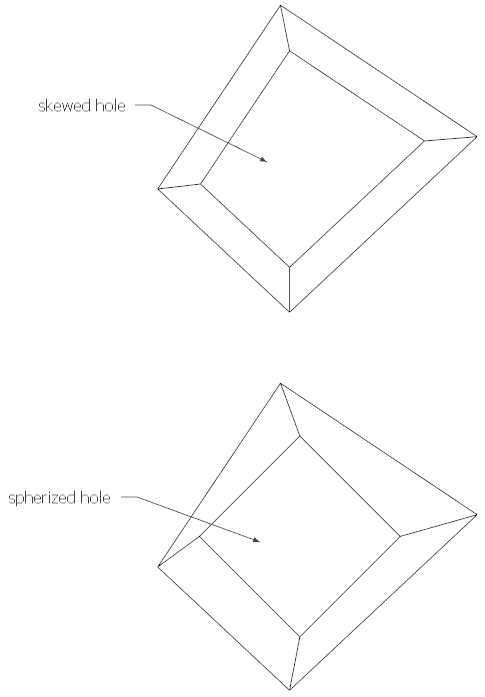
Is there a means to form or force a seletion of edges into a spherical shape?
-
Your 'skewed' example is just an offset that's had 'split-donut' run on it.
Your 'spherized' example is incomprehensible
What criteria are used to determine the size of the 'square' hole?
How is its relationship to the original edges determined ?
Would this only need to work on quads?
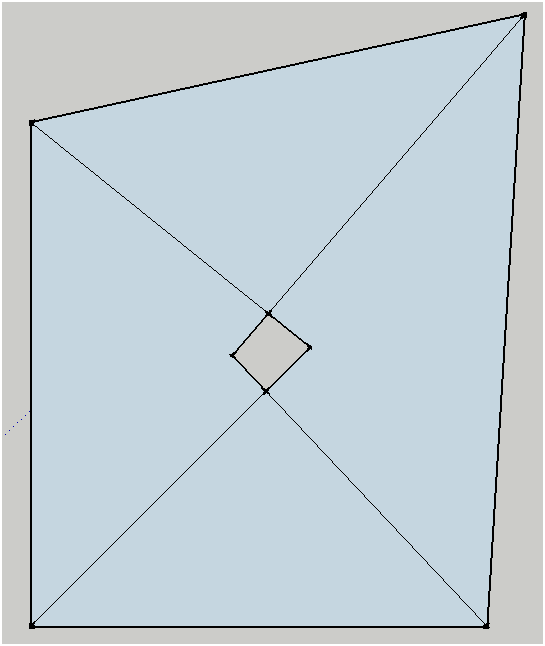
If you wanted four triangles to form a quad hole that is not what you drew ???
If the new edges bisect the angles you get add results...
-
@unknownuser said:
Your 'skewed' example is just an offset that's had 'split-donut' run on it.
So....the centre hole is skewed and not circular
@unknownuser said:
Your 'spherized' example is incomprehensible
It is perfectly circlular
@unknownuser said:
What criteria are used to determine the size of the 'square' hole?
I don't care about the size of the hole as I can scale it
@unknownuser said:
How is its relationship to the original edges determined ?
best fit
@unknownuser said:
Would this only need to work on quads?
do you mean 4 sided holes? then no, # sided holes
@unknownuser said:
If you wanted four triangles to form a quad hole that is not what you drew ???
nope
@unknownuser said:
If the new edges bisect the angles you get odd results...
If the create circular hole remains selected on creation then you can immediately scale.
-
http://en.wiktionary.org/wiki/spherize
So perhaps this is what you want/need...
You have an n-sided face [no holes].
It adds an n-sided regular-polygon into the center of the face.
This sized so that all of its vertices are on the face.
It draws a lines from the first polygon vertex to the nearest face outer_loop vertex.
Then each vertex in turn is joined to the next face vertex.
Finally the whole thing merges with the original face.
It's easier to scale the polygonal 'hole' if its face is kept - you can delete it later a a real hole is required...
Give me a sec' it's not like I have a million other things to do
-
This 'spherizes' a selected face http://sketchucation.com/forums/viewtopic.php?p=471346#p471346


Hello! It looks like you're interested in this conversation, but you don't have an account yet.
Getting fed up of having to scroll through the same posts each visit? When you register for an account, you'll always come back to exactly where you were before, and choose to be notified of new replies (either via email, or push notification). You'll also be able to save bookmarks and upvote posts to show your appreciation to other community members.
With your input, this post could be even better 💗
Register Login


Advertisement