[Plugin] ToolbarEditor (1.1.2) – updated 08.06.2014
-
Currently the plugin writes each snippet to a ruby file (in %APPDATA%) and stores the metadata with the plugin's preferences in the registry.
Is the numeric part of the filename unique for each user? If so, that makes it difficult to have a way to share commands.
-
another detail: the toolbar position is not stored when you close sketchup
so you have to move it everytime you open
not really important, but would it be possible to dck the created toolbars as the other native toolbars?
-
Plugins can not influence the position of the toolbar (they can only tell SketchUp to show/hide a toolbar, and Sketchup remembers the position). Since these toolbars are created with a timeout (after all other plugins have been loaded), there was initially a problem wher the toolbar didn't remember its position. After report it was improved in SU2013 so that SketchUp should remember the position even after timeout. In which SketchUp version does it happen to you?
I have reduced the timeout, maybe that caused the problem? -
@aerilius said:
Plugins can not influence the position of the toolbar (they can only tell SketchUp to show/hide a toolbar, and Sketchup remembers the position). Since these toolbars are created with a timeout (after all other plugins have been loaded), there was initially a problem wher the toolbar didn't remember its position. After report it was improved in SU2013 so that SketchUp should remember the position even after timeout. In which SketchUp version does it happen to you?
I have reduced the timeout, maybe that caused the problem?i use sketchup 8
i shall try version 13 or 14, to check
thank you
-
This would be just what I'm looking for... if I could get it working.
When I open it up (v. 1.1.2 on SU 2014 on Win7), the list of available commands is very limited.
The vast majority of them is from the 1001bits extension I've got installed. Then there are perhaps 20 more. No View menu commands, for example, which is what I wanted.
Speaking for myself and as a relative noob, I think I'd prefer the commands listed in menu order: i.e. Tools/Sandbox/Smoove, but I perhaps I'm putting too much stock in the menus, with which I'm faintly familiar. I'd also love an option to list in different formats, i.e. a nice tight text list that would show about twice as much per page.
This looks awesome, and I can see it's working for other people. I've tried shutting down & restarting SU. I also just uninstalled and reinstalled TE, and an interesting thing happened: it still had about as many non-1001bits commands, but not the same ones! I only know this b/c I saw smoove on there before, and it's not there now. I tried disabling 1001bits, and interestingly enough there aren't any more non-1001bits tools there than before. 25 to be precise. Then I uninstalled TE, reinstalled, and same thing.
-
SketchUp does not make its menus readable, they can not be accessed or included in custom plugin toolbars. This plugin can only make toolbars for plugin commands (sorry, it got missing from the description in the SCF plugins store, it's still mentioned in the SU extension warehouse).
SketchUp's native commands need to be replicated one by one. You can install LaunchUp, which comes with a lot of copies of SketchUp's native commands.
-
Thanks Aurelius, I don't think I understand, but now I understand that I don't understand. I haven't really looked at creating commands, my level of sophistication extended only to picking something off a list

-
Do you know you can make custom toolbars natively in 2014?
-
Hello,
Im looking to make a button that will add a custom object that I have made. I am currently running SU8 and some one in my company (no longer here) made a button that did this. But I want to move to sketchup 2014 unfortunately I cant seem to figure out how to add this button. I see the box on your toolbar editor that allows you to add in ruby code but I'm not a programmer. I don't know if any one has made a button like this and would be willing to share there ruby code would help out allot.
I dont know if this is important but I also have to be able to move/edit parts of this object once it has been placed.
-
The old button must have been a plugin, so it has ruby code. Without that ruby code there won't be a button. Could you look up where that plugin was located (installed) in the old SketchUp version (SU8 had the plugins under Program Files/Google/Google SketchUp 8/Plugins) and then you could just install it in SketchUp 2014 (under <your_user>/AppData/Roaming/SketchUp/SketchUp 2014/SketchUp/Plugins).
This plugin is rather for small code snippets (~1-10 lines). Of course one can make such a script that inserts a component, but that depends on what exactly it should do.
-
Thanks there seems to be multiple .rb files that have names of the buttons. So if I run them I should get the button thanks for the help.
-
You can add native plugins and commands if you install Jim's custom toolbars in conjunction with Aerilius' custom toolbars. Jim's makes native commands available inside of Aerilius' customizer. I have both installed for this reason.
-
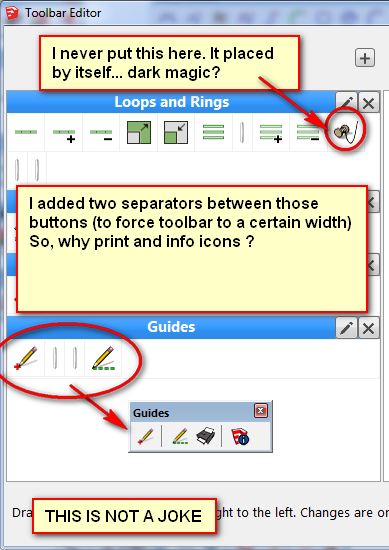
I think I found a very nasty bug on Toolbar Editor. It acts strange sometimes. Please check the image attached.
Also, a backup function for it would be nice... ideally embedded in warehouse user account somehow, if possible.
But, in the meantime, look at my unintended toolbars:
Is not the first time when it acts randomly. On a previous date I found a separator that I never dragged it in place.
Any possible explanation?
-
Second note:
When editing an existing toolbar, in edge cases not all changes can be correctly applied (for example buttons can not be removed, and buttons can only be appended at the end), but changes should be completely applied at next restart. The alternative would be that the plugin does not even try updating the toolbar, but requests the user to restart SketchUp.Anyways, it is clear that wrong icons should not be added. I'll try to find the best compromise for updated toolbars.
First note: Could be a hash collision (although I thought unlikely). I will try to reproduce it (evt. I will ask for a specific registry setting). Can you tell me what plugin the two pencil icons are?
-
hello,
how look a ruby-snipped to have a plugin with an icon?some developer have only plugins that's work in menue. ok i could add short-cuts for this, however sometimes i would have a toolbar with all my most used plugins together.
-
@deaneau said:
hello,
how look a ruby-snipped to have a plugin with an icon?some developer have only plugins that's work in menue. ok i could add short-cuts for this, however sometimes i would have a toolbar with all my most used plugins together.
See how plugins that do have a toolbar do it...
Typically the plugin's menu entry is set up using a 'command'.
You can add a line or two of code to that to use that command in a new toolbar.
You'll need an icon png file to be loaded from somewhere.
After all of the scripts have loaded as SketchUp starts, you cannot add items to an existing menu or toolbar.
Several scripts can add items to an existing menu or toolbar if they do so as they load when SketchUp starts, but this is only possible if that menu or toolbar has a 'reference' that they can access - e.g. an@instance_variableor aCONSTANT, which has been set up in amodulewhich they all share, or a$global_variable_with_a_unique_name[not recommended as it is shared by all modules and could clash with other's too]...An example of the menu making command is:
unless file_loaded?(__FILE__)
	cmd = UI;;Command.new("SomeCommandName"){ SomeCommand.new() }
	UI.menu("Plugins").add_item(cmd)
### START - ADD TOOLBAR HERE...
### END -   ADD TOOLBAR HERE
	file_loaded(__FILE__)
end
If it's a 'Tool' the CMD setup is slightly different...
An example to use that within a toolbar is this additional code added between the ### markers:
cmd.tooltip = "SomeCommandName"
cmd.status_bar_text = "SomeText"
cmd.small_icon = File.join("SomeCommandFolder/ImagesFolder", 'icon-24.png')
cmd.large_icon = File.join("SomeCommandFolder/ImagesFolder", 'icon-32.png')
toolbar = UI;;Toolbar.new("SomeCommandName")
toolbar.add_item(cmd)
toolbar.show if toolbar.get_last_state.abs == 1 # TB_VISIBLE/NEVER
Note how addition properties are needed for the cmd to be used in a toolbar.
The path to the button icons and their names is up to you...
Remember to use a plain-text editor like Notepad++ to edit the .rb file.
Encoding must be UTF-8_without_BOM to be compatible with all SketchUp versions... -
@tig said:
toolbar.show if toolbar.get_last_state.abs == 1 # TB_VISIBLE/NEVER
toolbar.restoredoes the exact same thing. -
thanks at TIG and ThomThom... i will look at this deeper in the next week.
thank you
-
Thank You
but downloadlink do not work for me ? -
@esense3d said:
Thank You
but downloadlink do not work for me ?
Have you tried the PluginStore RBZ ??
http://sketchucation.com/pluginstore?pln=ae_ToolbarEditor






Hello! It looks like you're interested in this conversation, but you don't have an account yet.
Getting fed up of having to scroll through the same posts each visit? When you register for an account, you'll always come back to exactly where you were before, and choose to be notified of new replies (either via email, or push notification). You'll also be able to save bookmarks and upvote posts to show your appreciation to other community members.
With your input, this post could be even better 💗
Register Login


Advertisement