DC not working Help?
-
I downloaded the attached DC from 3D Warehouse. The description on the component stated it is editable for width, but when I try to edit the width (or anything), SU says there are no options to choose from on this component. Since I am a newbie regarding DCs, can someone please double check if this component has any options? I cannot tell from the component attribute box whether this is a working DC.
Thanks in advance.
-
Try importing the .skp rather then opening it.
-
When I try to import model, I get the following error
Cannot create a recursively defined model or component!
I imported a cabinet component from "Kraftmaid" and it did work. Now wondering if Tall Open Component is buggy.
Did you get this particular component to work?
-
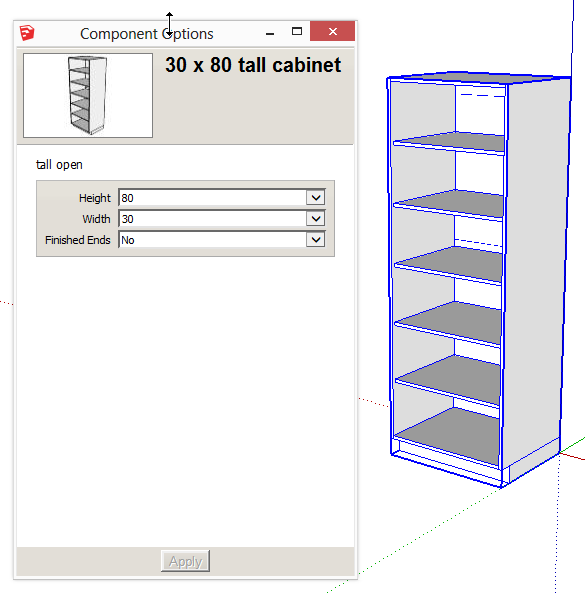
I downloaded the component and imported it no problem.
-
Thanks Jim,
I closed SU and re-opened. Imported file and it worked fine.
-
@sfto1 said:
When I try to import model, I get the following error
Cannot create a recursively defined model or component!
Just for future reference, this error sounds like you tried to import the component into itself.
In the same way you can't paste a component into itself.As in:
create a box and make it a component.
Select the component and copy it.
Open the component to edit and Paste in place.
You should get the same error. -
Hi Box,
Here is what I did. I downloaded file and opened it. I had trouble as I first posted with the component having no component options. I received a comment that I should import it, not open it.
So when I tried that, I deleted the component from the screen and imported the file. Yes indeed, I imported the component into itself. Arrgghhh!!!!!
So, I am now understanding that DCs must be imported in order for component options to be activated. Is that correct?
and thanks for the heads up regarding not pasting a component into itself.



Hello! It looks like you're interested in this conversation, but you don't have an account yet.
Getting fed up of having to scroll through the same posts each visit? When you register for an account, you'll always come back to exactly where you were before, and choose to be notified of new replies (either via email, or push notification). You'll also be able to save bookmarks and upvote posts to show your appreciation to other community members.
With your input, this post could be even better 💗
Register Login


Advertisement