Removing unused commands and shortening toolbars
-
Hi, Is there a way to shorten a toolbar, for instance I use ThomThom's LayerTools often - it's a great tool TT, thanks, although I only ever use five commands and so have removed the remainders associated button images:

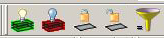
The rest of the toolbar is 'wasted' screen space.Is their a way of reducing the toolbar length to equal the width of just the buttons in the folder so it looks like this?
-
Yes but you need to edit some .rb file... best to ask its author where/how - perhaps PM him... ?
Where it is effectively saying "sometoolbar.add_item(command)" you put a # in front of it to disable that line of code and thereby stop that button being added to the toolbar... Of course any update to the files will lose your changes... -
Thanks for that TIG, I'll go and poke around in the .rb before I bother the writer - I was wrong it was Didier (with help from you apparently, according to the help file).
-
Thanks TIG, that worked. Knowing almost nothing about ruby or coding in general I found I had to hash out all the lines concerning each icon e.g. (showing a modified and an unmodified commant set)
*#Delete layer
cmd1129 = UI::Command.new(("Delete layer")) { Sketchup.active_model.select_tool(DeleteClickedObjectLayer.new) }
cmd1129.small_icon = "Layer Manager/lm_del_lay_16.png"
cmd1129.large_icon = "Layer Manager/lm_del_lay_24.png"
cmd1129.tooltip = "Delete layer"
layertools_tb.add_item(cmd1129)
#Lock layer
cmd1229 = UI::Command.new(("Lock layer")) { Sketchup.active_model.select_tool(SetClickedObjectLayer.new("locked")) }
cmd1229.small_icon = "Layer Manager/lm_set_locked_16.png"
cmd1229.large_icon = "Layer Manager/lm_set_locked_24.png"
cmd1229.tooltip = "Lock layer"
layertools_tb.add_item(cmd1229)*and now I have a nice short toolbar
 .
. -
Using
**#** layertools_tb.add_item(cmd1129)
alone will stop its command appearing in the toolbar.
It might be a good idea to keep the other 'cmd1129' lines as defined - as they might be used in a 'menu' too ?
By adding # in front of every line containing that 'cmd1129' you effectively stop the command getting created altogether...
Your choice... -
That's not my plugin...
-
@thomthom said:
That's not my plugin...
I think it's Didier Bur's ?
The principal remains the same... -
Thanks TIG for the heads up on how to do that - so far I've only needed that small cmd set, and yes I've since realised it's Didiers' plugin not ThomThoms'.


Hello! It looks like you're interested in this conversation, but you don't have an account yet.
Getting fed up of having to scroll through the same posts each visit? When you register for an account, you'll always come back to exactly where you were before, and choose to be notified of new replies (either via email, or push notification). You'll also be able to save bookmarks and upvote posts to show your appreciation to other community members.
With your input, this post could be even better 💗
Register Login


Advertisement