Problem changing axis
-
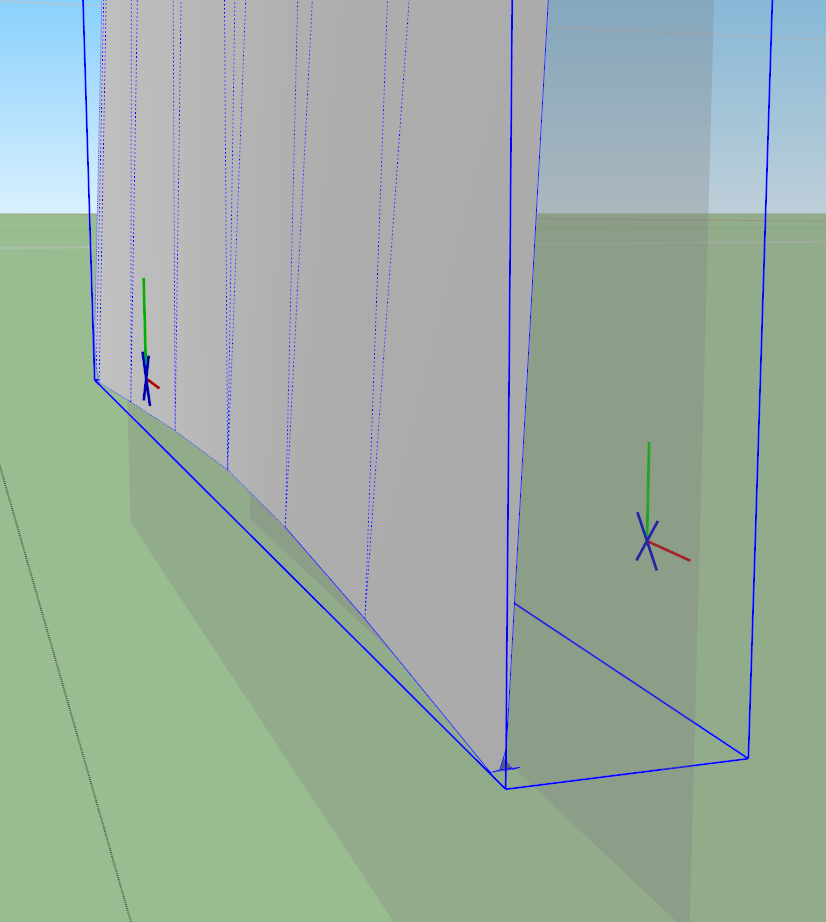
When I try to change the axis of this component, I get this weird axis symbol, with a blue X where the blue axis line should be. Any suggestions?
-
These are the axes for a component set to "glue to". Change it in the component window under "edit" if you want.
-
@pbacot said:
These are the axes for a component set to "glue to". Change it in the component window under "edit" if you want.
Thanks, that did the trick. Can't imagine how it got that way, I have never glued anything.
Wow, now I know almost a dozen things about SU

-
It happen if you create a component on a face.
-
@gilles said:
It happen if you create a component on a face.
Indeed. SU then assumes you want that component (or group as a matter of fact) to be glued later. Actually, it's the easiest way to create such components with the proper gluing plane from scratch.
-
Huh! I've created plenty of components on faces before, but since I don't have to change axis very often I guess I just never noticed this before.
Good info, thanks





Hello! It looks like you're interested in this conversation, but you don't have an account yet.
Getting fed up of having to scroll through the same posts each visit? When you register for an account, you'll always come back to exactly where you were before, and choose to be notified of new replies (either via email, or push notification). You'll also be able to save bookmarks and upvote posts to show your appreciation to other community members.
With your input, this post could be even better 💗
Register Login


Advertisement