sketchucation logo sketchucation
    • Login
    Oops, your profile's looking a bit empty! To help us tailor your experience, please fill in key details like your SketchUp version, skill level, operating system, and more. Update and save your info on your profile page today!
    ⚠️ Important | Libfredo 15.6b introduces important bugfixes for Fredo's Extensions Update

    Problem changing axis

    Scheduled Pinned Locked Moved SketchUp Discussions
    sketchup
    6 Posts 4 Posters 185 Views 4 Watching
    Loading More Posts
    • Oldest to Newest
    • Newest to Oldest
    • Most Votes
    Reply
    • Reply as topic
    Log in to reply
    This topic has been deleted. Only users with topic management privileges can see it.
    • hellnbakH Offline
      hellnbak
      last edited by

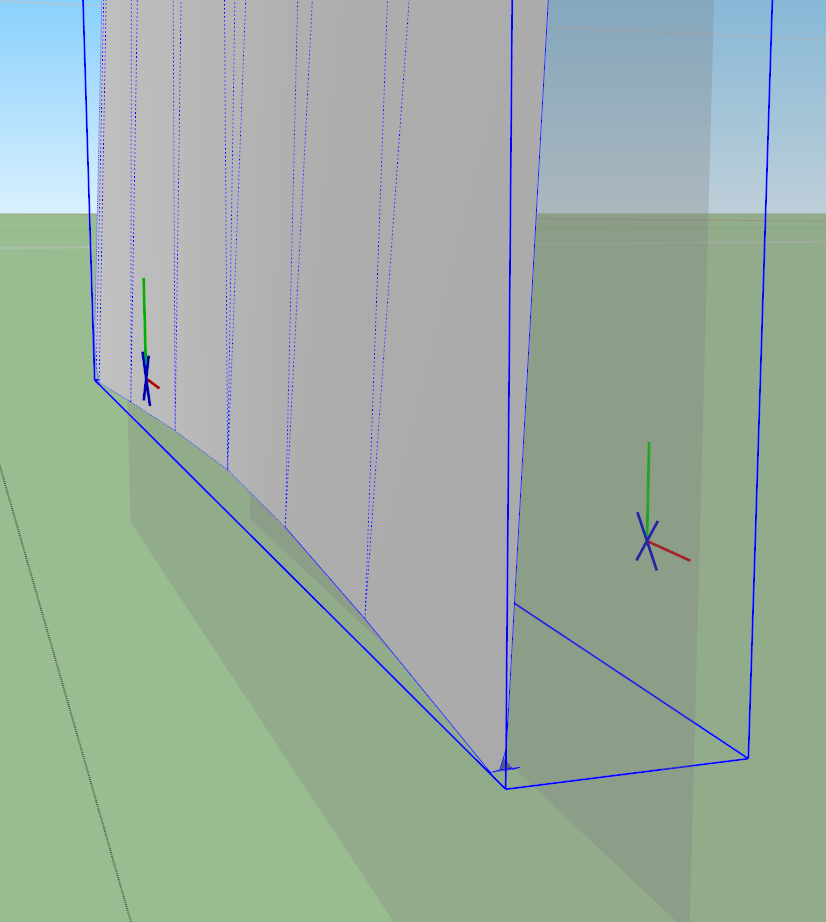
      When I try to change the axis of this component, I get this weird axis symbol, with a blue X where the blue axis line should be. Any suggestions?

      1.png

      "Politicians are just like diapers -- they need to be changed often, and for the same reason"

      1 Reply Last reply Reply Quote 0
      • pbacotP Offline
        pbacot
        last edited by

        These are the axes for a component set to "glue to". Change it in the component window under "edit" if you want.

        MacOSX MojaveSketchUp Pro v19 Twilight v2 Thea v3 PowerCADD

        1 Reply Last reply Reply Quote 0
        • hellnbakH Offline
          hellnbak
          last edited by

          @pbacot said:

          These are the axes for a component set to "glue to". Change it in the component window under "edit" if you want.

          Thanks, that did the trick. Can't imagine how it got that way, I have never glued anything.

          Wow, now I know almost a dozen things about SU πŸ˜„

          "Politicians are just like diapers -- they need to be changed often, and for the same reason"

          1 Reply Last reply Reply Quote 0
          • gillesG Offline
            gilles
            last edited by

            It happen if you create a component on a face.

            " c'est curieux chez les marins ce besoin de faire des phrases "

            1 Reply Last reply Reply Quote 0
            • GaieusG Offline
              Gaieus
              last edited by

              @gilles said:

              It happen if you create a component on a face.

              Indeed. SU then assumes you want that component (or group as a matter of fact) to be glued later. Actually, it's the easiest way to create such components with the proper gluing plane from scratch.

              Gai...

              1 Reply Last reply Reply Quote 0
              • hellnbakH Offline
                hellnbak
                last edited by

                Huh! I've created plenty of components on faces before, but since I don't have to change axis very often I guess I just never noticed this before.

                Good info, thanks πŸ‘

                "Politicians are just like diapers -- they need to be changed often, and for the same reason"

                1 Reply Last reply Reply Quote 0
                • 1 / 1
                • First post
                  Last post
                Buy SketchPlus
                Buy SUbD
                Buy WrapR
                Buy eBook
                Buy Modelur
                Buy Vertex Tools
                Buy SketchCuisine
                Buy FormFonts

                Advertisement

