Editing texture in application
-
While watching a video that thomthom did on quadface tool unwrap he edited a texture in Ps and save it, and it was updated in SU while I'm not using Ps but Pixelmator for Mac it doesn't seem to update Su for me. Is this a Ps thing or am I missing something here.
http://www.youtube.com/watch?v=hnW_yjkM_SY it's about 4:00 in
-
• in sketchup, go: Sketchup-> Preferences-> Applications.... make sure you have that set to pixelmator
• apply a texture to a face in sketchup
• go to 'colors in model' panel of sketchup's color picker
• double click on the texture you'd like to edit
• click button 'edit texture image in external editor'
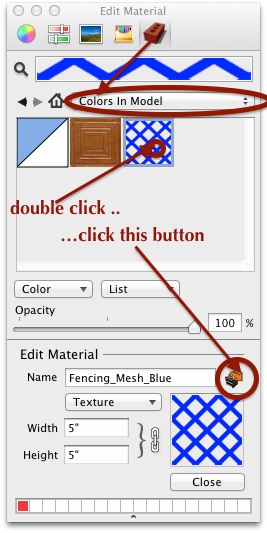
• the image will open in pixelmator
• make your adjustments in pixelmator then save it
• go back to sketchup and the image will update in the model -
Maybe you did not set your image editor in Window/preferences/apllication
-
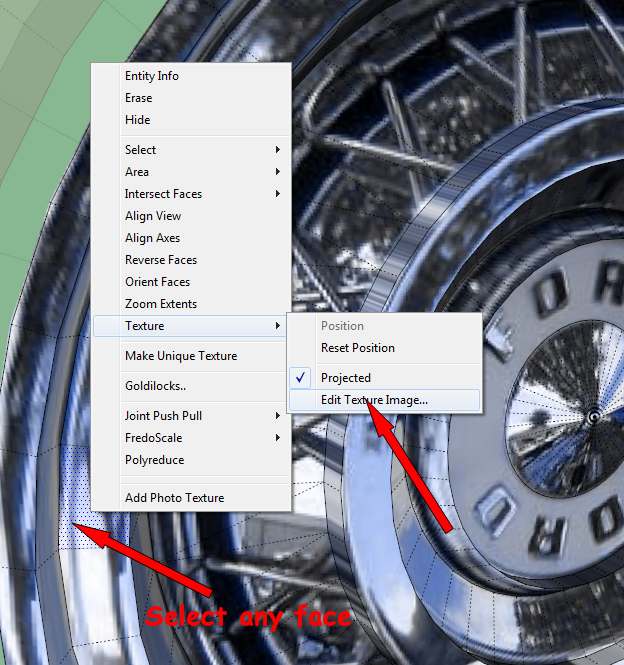
A simpler way is to just select any face that has the texture and click "edit texture image". At least that's the way I've always done it.
-
I did all of the above suggestions thanks by the way. Pixelmator wants to know where to save it, by default it wants to save it in MacHD/private/tmp so I let it didn't work, so I did it again and saved it in user/documents didn't work, I guess what I need to know is where to save it ?
-
@mwm5053 said:
I did all of the above suggestions thanks by the way. Pixelmator wants to know where to save it, by default it wants to save it in MacHD/private/tmp so I let it didn't work, so I did it again and saved it in user/documents didn't work, I guess what I need to know is where to save it ?
If it asks you where you want to save it, something's wrong, and it won't work. Are you clicking "Save" or "Save As"?
-
just save
-
@srx said:
Maybe you did not set your image editor in Window/preferences/apllication
@hellnbak said:
Are you clicking "Save" or "Save As"?
fellas... he's on a mac -- these are windows things you guys are talking about...
pixelmator is weird in that it's trying to save the texture as a .pxm file (pixelmator's own file type.. similar to photoshop's .psd etc..)
so, when you're in pixelmator's save dialog, tick the box that says 'save copy as [png, jpg, or whatever format the texture happens to be.. the right choice will already be selected for you but it will vary depending on which type of texture you're using]
(then choose 'replace' at the prompt) -
Thanks Jeff that helps a lot will try it and get back
-
Yep that worked Thanks again Jeff
-

-
Thank you Jeff.
I tray it in PhotoShop, and works very well
Pedro



Hello! It looks like you're interested in this conversation, but you don't have an account yet.
Getting fed up of having to scroll through the same posts each visit? When you register for an account, you'll always come back to exactly where you were before, and choose to be notified of new replies (either via email, or push notification). You'll also be able to save bookmarks and upvote posts to show your appreciation to other community members.
With your input, this post could be even better 💗
Register Login


Advertisement