[Request] Scene tween
-
Is there a plugin that can create scenes between camera's?
I have a scene and I'd like to render frames between camera's, I'd like to be able to chose the amount of frames if possible.
-
I swear I wrote this into a plugin once. Let me dig around and see if that's real or not.
-
Yeah, I have passed my trial period, I thought there was maybe a plugin that just did the tweens instead of purchasing the whole animation app.
Chris, that sounds good.
-
Hmm, I don't see anything I published that does that exactly. It would be fairly simple to write though.
-
@d12dozr said:
I think [url=sketchucation.com/forums/viewtopic.php?f=323&t=33417]Keyframe animation[/url] will do that
edit... the URL isn't clickable

I think the "http://" is missing after "url="...
-
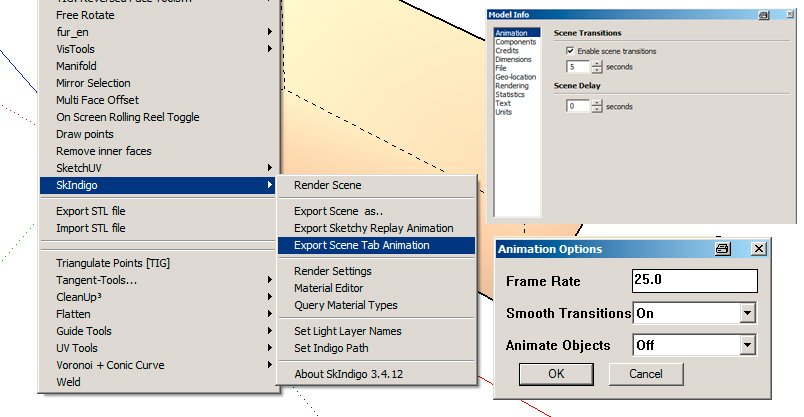
In SkIndigo (SketchUp Plugin for Indigo Renderer) there is an option for creating such an animation, maybe for your render engine there is a similar possibility like this?
-
I think Keyframe animation will do that
edit... thanks Carsten
-
-
Dear all,
I used this little script. Very limited but it insert scenes with intermediate cameras.
Yoursrequire "sketchup.rb"
Add a menu item
plugins_menu = UI.menu "Plugins"
insert_scenes_menu = plugins_menu.add_item("Insert Scenes") {# Access the Pages container pages = Sketchup.active_model.pages # check existing pages if pages.count < 2 UI.messagebox("Needs 2 scenes to be created first.") exit end eye1 = pages[0].camera.eye target1 = pages[0].camera.target up1 = pages[0].camera.up fov1 = pages[0].camera.fov eye2 = pages[1].camera.eye target2 = pages[1].camera.target up2 = pages[1].camera.up fov2 = pages[1].camera.fov # prompts for number of scenes prompts = ["Number of scenes to add : "] defaults = ["10"] input = UI.inputbox prompts, defaults, "Insert Scenes" if (input) insertcount = input[0].to_i + 1 else exit end for i in 1..insertcount - 1 eyetmp = Geom::Point3d.new (eye1.x + (((eye2.x - eye1.x) / insertcount) * i),eye1.y + (((eye2.y - eye1.y) / insertcount) * i),eye1.z + (((eye2.z - eye1.z) / insertcount) * i)) targettmp = Geom::Point3d.new (target1.x + (((target2.x - target1.x) / insertcount) * i),target1.y + (((target2.y - target1.y) / insertcount) * i),target1.z + (((target2.z - target1.z) / insertcount) * i)) uptmp = Geom::Vector3d.new(up1.x + (((up2.x - up1.x) / insertcount) * i),up1.y + (((up2.y - up1.y) / insertcount) * i),up1.z + (((up2.z - up1.z) / insertcount) * i)) fovtmp = fov1 + (((fov2 - fov1) / insertcount) * i) pagetmp = pages.add(i.to_s) pagetmp.camera.set eyetmp, targettmp, uptmp pagetmp.camera.fov = fovtmp end}
-
@ppoublan said:
Dear all,
I used this little script. Very limited but it insert scenes with intermediate cameras.
Yoursrequire "sketchup.rb"
Add a menu item
plugins_menu = UI.menu "Plugins"
insert_scenes_menu = plugins_menu.add_item("Insert Scenes") {Access the Pages container
pages = Sketchup.active_model.pages
check existing pages
if pages.count < 2
UI.messagebox("Needs 2 scenes to be created first.")
exit
endeye1 = pages[0].camera.eye
target1 = pages[0].camera.target
up1 = pages[0].camera.up
fov1 = pages[0].camera.foveye2 = pages[1].camera.eye
target2 = pages[1].camera.target
up2 = pages[1].camera.up
fov2 = pages[1].camera.fovprompts for number of scenes
prompts = ["Number of scenes to add : "]
defaults = ["10"]
input = UI.inputbox prompts, defaults, "Insert Scenes"
if (input)
insertcount = input[0].to_i + 1
else
exit
endfor i in 1..insertcount - 1
eyetmp = Geom::Point3d.new (eye1.x + (((eye2.x - eye1.x) / insertcount) * i),eye1.y + (((eye2.y - eye1.y) / insertcount) * i),eye1.z + (((eye2.z - eye1.z) / insertcount) * i))
targettmp = Geom::Point3d.new (target1.x + (((target2.x - target1.x) / insertcount) * i),target1.y + (((target2.y - target1.y) / insertcount) * i),target1.z + (((target2.z - target1.z) / insertcount) * i))
uptmp = Geom::Vector3d.new(up1.x + (((up2.x - up1.x) / insertcount) * i),up1.y + (((up2.y - up1.y) / insertcount) * i),up1.z + (((up2.z - up1.z) / insertcount) * i))
fovtmp = fov1 + (((fov2 - fov1) / insertcount) * i)
pagetmp = pages.add(i.to_s)
pagetmp.camera.set eyetmp, targettmp, uptmp
pagetmp.camera.fov = fovtmp
end}
Thanks for the codes, but i dont understand how does it works.
It will be helpful if you can explain it.
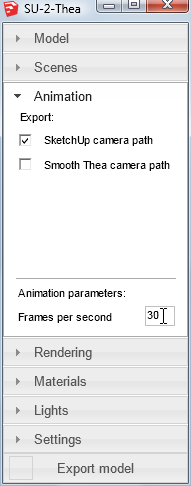
What if i have about 26 scenes, & i want it to be 24fps?



Hello! It looks like you're interested in this conversation, but you don't have an account yet.
Getting fed up of having to scroll through the same posts each visit? When you register for an account, you'll always come back to exactly where you were before, and choose to be notified of new replies (either via email, or push notification). You'll also be able to save bookmarks and upvote posts to show your appreciation to other community members.
With your input, this post could be even better 💗
Register Login


Advertisement