sketchucation logo sketchucation
    • Login
    Oops, your profile's looking a bit empty! To help us tailor your experience, please fill in key details like your SketchUp version, skill level, operating system, and more. Update and save your info on your profile page today!
    Mac User? | Join the Rayscaper Beta for Mac Learn More

    [Plugin] TIG-Smart_offset

    Scheduled Pinned Locked Moved Plugins
    143 Posts 55 Posters 196.6k Views 54 Watching
    Loading More Posts
    • Oldest to Newest
    • Newest to Oldest
    • Most Votes
    Reply
    • Reply as topic
    Log in to reply
    This topic has been deleted. Only users with topic management privileges can see it.
    • JClementsJ
      JClements
      last edited by

      Thank you, Santa TIG. Milk and cookies will await you Xmas morning. ๐Ÿ˜„

      Any chance of having:
      1- a "Weld Offset" option button in the dialog
      or
      2- have the offset automatically welded if its source-edges were made from the circle, arch, polygon tools or previously "welded" edges?

      Regards, John

      John | Illustrator | Beaverton, Oregon

      1 Reply Last reply
      Reply Quote 0
      • M
        matt.gordon320
        last edited by

        Thanks TIG! I don't think I could have asked for a better Christmas/World not ending present!

        1 Reply Last reply
        Reply Quote 0
        • PixeroP
          Pixero
          last edited by

          Thanks for this great plugin.
          Would it be very difficult to have it work as an interactive tool also using the measurement toolbar instead of the pop up window so it can replace the native tool all together?

          1 Reply Last reply
          Reply Quote 0
          • TIGT
            TIG Moderator
            last edited by

            Here's v1.5 http://sketchucation.com/forums/viewtopic.php?p=446462#p446462
            There's some code improvements and fewer fails etc.
            Some of the requested changes like 'holes', welded-outlines and VCB input will have to wait...

            Merry Xmas... ๐Ÿ˜„

            TIG

            1 Reply Last reply
            Reply Quote 0
            • fredo6F
              fredo6
              last edited by

              @pixero said:

              Thanks for this great plugin.
              Would it be very difficult to have it work as an interactive tool also using the measurement toolbar instead of the pop up window so it can replace the native tool all together?

              Pixero,

              Then you can use Offset on Surfacewhich shows interactively the offset profile and allow to type the offset distance in the VCB. Still many glitches with convoluted contours however.

              Fredo

              1 Reply Last reply
              Reply Quote 0
              • B
                blajnov
                last edited by

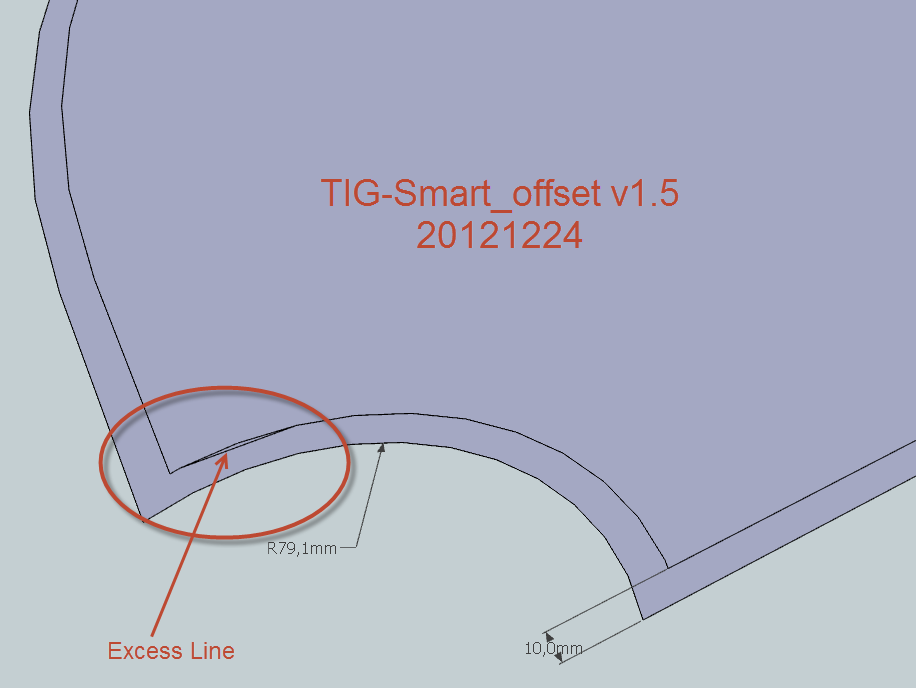
                Excess loop ...


                25-12-2012 10-52-04.png

                1 Reply Last reply
                Reply Quote 0
                • TIGT
                  TIG Moderator
                  last edited by

                  @blajnov

                  Looking at ways of minimizing this, and offsetting curves as curves...
                  Watch this space...

                  TIG

                  1 Reply Last reply
                  Reply Quote 0
                  • TIGT
                    TIG Moderator
                    last edited by

                    Here's v1.6 http://sketchucation.com/forums/viewtopic.php?p=446462#p446462
                    Curves/Arcs are now offset as curves in the offset-outline...
                    Speed improved.
                    Glitches avoided.

                    A Very Extra-Merry Xmas to you all... ๐Ÿ˜„

                    TIG

                    1 Reply Last reply
                    Reply Quote 0
                    • JClementsJ
                      JClements
                      last edited by

                      Santa never rests. โ˜€

                      John | Illustrator | Beaverton, Oregon

                      1 Reply Last reply
                      Reply Quote 0
                      • micioneM
                        micione
                        last edited by

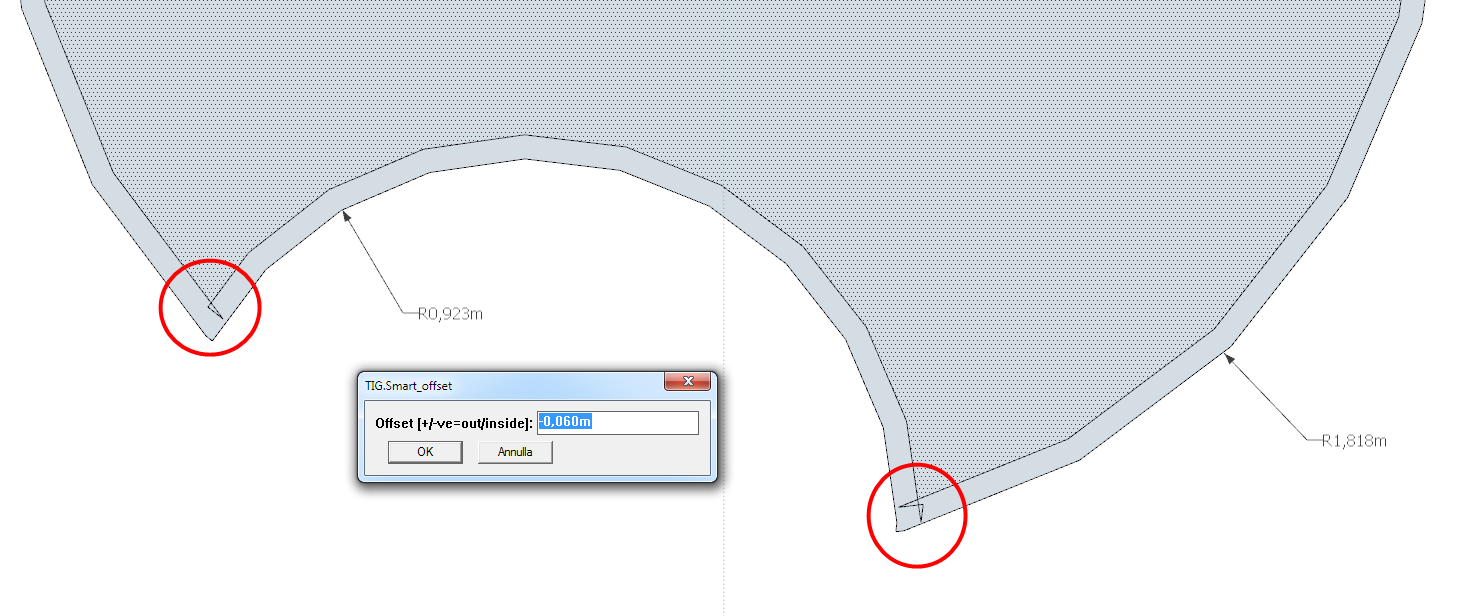
                        TIG,
                        this, in the latest version (1.6) of your very useful tool.
                        (windows 7 - Last Updated SketchUp).
                        regards,
                        Roberto

                        1.6.png

                        1 Reply Last reply
                        Reply Quote 0
                        • B
                          blajnov
                          last edited by

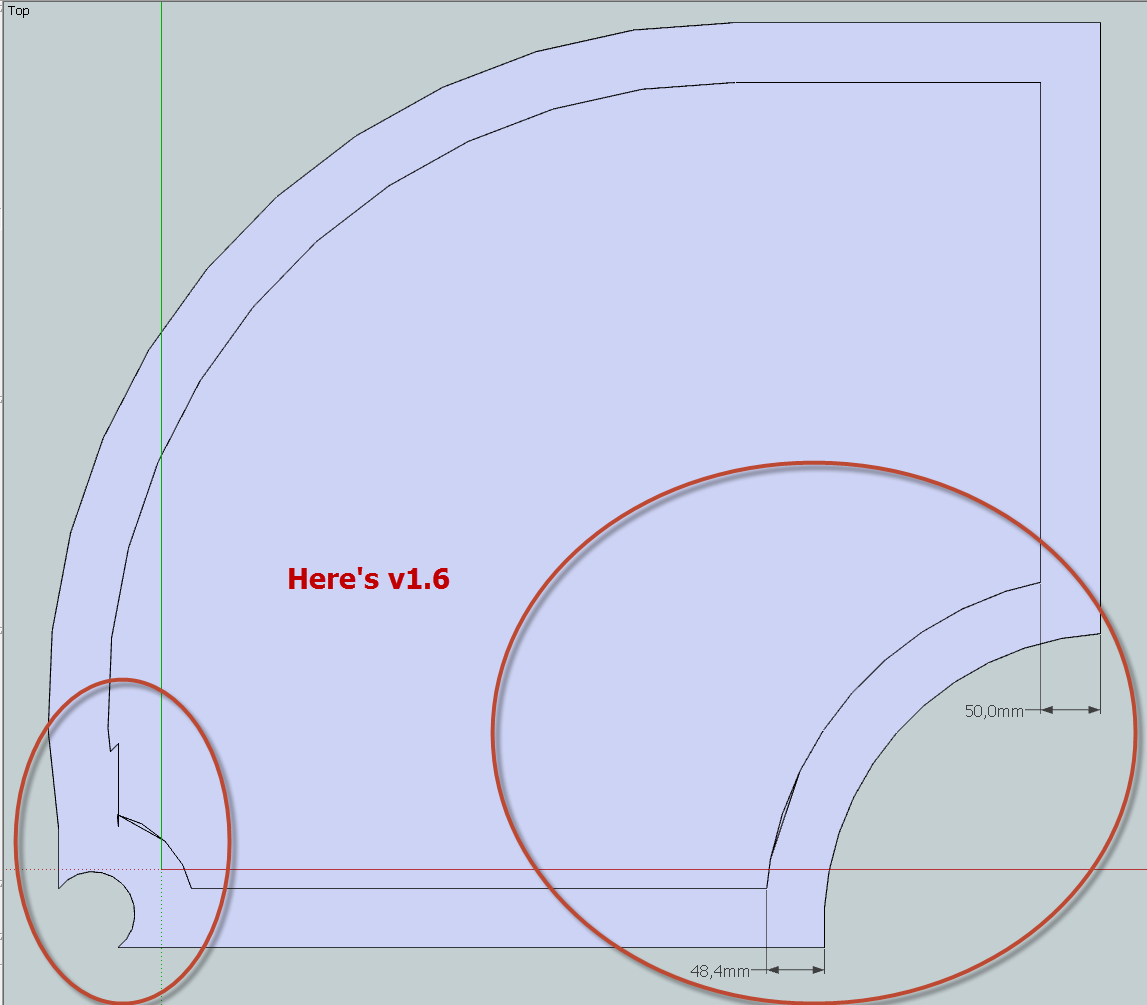
                          Error Again


                          25-12-2012 22-31-38.png

                          1 Reply Last reply
                          Reply Quote 0
                          • R
                            rv1974
                            last edited by

                            @blajnov said:

                            Error Again

                            the 48.4 dimension was not taken 'legitimately' (you should measure from the center of the arch segment perpendicular to offset segment)

                            1 Reply Last reply
                            Reply Quote 0
                            • TIGT
                              TIG Moderator
                              last edited by

                              Two steps forward one step back...
                              Another 'fix' is in the mixer... ๐Ÿ˜’

                              TIG

                              1 Reply Last reply
                              Reply Quote 0
                              • artmusicstudioA
                                artmusicstudio
                                last edited by

                                hi tig,
                                just send something thru paypal, is 5 p. ok ?

                                i am trying the offset-script, but have some problems, i cannot solve

                                drawing new curves : ruby works

                                in my actual project a have to insert lots of curves for landscape modelling.

                                i created a hole in an existing mesh >> extrqacted the borders of this hole >>
                                projected these border to a plane (sandbox) >> converted the borderline to

                                1. polygon
                                2. curve

                                but somehow the script does not create offsets here (standard sketchup offset works - with all its mistakes)

                                i attach the planes, maybe you can check it

                                i work in skp 6

                                thanx and regards stan


                                2 planes - border curve / border polygon

                                1 Reply Last reply
                                Reply Quote 0
                                • Mike LuceyM
                                  Mike Lucey
                                  last edited by

                                  Thanks TIG,

                                  I don't use a lot of plugins but I think this one will be very useful. Happy New Year to you.

                                  Mike

                                  Support us so we can support you! Upgrade to Premium Membership!

                                  1 Reply Last reply
                                  Reply Quote 0
                                  • TIGT
                                    TIG Moderator
                                    last edited by

                                    @Stan, any donation is more than welcome... I assume you meant ยฃ5 because 5p=~8ยข... ๐Ÿ˜‰

                                    I think I have a fix for your probable issue - these 3m inset/outset offsets worked OK with a new version that I am working on [native fails with twisted parts].

                                    It fixes some issues with multi-curve loops and also some curves that straddle a loop's start/end vertex not all offsetting as curves...

                                    So far it seems to trap various permutations of offset size and loop contents and convolutions, that have been some unexpected causing issues...

                                    I hope to have that version ready for release tomorrow...
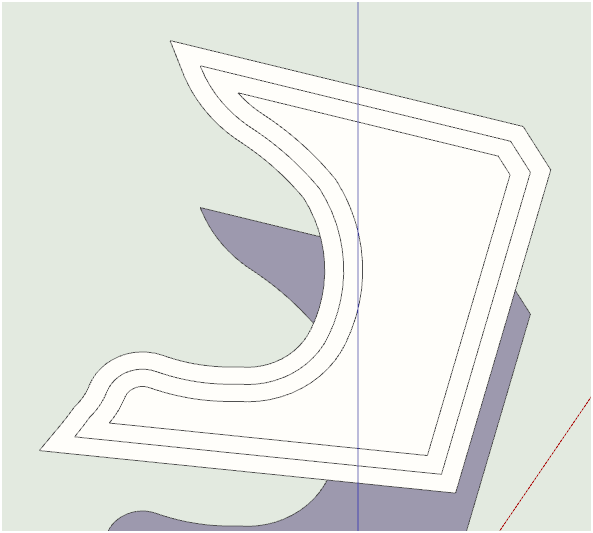

                                    3m.PNG


                                    3m[native].PNG

                                    TIG

                                    1 Reply Last reply
                                    Reply Quote 0
                                    • D
                                      designforgood
                                      last edited by

                                      Merry Xmas TIG. This looks awesome!

                                      1 Reply Last reply
                                      Reply Quote 0
                                      • TIGT
                                        TIG Moderator
                                        last edited by

                                        Here's v1.7 http://sketchucation.com/forums/viewtopic.php?p=446462#p446462
                                        Further glitches and convoluted offsets trapped.
                                        I am hopeful this will address most issues reported to date...
                                        ๐Ÿ˜•

                                        Happy New Year !
                                        [arriving shortly... ๐Ÿ˜‰ ]
                                        ๐Ÿ˜

                                        TIG

                                        1 Reply Last reply
                                        Reply Quote 0
                                        • kenK
                                          ken
                                          last edited by

                                          TIG

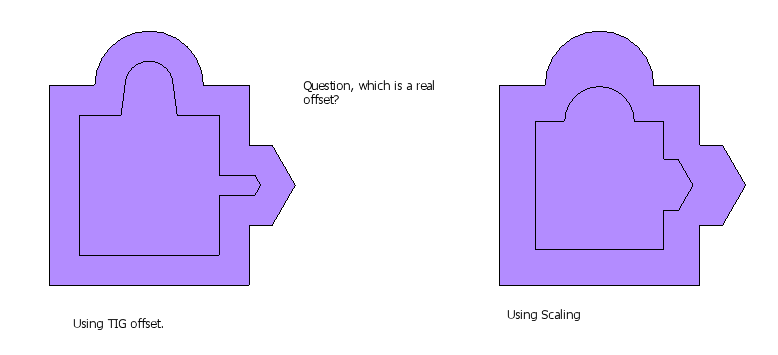
                                          Not to confuse the issue. Just how should and object look after an offset. I have attached two illustrations, showing an object that has two results. The first shows the object with an offset from your plugin, and the other showing the same object after scaling.

                                          I certainly do not have the smarts to determine which is correct. However, I would suggest that the scaling illustration that shows the object retaining the basic shape would be the more correct solution.

                                          Again, TIG thanks for all your work.

                                          Ken

                                          Offset.png

                                          Fight like your the third monkey on Noah's Ark gangway.

                                          1 Reply Last reply
                                          Reply Quote 0
                                          • TIGT
                                            TIG Moderator
                                            last edited by

                                            @Ken

                                            The definition of an 'offset' is that all of the edges of the original face's 'outline' are replicated 'offset' perpendicularly by a fixed distance. In your illustration that is 'inwards'.
                                            Clearly in the example made using my tool all of these new 'offset' edges are properly equidistant from the equivalent original perimeter edges.
                                            In your 'scaling' example the new 'outline' is an exact replica of the original outline, it's only smaller is size, not 'offset'.
                                            Therefore only some of these new edges are equidistant from their equivalents, the rest are further away by varying amounts.
                                            Thus, the 'scaled' option gives a copy that's a shrunken version,: although it might be what you want, this is NOT what we are trying to do with an 'offset' - for that we want the 'walls' of the offset shape to be a consistent width; so for us the 'offset' option IS the correct tool to use...
                                            Use can 'scale' to make smaller/larger exact 'copies' of a face's perimeter, BUT you need offset/Smart_offset to make proper 'offsets' of it...


                                            TIG

                                            1 Reply Last reply
                                            Reply Quote 0

                                            Hello! It looks like you're interested in this conversation, but you don't have an account yet.

                                            Getting fed up of having to scroll through the same posts each visit? When you register for an account, you'll always come back to exactly where you were before, and choose to be notified of new replies (either via email, or push notification). You'll also be able to save bookmarks and upvote posts to show your appreciation to other community members.

                                            With your input, this post could be even better ๐Ÿ’—

                                            Register Login
                                            • 1
                                            • 2
                                            • 3
                                            • 4
                                            • 5
                                            • 6
                                            • 7
                                            • 8
                                            • 4 / 8
                                            • First post
                                              Last post
                                            Buy SketchPlus
                                            Buy SUbD
                                            Buy WrapR
                                            Buy eBook
                                            Buy Modelur
                                            Buy Vertex Tools
                                            Buy SketchCuisine
                                            Buy FormFonts

                                            Advertisement