sketchucation logo sketchucation
    • 登入
    Oops, your profile's looking a bit empty! To help us tailor your experience, please fill in key details like your SketchUp version, skill level, operating system, and more. Update and save your info on your profile page today!
    ⚠️ Important | Libfredo 15.6b introduces important bugfixes for Fredo's Extensions Update

    Sculpt using UVs and displacement maps

    已排程 已置頂 已鎖定 已移動 Corner Bar
    60 貼文 9 Posters 3.8k 瀏覽 9 Watching
    正在載入更多貼文
    • 從舊到新
    • 從新到舊
    • 最多點贊
    回覆
    • 在新貼文中回覆
    登入後回覆
    此主題已被刪除。只有擁有主題管理權限的使用者可以查看。
    • olisheaO 離線
      olishea
      最後由 編輯

      Yeah that film is pretty terrible, apart from Chuck Norris!! You can't go wrong! 😆 I can't believe you actually watched it 😆

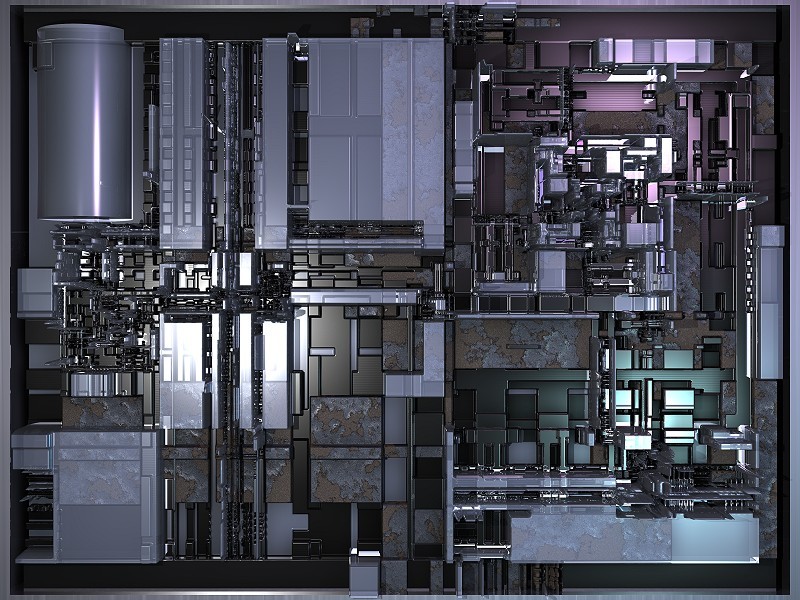
      I've been working on a sci-fi scene on the side and this is really inspiring stuff, each panel looks like an entire landscape, a whole SU model per panel 😲 great stuff,the ship's got sinews! 😎

      oli

      1 條回覆 最後回覆 回覆 引用 0
      • michaliszissiouM 離線
        michaliszissiou
        最後由 編輯

        @unknownuser said:

        I can't believe you actually watched it

        I was sleeping, most of the time. LOL
        But, I was lucky, saw Arnold's part.
        wow, tell me more about this scifi scene.

        1 條回覆 最後回覆 回覆 引用 0
        • michaliszissiouM 離線
          michaliszissiou
          最後由 編輯

          A funny space ship. 😆

          https://dl.dropbox.com/u/24090090/GshipLoops1.jpg

          1 條回覆 最後回覆 回覆 引用 0
          • pilouP 離線
            pilou
            最後由 編輯

            A stone star ship very detailed! 😄

            Frenchy Pilou
            Is beautiful that please without concept!
            My Little site :)

            1 條回覆 最後回覆 回覆 引用 0
            • michaliszissiouM 離線
              michaliszissiou
              最後由 編輯

              LOL, Pilou
              What about this one? I can't figure out what it is. 😆

              https://dl.dropbox.com/u/24090090/goAlGr1.jpg

              And one of MealeaYing's sculpts, rendered in cycles by me.

              https://dl.dropbox.com/u/24090090/MelY.jpg

              1 條回覆 最後回覆 回覆 引用 0
              • majidM 離線
                majid
                最後由 編輯

                Michalis , I like your sculps and also the trick you use. but am really confused with unwrapping (I;ve only tested 3ds max,...... Blender is almost horrible to me,... I scare the interface... )

                My inspiring A, B, Sketches book: https://sketchucation.com/shop/books/intermediate/2612-alphabet-inspired-sketches--inspiring-drills-for-architects--3d-artists-and-designers-

                1 條回覆 最後回覆 回覆 引用 0
                • olisheaO 離線
                  olishea
                  最後由 編輯

                  The sci-fi scene was just something I'm playing with, trying to push SU to breaking point basically!! These sculpts are fantastic 👍

                  oli

                  1 條回覆 最後回覆 回覆 引用 0
                  • michaliszissiouM 離線
                    michaliszissiou
                    最後由 編輯

                    Thanks
                    Oli, Majid.
                    Blender UV editor is among the best around.
                    All my recent "panels" for baking them into a depth map, are, now, made in SU. Maybe the best tool for this job. As, topology is irrelevant to this method. Then obj export and bake depth in blender. Fast, precise and effective.

                    1 條回覆 最後回覆 回覆 引用 0
                    • michaliszissiouM 離線
                      michaliszissiou
                      最後由 編輯

                      A friend from blenderartists made a tutorial on this method.
                      It's only the basics, plus a nice compositing tut in the end.
                      Many more to say on the UV editor but you can see the idea behind such technics.
                      It's the old displacement method, but indicates the need of clean topology as base and the use of a UV editor.
                      All the trick is to align the unwrapping to the geometry of the pattern. Horizontals and verticals on the pattern, only. Any curves are coming from curving the topology. Loops etc.
                      http://www.youtube.com/watch?v=VY9vHdwUo98

                      1 條回覆 最後回覆 回覆 引用 0
                      • olisheaO 離線
                        olishea
                        最後由 編輯

                        excellent tutorial, you are famous!

                        in fact it's probably the only blender video that breaks it down quite nicely, got me intrigued now!

                        oli

                        1 條回覆 最後回覆 回覆 引用 0
                        • simon le bonS 離線
                          simon le bon
                          最後由 編輯

                          Hi Michalis,

                          I am completely fan of these productions

                          my best, Simon.

                          1 條回覆 最後回覆 回覆 引用 0
                          • michaliszissiouM 離線
                            michaliszissiou
                            最後由 編輯

                            Thanks Oli. I believe, by all means, I have something here. So many fancy apps for just using displacing as a sculpting method. Fancy tools on such worlaround. Think about it. No real geometry. No real extrudes (push pull). Just displacing a hi subdivided mesh.
                            @Simon.
                            What production now? These are just 10 mins doodles.
                            We may be more clever than others involved into 3d VideoGaming industry. You never know LOL
                            we can understand maths, thus, we can understand what displacement, as a sculpting method, means. Though Zbrush is dedicated on this method.
                            Sorry to say this, but I mean it.

                            1 條回覆 最後回覆 回覆 引用 0
                            • simon le bonS 離線
                              simon le bon
                              最後由 編輯

                              @michaliszissiou said:

                              @Simon.
                              What production now? These are just 10 mins doodles.
                              We may be more clever than others involved into 3d VideoGaming industry. You never know LOL
                              we can understand maths, thus, we can understand what displacement, as a sculpting method, means. Though Zbrush is dedicated on this method.
                              Sorry to say this, but I mean it.

                              "What production now? These are just 10 mins doodles."
                              I Michalis, I see you actually engaged in a certain waywardness mood. And even if I miss the context implicated I'm sure you have some good reasons for.

                              Apart that, no matter the time passed and the effort/difficulty (I know the simple use of displacement maps 😉 😞 everything you touch by sculpting , by computer modelling etc comes artistically interesting / beautiful.

                              See that Gothic/Futuristic building!!
                              I would really like to see it constructed in a real place. I feel it

                              https://dl.dropbox.com/u/24090090/goth1H.jpg

                              (Well, I can also understand that it is annoying in a certain way to receive compliments too simple and direct)

                              Staying aware of your "productions"
                              ++ simon.

                              1 條回覆 最後回覆 回覆 引用 0
                              • michaliszissiouM 離線
                                michaliszissiou
                                最後由 編輯

                                Simon
                                It's a nice trick, a very inspiring game if you like.
                                One for sure.
                                Real sculpting means real geometry. The best way is to use tris for this.
                                After you have the basics, the rest can be just displacements. Not real sculpting though, is it doesn't change the topology, Only subdivides and displaces it.
                                But to use random patterns around, have a full control on where to place them after... a nice tool for visualizing things.

                                1 條回覆 最後回覆 回覆 引用 0
                                • pilouP 離線
                                  pilou
                                  最後由 編輯

                                  The Uv Video construction of the Texture remember this crazzy gallery!
                                  Have fun visit! ☀
                                  by Jock Cooper (I believe that you can use these textures for no commercial use - Creative Commons licence)
                                  http://www.fractal-recursions.com/fractals/fractal-02070501.jpg

                                  Frenchy Pilou
                                  Is beautiful that please without concept!
                                  My Little site :)

                                  1 條回覆 最後回覆 回覆 引用 0
                                  • pilouP 離線
                                    pilou
                                    最後由 編輯

                                    And also another thing 😄
                                    The texturing of the tore is a very long process! 😲
                                    Why not use an unique square texture composed with tricky organisation on the edges for have graphic connection ? And no symmetric thing in the center!
                                    So you have 4 possibilities in 2D for one quad or 8 if you inverse the face!
                                    So just make a random for each quad and you have a perfect texture with no repetition on the tore!

                                    I have make the same for volumes (and a 24 position of a dice) !
                                    Here the script for 24 positions of a volume in the space 3D for Blender 😉
                                    Many Thanks to Zeauro! 😎

                                    http://www.3dsaloon.fr/phpbb3/download/file.php?id=453&mode=view/rokbox.jpg

                                    Remember i have made that also for SU! 😉
                                    Thx to Sdmitch for the same script for SU 😉 Page (2)
                                    Here a no symmetric volume can connect on each face!

                                    http://www.3dsaloon.fr/phpbb3/download/file.php?id=1421&mode=view/rokbox.jpg

                                    And the next year i will make animation with that inside SU because now I can manage Simfonia! ☀

                                    @Simon :look my little videos about Simofonia: and try the free version, you don't regreat it! (in French ze vidéos! 😉
                                    Menu Divers / Simfonia
                                    It's a very funny Plugin! 👍

                                    Frenchy Pilou
                                    Is beautiful that please without concept!
                                    My Little site :)

                                    1 條回覆 最後回覆 回覆 引用 0
                                    • michaliszissiouM 離線
                                      michaliszissiou
                                      最後由 編輯

                                      @Pilou
                                      This tutorial explains some basic thoughts.
                                      This technique is made for much more than displacing a torus (which actually isn't sculpting at all)
                                      Much more to say on UV editing, on blender UV editor especially. It seems, I'm among the few who know how to handle it spontaneously. Funny, the tool is among the best I've seen around, very easy to use. I still remember this maya UV nonsense (brrrr)
                                      The UV texturing of a torus is a two-three clicks operation.
                                      -select faces
                                      -U key for UV_unwrap, [reset], ctrl+P to pack on texture, [foolow active quad] to align them nicely. Voilà.
                                      Now, the next generation of experiments LOL
                                      Psychonautics. More are coming, including figurative sculpting too.

                                      https://dl.dropbox.com/u/24090090/psychoA1.jpg

                                      1 條回覆 最後回覆 回覆 引用 0
                                      • N 離線
                                        nickchun
                                        最後由 編輯

                                        Michalis, thanks a lot for introducing this. I have just started learning Blender again and have learned a lot by following yours and Olivers tutorials.

                                        1 條回覆 最後回覆 回覆 引用 0
                                        • pilouP 離線
                                          pilou
                                          最後由 編輯

                                          As any image can be used for displacement this world is quasi infinite! 😄

                                          Number images 1000 * 1000 pixels with 1 000 000 colors
                                          = 1 000 000 Power 1 000 000 so a big number! 😄

                                          Frenchy Pilou
                                          Is beautiful that please without concept!
                                          My Little site :)

                                          1 條回覆 最後回覆 回覆 引用 0
                                          • michaliszissiouM 離線
                                            michaliszissiou
                                            最後由 編輯

                                            @unknownuser said:

                                            As any image can be used for displacement this world is quasi infinite!

                                            Indeed.
                                            Meanwhile try exr 32 bit images for depth map. Unfortunately, such maps can be produced by baking only. Any other attempt may become quite unpredictable.
                                            Pilou, my "message" is to use horizontals and verticals only, leaving the interesting part on the topology and UV mapping. So, to have predictable results, and unpredictable results too. Like clicking the button "I feel lucky", sometimes. 😄

                                            1 條回覆 最後回覆 回覆 引用 0
                                            • 1
                                            • 2
                                            • 3
                                            • 1 / 3
                                            • 第一個貼文
                                              最後的貼文
                                            Buy SketchPlus
                                            Buy SUbD
                                            Buy WrapR
                                            Buy eBook
                                            Buy Modelur
                                            Buy Vertex Tools
                                            Buy SketchCuisine
                                            Buy FormFonts

                                            Advertisement


