sketchucation logo sketchucation
    • 登入
    Oops, your profile's looking a bit empty! To help us tailor your experience, please fill in key details like your SketchUp version, skill level, operating system, and more. Update and save your info on your profile page today!
    🔌 Smart Spline | Fluid way to handle splines for furniture design and complex structures. Download

    [Plugin] Stepped Extrude [Updated 20121106]

    已排程 已置頂 已鎖定 已移動 Plugins
    28 貼文 18 Posters 31.3k 瀏覽 18 Watching
    正在載入更多貼文
    • 從舊到新
    • 從新到舊
    • 最多點贊
    回覆
    • 在新貼文中回覆
    登入後回覆
    此主題已被刪除。只有擁有主題管理權限的使用者可以查看。
    • I 離線
      icepam
      最後由 編輯

      Thanks for a much useful plugin. I had coded something similar in AutoLisp a few years ago to do this in Autocad, precisely for stairs and contours.

      @rami_lpm said:

      @pbacot said:

      ... interpret the height of contours in plan by the user drawing a section line.

      This sounds very complicated, I'll see what I can do.

      I think this could be simpler than it sounds, maybe one of the forum's rubymasters could help out with the code. Here's how i would imagine it:
      Method 1, should work with lines:
      -User draws a line across the contours he wishes to raise and sets H=riser height.
      -Plugin figures if it's a generally horizontal or vertical line (is that necessary?)
      -Plugin finds all intersection points and makes an array ordered based on their X (or Y?) coordinate
      -Plugin traverses array raising each line by H x its index in the array.

      Method 2, perhaps this is the solution for faces?
      -User selects all faces that need to be raised (by window or select all or whatever... if one by one, it's just the current method)
      -User draws a line L through all said faces
      -Plugin filters out non-faces from selection and makes an array as above, ordered by X or Y coordinate of mid-point of segment created by intersection between line L and each face.
      -Plugin traverses and raises as above.

      Hope this makes sense!

      1 條回覆 最後回覆 回覆 引用 0
      • pilouP 離線
        pilou
        最後由 編輯

        No possibility to add the other options? As asked in my old request here 😉

        Now we have a =a + x 😉

        http://sketchucation.com/forums/download/file.php?id=83670

        Frenchy Pilou
        Is beautiful that please without concept!
        My Little site :)

        1 條回覆 最後回覆 回覆 引用 0
        • C 離線
          caronte01
          最後由 編輯

          Great simple tool, perfect for stairs. Will try it as soon as I have a chance!

          Thanks!

          santiago

          1 條回覆 最後回覆 回覆 引用 0
          • rami_lpmR 離線
            rami_lpm
            最後由 編輯

            icepam: I'm a bit math-challenged, so it will take some time.
            pilou: It really should work with lines. About your request, what does the 'list' option do?
            Thanks everyone for the comments

            1 條回覆 最後回覆 回覆 引用 0
            • pilouP 離線
              pilou
              最後由 編輯

              @unknownuser said:

              what does the 'list' option do?

              Like in this Multiple Offsets by Sdmitch 😉

              You enter a list in a dialog box like 5,17,22,10 etc...
              At each click the PushPush take a nomber in the list
              so first click is 5
              second click 17
              etc...
              and then after the 10 that will be the 5
              etc...

              PS You can also have a random option one in a list given or out of a list (Mini-maxi)! 😉

              here the list was 10,20,30,50* (the * indicated the last number)
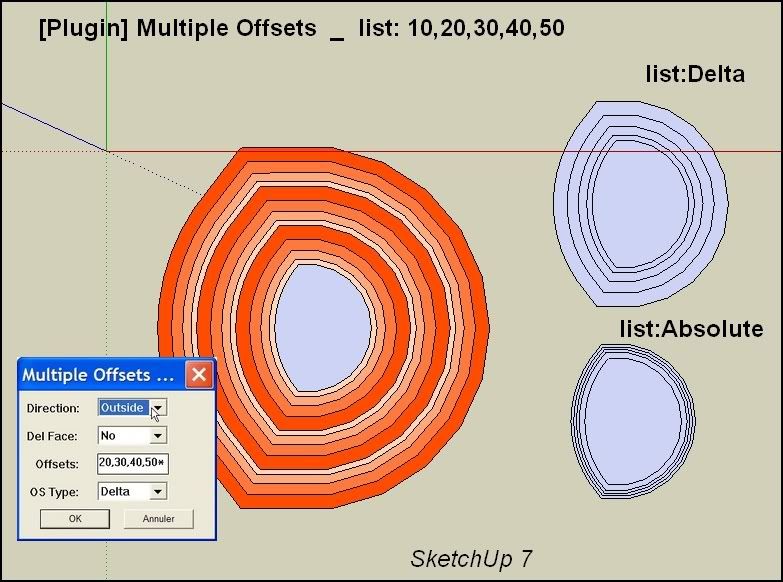
              http://i274.photobucket.com/albums/jj245/Spendauballet/SketchUp/MultipleOffsets001.jpg

              Frenchy Pilou
              Is beautiful that please without concept!
              My Little site :)

              1 條回覆 最後回覆 回覆 引用 0
              • qingtongQ 離線
                qingtong
                最後由 編輯

                thanks very much!

                1 條回覆 最後回覆 回覆 引用 0
                • greenskpG 離線
                  greenskp
                  最後由 編輯

                  Thank you very much rami_lpm. Very usefull and saved my life in actual job.
                  It's possible that commit_operation undo all steps instead one by one?

                  1 條回覆 最後回覆 回覆 引用 0
                  • E 離線
                    Emad12
                    最後由 編輯

                    Thanks

                    1 條回覆 最後回覆 回覆 引用 0
                    • 1
                    • 2
                    • 2 / 2
                    • 第一個貼文
                      最後的貼文
                    Buy SketchPlus
                    Buy SUbD
                    Buy WrapR
                    Buy eBook
                    Buy Modelur
                    Buy Vertex Tools
                    Buy SketchCuisine
                    Buy FormFonts

                    Advertisement