[Plugin] Snapshot – (1.0.1) — updated 09.10.2012
-
@glro said:
it doesn't help...
oops,I missed a step,,, your ruby file needs to point to
/iConEdit/test_3_iConEdit.html@unknownuser said:
i get 2 errors messages
the nicEdit.js error on line 169 character 2 is a tab and unchanged, I only tidied up the text sizes and the color picker, so revert to the other if you still have the error.
john -
@driven said:
@glro said:
it doesn't help...
oops,I missed a step,,, your ruby file needs to point to
/iConEdit/test_3_iConEdit.html@unknownuser said:
i get 2 errors messages
the nicEdit.js error on line 169 character 2 is a tab and unchanged, I only tidied up the text sizes and the color picker, so revert to the other if you still have the error.
johni came back to the previous version of nice edit.js and i changed the html file name
now the html windows opens normally
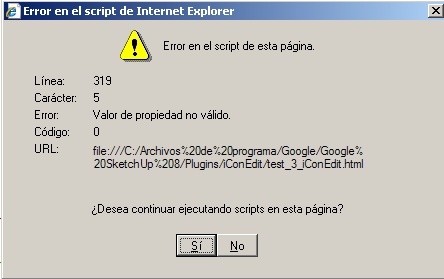
i realised that i have to click on "placeholder text" to make active the menu above; but still, i get an error message
i click "si" and if i type the image address, it appears in the html windows, but it doesn't fit ...
nothing is simple...
-
giro,
type in C:/Archivos de programa/Google/ SketchUp 8/Plugins/iConEdit/logo_images/site_logo.png
and see what happens...
post a screenshot
john -
hi
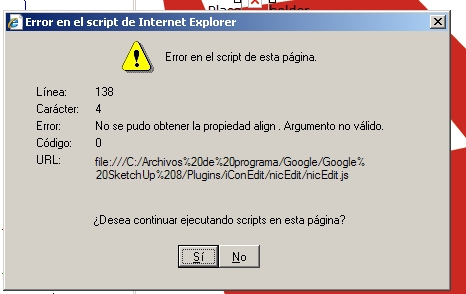
I typed "C:/Archivos de programa/Google/ SketchUp 8/Plugins/iConEdit/logo_images/site_logo.png" in the "add/edit image" URL dialogue box
i got this
-
Hi A:
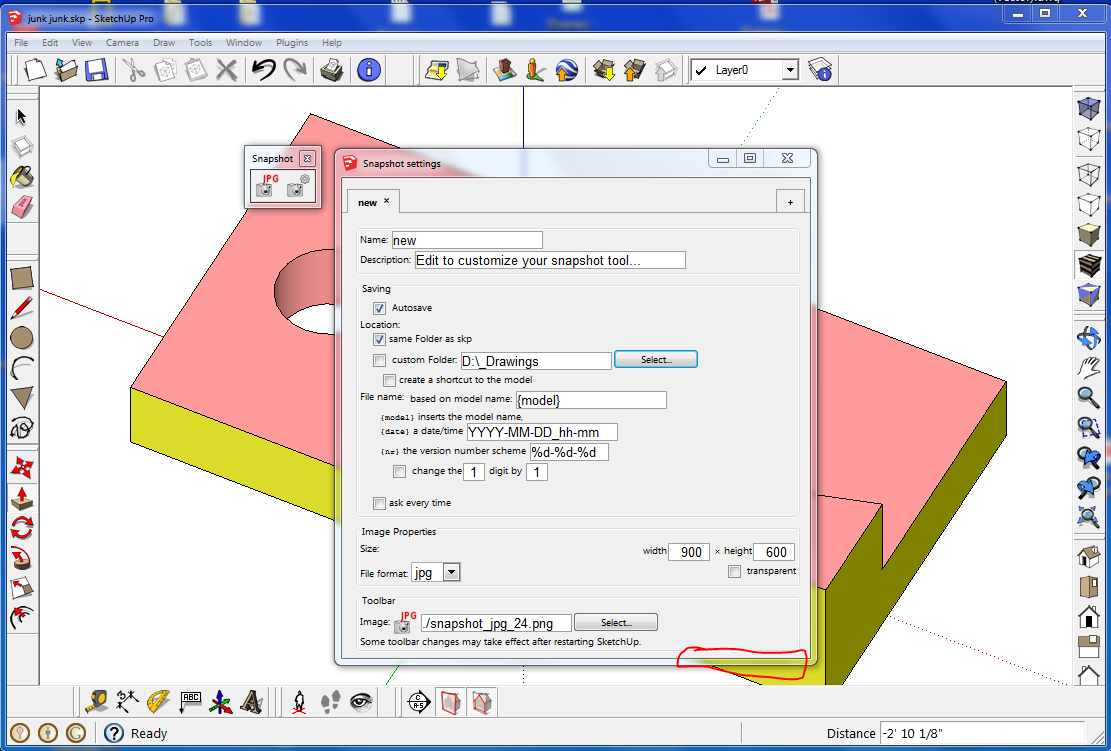
When the settings dialog opens, it does not extend downward enough to reveal the Cancel and OK buttons. I could not figure out why my setting changes were being ignored until I manually dragged the bounds of the dialog.
Also, when unchecking the Ask Every Time option, it would not take until closing and reopening SketchUp.
Regards, John
-
Thanks for reporting. The toolbar buttons took the settings from the moment when they were created (when SketchUp starts). That should be fixed now in version 1.0.2.
-
@driven said:
I've been having a look at 'less' cutting edge editor's to see if I can get enough usable feature on a PC version.
I'll PM the volunteers Giro + simon to test the basic concept using hard linked files with this template....
About a week without any participation, I'm sorry. I'm always busy by waves.. Shall test and read the news this week end.
++simon
-
i posted a message with some code related to your plugin ae snapshot.rb
http://sketchucation.com/forums/viewtopic.php?f=323&t=39304&p=436887#p436887
your plugin creates automatically a thumbnail and file shortcut to the model that is being created
what i needed was the same functions, but for already existing models
In the batch procedure i adapted from JF's code, the skp file is saved, and this triggers automatically aesnapshot.rb and creates the files in the specified folder
when looking for a model, you just have to go to this folder
Now, it is not completely finished:
the prompt between each files is not convenient
would be better to look for skp files in all subfolders too...i am working on it
-
Thank You A:
The dialog is now larger and the top two-thirds of the buttons are visible; good enough to see and use.
Regards, John
-
It looks good. I'll try it.
-
Hey, I don't know whether you take requests, but if you don't mind, I have one:
I would like to be able to disable Anti-Aliasing on the exported image, as is possible when exporting an image directly via sketchup. I want to export images with transparency without anti-aliasing, it would be great if this could be done. -
This would need a little change (that even you could do if you like) to set the
write_imageoptionantialias => false. This rather old and complex plugin consists mainly of a plethora of options because every user could want something slightly different. Instead, you could also use Toolbar Editor.[off:c47o1jic]%(#BF0000)[This plugin is superseded by the extension "Toolbar Editor".
It allows to create your own toolbar buttons for whatever function you want, in exactly the way you want.
You can achieve the snapshot function by pasting into the code field:]filepath = UI.savepanel view = Sketchup.active_model.active_view keys = { ;filename => filepath, ;width => view.vpwidth, ;height => view.vpheight, ;antialias => true, # or false ;compression => 0.9, # Only for jpeg ;transparent => true # Only for png } view.write_image(keys)[/off:c47o1jic]
-
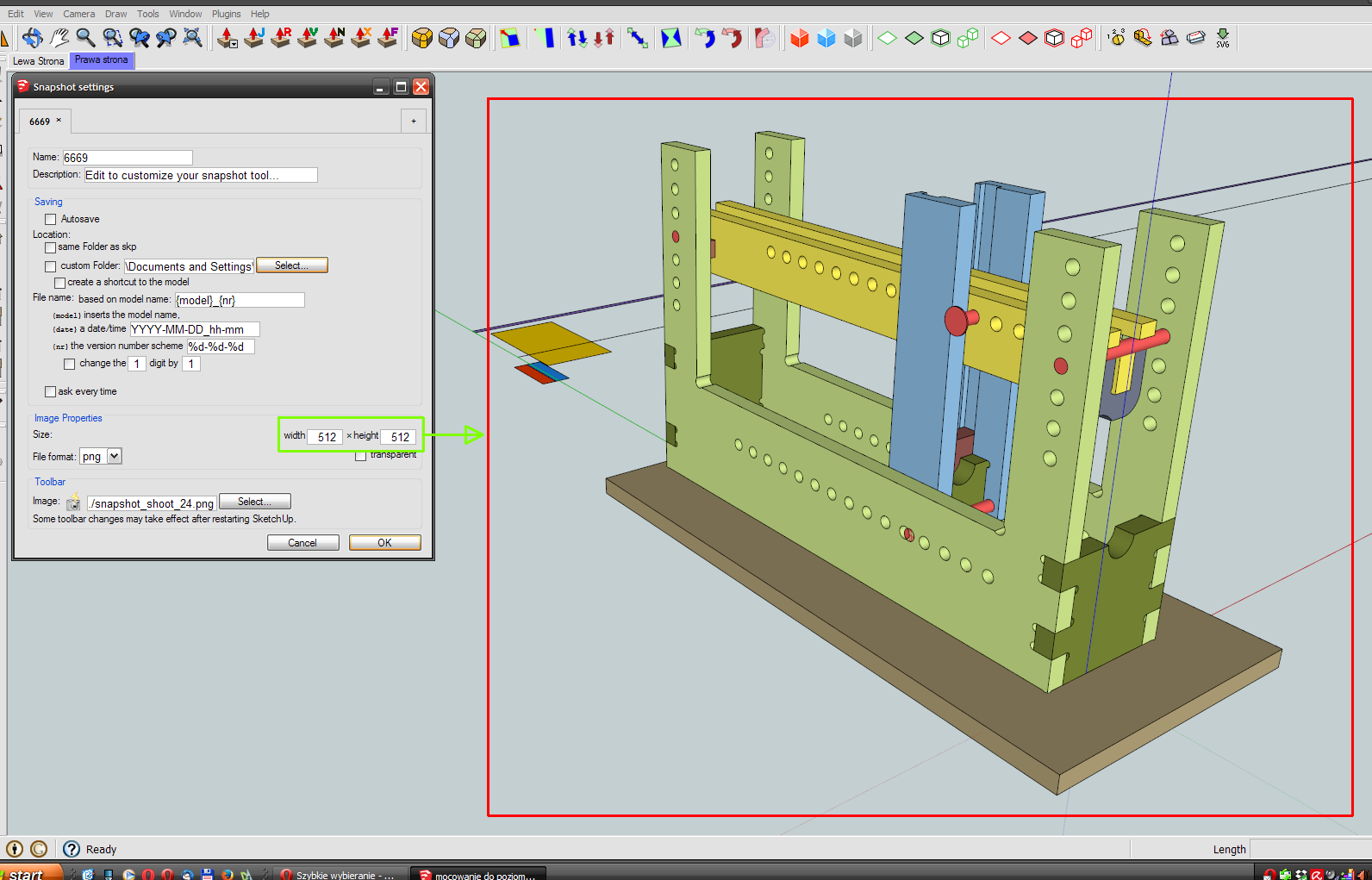
I miss the window that will show a screen clipping.
Robert
-
The original plugin was not able to do a screen clipping/cropping. When SketchUp exports images of the current view, they always include the whole viewport. But you can set the pixel dimensions of the image.
If someone really needs all the options of the original plugin, it is still downloadable. Otherwise you create a toolbar button with a code snippets using ToolbarEditor. This is much easier to support, and it is easier to adapt to your specific needs.
This snippet asks for the file name and image dimensions. If you choose a filename with png or tif, the image will have transparency.
model = Sketchup.active_model
view = model.active_view
ro = model.rendering_options

filepath = UI.savepanel("Save Image File", nil, "BMP|*.bmp;|JPG|*.jpg;*.jpeg|PNG|*.png|TIF|.*tif;*.tiff|TGA|*.tga||")

width, height = UI.inputbox(
  ["width", "height"],
  [view.vpwidth, view.vpheight],
  "Size of the screenshot")

unless filepath.nil? || width.nil? || height.nil?
  is_transparent = filepath[/\.(png|tiff?)$/i]
  if is_transparent
    drawGround, ro["DrawGround"] = ro["DrawGround"], false
    drawHorizon, ro["DrawHorizon"] = ro["DrawHorizon"], false
  end

  keys = {
    ;filename => filepath,
    ;width => width,
    ;height => height,
    ;antialias => true,  # or false
    ;compression => 0.9, # Only for jpeg
    ;transparent => true # Only for png
  }

  begin
    raise unless view.write_image(keys)
    Sketchup.status_text = "A snapshot has been saved as #{filepath}."
  rescue Exception => e
    Sketchup.status_text = "Failed to save snapshot to #{filepath}. #{e.message}"
  end

  if is_transparent
    ro["DrawGround"] = drawGround
    ro["DrawHorizon"] = drawHorizon
  end
end





Advertisement