sketchucation logo sketchucation
    • Login
    Oops, your profile's looking a bit empty! To help us tailor your experience, please fill in key details like your SketchUp version, skill level, operating system, and more. Update and save your info on your profile page today!
    Mac User? | Join the Rayscaper Beta for Mac Learn More

    How to deform ovalish object

    Scheduled Pinned Locked Moved Newbie Forum
    sketchup
    70 Posts 5 Posters 11.9k Views 5 Watching
    Loading More Posts
    • Oldest to Newest
    • Newest to Oldest
    • Most Votes
    Reply
    • Reply as topic
    Log in to reply
    This topic has been deleted. Only users with topic management privileges can see it.
    • pilouP
      pilou
      last edited by

      @unknownuser said:

      these two triangles to get skewed rectangle (one polygon)

      You can't have a losange or a 4 segment surface so a polygon if these 2 triangles are not on the same plan!
      You will have always 2 triangles!

      Frenchy Pilou
      Is beautiful that please without concept!
      My Little site :)

      1 Reply Last reply
      Reply Quote 0
      • pilouP
        pilou
        last edited by

        @unknownuser said:

        what does it mean to extrude segment?

        It mades that SU can't made with the native tools! πŸ˜‰

        Very useful! πŸ‘
        And works of course with multiple sélection! 😎 So curves etc...

        Here the vertical move but you can make any 360Β° !
        projection.jpg

        PS and it's repeating! So new selection is the new position of the segment! etc... 😎

        If you want scale the segment draw another segment somewhere and scale the 2 segments in the same time πŸ˜‰

        Frenchy Pilou
        Is beautiful that please without concept!
        My Little site :)

        1 Reply Last reply
        Reply Quote 0
        • R
          rumcajs
          last edited by

          @unknownuser said:

          You can't have a losange or a 4 segment surface so a polygon if these 2 triangles are not on the same plan!
          You will have always 2 triangles!

          OK. then there could be solution to correct triangles which are created when you create some line. I will show image, what I mean, wait.

          http://i48.tinypic.com/11ifsap.png

          http://i45.tinypic.com/501s74.png

          Maybe that is not good example...

          1 Reply Last reply
          Reply Quote 0
          • R
            rumcajs
            last edited by

            Projections will be very useful, but does not solve actual problem. And how can I change division number? I tried enter, tab, f4, f5, nothing helped.

            1 Reply Last reply
            Reply Quote 0
            • pilouP
              pilou
              last edited by

              Try tools on surface by Fredo 6
              It's useful for draw on curvated surface!

              for your triangle that will be not a "flat" triangle because you are on curvated surface!
              So a curvated triangle
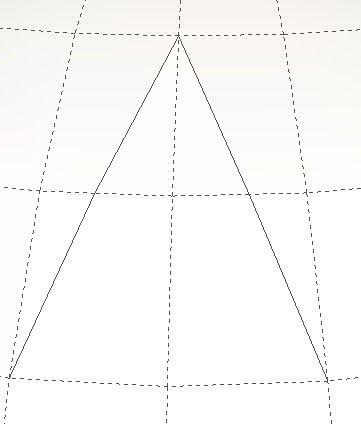
              triangle.jpg

              Frenchy Pilou
              Is beautiful that please without concept!
              My Little site :)

              1 Reply Last reply
              Reply Quote 0
              • R
                rumcajs
                last edited by

                Then I need to transform the curved faces to flat faces.

                1 Reply Last reply
                Reply Quote 0
                • pilouP
                  pilou
                  last edited by

                  If you flat the "rectangle" some faces around it will be deform too πŸ˜‰

                  Frenchy Pilou
                  Is beautiful that please without concept!
                  My Little site :)

                  1 Reply Last reply
                  Reply Quote 0
                  • R
                    rumcajs
                    last edited by

                    Pilou, I have opened the document, selected the object and checked the window Soften Edges. There are 0Β°. So it is really not object with curved faces. Maybe there some conversion happened without me to be aware. Strange. All lines are no dashed no, but I don't remember that I would do some conversion.

                    So there is not a way how to arrange two planes on the way, they to be on the same plane?

                    http://i48.tinypic.com/fw6cty.png

                    1 Reply Last reply
                    Reply Quote 0
                    • pilouP
                      pilou
                      last edited by

                      kill all segments where is the rectangle
                      draw the rectangle and fill the holes around it with new segments

                      Frenchy Pilou
                      Is beautiful that please without concept!
                      My Little site :)

                      1 Reply Last reply
                      Reply Quote 0
                      • R
                        rumcajs
                        last edited by

                        Do you know
                        http://forums.sketchucation.com/viewtopic.php?f=10&t=9011
                        cleanup.rb?

                        This is not exactly what I need, but similar and interesting.

                        1 Reply Last reply
                        Reply Quote 0
                        • pilouP
                          pilou
                          last edited by

                          @unknownuser said:

                          Do you know Clean Up ?

                          You have a better one with the same name Clean Up by Thomthom πŸ˜‰

                          If you use the previous Projection by Didier Bur, It's a game's boy to make parallal in any direction with it! πŸ˜‰
                          and any number just redraw one from the last

                          http://forums.sketchucation.com/download/file.php?id=93618

                          or this one Edge tool Divide face by thomthom
                          [flash=560,315:q55w7sw4]http://www.youtube.com/v/hM7t6t1cCkY[/flash:q55w7sw4]

                          Frenchy Pilou
                          Is beautiful that please without concept!
                          My Little site :)

                          1 Reply Last reply
                          Reply Quote 0
                          • R
                            rumcajs
                            last edited by

                            I did it in different way:

                            http://i47.tinypic.com/u8sjc.jpg

                            Side view:

                            http://i49.tinypic.com/5x0jr8.png

                            But it is slow work. It took me few minutes to make the lines parralel. Then I used Created faces tool from utilities.

                            You see that it is possible to do it. Hence now I need only plugin to make two lines parallel. Or 2x2 parallel. Is there some for it? I did it just with my own estimation (just observing/comparing) because I don't the technique to do that accurarely.

                            1 Reply Last reply
                            Reply Quote 0
                            • R
                              rumcajs
                              last edited by

                              @unknownuser said:

                              If you use the previous Projection by Didier Bur, It's a game's boy to make..

                              Did you wanted to say boy's game?

                              The guy does nice plug-ins, nice icons and it look really useful in practice. I only had really big problem to understand his English in the video so I capture 4% of the content.

                              See the "Co-linear Edges" - this look like this toy could do the job I need. Don't you think? Thanks for link.

                              Do you understand how the to control the colinear tool?
                              What I must to do if I want to make the two lines of the face paralel? (same image as above). I try and it nothing did to my model...

                              1 Reply Last reply
                              Reply Quote 0
                              • pilouP
                                pilou
                                last edited by

                                @unknownuser said:

                                Did you wanted to say boy's game?

                                for the the parallal edges πŸ˜„

                                Frenchy Pilou
                                Is beautiful that please without concept!
                                My Little site :)

                                1 Reply Last reply
                                Reply Quote 0
                                • R
                                  rumcajs
                                  last edited by

                                  TGI3D - cross section tool : error: Cannot resolve cross seciton.

                                  This problem can occur, when the program has has some dilemma. In the tutorial with wine glass, there is a cylinder and the instructor deleted at least top of the cylinder. In the case, that I create cylinder, which top is different shape or different angle then the bottom, than this problem will occur. The solution would be simple. Either delete top of the cylinder, or bottom, or (maybe), to draw one more circle on the face of the cylinder - I would use Tools on surface.

                                  1 Reply Last reply
                                  Reply Quote 0
                                  • R
                                    rumcajs
                                    last edited by

                                    To deform faces, I found very useful, fast and simple to use this tool:

                                    TGI3D: move

                                    http://i48.tinypic.com/ve3typ.png

                                    It is much more better then LSS deformation functions which are too slow (and create extra group, which is not needed in my case)

                                    1 Reply Last reply
                                    Reply Quote 0

                                    Hello! It looks like you're interested in this conversation, but you don't have an account yet.

                                    Getting fed up of having to scroll through the same posts each visit? When you register for an account, you'll always come back to exactly where you were before, and choose to be notified of new replies (either via email, or push notification). You'll also be able to save bookmarks and upvote posts to show your appreciation to other community members.

                                    With your input, this post could be even better πŸ’—

                                    Register Login
                                    • 1
                                    • 2
                                    • 3
                                    • 4
                                    • 3 / 4
                                    • First post
                                      Last post
                                    Buy SketchPlus
                                    Buy SUbD
                                    Buy WrapR
                                    Buy eBook
                                    Buy Modelur
                                    Buy Vertex Tools
                                    Buy SketchCuisine
                                    Buy FormFonts

                                    Advertisement