sketchucation logo sketchucation
    • 登入
    Oops, your profile's looking a bit empty! To help us tailor your experience, please fill in key details like your SketchUp version, skill level, operating system, and more. Update and save your info on your profile page today!
    ⚠️ Important | Libfredo 15.6b introduces important bugfixes for Fredo's Extensions Update

    Using the Cancel btn, to return to previous menu?

    已排程 已置頂 已鎖定 已移動 Developers' Forum
    22 貼文 5 Posters 942 瀏覽 5 Watching
    正在載入更多貼文
    • 從舊到新
    • 從新到舊
    • 最多點贊
    回覆
    • 在新貼文中回覆
    登入後回覆
    此主題已被刪除。只有擁有主題管理權限的使用者可以查看。
    • T 離線
      tomot
      最後由 編輯

      The evaluation of My RiserHeight can only take place after the orignal values are entered in the previous menu. If the value of My RiserHeight is not within code limits, I want to use Cancelto return to the previous menu.

      What's the ruby code that will allow me to do this? TIA
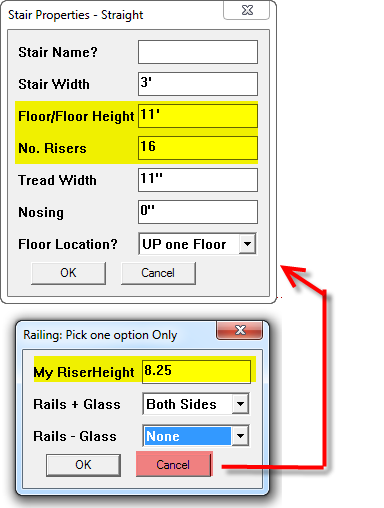

      menu.png

      [my plugins](http://thingsvirtual.blogspot.ca/)
      tomot

      1 條回覆 最後回覆 回覆 引用 0
      • Chris FullmerC 離線
        Chris Fullmer
        最後由 編輯

        When the user hits cancel the inputbox returns false. So test for your inbputbox being false. If its false, then rerun the previous inputbox. Does that work?

        Chris

        Lately you've been tan, suspicious for the winter.
        All my Plugins I've written

        1 條回覆 最後回覆 回覆 引用 0
        • T 離線
          tomot
          最後由 編輯

          Its something code wise I never was concerned about. Since there would normally be no reason to return to a previous menu. Presently the second menu on OK initiates the drawing routine, and on Cancel does nothing. 😞
          Here is the code for Dialog box in question

                  # Dialog box
                  railg = ["Both Sides", "Right only", "Left only", "None"]
                  rail = ["Both Sides", "Inner only", "Outer only", "None"]
                  enums = [ "", railg.join("|"), rail.join("|")]
                  prompts = ["My RiserHeight  ", "Rails + Glass", "Rails - Glass"]
                  values = [@ssincrt, @railg, @rail]
                  results = inputbox prompts, values, enums, "Railing; Pick one option Only"
                  
                  return if not results
                  @ssincrt, @railg, @rail = results
          

          [my plugins](http://thingsvirtual.blogspot.ca/)
          tomot

          1 條回覆 最後回覆 回覆 引用 0
          • J 離線
            Jim
            最後由 編輯

            Have a look at the inputbox method in Sketchup.rb (Tools folder.) It shows an example of using begin..rescue..retry..end.

            Hi

            1 條回覆 最後回覆 回覆 引用 0
            • T 離線
              tomot
              最後由 編輯

              @jim said:

              Have a look at the inputbox method in Sketchup.rb (Tools folder.) It shows an example of using begin..rescue..retry..end.

              Since there are 2 inputboxes in my example, or maybe more depending on the complexity of a particular Ruby script. I still don't see how I can control revisiting any inputbox in a script. Is there no inputbox identity name, which I could use to control via Cancel the direction a particular ruby would branch to. At the moment the only alternative I have, is to restart the script.

              [my plugins](http://thingsvirtual.blogspot.ca/)
              tomot

              1 條回覆 最後回覆 回覆 引用 0
              • TIGT 離線
                TIG Moderator
                最後由 編輯

                Make each inputbox work from within its on method.
                When the 2nd one fails the 1st one is reused...

                def dialog1()
                  @results1=inputbox...
                  if @results1
                    dialog2()
                  else
                    return nil
                  end 
                end
                def dialog2()
                  @results2=inputbox...
                  if @results2
                    #do stuff with @results2
                  else
                    dialog1()
                  end
                end
                

                😕

                TIG

                1 條回覆 最後回覆 回覆 引用 0
                • T 離線
                  tomot
                  最後由 編輯

                  TIG: I have been struggling with applying your code: Would you be so kind to attach your code to my simple example, TIA!

                  =begin
                  # Name;           Cancel 
                  # Description;    Initiate Canel routine in Dialog Box #2
                  #                 returning user back to Dialog Box #1
                  # Date;           2012/21/08
                  #---------------------------------------------------------------------------
                  =end
                  require 'sketchup.rb'
                  
                  module CANCEL        
                  #---------------------------------------------------------------------------
                          #Set default settings
                          @height = 9.feet if not @height # floor to floor height    
                          @riser = 16 if not @riser       # no. risers total    
                          
                      def self.cancel    
                      
                          # Dialog box #1
                          prompts = ["Floor/Floor Height ", "No. Risers"]
                          values = [@height, @riser]
                          results = inputbox prompts, values, "Dialog Box #1"
                          
                          return if not results
                          @height, @riser = results
                          
                          @riserheight=@height/@riser  # riser height
                        
                          # Dialog box #2
                          prompts = ["My RiserHeight  ", "--------"]
                          values = [@riserheight, @any_entry]
                          results = inputbox prompts, values, "Dialog Box #2"
                          
                          return if not results
                          @riserheight, @any_entry = results
                          
                      end #self.cancel 
                  end #module CANCEL  
                  #---------------------------------------------------------------------------
                      if( not file_loaded?("cancel.rb") )
                          UI.menu("Plugins").add_item("Cancel") { CANCEL.cancel }
                      end
                  #---------------------------------------------------------------------------
                      file_loaded("cancel.rb") # load"cancel.rb"
                  

                  [my plugins](http://thingsvirtual.blogspot.ca/)
                  tomot

                  1 條回覆 最後回覆 回覆 引用 0
                  • TIGT 離線
                    TIG Moderator
                    最後由 編輯

                    Reread my example.
                    Change the method names to suit yourself.
                    Change the two 'inputbox...' parts to suit your own prompts/values/titles etc...
                    The way it works is straightforward.
                    If you OK dialog1 it maybe does stuff like set @ values to the @results1 and then runs dialog2
                    BUT if you Cancel dialog1 [i.e. @results1==nil] it stops processing [== return nil] and dialog2 never runs.

                    If id does and you OK dialog2 it does stuff with those @ results from maybe both dialogs.
                    BUT if you Cancel it then it'll reopen dialog1 and you can start the loop again...

                    Please don't make modules methods like CANCEL.cancel() - it's very confusing 😕

                    TIG

                    1 條回覆 最後回覆 回覆 引用 0
                    • J 離線
                      Jim
                      最後由 編輯

                      Not often used, but Ruby has a loop statement. Just break out of the loop when proper input is entered.

                      Hi

                      1 條回覆 最後回覆 回覆 引用 0
                      • T 離線
                        tomot
                        最後由 編輯

                        @jim said:

                        Not often used, but Ruby has a loop statement. Just break out of the loop when proper input is entered.

                        This example has nothing to do with the user entering improper input. The results of the
                        of the 1st dialog box are entered into the 2nd dialog box. Its really a very poor example of a calculator, in Ruby. Ideally I would like the division to take place and displayed in 1st dialog box.

                        [my plugins](http://thingsvirtual.blogspot.ca/)
                        tomot

                        1 條回覆 最後回覆 回覆 引用 0
                        • T 離線
                          tomot
                          最後由 編輯

                          Short of tearing my hair out, of which I already have too few to part with. I don't seem to be able to get any menu to appear each time I add @results to my cancel.rb script. Neither does the ruby console identify any errors.

                          I suppose part of my problem is not understanding how "OK" and "Cancel" magically become part of any dialog box. There is no specific Ruby code identifying either of those terms, in the script.

                          =begin
                          # Name;           Cancel 
                          # Description;    Initiate Cancel routine in Dialog Box #2
                          #                 returning user back to Dialog Box #1
                          # Date;           2012/21/08
                          # revised         2012/03/09 not working! 
                          #--------------------- ------------------------------------------------------
                          =end
                          require 'sketchup.rb'
                          
                          module CANCEL        
                          #---------------------------------------------------------------------------
                                  #Set default settings
                                  @height = 9.feet if not @height # floor to floor height    
                                  @riser = 16 if not @riser       # no. risers total    
                                  
                              def self.cancel    
                              
                                  # Dialog box #1
                                  def dialog1()
                                  prompts = ["Floor/Floor Height ", "No. Risers"]
                                  values = [@height, @riser]
                                      @results1 = inputbox prompts, values, "Dialog Box #1"
                                      if @results1
                                          dialog2()
                                      else
                                          return nil
                                      end
                                  end
                                  
                                  return if not @results1
                                  @height, @riser = @results1
                                  
                                  
                                  @riserheight=@height/@riser  # riser height
                                
                                  # Dialog box #2
                                  def dialog2()
                                  prompts = ["My RiserHeight  ", "--------"]
                                  values = [@riserheight, @any_entry]
                                      @results2 = inputbox prompts, values, "Dialog Box #2"
                                      if @results2 
                                      
                                      else
                                          dialog1()
                                      end    
                                  end
                                  
                                  return if not @results2
                                  @riserheight, @any_entry = @results2
                                   
                              end #self.cancel 
                          end #module CANCEL  
                          #---------------------------------------------------------------------------
                              if( not file_loaded?("cancel.rb") )
                                  UI.menu("Plugins").add_item("Cancel") { CANCEL.cancel }
                              end
                          #---------------------------------------------------------------------------
                              file_loaded("cancel.rb") # load"cancel.rb"
                          

                          [my plugins](http://thingsvirtual.blogspot.ca/)
                          tomot

                          1 條回覆 最後回覆 回覆 引用 0
                          • TIGT 離線
                            TIG Moderator
                            最後由 編輯

                            You haven't followed my template 😒
                            Try this...

                                =begin
                                # Name;           Cancel
                                # Description;    Initiate Cancel routine in Dialog Box #2
                                #                 returning user back to Dialog Box #1
                                # Date;           2012/21/08
                                # revised         2012/03/09 not working!
                            TIG'd 201201003 !
                                #--------------------- ------------------------------------------------------
                                =end
                                require 'sketchup.rb'
                            
                                module CANCEL       
                                #---------------------------------------------------------------------------
                                        #Set default settings
                                        @height = 9.feet if not @height # floor to floor height   
                                        @riser = 16 if not @riser       # no. risers total   
                                       
                                    def self.cancel   
                                   
                                        # Dialog box #1
                                        def dialog1()
                                        prompts = ["Floor/Floor Height ", "No. Risers"]
                                        values = [@height, @riser]
                                            @results1 = inputbox prompts, values, "Dialog Box #1"
                                            if @results1
                                                @height, @riser = @results1
                                                @riserheight=@height/@riser  # riser height
                                                dialog2()
                                            else
                                                return nil
                                            end
                                        end
                            
                                        # Dialog box #2
                                        def dialog2()
                                            prompts = ["My RiserHeight  ", "--------"]
                                            values = [@riserheight, @any_entry]
                                            @results2 = inputbox prompts, values, "Dialog Box #2"
                                            if @results2
                                                @riserheight, @any_entry = @results2
                                                puts "Got here !"
                                                [@height,@riser,@riserheight,@any_entry].each{|e| puts e}
                                            else
                                                dialog1()
                                                return nil
                                            end   
                                        end
                               
                                    end #self.cancel
                                    ###
                                    unless file_loaded?(__FILE__)
                                        UI.menu("Plugins").add_item("Cancel") { CANCEL.cancel }
                                    end
                                    ###
                                    file_loaded(__FILE__)
                            
                                    # load"cancel.rb"
                            
                                end #module CANCEL
                            

                            TIG

                            1 條回覆 最後回覆 回覆 引用 0
                            • Dan RathbunD 離線
                              Dan Rathbun
                              最後由 編輯

                              @tomot said:

                              I don't seem to be able to get any menu to appear each time I add @results to my cancel.rb script.

                              dialog not menu. A menu is a list of items, that drops down from the application menubar, (or pops up when you click the right mouse button.)

                              @tomot said:

                              I suppose part of my problem is not understanding how "OK" and "Cancel" magically become part of any dialog box.

                              (1) It's a standard Windows API function, that the SketchUp API wraps in a Ruby method.

                              (2) You are discussing a certain sub-type of dialog box, called an inputbox, which always gets an OK and Cancel button.

                              @tomot said:

                              There is no specific Ruby code identifying either of those terms, in the script.

                              Because if the user cancels, the return value evals false, otherwise the return value is an array (even if the user changed nothing,) which evals as not false. (Even an empty array and an empty string in Ruby will eval logically as not false.)
                              This is why we always do
                              return unless results
                              or
                              if results
                              just after the results = UI.inputbox( ... ) call.

                              Another sub-type of dialog box, is the messagebox. With that you CAN specify the button set, using constants that begin "MB" (such as MB_OK, MB_YESNOCANCEL, etc.)
                              With a messagebox, you DO check the integer return value against the constants IDYES, IDNO or IDCANCEL, etc.

                              I'm not here much anymore.

                              1 條回覆 最後回覆 回覆 引用 0
                              • T 離線
                                tomot
                                最後由 編輯

                                @tig said:

                                You haven't followed my template 😒
                                Try this...

                                I tried your code, but it does not produce an on screen dialog either 😢

                                [my plugins](http://thingsvirtual.blogspot.ca/)
                                tomot

                                1 條回覆 最後回覆 回覆 引用 0
                                • T 離線
                                  tomot
                                  最後由 編輯

                                  @dan rathbun said:

                                  Another sub-type of dialog box, is the messagebox. With that you CAN specify the button set, using constants that begin "MB" (such as MB_OK, MB_YESNOCANCEL, etc.)
                                  With a messagebox, you DO check the integer return value against the constants IDYES, IDNO or IDCANCEL, etc.

                                  Dan thanks for your comments. which raises one question. Would it then be possible to construct a single dialog box with a 3rd button ie. Calculate btn? Which in my example would calculate the division.

                                  [my plugins](http://thingsvirtual.blogspot.ca/)
                                  tomot

                                  1 條回覆 最後回覆 回覆 引用 0
                                  • TIGT 離線
                                    TIG Moderator
                                    最後由 編輯

                                    Learn web-dialogs and then you can have any buttons you want, called anything you want, doing anything you desire... 😕

                                    TIG

                                    1 條回覆 最後回覆 回覆 引用 0
                                    • Dan RathbunD 離線
                                      Dan Rathbun
                                      最後由 編輯

                                      You only have two choices to construct dialogs with custom controls:

                                      (1) Write native code for the platform your on, making system calls. (Very low-level nitty gritty advanced programming.)

                                      (2) Write a WebDialog and use a HTML form.

                                      @TIG EDIT: PUNCHBUG!

                                      I'm not here much anymore.

                                      1 條回覆 最後回覆 回覆 引用 0
                                      • T 離線
                                        tomot
                                        最後由 編輯

                                        @dan rathbun said:

                                        You only have two choices to construct dialogs with custom controls:

                                        (1) Write native code for the platform your on, making system calls. (Very low-level nitty gritty advanced programming.)

                                        (2) Write a WebDialog and use a HTML form.
                                        ]

                                        There is a (3) option. Maybe Trimble will add some more stuff to the SketchUp Ruby API, however I'm not holding my breath!

                                        [my plugins](http://thingsvirtual.blogspot.ca/)
                                        tomot

                                        1 條回覆 最後回覆 回覆 引用 0
                                        • T 離線
                                          tomot
                                          最後由 編輯

                                          @tig said:

                                          Learn web-dialogs and then you can have any buttons you want, called anything you want, doing anything you desire... 😕

                                          Luckily I have shortened my list of things that I desire. However if I were, and if I was my 20's, I would not waste my time learning web-dialogs. I'd learn COBOL, an almost extinct language, yet COBOL still runs 90% of the worlds financial programs. And since there are almost no COBOL programmers left, since most have or are retiring. One could make a great deal of money learning COBOL instead of Web-dialogs. 😄

                                          However that still does not answer my followup question: why does the Cancel dialog not display with your included revisions?

                                          [my plugins](http://thingsvirtual.blogspot.ca/)
                                          tomot

                                          1 條回覆 最後回覆 回覆 引用 0
                                          • Dan RathbunD 離線
                                            Dan Rathbun
                                            最後由 編輯

                                            OMG! I had to take COBOL in college. I hated it.

                                            I always wanted to have a "COBOL Sucks!" T-shirt made.

                                            I'm not here much anymore.

                                            1 條回覆 最後回覆 回覆 引用 0
                                            • 1
                                            • 2
                                            • 1 / 2
                                            • 第一個貼文
                                              最後的貼文
                                            Buy SketchPlus
                                            Buy SUbD
                                            Buy WrapR
                                            Buy eBook
                                            Buy Modelur
                                            Buy Vertex Tools
                                            Buy SketchCuisine
                                            Buy FormFonts

                                            Advertisement

