Creating New Materials Group and Sharing with Others
-
Hello,
This may be a dumb question, so excuse me in advance. Is there a way to save a new materials group and populate it with custom textures so that it can be shared? I would like to make a Materials group with my custom textures (ie: local brick patterns). I would also like to be able to provide this Material group to all my co-workers so that we have the same Materials when working on projects. Does anyone know of a way to do this?
Thanks in advance...
Ryan -
You might find the discussion at the following link helpful.
http://forums.sketchucation.com/viewtopic.php?f=79&t=42446&p=377074&hilit=creating+materials#p377074
-
In the Materials Browser, Model pane you have options to 'export' [save_as/collection], either for just one or all of the Materials in the Model.
These are saved as SKM files in the specified folder [sensibly that is usually a subfolder within the Materials folder], which can copied to other users PCs who put it in the same place.
Then they can access your Model's materials and you can reuse those materials yourself in any other Models too... -
Thanks for the help. I tried this, but when I Save As, each texture is a .skm. I was hoping to have the whole folder with X number of textures saved as a .skm, similar to the default Materials stored in SketchUp.
Thanks,
Ryan -
An individual Model Material has a SaveAs == 1 SKM file.
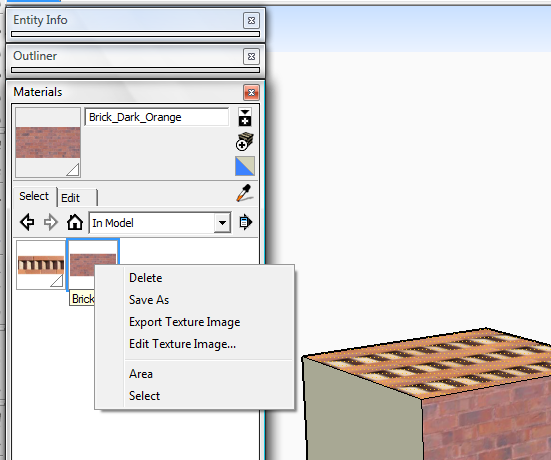
But the right-side pop-out menu lets you save everything as a Collection == a folder of SKM files.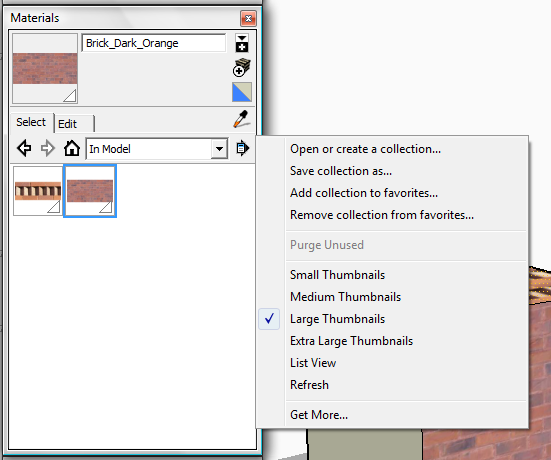


Hello! It looks like you're interested in this conversation, but you don't have an account yet.
Getting fed up of having to scroll through the same posts each visit? When you register for an account, you'll always come back to exactly where you were before, and choose to be notified of new replies (either via email, or push notification). You'll also be able to save bookmarks and upvote posts to show your appreciation to other community members.
With your input, this post could be even better 💗
Register Login


Advertisement