[Plugin] Ruby Console+ (3.0.2) – updated 30.10.2017
-
Nevermind...I was just too eager on the trigger
-
Hi. Yes there seams to be Typerror during load.
Ruby console spits this out. Next time I launch dialog opens, and no error message.
Error; #<TypeError; can't convert Symbol into String> C;/Program Files (x86)/Google/Google SketchUp 8/Plugins/ae_Console/Console.rb;297;in `join' C;/Program Files (x86)/Google/Google SketchUp 8/Plugins/ae_Console/Console.rb;297;in `initialize' C;/Program Files (x86)/Google/Google SketchUp 8/Plugins/ae_Console/Console.rb;297;in `map' C;/Program Files (x86)/Google/Google SketchUp 8/Plugins/ae_Console/Console.rb;297;in `initialize' C;/Program Files (x86)/Google/Google SketchUp 8/Plugins/ae_Console/Console.rb;295;in `each' C;/Program Files (x86)/Google/Google SketchUp 8/Plugins/ae_Console/Console.rb;295;in `initialize' C;/Program Files (x86)/Google/Google SketchUp 8/Plugins/ae_Console/Console.rb;90;in `new' C;/Program Files (x86)/Google/Google SketchUp 8/Plugins/ae_Console/Console.rb;90;in `open' C;/Program Files (x86)/Google/Google SketchUp 8/Plugins/ae_Console/Console.rb;578 -
Error is no longer coming up for me, just like jolran said. Thanks gents! Looking forward to using what looks to be an awesome console upgrade!
-
v2.1.3
Testing the namespace feature does not seem to work.
when I first open the Console+, and type
self, it returns an instance of AE::ConsoleIf I try to switch to a module it does not work.
Sometimes the text changes in the box, other times it does not and keeps resetting to "global".If I cause an error by typing "module Dan" the output is an exception backtrace, and
selfbecomesmain.Other times it starts as main, after attempting to set to some class like String, it is instead within AE::Console.
-
Yes, the namespace feature is the last missing piece that doesn't work in some versions of Ruby. I've fixed it, but not yet published, because I also want to inspect a problem with garbage collection (closed AE::Console instances stay in memory).
-
@aerilius said:
(closed AE::Console instances stay in memory).
I had the same issue with SKUI. After diggin into it it appeared to be the callback handlers that held on to variables from the scope they where defined in causing circular references back to the webdialog. I had to do some awkward workaround to avoid that:
https://github.com/thomthom/SKUI/blob/master/src/SKUI/window.rb#L461 -
Thanks, I'll look into that.
As far as I could analyze my code, it should not permanently keep references of these dialogs. So I've started compiling a patched Ruby version that can reverse-lookup references of an object. -
The issue I found wasn't explicitly holding on to variables, but when you create a block in Ruby the outer variables will be available to the block - this implicitly binds objects to that block.
So when you create a block for the event handlers of a webdialog you implicitly bind the webdialog variable from the outer scope to the block which ends up creating a circular reference. -
But as far as I know Ruby's gabrage collector is able to release circular references. The object diagram (from the linked ruby-find-references) looks ok. I haven't yet understood fully understood what is happening.
So if I avoid that the proc includes a reference to the dialog, I can not easily use instance variables in the proc (without using hacks like
__send__(:instance_variabe_get))? -
I'm not sure it can release all circular dependencies. Also remember that SketchUp's API classes are defined in C - maybe there's some small differences happening there.
I'm not really 100% sure what was going on. I was not pleased with the workaround I had to apply to make SKUI clean up properly, but it did work. I'd be very interested in hearing what you find out.
-
Big update to version 3.0.2!
For development, see also on github. Contributions welcome! -
When I update via EW (that indicates v3.0.2) I get v 3.0.1 after restarting SketchUp 2016.
(EDIT: okay, I see that v3.0.1 is the EW release. So, n/m.)
Manual d/l from GitHub:
https://github.com/Aerilius/sketchup-console-plus/releases/
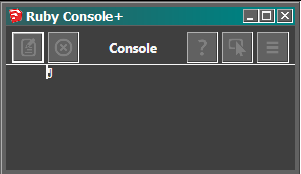
Also, on my machine (Win7) with a high contrast custom charcoal system scheme the console is unusable.
Issue #17 filed at GitHub repo.
(Pic attached)
-
Hello
and thank you so much Aerilius for the update of my favorite tool for coding/testing scripts in SketchUp.
Nevertheless i miss the "reload scripts" button from the previous version.
This was very convenient and fitted my workflow so well...
I use an external editor (Notepad++) and save the files to my plugins folder. Once loaded by typingload "myscript.rb"the file was automatically kept in the autoload list. After editing a script and saving the modified file, a button press brought the modified version back into Sketchup for a testrun.
Any chance to get my button back? Please? Or is this functionality somewhere and i haven't found it yet? Of course i could write a <reload_all_my_scripts>-function and call it from the console or add an icon to a SketchUp toolbar. Just thinking this functionality fitted so well into the console (since there's still the autoload list anyway)...best regards,
Michael S. -
The previous "Reload all scripts" button had several flaws:
- it would reload too many scripts, even those that were not changed
- it was a manual action for something that was already automated
I thought since changed scripts are reloaded by default now, there is no need to have a button clutter space, or do something manually that is automated, or offer configurability if there can be a better default.
There could of course exist workflows that I oversaw, but then instead of adding a poor implementation (even for a single user) I'd prefer to find a new solution to the problem.
To understand the problem, how does the automatic script reloading not cover your workflow? When a script under surveillance changes its last modified timestamp, it should be reloaded. Why do you need to manually trigger it? -
Thanks Aerilius, i had suspected it should work automatic now and (thought) i had tried but it didn't work. Must have done something wrong.
I will try again when i'm back at my computer.Michael S.
-
Ok - checked again and i can't get it to work. What am i doing wrong?
I load my script in the console with
load "myscript.rb"As expected, the script now appears in the list of monitored scripts.
When i edit the file in an external editor (leaving SketchUp and the console window open), save it and switch back to the console window, my changes are not recognised.
I get an "undefined method" error if i try to add a new function to my script this way and call it from the console.
I'm on Win7, Sketchup Make 2016, 64 bit, ae-console 3.0.2 from PluginStoreDid i miss something?
Grateful for any help.
Michael S.
-
It is reliably reloading every changed file on my system. When it works, it prints the filename ('... has been reloaded') to the console.
So it could be that some difference of the system makes the file observer not trigger (in that with
rake testin the repo root directory the fileobserver_test.rb fails). -
Ok - found the spot:
In "fileobserver.rb" line 71: you're using ctime to check whether the file was modified. Might be different on OSX but on Win, i need to use mtime here (ctime doesn't change if i modify the file in an external editor and save, so reload wasn't triggered).
I changed this call to mtime and now it works.
Michael S.
-
Thanks! I wasn't aware that Ruby's Windows port does not even try to emulate the unix behavior but does something totally different. Indeed, even on unix
mtime(modification of content) is more accurate for what the fileobserver is supposed to do here thanctime(standard: changed attributes, Windows: creation time). -
Re: [[Plugin] Ruby Console+ (3.1.7)
The lastest version 3.1.7 cannot be installed in SketchUp 2024. will there be an update available soon?Errors:
Fehlerbericht Erweiterungen
SketchUp: 24.0.484
OS: Windows 11
Ruby: 3.2.2Erweiterung: Ruby-Konsole+ (3.1.7)
Fehler: TypeError (allocator undefined for #Class:0x00000208d9536860)
C:/Users/uwebe/AppData/Roaming/SketchUp/SketchUp 2024/SketchUp/Plugins/ae_console/core.rb:125:innew' C:/Users/uwebe/AppData/Roaming/SketchUp/SketchUp 2024/SketchUp/Plugins/ae_console/core.rb:125:ininitialize_plugin'
C:/Users/uwebe/AppData/Roaming/SketchUp/SketchUp 2024/SketchUp/Plugins/ae_console/core.rb:213:in<module:ConsolePlugin>' C:/Users/uwebe/AppData/Roaming/SketchUp/SketchUp 2024/SketchUp/Plugins/ae_console/core.rb:3:inmodule:AE'
C:/Users/uwebe/AppData/Roaming/SketchUp/SketchUp 2024/SketchUp/Plugins/ae_console/core.rb:1:in<top (required)>' C:/Program Files/SketchUp/SketchUp 2024/Tools/extensions.rb:197:inrequire'
C:/Program Files/SketchUp/SketchUp 2024/Tools/extensions.rb:197:inload' C:/Users/uwebe/AppData/Roaming/SketchUp/SketchUp 2024/SketchUp/Plugins/ae_console.rb:26:inregister_extension'
C:/Users/uwebe/AppData/Roaming/SketchUp/SketchUp 2024/SketchUp/Plugins/ae_console.rb:26:in<module:ConsolePlugin>' C:/Users/uwebe/AppData/Roaming/SketchUp/SketchUp 2024/SketchUp/Plugins/ae_console.rb:7:inmodule:AE'
C:/Users/uwebe/AppData/Roaming/SketchUp/SketchUp 2024/SketchUp/Plugins/ae_console.rb:5:in `<top (required)>'







Advertisement