[Code] Print the transformation matrix
-
Hi, I'm trying to print a transformation matrix, I tried the following:
pointdd = Geom::Point3d.new 11,22,33 tdd = Geom::Transformation.new pointdd a = tdd.to_a text="-------------------------------------------------------\n" 4.times do |b| 4.times do |e| if ((e+1)%4==0) text << a[e*4+b].to_s+"\n" else text << a[e*4+b].to_s+" "+" "+" "+" "+" "+" "+" "+" "+" "+" " end end end text<<"------------------------------------------------------\n" UI.messagebox( text, MB_MULTILINE)I wanted to hear suggestions of more elegant ways to do this. (I wrote several times
+" "for failure to escrbir several spaces followed here)thank you for your attention.
-
Here's one in your format, although you should probably use one of the ones above (More info here)
def inspect_transformation_adv(t, args={})
    format = "%.#{args[;places] || 3}f"
    ta = t.to_a.map() {|i|
        format%[i]
    }
    maxlength = ta.max() {|i, j| i.length <=> j.length }.length
    ta = ta.map() {|i|
        i.ljust(maxlength)
    }
    return (0...4).map() {|i|
        (0...4).map() {|j|
            ta[j*4+i]
        }.join(args[;separator] || ', ')
    }.join("\n")
end
>>> point = Geom;;Point3d.new 11,22,33 >>> tdd = Geom;;Transformation.new pointdd >>> puts inspect_transformation_adv(tdd) 1.000 , 0.000 , 0.000 , 11.000 0.000 , 1.000 , 0.000 , 22.000 0.000 , 0.000 , 1.000 , 33.000 0.000 , 0.000 , 0.000 , 1.000 >>> puts inspect_transformation_adv(t, {;separator => ' '}) 1.000 0.000 0.000 11.000 0.000 1.000 0.000 22.000 0.000 0.000 1.000 33.000 0.000 0.000 0.000 1.000 -
def inspect_transformation(t)
    ta = t.to_a
    return (0...4).collect() {|i|
        ta[i*4, 4].join(', ')
    }.join("\n")
end
>>> point = Geom;;Point3d.new 11,22,33 >>> tdd = Geom;;Transformation.new pointdd >>> puts inspect_transformation(tdd) 1.0, 0.0, 0.0, 0.0 0.0, 1.0, 0.0, 0.0 0.0, 0.0, 1.0, 0.0 11.0, 22.0, 33.0, 1.0Edit: And if you like things to line up:
def inspect_transformation_adv(t, args={})
    format = "%.#{args[;places] || 3}f"
    ta = t.to_a.map() {|i|
        format%[i]
    }
    maxlength = ta.max() {|i, j| i.length <=> j.length }.length
    ta = ta.map() {|i|
        i.ljust(maxlength)
    }
    return (0...4).collect() {|i|
        ta[i*4, 4].join(args[;separator] || ', ')
    }.join("\n")
end
>>> point = Geom;;Point3d.new 11,22,33 >>> tdd = Geom;;Transformation.new pointdd >>> puts inspect_transformation_adv(tdd) 1.000 , 0.000 , 0.000 , 0.000 0.000 , 1.000 , 0.000 , 0.000 0.000 , 0.000 , 1.000 , 0.000 11.000, 22.000, 33.000, 1.000Edit: although that's not the orientation you use
-
Is it to visually inspect the matrix of entities, if so you can use this tool: http://forums.sketchucation.com/viewtopic.php?t=44859
-
Here's my simple brute force method:
  def trans_matrix_text( gt )

    return "Not a trnasformation object!" unless gt.is_a?(Geom;;Transformation)

    a = gt.to_a

    w = 3  # width
    a.each{|n| s = n.to_s.size; w = s if s>w }
    l = (w*4)+3

    # create a line output format string;
    fmt = "  | %#{w}s %#{w}s %#{w}s %#{w}s |\n"

    text = "\n"

    text << (32.chr*2)<<151.chr<<151.chr<<(32.chr*l)<<151.chr<<151.chr<<"\n"
    text << fmt % [  a[0].to_s,  a[1].to_s,   a[2].to_s,  a[3].to_s ]
    text << fmt % [  a[4].to_s,  a[5].to_s,   a[6].to_s,  a[7].to_s ]
    text << fmt % [  a[8].to_s,  a[9].to_s,  a[10].to_s, a[11].to_s ]
    text << fmt % [ a[12].to_s, a[13].to_s,  a[14].to_s, a[15].to_s ]
    text << (32.chr*2)<<151.chr<<151.chr<<(32.chr*l)<<151.chr<<151.chr<<"\n"

    return text

  end # def

  pt = Geom;;Point3d.new( 11,22,33 )
  text = trans_matrix_text( Geom;;Transformation.new(pt) )

  UI.messagebox( text, MB_MULTILINE, "Tranformation Matrix" )
I have tweaked my system by copying Consolas font to the font used by dialogs, so I have monospaced text output. (It was easier than tweaking the resources in the executable after each update.)
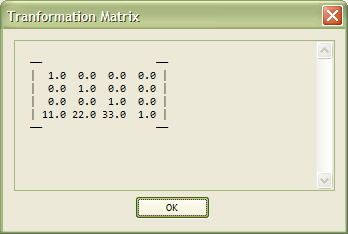
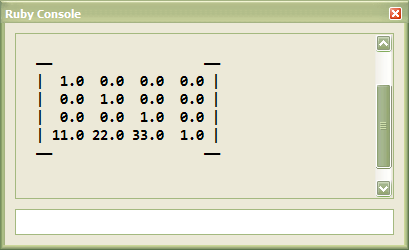

-
Thanks for responding, I have helped a lot.

me a question arises about the transformations. if I need to apply a transformation to an object but not in the principal coordinate axes, but the coordinate axes of a group (rotated) what should I use?
(sorry for my bad English)
-
You mean, transform an object around its own axis and not world axis?
-
-
Create a local transformation and apply with with
.transform!( tramsformation )instead of setting the.transformationmatrix manually. Or am I missing something? -
@thomthom said:
Create a local transformation and apply with with
.transform!( tramsformation )instead of setting the.transformationmatrix manually. Or am I missing something?How to create a local transformation? I would like to see some sample piece of code to guide me
-
I wonder if there is any way to know the orientation of a group with respect to the axis of the world
-
You have the model's axes from X_AXIS etc and ORIGIN.
Then you have group.transformation.axes or group.transformation.xaxis etc... and group.transformation.origin too...
So you can find the relative locations [which are points3ds] and angles between axes [which are vector3ds] - see the methods for those types... -
@dacastror said:
@thomthom said:
Create a local transformation and apply with with
.transform!( tramsformation )instead of setting the.transformationmatrix manually. Or am I missing something?How to create a local transformation? I would like to see some sample piece of code to guide me
<span class="syntaxdefault"><br />point </span><span class="syntaxkeyword">=</span><span class="syntaxdefault"> instance</span><span class="syntaxkeyword">.</span><span class="syntaxdefault">transformation</span><span class="syntaxkeyword">.</span><span class="syntaxdefault">origin<br />vector </span><span class="syntaxkeyword">=</span><span class="syntaxdefault"> instance</span><span class="syntaxkeyword">.</span><span class="syntaxdefault">transformation</span><span class="syntaxkeyword">.</span><span class="syntaxdefault">yaxis<br />rotation </span><span class="syntaxkeyword">=</span><span class="syntaxdefault"> Geom</span><span class="syntaxkeyword">;;</span><span class="syntaxdefault">Transformation</span><span class="syntaxkeyword">.</span><span class="syntaxdefault">rotation</span><span class="syntaxkeyword">(</span><span class="syntaxdefault"> point</span><span class="syntaxkeyword">,</span><span class="syntaxdefault"> vector</span><span class="syntaxkeyword">,</span><span class="syntaxdefault"> 30</span><span class="syntaxkeyword">.</span><span class="syntaxdefault">degrees </span><span class="syntaxkeyword">)<br /></span><span class="syntaxdefault">instance</span><span class="syntaxkeyword">.</span><span class="syntaxdefault">transform</span><span class="syntaxkeyword">!(</span><span class="syntaxdefault"> rotation </span><span class="syntaxkeyword">)<br /></span><span class="syntaxdefault"> </span> -
thank you very much Thomas and Tig that prompt reply!
I will try to implement your suggestions right now




Hello! It looks like you're interested in this conversation, but you don't have an account yet.
Getting fed up of having to scroll through the same posts each visit? When you register for an account, you'll always come back to exactly where you were before, and choose to be notified of new replies (either via email, or push notification). You'll also be able to save bookmarks and upvote posts to show your appreciation to other community members.
With your input, this post could be even better 💗
Register Login


Advertisement