sketchucation logo sketchucation
    • 登入
    Oops, your profile's looking a bit empty! To help us tailor your experience, please fill in key details like your SketchUp version, skill level, operating system, and more. Update and save your info on your profile page today!
    🔌 Smart Spline | Fluid way to handle splines for furniture design and complex structures. Download

    Webdialogs: inputbox shows black background (sketchup webkit

    已排程 已置頂 已鎖定 已移動 SketchUp Bug Reporting
    sketchup
    50 貼文 22 Posters 37.4k 瀏覽 22 Watching
    正在載入更多貼文
    • 從舊到新
    • 從新到舊
    • 最多點贊
    回覆
    • 在新貼文中回覆
    登入後回覆
    此主題已被刪除。只有擁有主題管理權限的使用者可以查看。
    • J 離線
      jeroentheuns
      最後由 編輯

      webdialogs: inputbox shows black background (sketchup webkit osx)

      Hi,

      Following html inputbox shows with a black background color when loaded inside a sketchup webdialog. Same html file opens ok on safari.
      Until 2 days ago it worked ok in sketchup. I DID UPGRADE TO LION 10.7.4

      restarting SketchUp and computer doesn't help
      removing all other plugins and restarting Sketchup doesn't help
      removing all sketchup preferences (plist files in library/preferences/) doesn't help
      removing and reïnstalling sketchup doesn't help.

      Does anybody know where sketchups webkit stores it's cache? In 'com.google.sketchuppro8.plist'I see
      <key>WebKitCacheModelPreferenceKey</key>
      <integer>1</integer>
      I was thinking to set this to 0 as to force webkit/sketchup to clean it's cache as I suspect there is something in there that gets loaded and produces this incorrect html rendering.
      I can see this by opening the file in textwrangler, but textwrangler apparently cannot correctly save the editet binary format.

      SketchUp 8.0.11751, OSX Lion 10.7.4


      webdialog black input.png


      html source

      1 條回覆 最後回覆 回覆 引用 0
      • D 離線
        driven
        最後由 編輯

        hi if you have Apples Developer Tools you can use Web Inspector to find the cause...
        see this post http://forums.sketchucation.com/viewtopic.php?f=180&t=37277&p=328917&hilit=enable+webInspector#p328855
        john

        learn from the mistakes of others, you may not live long enough to make them all yourself...

        1 條回覆 最後回覆 回覆 引用 0
        • M 離線
          mwm5053
          最後由 編輯

          Well by the subject you can tell my problem. It seems to be native to my computer. Mac OSX 10.7 using SU 8 Pro the same DC comp. on my WIN laptop are correctly displayed. The peculiar thing is the DC comp. from Google are able to change dim.


          screen2.jpg


          base cab.skp

          2011 iMac
          SU 2015 Pro, 2017 Make
          V2 Twilight
          macOS Sierra 10.12.5

          1 條回覆 最後回覆 回覆 引用 0
          • M 離線
            mwm5053
            最後由 編輯

            John, I saw the link you posted and that's way over my expertise. In the skp file I uploaded the DC components values were blacked out all but the ones from Google any reason why? The components from Sketchdata and Kraftmaid still had some options that however were still accesable 😉

            2011 iMac
            SU 2015 Pro, 2017 Make
            V2 Twilight
            macOS Sierra 10.12.5

            1 條回覆 最後回覆 回覆 引用 0
            • P 離線
              petersaal
              最後由 編輯

              Just in case I wasn't clear in the previous post, you only need to make the additions/changes in red.

              Here's some background on the issue on StackOverflow:

              Link Preview Image
              Black input backgrounds - Cocoa WebView

              Morning everyone, I've been developing and maintaining a Cocoa app which contains a WebView section. It's built against the 10.5 SDK to maintain PPC compatibility. With the most recent Safari upda...

              favicon

              Stack Overflow (stackoverflow.com)

              1 條回覆 最後回覆 回覆 引用 0
              • P 離線
                petersaal
                最後由 編輯

                I found the same problem last week. The source of the problem is the Safari update that Apple pushed out last week (5.1.7). Here's a work-around for dynamic components: make the following edits in red to the manager.css and configurator.css files. (located in Library/Application Support/Google SketchUp 8/SketchUp/Tools/Dynamic Components/css)

                In Manager.css:

                .edit-field {
                position: absolute;
                border-top: 2px solid #3063C9;
                border-left: 2px solid #3063C9;
                border-right: 2px solid #A5C4FF;
                border-bottom: 2px solid #A5C4FF;
                background-color: white; font-size: 12px;
                font-family: sans-serif;
                width: 100%;
                height: 100%;
                overflow: hidden;
                padding-left: 2px;
                padding-top: 1px;
                border: 1px solid #000000;
                }

                In Configurator.css:

                .config-field {
                width: 100%;
                font-size: 11px;
                font-family: tahoma, sans-serif;
                height: 22px;
                background-color: white;
                border: 1px solid #000000;
                }

                .config-field-readonly {
                width: 100%;
                font-size: 11px;
                font-family: tahoma, sans-serif;
                height: 22px;
                background-color: threedface;
                border: 1px solid #000000;
                }

                1 條回覆 最後回覆 回覆 引用 0
                • R 離線
                  rdeath
                  最後由 編輯

                  Hi, i have located the manager.css and configurator.css files and opened them. I don't seem to be able to edit them. Can you point me in the right direction. THX for finding the problem it's been driving me nuts. Look forward to your help

                  1 條回覆 最後回覆 回覆 引用 0
                  • GaieusG 離線
                    Gaieus
                    最後由 編輯

                    @rdeath said:

                    I don't seem to be able to edit them.

                    Why not? Open it in a plain text editor (not a word processor) and you can simply copy/paste those lines then save.

                    Gai...

                    1 條回覆 最後回覆 回覆 引用 0
                    • R 離線
                      rdeath
                      最後由 編輯

                      Ok, I have done all that RESTARTED iMAC and things don't seem to have changed.....? Any ideas..?


                      black feilds.jpg

                      1 條回覆 最後回覆 回覆 引用 0
                      • Dan RathbunD 離線
                        Dan Rathbun
                        最後由 編輯

                        @rdeath said:

                        Ok, I have done all that RESTARTED iMAC and things don't seem to have changed.....? Any ideas..?

                        Clear your browser cache (or temporary internet files directory.)

                        I'm not here much anymore.

                        1 條回覆 最後回覆 回覆 引用 0
                        • M 離線
                          mwm5053
                          最後由 編輯

                          Still no luck

                          2011 iMac
                          SU 2015 Pro, 2017 Make
                          V2 Twilight
                          macOS Sierra 10.12.5

                          1 條回覆 最後回覆 回覆 引用 0
                          • jeff hammondJ 離線
                            jeff hammond
                            最後由 編輯

                            @mwm5053 said:

                            Well by the subject you can tell my problem. It seems to be native to my computer. Mac OSX 10.7 using SU 8 Pro the same DC comp. on my WIN laptop are correctly displayed. The peculiar thing is the DC comp. from Google are able to change dim.

                            that's odd.. (i'm seeing the same behavior..)

                            the items are still editable, it's just that the black is the same color as the text so you can see it.. if you triple click an entry, the field will highlight in blue so you can see it.. (when blue, push delete then enter your new numbers ..albeit blindly)

                            heres a shot after focusing the component options dialog then selectAll-- 😕 😕


                            screen 2012-05-22 at 10.04.52 PM.jpg

                            dotdotdot

                            1 條回覆 最後回覆 回覆 引用 0
                            • A 離線
                              Aerilius
                              最後由 編輯

                              @rdeath said:

                              Ok, I have done all that RESTARTED iMAC and things don't seem to have changed.....? Any ideas..?

                              Your image shows a website (that is loaded from the internet and can't use these css hacks). Does it at least work for components options?

                              @mwm5053 said:

                              Still no luck

                              Can you check again that all the css properties are separated with a semi-colon? I think you forgot one in %(#000000)[.config_field].

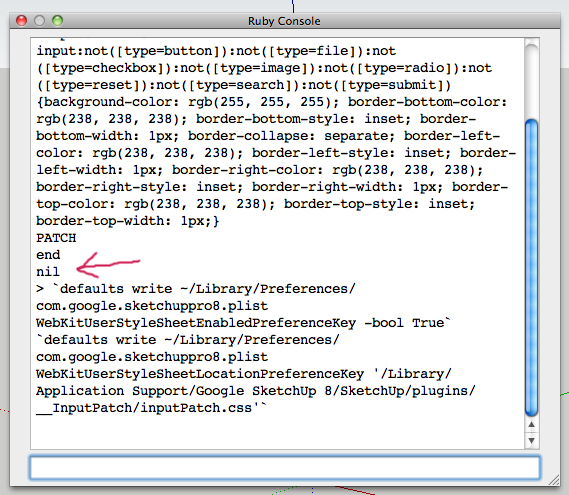
                              Another idea, would a WebView also accept a user stylesheet (that would override the default background in all websites+webdialogs in SketchUp)?

                              1 條回覆 最後回覆 回覆 引用 0
                              • M 離線
                                mwm5053
                                最後由 編輯

                                I saw that and thanks for pointing that out but still seeing black fields. Jeff's solution did allow me to change width dimension ultimately. I don't think this a SU thing however I believe it was an update to the Safai browser for Macs after the Flashback incident. From what I've read it not only effected SU but other programs that use webdialog boxes on Mac. Emptying the cache hasn't proved to be useful either.

                                2011 iMac
                                SU 2015 Pro, 2017 Make
                                V2 Twilight
                                macOS Sierra 10.12.5

                                1 條回覆 最後回覆 回覆 引用 0
                                • R 離線
                                  rdeath
                                  最後由 編輯

                                  OK, purged cache in Safari and still no luck...!! anything else i can try..??? this is VERY frustrating..!!


                                  CSS feilds.jpg

                                  1 條回覆 最後回覆 回覆 引用 0
                                  • P 離線
                                    petersaal
                                    最後由 編輯

                                    Move "font-size: 12px;" down to its own line. I had that on the same line as background-color and that's an error on my part.

                                    If that doesn't do the trick, the only difference might be the OS X version. I'm still on 10.6 and I don't have a way to test 10.7.

                                    Just to be clear: this fix is only for dynamic components. It will not fix the 3D Warehouse search box or any other affected software on the mac.

                                    1 條回覆 最後回覆 回覆 引用 0
                                    • L 離線
                                      lwerner
                                      最後由 編輯

                                      Thanks for posting this workaround! It worked perfectly for me. (On OSX 10.7.4 Lion, Sketchup 8.0.14345 Pro)

                                      Laura

                                      1 條回覆 最後回覆 回覆 引用 0
                                      • M 離線
                                        mwm5053
                                        最後由 編輯

                                        @ Petersall

                                        I followed your suggestion and didn't seem to make any differance 😞
                                        Did I do it right?

                                        Edit Went back and corrected a few errors and fine now.


                                        manager.css.jpg


                                        configure .css.jpg

                                        2011 iMac
                                        SU 2015 Pro, 2017 Make
                                        V2 Twilight
                                        macOS Sierra 10.12.5

                                        1 條回覆 最後回覆 回覆 引用 0
                                        • JuantxoJ 離線
                                          Juantxo
                                          最後由 編輯

                                          When I updated to Safari to 5.1.7 in Mac Leopard webdialogs boxes turn black in Sketchup.
                                          I've installed an older version of safari with pacifist and now it works again.

                                          http://www.charlessoft.com/ (pacifist software)
                                          http://mac.oldapps.com/safari.php (Safari 5.1.1 (Snow Leopard))

                                          1 條回覆 最後回覆 回覆 引用 0
                                          • jeff hammondJ 離線
                                            jeff hammond
                                            最後由 編輯

                                            @lwerner said:

                                            Thanks for posting this workaround! It worked perfectly for me. (On OSX 10.7.4 Lion, Sketchup 8.0.14345 Pro)

                                            Laura

                                            ditto.. works fine for me too..
                                            thanks peter.

                                            dotdotdot

                                            1 條回覆 最後回覆 回覆 引用 0
                                            • 1
                                            • 2
                                            • 3
                                            • 3 / 3
                                            • 第一個貼文
                                              最後的貼文
                                            Buy SketchPlus
                                            Buy SUbD
                                            Buy WrapR
                                            Buy eBook
                                            Buy Modelur
                                            Buy Vertex Tools
                                            Buy SketchCuisine
                                            Buy FormFonts

                                            Advertisement