sketchucation logo sketchucation
    • 登入
    Oops, your profile's looking a bit empty! To help us tailor your experience, please fill in key details like your SketchUp version, skill level, operating system, and more. Update and save your info on your profile page today!
    🔌 Smart Spline | Fluid way to handle splines for furniture design and complex structures. Download

    [Plugin] SectionByCamera (V0.2) - UPDATED 4 June 2012

    已排程 已置頂 已鎖定 已移動 Plugins
    26 貼文 16 Posters 20.4k 瀏覽 16 Watching
    正在載入更多貼文
    • 從舊到新
    • 從新到舊
    • 最多點贊
    回覆
    • 在新貼文中回覆
    登入後回覆
    此主題已被刪除。只有擁有主題管理權限的使用者可以查看。
    • P 離線
      pgarmyn
      最後由 pgarmyn 編輯

      Hallo everybody, here is my second (public) plugin.
      The plugin gives me an other way of making plans. Especially in those cases where a 3d model is complete. Shadows in Sketchup plans are not very natural. The sun enters by the cutted part of the model. This way of making the section preserves the realistic shadows:
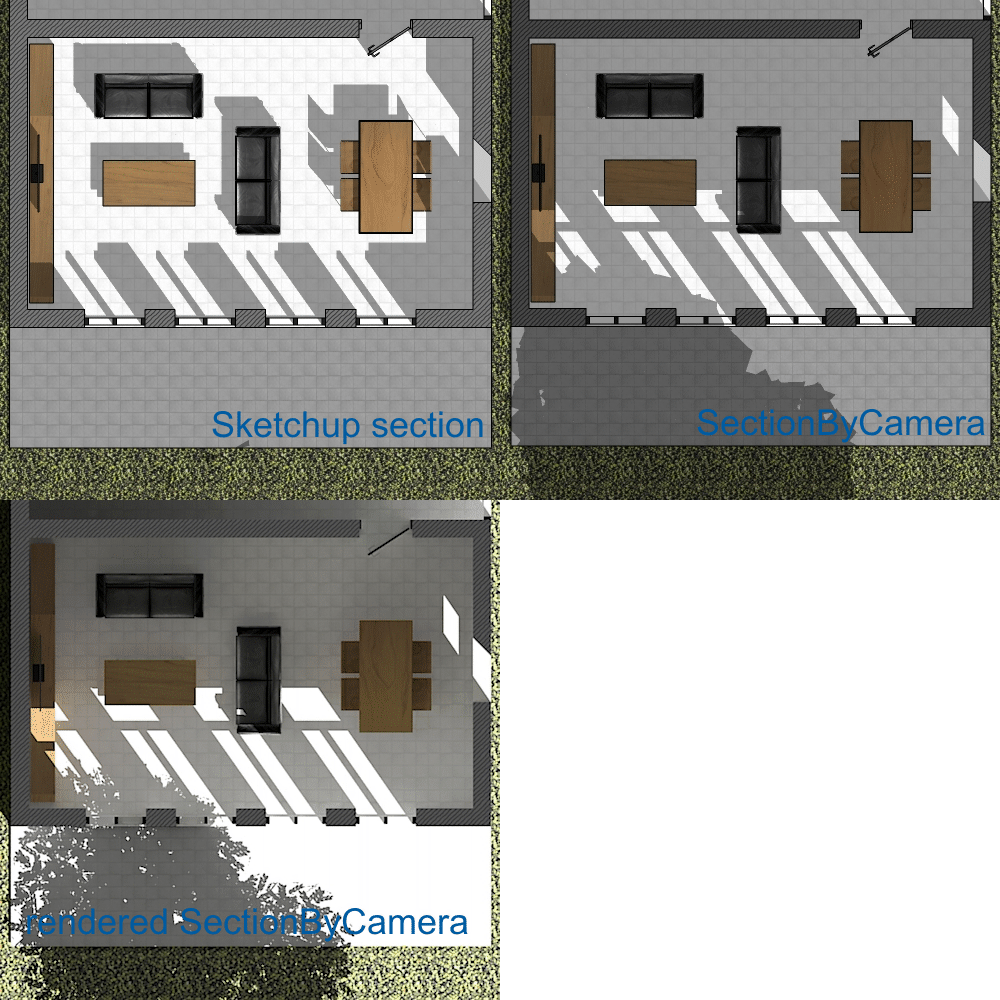
      SketchupSection - SectionByCamera - RenderedSectionByCamera (Twilight + Kerkythea) : CLICK ON IT TO SEE THE COMPLETE IMAGE

      In this file, the image has been combined with vector-drawing (Powerdraft):
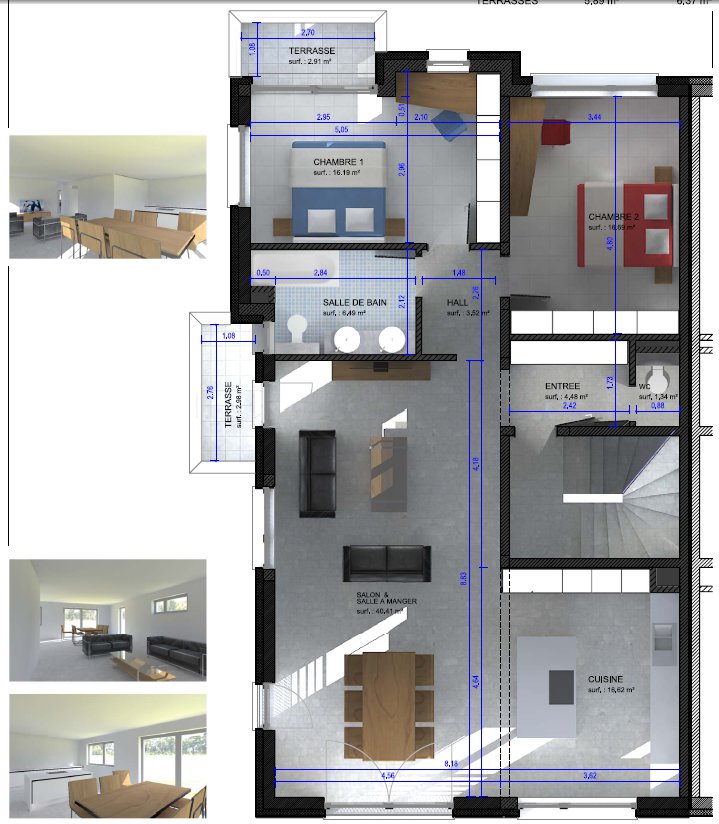
      Rendered SectionByCamera (Twilight + Kerkythea)

      It works also on Mac. Thanks Peter (pbacot) for testing.

      For the SketchupTeam : realistic shadows in sections (plan en vertical section) is in my wish list.

      Copyright
      THIS SOFTWARE IS PROVIDED "AS IS" AND WITHOUT ANY EXPRESS OR
      IMPLIED WARRANTIES, INCLUDING, WITHOUT LIMITATION, THE IMPLIED
      WARRANTIES OF MERCHANTABILITY AND FITNESS FOR A PARTICULAR PURPOSE.

      Name : SectionByCamera
      Version: V0.2-2012.06.04-2113
      Author : pgarmyn
      Type : Tool

      Description :
      This tool places the camera in (near) the sectionplan. The parallel view will section the model (without section cuts active). But the SHADOWS of the entire model will be displayed (if section cuts are switched off). This will produce a plan or section view with realistic shadow information.
      Works with SKetchup 8 and 2013. [highlight=#ffff00:hmyj04s3]NOT FOR Sketchup 2014[/highlight:hmyj04s3]
      The camera-position is saved in a new scene called "SectByCam"
      The generated camera should also work with those renderers :

      • Twilight : OK
      • Kerkythea, with Twilight exporter
      • SU2KT from Tomasz : The camera is moved, outside the model : Doesn't work.
      • Maxwell : shadows not correct, shadows of 'ceilings' are missing. Thanks Peter (pbacot) for testing .

      Installation :

      • unzip and copy the unique file into the plugins directory

      Usage :

      • select a section plan
      • in the context menu : select 'Section by camera' > '.... automatic'
        or 'Section by camera' > '.... define camera distance'
      • switch off the 'section planes' and 'section cuts' (Menu : View >> Section...)

      Known issues:
      The image rendered on the screen is cutted some centimeters before the camera. The distance between this 'cut' and the camera depends of the dimensions of the model. The tools estimates this distance (in '.... automatic'; distance proposed in '.... define camera distance'), if necessary, it can be adapted in the second option.
      If the applied value is to small, the SectionPlane won't be visible after activating the tool. This is also true for faces generated by plugins like SectionCutFace (TIG) or realSection (GWydouw).
      SOLUTION : apply a greater distance in '.... define camera distance'

      History:
      First version V0.1-2012.05.06-1938
      2nd version V0.2-2012.06.04-2059 : Correction for certain non horizontal sections (thanks vidy for reporting the bug)
      IMPORTANT : erase the older version if installed (= file SectionByCam-20120506-1939.rb) ❗


      COPY in the plugin-directory; IMPORTANT : erase the older version if installed (= SectionByCam-20120506-1939.rb)

      1 條回覆 最後回覆 回覆 引用 0
      • PixeroP 離線
        Pixero
        最後由 編輯

        Thanks, this looks very useful.

        1 條回覆 最後回覆 回覆 引用 0
        • CadFatherC 離線
          CadFather
          最後由 編輯

          Many thanks pgarmyn.. this is a really good plugin - i was asked this in a recent class and it was not an easy answer.. 👍

          1 條回覆 最後回覆 回覆 引用 0
          • pilouP 離線
            pilou
            最後由 編輯

            Very neat result! ☀

            Frenchy Pilou
            Is beautiful that please without concept!
            My Little site :)

            1 條回覆 最後回覆 回覆 引用 0
            • H 離線
              haynesc
              最後由 編輯

              Can I see a video explaining how this works please?

              1 條回覆 最後回覆 回覆 引用 0
              • pbacotP 離線
                pbacot
                最後由 編輯

                [floatl:wid3noag][/floatl:wid3noag]this looks like a good one. Works in Mac.

                But with Maxwell Fire the result is not correct. The wall shadows are there but the ceiling shadows and ceiling are not. View is not section. Needs more tries to figure out--sort of a half way result.

                Thank you very much for sharing this! 👍

                MacOSX MojaveSketchUp Pro v19 Twilight v2 Thea v3 PowerCADD

                1 條回覆 最後回覆 回覆 引用 0
                • P 離線
                  Phil Rader AIA
                  最後由 編輯

                  thanks I'll give it a whirl

                  http://www.philrader.com

                  1 條回覆 最後回覆 回覆 引用 0
                  • M 離線
                    mirale999
                    最後由 編輯

                    great plugin~! I just wanted this function a few days, for my works to display better~

                    paranoia is a higher form of awareness...

                    1 條回覆 最後回覆 回覆 引用 0
                    • V 離線
                      vidy
                      最後由 編輯

                      Dear pgarmyn,

                      thanks for this plug-in, its really good, but i try to do it on section elevation, but it seems won't generate the scene, is it only just for plan view??

                      thanks,
                      vd

                      still so much to learn..

                      1 條回覆 最後回覆 回覆 引用 0
                      • P 離線
                        pgarmyn
                        最後由 編輯

                        @vidy said:

                        Dear pgarmyn,

                        thanks for this plug-in, its really good, but i try to do it on section elevation, but it seems won't generate the scene, is it only just for plan view??

                        thanks,
                        vd

                        It should work in any direction. What happens? What's your system? What is your Sketchup version?

                        1 條回覆 最後回覆 回覆 引用 0
                        • V 離線
                          vidy
                          最後由 編輯

                          Im working with Win XP SP 2, and Google Sketchup Pro 8 M3,
                          it just working fine whenever im doing it at plan view (it generated the scene tab)
                          but when i was try to do sectionbycamera on elevation, it seems don't have any reaction.. (not generated a scene tab)

                          thanks,
                          vd

                          still so much to learn..

                          1 條回覆 最後回覆 回覆 引用 0
                          • P 離線
                            pgarmyn
                            最後由 編輯

                            @vidy said:

                            Im working with Win XP SP 2, and Google Sketchup Pro 8 M3,
                            it just working fine whenever im doing it at plan view (it generated the scene tab)
                            but when i was try to do sectionbycamera on elevation, it seems don't have any reaction.. (not generated a scene tab)

                            thanks,
                            vd

                            OK.
                            I found out that a section parallel to the red-blue axises doesn't work.
                            I will fix that. Thanks for testing vidy. 😉

                            1 條回覆 最後回覆 回覆 引用 0
                            • P 離線
                              pgarmyn
                              最後由 編輯

                              This PLUGIN has been UPDATED :
                              Look at the top of this page.
                              IMPORTANT : erase the older version if installed (= file SectionByCam-20120506-1939.rb)

                              1 條回覆 最後回覆 回覆 引用 0
                              • M 離線
                                methade
                                最後由 編輯

                                This is my first post. And thank you for this great plugin. Its very very useful for me... Kind regards.

                                1 條回覆 最後回覆 回覆 引用 0
                                • M 離線
                                  methade
                                  最後由 編輯

                                  Me again. I am testing the plugin but having difficulties with renderer maxwell fire. It seems its not working. Any help?. Thanks.

                                  1 條回覆 最後回覆 回覆 引用 0
                                  • P 離線
                                    pgarmyn
                                    最後由 編輯

                                    @methade said:

                                    Me again. I am testing the plugin but having difficulties with renderer maxwell fire. It seems its not working. Any help?. Thanks.

                                    Can't help that. Pbacot had the same experience (see above). I menshioned it in the description.

                                    1 條回覆 最後回覆 回覆 引用 0
                                    • S 離線
                                      sepo
                                      最後由 編輯

                                      Does this plugin work with SU 2014 and btw where is the plugin folder in SU 2014?

                                      1 條回覆 最後回覆 回覆 引用 0
                                      • V 離線
                                        vidy
                                        最後由 編輯

                                        Tested it... and it works like charm
                                        thank you pgarmyn for the update..

                                        regards,
                                        vd

                                        still so much to learn..

                                        1 條回覆 最後回覆 回覆 引用 0
                                        • P 離線
                                          pgarmyn
                                          最後由 編輯

                                          @sepo said:

                                          Does this plugin work with SU 2014 and btw where is the plugin folder in SU 2014?

                                          Sorry doesn't work yet on SU 2014

                                          1 條回覆 最後回覆 回覆 引用 0
                                          • mitcorbM 離線
                                            mitcorb
                                            最後由 編輯

                                            @pgarmyn:
                                            From your first post- as edited: "Works with SKetchup 8 and 2014. NOT FOR Sketchup 2014 "
                                            ??

                                            I take the slow, deliberate approach in my aimless wandering.

                                            1 條回覆 最後回覆 回覆 引用 0
                                            • 1
                                            • 2
                                            • 1 / 2
                                            • 第一個貼文
                                              最後的貼文
                                            Buy SketchPlus
                                            Buy SUbD
                                            Buy WrapR
                                            Buy eBook
                                            Buy Modelur
                                            Buy Vertex Tools
                                            Buy SketchCuisine
                                            Buy FormFonts

                                            Advertisement

