sketchucation logo sketchucation
    • 登入
    Oops, your profile's looking a bit empty! To help us tailor your experience, please fill in key details like your SketchUp version, skill level, operating system, and more. Update and save your info on your profile page today!
    🔌 Smart Spline | Fluid way to handle splines for furniture design and complex structures. Download

    Mini-challenge

    已排程 已置頂 已鎖定 已移動 SketchUp Discussions
    sketchup
    328 貼文 26 Posters 38.2k 瀏覽 26 Watching
    正在載入更多貼文
    • 從舊到新
    • 從新到舊
    • 最多點贊
    回覆
    • 在新貼文中回覆
    登入後回覆
    此主題已被刪除。只有擁有主題管理權限的使用者可以查看。
    • pilouP 離線
      pilou
      最後由 編輯

      It's implicit at my new version above
      You have caltulated before the good rectangle for have the good result 😉

      Frenchy Pilou
      Is beautiful that please without concept!
      My Little site :)

      1 條回覆 最後回覆 回覆 引用 0
      • jeff hammondJ 離線
        jeff hammond
        最後由 編輯

        @unknownuser said:

        It was made step 3 😉

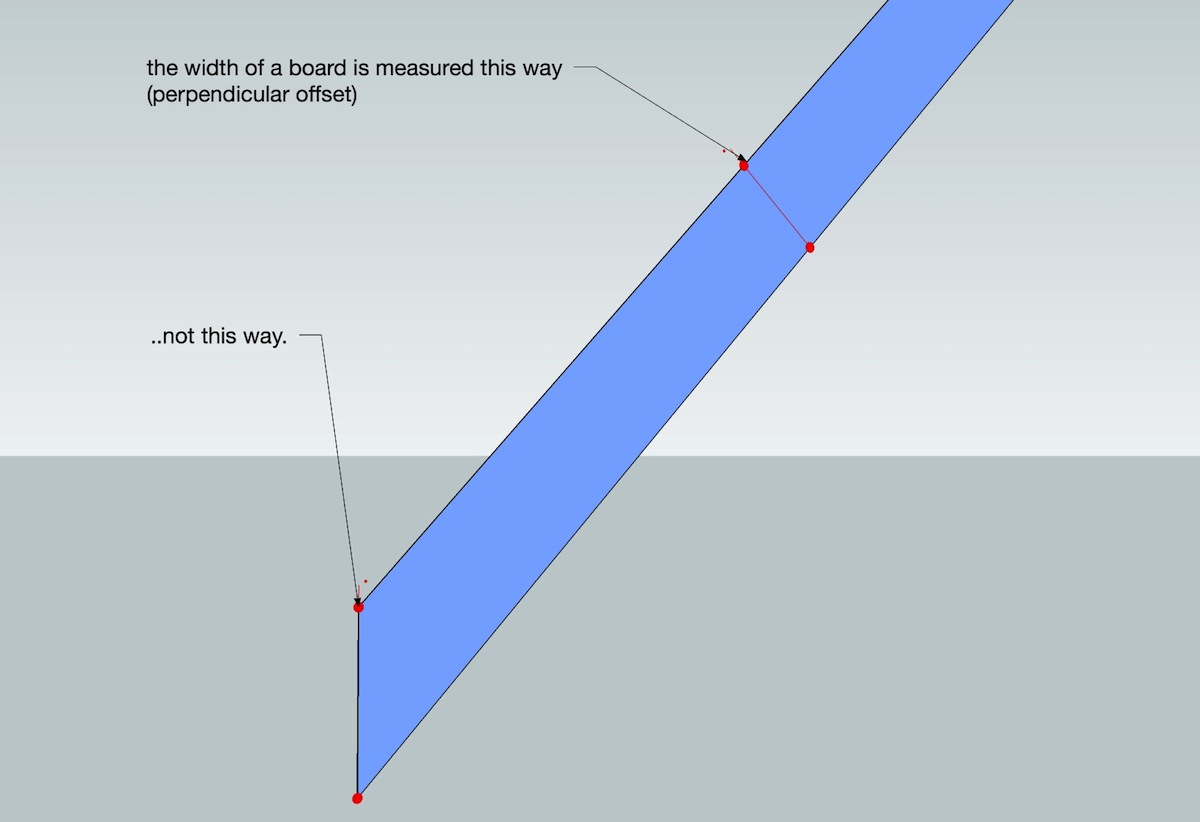
        thisway.jpg

        [ie--- the board is a set thickness.. it will always be the same.. the part you're measuring will constantly change depending on the gap and height (angle)..]

        dotdotdot

        1 條回覆 最後回覆 回覆 引用 0
        • pbacotP 離線
          pbacot
          最後由 編輯

          I just draw a 2x4 or whatever and rotate it then cut with two uprights...? I did that today in a trellis design.

          MacOSX MojaveSketchUp Pro v19 Twilight v2 Thea v3 PowerCADD

          1 條回覆 最後回覆 回覆 引用 0
          • thomthomT 離線
            thomthom
            最後由 編輯

            Does it has to be drawn correct in the first place?
            I was thinking, drawing the profile of the board in the correct size, extrude, rotate it, taper off the ends. - too many steps?

            Thomas Thomassen — SketchUp Monkey & Coding addict
            List of my plugins and link to the CookieWare fund

            1 條回覆 最後回覆 回覆 引用 0
            • jeff hammondJ 離線
              jeff hammond
              最後由 編輯

              @unknownuser said:

              It's implicit at my new version above
              You have caltulated before the good rectangle for have the good result 😉

              ok.. i'll try to switch up the way i'm presenting the problem..

              draw this:

              (notice which way the 5 units are being measured.. if i measure 5 in the place you're suggesting, my board will no longer have a width of 5.. it will be too skinny)
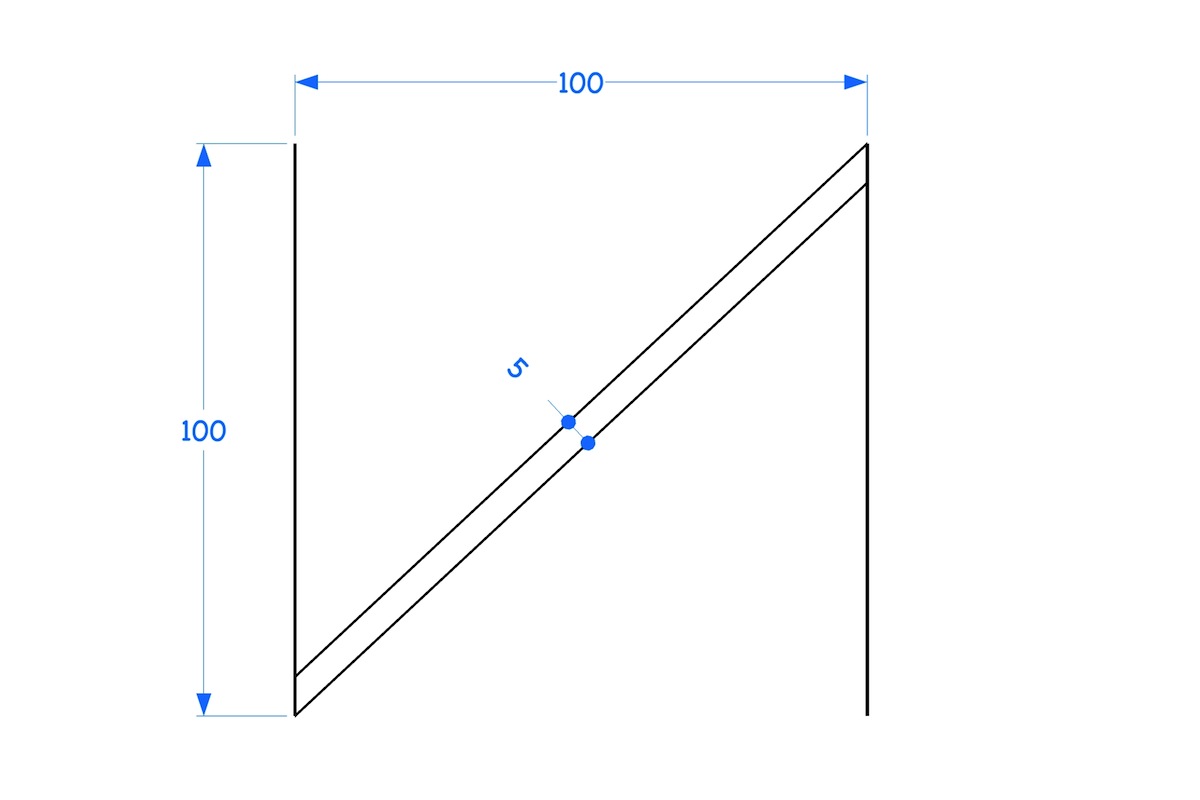
              mini3.jpg

              dotdotdot

              1 條回覆 最後回覆 回覆 引用 0
              • thomthomT 離線
                thomthom
                最後由 編輯

                This is an elaborate plugin request - right?

                Thomas Thomassen — SketchUp Monkey & Coding addict
                List of my plugins and link to the CookieWare fund

                1 條回覆 最後回覆 回覆 引用 0
                • pbacotP 離線
                  pbacot
                  最後由 編輯

                  Well if you had a true arc or circle you could find your exact intersection points. But there are no true circles in SU.

                  MacOSX MojaveSketchUp Pro v19 Twilight v2 Thea v3 PowerCADD

                  1 條回覆 最後回覆 回覆 引用 0
                  • jeff hammondJ 離線
                    jeff hammond
                    最後由 編輯

                    @thomthom said:

                    Does it has to be drawn correct in the first place?
                    I was thinking, drawing the profile of the board in the correct size, extrude, rotate it, taper off the ends. - too many steps?

                    take as many steps as needed.. but for you, once you recognize the issue, you'll probably immediate think ruby as a means of solving it.. the way i do it is with a dynamic component.. there's a brute force method to accomplish it within sketchup itself but i'm wondering if i happen to be missing a method.. no solutions given so far will accomplish it..

                    [EDIT.. haha.. re:your post while i was typing this one 😄 ]
                    but no.. i didn't set out for it to be.. it's a pretty cool little challenge because of how simple it seems.. hopefully a plugin doesn't jump in too soon and spoil all the fun 😉

                    dotdotdot

                    1 條回覆 最後回覆 回覆 引用 0
                    • jeff hammondJ 離線
                      jeff hammond
                      最後由 編輯

                      @pbacot said:

                      Well if you had a true arc or circle you could find your exact intersection points. But there are no true circles in SU.

                      right, that's the brute force method i mentioned above.. make a little arc with a thousand segments and it will work..

                      dotdotdot

                      1 條回覆 最後回覆 回覆 引用 0
                      • thomthomT 離線
                        thomthom
                        最後由 編輯

                        @unknownuser said:

                        @pbacot said:

                        Well if you had a true arc or circle you could find your exact intersection points. But there are no true circles in SU.

                        right, that's the brute force method i mentioned above.. make a little arc with a thousand segments and it will work..

                        That sounds dangerous - most likely you'll get some minor accuracy issue somewhere ~0.00001 of whatever - something that eventually cascades into a nightmare! (thinking of all them imported AutoCAD plans I've had... x_X )

                        Thomas Thomassen — SketchUp Monkey & Coding addict
                        List of my plugins and link to the CookieWare fund

                        1 條回覆 最後回覆 回覆 引用 0
                        • jeff hammondJ 離線
                          jeff hammond
                          最後由 編輯

                          @thomthom said:

                          @unknownuser said:

                          @pbacot said:

                          Well if you had a true arc or circle you could find your exact intersection points. But there are no true circles in SU.

                          right, that's the brute force method i mentioned above.. make a little arc with a thousand segments and it will work..

                          That sounds dangerous - most likely you'll get some minor accuracy issue somewhere ~0.00001 of whatever - something that eventually cascades into a nightmare! (thinking of all them imported AutoCAD plans I've had... x_X )

                          yes.. that can happen and why i eventually went with a dynamic component instead (maths)

                          for getting an accurate enough dimension for a framer to cut.. it's ok.. but to have something like that in a drawing where you may be inferencing etc for future parts of the drawing.. i agree, it's a no-no.. you can throw off everything else down the line..

                          dotdotdot

                          1 條回覆 最後回覆 回覆 引用 0
                          • pbacotP 離線
                            pbacot
                            最後由 編輯

                            From tip to tip you have length A-C the hypotenuse on the board. You know the width of the board B-C so you can find A-B. So when you have a board A-B long exactly you can rotate it with snaps then trim it, but is the rotate operation inaccurate?

                            MacOSX MojaveSketchUp Pro v19 Twilight v2 Thea v3 PowerCADD

                            1 條回覆 最後回覆 回覆 引用 0
                            • jeff hammondJ 離線
                              jeff hammond
                              最後由 編輯

                              @pbacot said:

                              From tip to tip you have length A-C the hypotenuse on the board. You know the width of the board B-C so you can find A-B. So when you have a board A-B long exactly you can rotate it with snaps then trim it, but is the rotate operation inaccurate?

                              rotate is accurate.. you just need something to snap to which is hard to get in this case..

                              but what you're saying.. can you do that geometrically (as in, can you do it using only sketchup tools) or would you need a calculator?
                              (currently, the only way i've been able to do it is with a calculator (well, i use the DC dialog for the calculator that can then adjust the position of lines))

                              dotdotdot

                              1 條回覆 最後回覆 回覆 引用 0
                              • thomthomT 離線
                                thomthom
                                最後由 編輯

                                Cursed this challenge! Now it really bothers me that I cannot find an easy way for this in SU.
                                I'm not even quite sure how to calculate the angel... ?

                                Thomas Thomassen — SketchUp Monkey & Coding addict
                                List of my plugins and link to the CookieWare fund

                                1 條回覆 最後回覆 回覆 引用 0
                                • GaieusG 離線
                                  Gaieus
                                  最後由 編輯

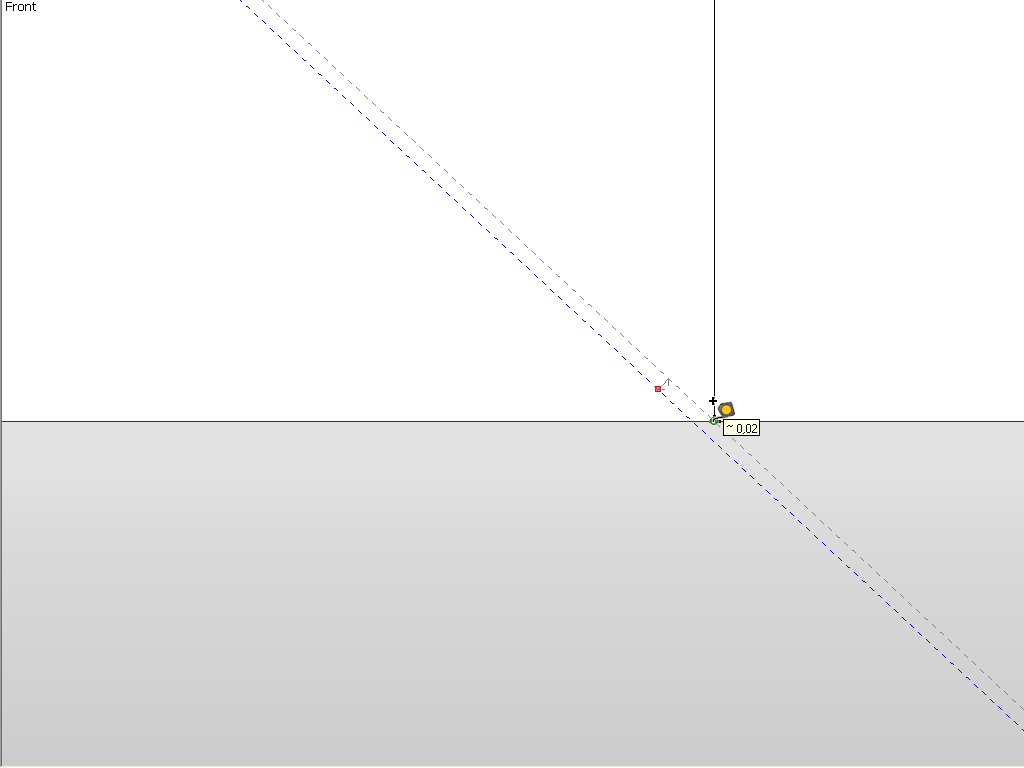
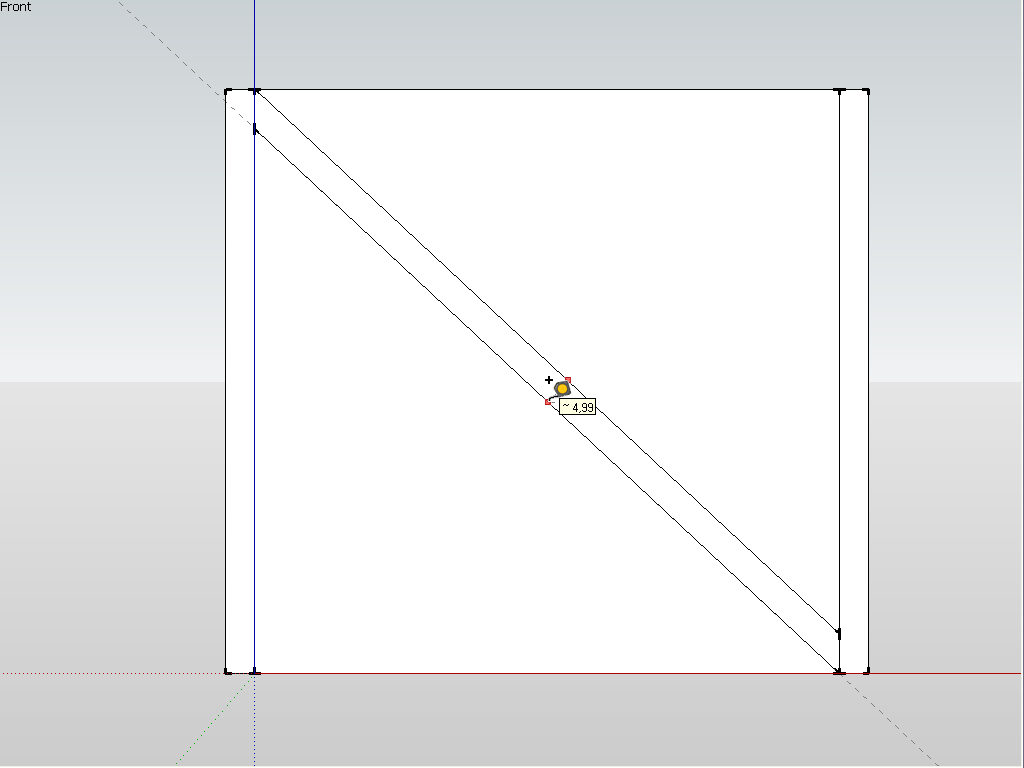
                                  Yes, it's a pity that true geometry is impossible in SU and one always needs to rely on workarounds. In this "rotation" workaround you still get a 0.01 cm (0.1 mm) inaccuracy which is obviously okay for constructing but annoying to know there is in your model since you never know when exactly you'd need that accuracy for inferencing.

                                  I have drawn two guides at 5 (well I used cms but who cares) apart and then tried to rotate them but as you can see, although I do get the endpoint inferencing, SU actually does not know what it is inferring there along the guide.
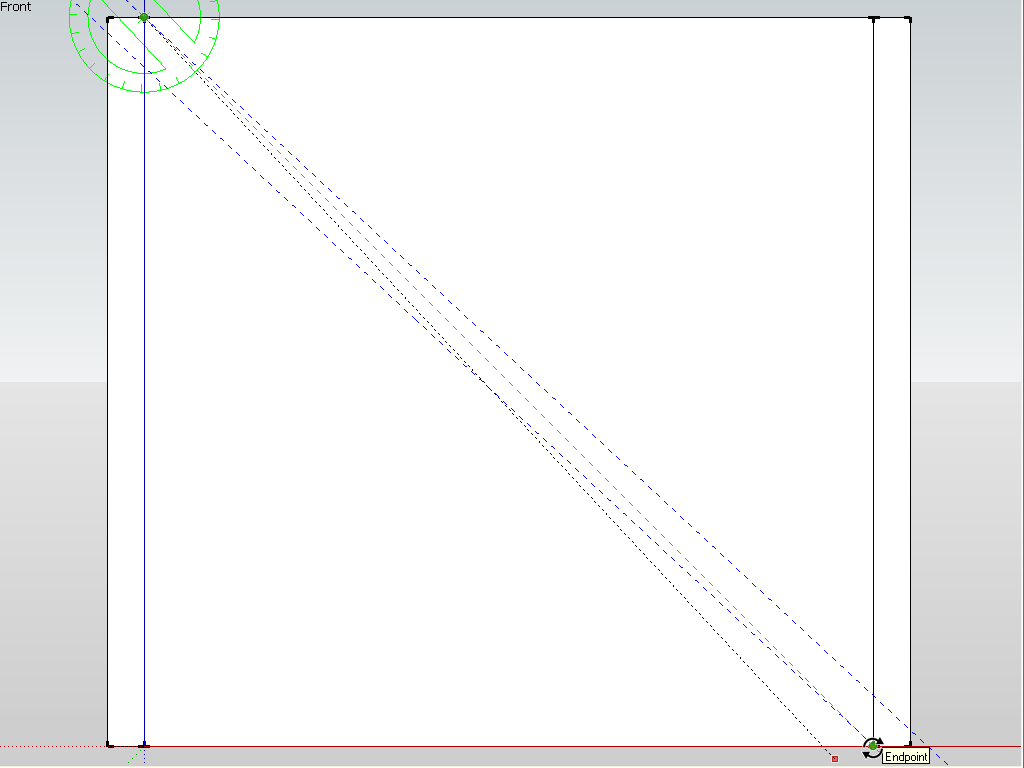
                                  01.png


                                  02.png


                                  03.png

                                  Gai...

                                  1 條回覆 最後回覆 回覆 引用 0
                                  • thomthomT 離線
                                    thomthom
                                    最後由 編輯

                                    Align.png

                                    Thomas Thomassen — SketchUp Monkey & Coding addict
                                    List of my plugins and link to the CookieWare fund

                                    1 條回覆 最後回覆 回覆 引用 0
                                    • pilouP 離線
                                      pilou
                                      最後由 編輯

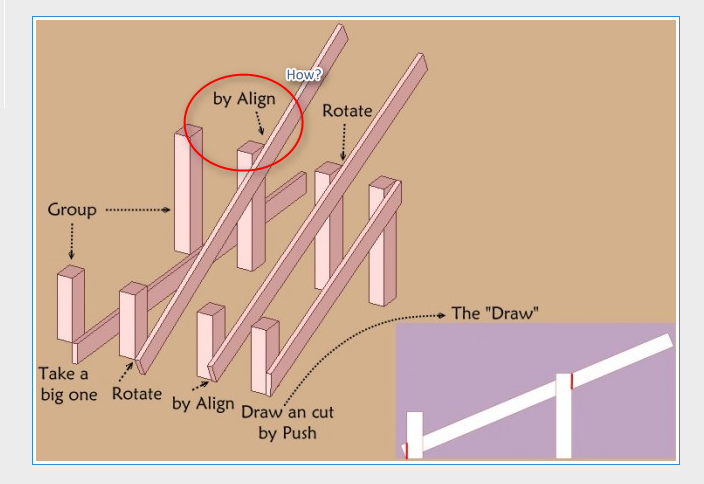
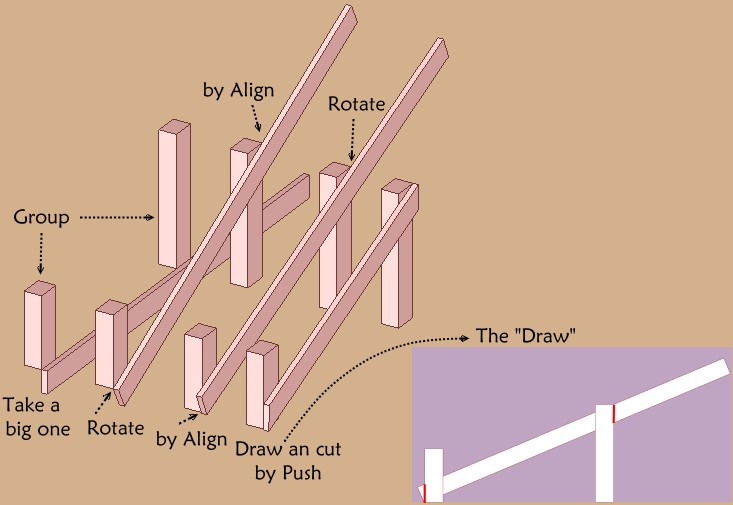
                                      Like in reality what more simple without any Plugin ? 💚
                                      The big one is of course any what you want!
                                      Groups are any size!
                                      general.jpg

                                      Frenchy Pilou
                                      Is beautiful that please without concept!
                                      My Little site :)

                                      1 條回覆 最後回覆 回覆 引用 0
                                      • thomthomT 離線
                                        thomthom
                                        最後由 編輯

                                        @gaieus said:

                                        I have drawn two guides at 5 (well I used cms but who cares) apart and then tried to rotate them

                                        What where you snapping to/with?

                                        Thomas Thomassen — SketchUp Monkey & Coding addict
                                        List of my plugins and link to the CookieWare fund

                                        1 條回覆 最後回覆 回覆 引用 0
                                        • GaieusG 離線
                                          Gaieus
                                          最後由 編輯

                                          It's in the screenshot. But note that no matter how "close" you seem to snap along a guide (or any edge), it will never be accurate (second screen shot). The cursor is "sliding along" the guide and does no give an accurate inference.

                                          Gai...

                                          1 條回覆 最後回覆 回覆 引用 0
                                          • thomthomT 離線
                                            thomthom
                                            最後由 編輯

                                            @unknownuser said:

                                            Like in reality what more simple without any Plugin ? 💚
                                            The big one is of course any what you want!
                                            Groups are any size!
                                            [attachment=0:1cpfqa3m]<!-- ia0 -->general.jpg<!-- ia0 -->[/attachment:1cpfqa3m]

                                            Wooh! Now I understand. I just didn't notice how you originally aligned the board.

                                            Thomas Thomassen — SketchUp Monkey & Coding addict
                                            List of my plugins and link to the CookieWare fund

                                            1 條回覆 最後回覆 回覆 引用 0
                                            • 1
                                            • 2
                                            • 9
                                            • 10
                                            • 11
                                            • 12
                                            • 13
                                            • 16
                                            • 17
                                            • 11 / 17
                                            • 第一個貼文
                                              最後的貼文
                                            Buy SketchPlus
                                            Buy SUbD
                                            Buy WrapR
                                            Buy eBook
                                            Buy Modelur
                                            Buy Vertex Tools
                                            Buy SketchCuisine
                                            Buy FormFonts

                                            Advertisement