Misbehaving endpoints
-
Hi everyone,
I've had a few models where the displayed geometry is not quite where SU thinks the endpoints are. For instance, you can see when drawing a line in the attached picture, the first endpoint is reasonably close to where it should be, but the second one is significantly misplaced in relation to the actual line. Similarly, I need to click randomly in the space around the line to actually find and select the line.
I thought it was a graphics card issue, but after turning off "hardware acceleration" it made no difference.
Any suggestions?
thanks
- Mick
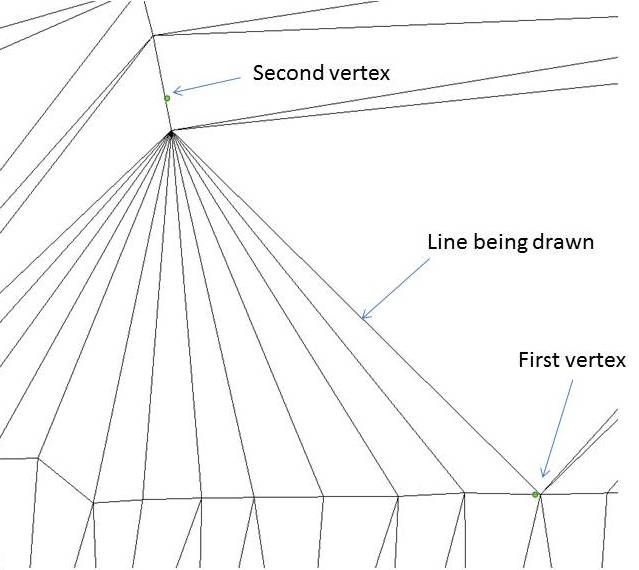
- Mick
-
It happens...just like when you are sometimes trying to infer a line parallel to another and SU thinks that's too boring and insists on inferring from some totally unrelated endpoint on the other side of the model instead.
I don't think there is any solution. You just have to be very careful in such situations...make sure you are getting a green dot indicating an existing endpoint before you make that second click...and keep an eye on the pop-ups that tell you what SU is inferring from.
-
How about the scale of the model? Are these extremely small distances? Would it help to scale up temporarily? Or, as DaveR does, use an upscaled component instance?
-
I agree with the idea that this is a small scale geometry issue.
Even quantum physics fails at the Planck Length.
Sketchup/OpenGL doesn't like tiny dimensions either, and can offer strange inferencing/snaps at the microscopic level.
If you temporarily scale everything up x100 and retry is this error still there ? -
Note, I have notice this on models over 200' long. To test to see I am having this particular problem I will make a line 10', usually a vertical line, and try to snap to one end, the snap will appear to be on the line's end, however, if I rotate, I am a great distance away in some other direction. My solution is to save, quite Sketchup and then restart.
It is annoying, however, it only appears randomly.
-
It occurs at very tiny and very large dimensions.
Sketchup is optimized for modeling 'buildings' and their contents; so the molecules or the innards of swiss-watches and city-blocks or cities can cause issues
-
Thanks for the replies chaps,
The line in my picture is about 2 metres long, so I don't think it's a small scale issue.
It may be a large scale issue: I have imported a points cloud which is far from the origin, then moved everything to the origin. The issue occurred before and after the move to origin (and also after saving/restarting etc).Cheers
- Mick
-
There must be something about the sourcefile of the points cloud. Or, something about the application that generated the sourcefile.
-
Have you moved everything to the origin.
Anything, no matter how insignificant, if it were 'hidden' or on an 'off' layer can cause such issues... -
thankyou TIG/mitcorb,
I turned all layers on and unhid all then zoomed to extents. I had a left behind a line at the original coordinates about 7000km away from the origin. I investigated one of my previous models that had the same issue and it was the same thing (a hidden component that I found in the outliner). Once I'd dealt with those, all was good.
Thanks!
- Mick




Hello! It looks like you're interested in this conversation, but you don't have an account yet.
Getting fed up of having to scroll through the same posts each visit? When you register for an account, you'll always come back to exactly where you were before, and choose to be notified of new replies (either via email, or push notification). You'll also be able to save bookmarks and upvote posts to show your appreciation to other community members.
With your input, this post could be even better 💗
Register Login


Advertisement