[Plugin] Honeycomber
-
Yes, i have all files and folder in his correct situation.
Perhaps another Mac user can tell us if the plugin works. -
There's nothing that I can think of that's PC specific... so it should work fine on MACs too...
Any MAC users want to chip in...
-
@oxer said:
Yes, i have all files and folder in his correct situation.
Perhaps another Mac user can tell us if the plugin works.TIG:
I have it installed exactly as you described (see attachment).
I had it installed that way before several times, but the plugin wasn't loading the either. The only way to have anything close to operational was the clumsy way I did try (which I realize isn't the way it is intended)... but it crashed SU every time.
Thanks.
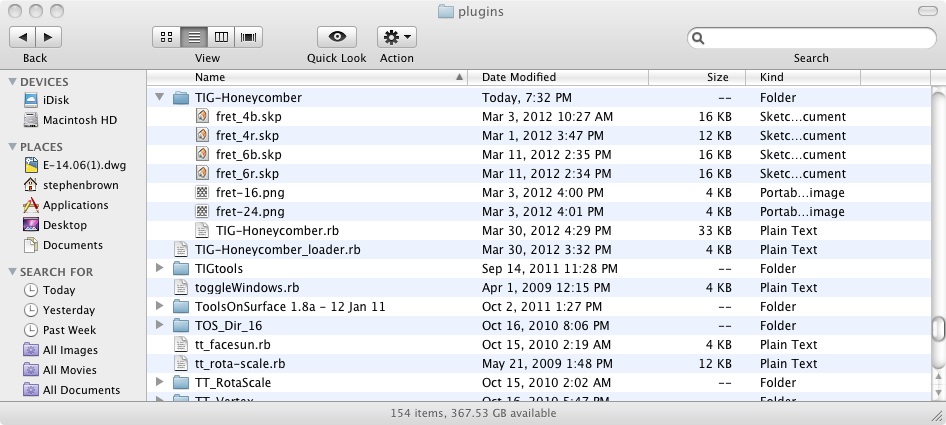
-
TIG, thank you so much.
-
SUFractal
I can't tell from your screenshot if the Plugins folder is in the the 'root' [Macintosh HD] library path, where it should be; or say an incorrect User path...
Assuming it's in the right place... can you be more specific about about what's 'crashing' and how this manifests itself...
Does Sketchup star without errors?
Does the Extension appear in the Preferences dialog?
If you deactivate it and restart does the Tools menu item vanish, and does the toolbar vanish?
If you activate it do you get a Tools menu item and a toolbar?
If you activate the toolbar does it appear as expected?
Open the Ruby Console.
If you make a simple 4" cube [e.g. make a square and PushPull it up 4"] and make it into a group [Entity Info will show it as 'solid' when it's selected] and run the tool from the toolbar what happens?
Does a dialog appear?
If you accept the default values and press OK, what happens?
Are there any error messages? [either in the Console or in a message-box]
If errors what do they say - exactly - ?
What happens to the cube-group?
etc...
With a little more logic applied to the testing/reporting we can track the issue and fix it...[Oxer - are you listening too?]
PS: On a completely separate side note... I see you have 'toggleWindows.rb' installed in your Plugins folder - that's a PC only script; since MACs don't have Outliner crash issues, and that script uses .so files incompatible with a MAC anyway ?
-
@tig said:
SUFractal
I can't tell from your screenshot if the Plugins folder is in the the 'root' [Macintosh HD] library path, where it should be; or say an incorrect User path...
Assuming it's in the right place... can you be more specific about about what's 'crashing' and how this manifests itself...
Does Sketchup star without errors?
Does the Extension appear in the Preferences dialog?
If you deactivate it and restart does the Tools menu item vanish, and does the toolbar vanish?
If you activate it do you get a Tools menu item and a toolbar?
If you activate the toolbar does it appear as expected?
Open the Ruby Console.
If you make a simple 4" cube [e.g. make a square and PushPull it up 4"] and make it into a group [Entity Info will show it as 'solid' when it's selected] and run the tool from the toolbar what happens?
Does a dialog appear?
If you accept the default values and press OK, what happens?
Are there any error messages? [either in the Console or in a message-box]
If errors what do they say - exactly - ?
What happens to the cube-group?
etc...
With a little more logic applied to the testing/reporting we can track the issue and fix it...[Oxer - are you listening too?]
PS: On a completely separate side note... I see you have 'toggleWindows.rb' installed in your Plugins folder - that's a PC only script; since MACs don't have Outliner crash issues, and that script uses .so files incompatible with a MAC anyway ?
TIG:
I have the plugin installed in the correct location ... as I have all of my countless other plugins. I am in full understanding of where plugins are req'd to be located on Macs. I've gotten rid of the 'toggleWindows.rb' script (didn't realize that was PC only at the time I suppose).
When I attempt to operate the plugin with even a simple cube:
A dialogue box appears asking for parameters.
The cube switches to X-ray mode immediately.
Using the default settings, the console window says" TIG::Honeycomber: Perforating.
After waiting as long as 15 minutes, nothing "happens" to the simple cube.
If at any time during the console message (or even after 15 minutes) I even slightly move the mouse/cursor, the message in the status window disappears.The 'symptoms' I am describing sound very similar to juanjo's.
-
SUFractal
You'd only need to wait 15 minutes if doing an incredibly complex object with thousands of perforations...
So, it seems that it runs, but produces no result?
Does it 'crash' ?
Does it 'hang' ?
What 'Console message[s]' ?
There should be none, only Status-bar messages saying what's being done and some incrementing '...' or ',,,' etc.
You should actually see the perforators being added, then subtracted in turn as the view refreshes as it goes...Can you post your cube size, and a screenshot of the dialog settings you used...
It it completes with no changes, then it suggests that the perforations were bigger than the object so it remains unchanged.
If you use 'Shell' > 0 [at a fraction of the cube's dims] do you at least get a simple shell added ?
This is a mystery -
@tig said:SUFractal
You'd only need to wait 15 minutes if doing an incredibly complex object with thousands of perforations...
So, it seems that it runs, but produces no result?
Does it 'crash' ?
Does it 'hang' ?
What 'Console message[s]' ?
There should be none, only Status-bar messages saying what's being done and some incrementing '...' or ',,,' etc.
You should actually see the perforators being added, then subtracted in turn as the view refreshes as it goes...Can you post your cube size, and a screenshot of the dialog settings you used...
It it completes with no changes, then it suggests that the perforations were bigger than the object so it remains unchanged.
If you use 'Shell' > 0 [at a fraction of the cube's dims] do you at least get a simple shell added ?
This is a mysteryI meant status window, not console, sorry.
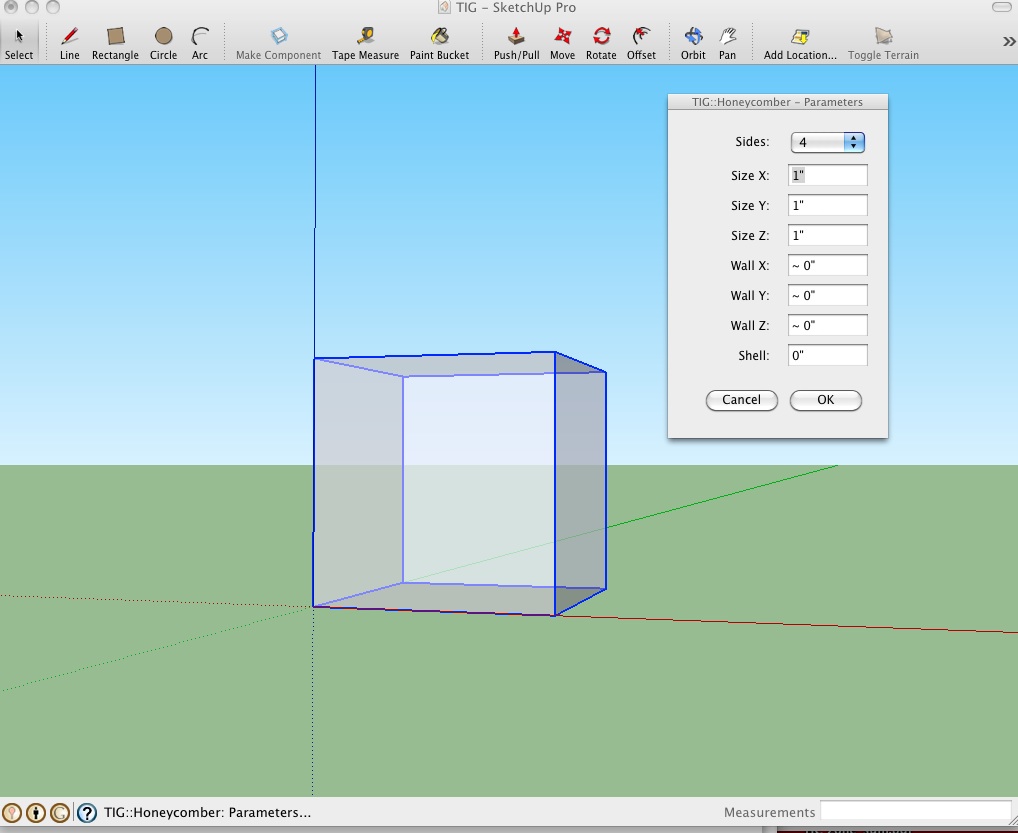
Using a 12' x 12' x 12' cube and the default parameters (see screenshot), I click 'OK', the status window changes to "Tig::Honeycomber:Perforating", and then it "hangs/doesn't do anything else/whatever" ... nothing 'happens' to the cube.
I then tried a shell setting in the Parameters window of 12" (and all other settings at 12") and it generated a shell and 'cube within a cube'.
I get no prompts for structure, comb, or foam (or anything) beyond that.
-
Hi again, again... TIG

See images below- I select the Cubo (Solid Group) push the plugin icon and it appears the Setting Window.
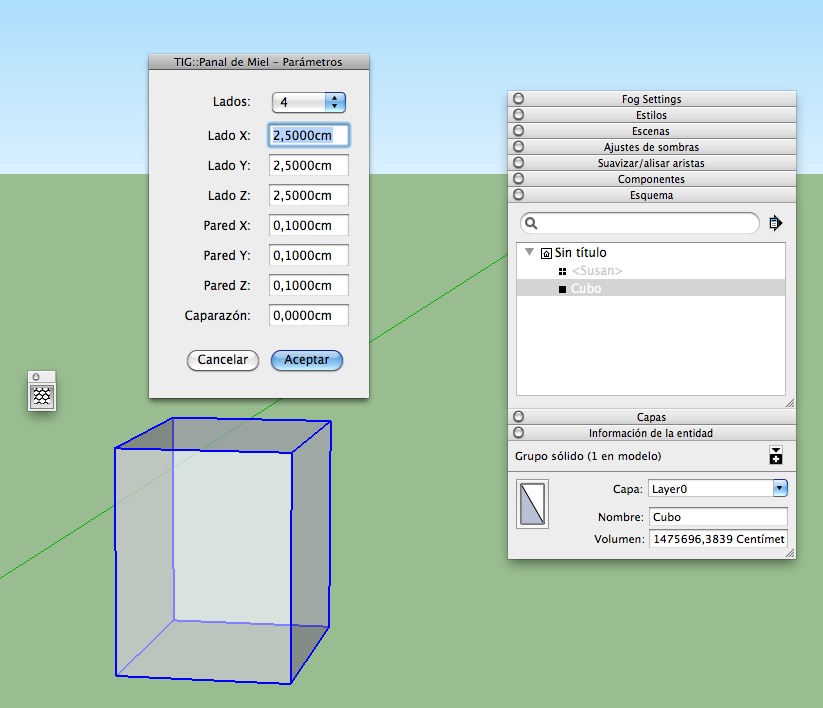
- I press Aceptar (OK) and nothing happens, see the Error Ruby Console.
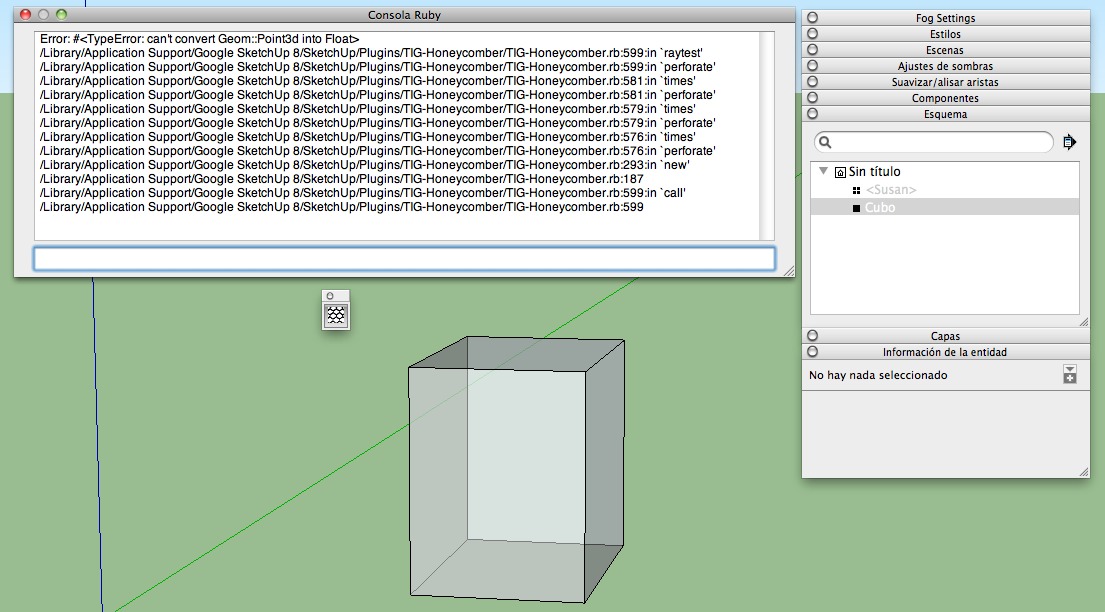
- I select the Cubo (Solid Group) push the plugin icon and it appears the Setting Window.
-
Oxer[and probably SUFractal in the absence of a Console error report from him...]
The reason the 'Shell' part works is that the basic shell is added before any raytesting starts [it still fails BUT then the shell is there], but with no shell specified the raytesting starts early-on - before any new geometry is added at all.
From the error messages I can see the error is that your setup seems to think that the
model.raytestis expecting aFloat[number] not aPoint3das it is getting.
In fact it has to be that
model.raytest([**point**, vector], true)
which is of course exactly what the code in line #599 does.
rayt=@model.raytest([zcent, Z_AXIS], true)
where 'zcent' is clearly defined as a point [as it ought to be],
the Z_AXIS is clearly a vector, and 'true' is simply saying 'ignore hidden objects'.So... I can but deduce that another third-party script is ill-advisedly redefining the
model.raytest()method
Though God knows why...To see if the error occurs outside of my tool's code, please do the following and report back...
Use an empty SKP.
Switch Axes 'on'.
Make ~1m radius circle, based flat on the ground [Z/Blue=0], centered on the origin [crossing of XYZ/RGB axes].
Now open the Ruby Console.
Then copy/paste +<enter> this line of codeSketchup.active_model.raytest([Geom;;Point3d.new(0,0,-1),Z_AXIS],true)You should get a result something like this [although the face's 'reference' will vary].
[Point3d(0, 0, 0), [#<Sketchup::Face:0x11aba8e0>]]
If it succeeds then I can't immediately see why it'd work in the Ruby Console and not my code...
If you get an error similar to the one you've posted we know the built-inmodel.raytest()method has been broken.
If there is an error could you try to 'grep' [i.e. 'search' through files for certain text inside them] through the files in the 'Plugins' folder, and its subfolders [and also in the 'Tools' folder], for the text 'def raytest'.
If you find a file please report back.
If you disable that file does themodel.raytest()'test' work now ???
-
I have done it that you have said, this is the result TIG.
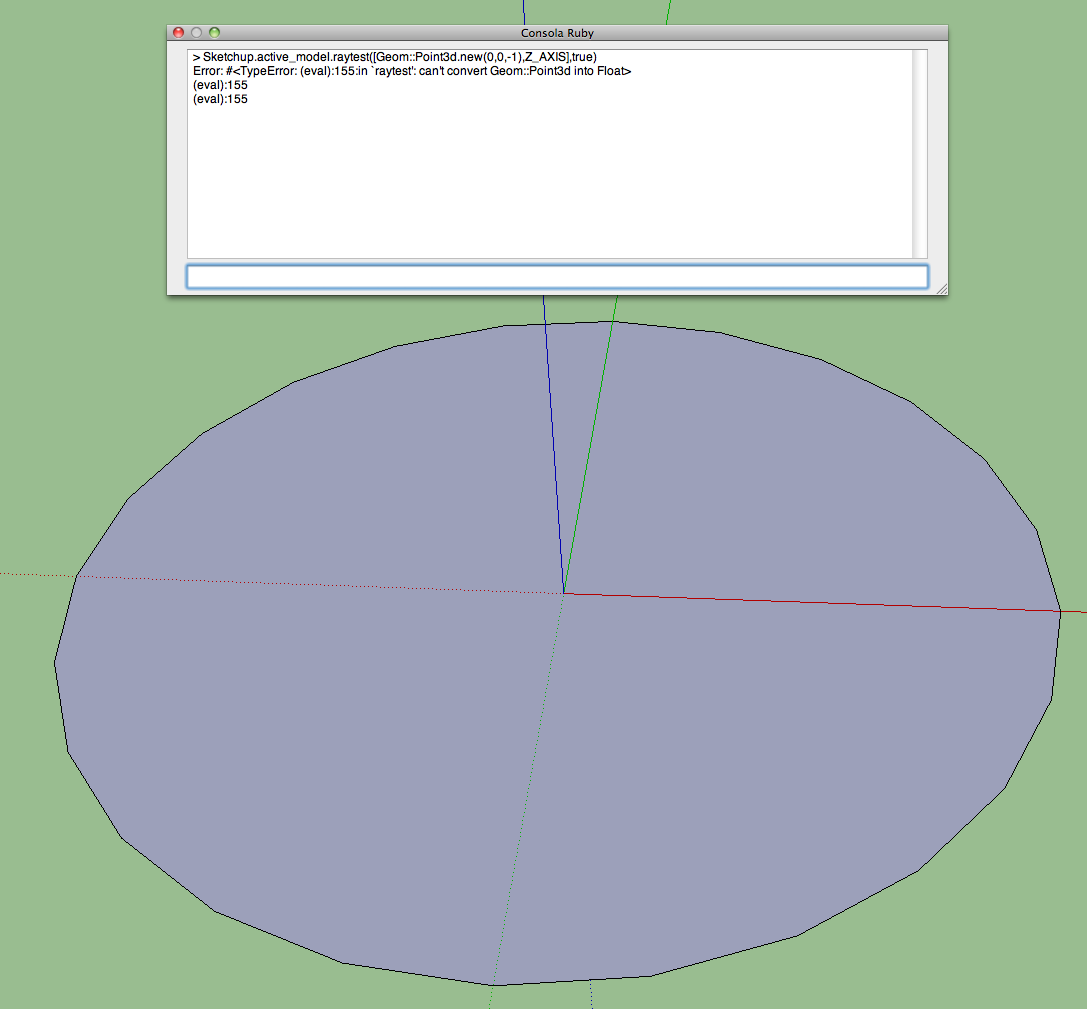
-
Oxer
Thanks!

Now we know that it's has nothing to do with my tool.
Rather, the built-inmodel.raytest()method is broken.Can you try to find the '
def raytest' text in Plugins etc as I explained...
There has to be something redefining it.
If its inside a compiled .rbs we won't find it, BUT it might be a .rb and we get lucky...
We can do mass disablement testing, BUT that's a last resort...When we find out what's messing with your system we can 'fix' it...
-
SUFractal
Your issue is just the same as Oxer's !
It is not my tool... but something broken in the core methods: almost certainly by a 'rogue' script...
Can you try the steps I set out for Oxer over the last few posts...
Hopefully we can resolve this... -
@tig said:
Oxer[and probably SUFractal in the absence of a Console error report from him...]
The reason the 'Shell' part works is that the basic shell is added before any raytesting starts [it still fails BUT then the shell is there], but with no shell specified the raytesting starts early-on - before any new geometry is added at all.
From the error messages I can see the error is that your setup seems to think that the
model.raytestis expecting aFloat[number] not aPoint3das it is getting.
In fact it has to be that
model.raytest([**point**, vector], true)
which is of course exactly what the code in line #599 does.
rayt=@model.raytest([zcent, Z_AXIS], true)
where 'zcent' is clearly defined as a point [as it ought to be],
the Z_AXIS is clearly a vector, and 'true' is simply saying 'ignore hidden objects'.So... I can but deduce that another third-party script is ill-advisedly redefining the
model.raytest()method
Though God knows why...To see if the error occurs outside of my tool's code, please do the following and report back...
Use an empty SKP.
Switch Axes 'on'.
Make ~1m radius circle, based flat on the ground [Z/Blue=0], centered on the origin [crossing of XYZ/RGB axes].
Now open the Ruby Console.
Then copy/paste +<enter> this line of codeSketchup.active_model.raytest([Geom;;Point3d.new(0,0,-1),Z_AXIS],true)You should get a result something like this [although the face's 'reference' will vary].
[Point3d(0, 0, 0), [#<Sketchup::Face:0x11aba8e0>]]
If it succeeds then I can't immediately see why it'd work in the Ruby Console and not my code...
If you get an error similar to the one you've posted we know the built-inmodel.raytest()method has been broken.
If there is an error could you try to 'grep' [i.e. 'search' through files for certain text inside them] through the files in the 'Plugins' folder, and its subfolders [and also in the 'Tools' folder], for the text 'def raytest'.
If you find a file please report back.
If you disable that file does themodel.raytest()'test' work now ???I get this ruby console 'result' when trying your suggestion to Oxer.
Sketchup.active_model.raytest([Geom::Point3d.new(0,0,-1),Z_AXIS],true)
Error: #<TypeError: (eval):61:in `raytest': can't convert Geom::Point3d into Float>
(eval):61
(eval):61By the way ... I do not see 'def raytest' in my plugins folder anywhere. Using the "Find" function, I do not 'def raytest' anywhere on my computer.
-
@tig said:
SUFractal
Your issue is just the same as Oxer's !
It is not my tool... but something broken in the core methods: almost certainly by a 'rogue' script...
Can you try the steps I set out for Oxer over the last few posts...
Hopefully we can resolve this...I did just try that ... no luck.
-
I have found these rb files with "raytest" word in the plugin folder only the simple_rays.rb file contains "def raytest2" this is the text:
def raytest2 ray
hit = false
entities = self.entities
entities.each { |face|
if face.kind_of?(Sketchup::Face) and face.classify_point(ray[0]) > 4
plane = [face.vertices[0].position, face.normal]
intersection = Geom.intersect_line_plane(ray, plane)
if intersection and face.classify_point(intersection) < 8
hit = true
break
end
endI have probed to unistall this file but the Honeycomber plugin does not work.
Some .rb files that include "raytest" word.
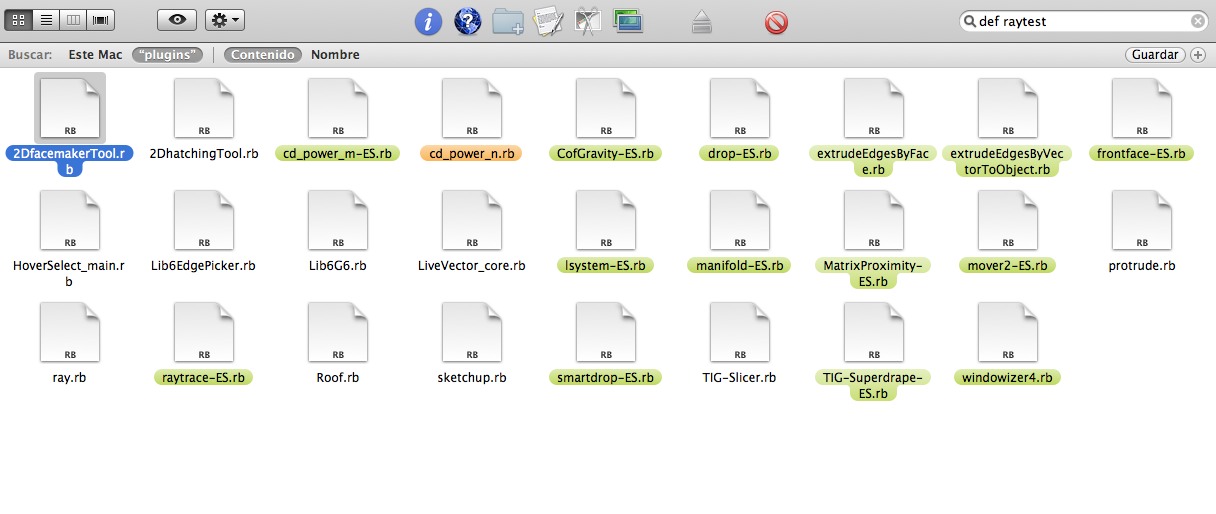
I'll continue search for
-
SUFractal
OK, I misread your post
Some 'search-tools' [like the built-in one on PCs] don't look inside all files and miss .rb ones - so on a PC I'd use 'BareGrep' that looks in ALL files.
Did you include subfolders inside Plugins ?
If you do a 'find' search for say 'module TIG' what do you get?
I know you'll get at least one 'hit' from the above text, as it's in my tool's file [in the subfolder]... If it includes it we know that the 'def raytest' is not defined in readable code [.rb], but it might still be inside an unreadable [compiled] '.rbs' file.If we are sure the problem is not arising from a particular .rb file, we can then use a 'disable/enable-by-halves' approach, to zoom in on the culprit...
I'll walk you both through this if method, if we have to...
-
Oxer
The
def raytest**2**is excluded as we are interested in just 'raytest'.
The listed scripts USE 'raytest', but do not re-define it...Did the search include subfolders ?
My suggested method in the last post will confirm if subfolders are getting searched, if it finds the tool's .rb in its subfolder.Once we have exhausted these possibilities we can consider the 'disabling' options.
-
Yes, i confirm you that the search includes subfolders.
I have found other plugin with "def raytest" it's manifold.rb but i have uninstalled it and Honeycombre continues off.
I don't undestand the code ruby but i think the problem isn't in the conflict with others plugins.
Sorry TIG, i can't help you of the other form. -
@tig said:
Oxer
The
def raytest**2**is excluded as we are interested in just 'raytest'.
The listed scripts USE 'raytest', but do not re-define it...Did the search include subfolders ?
My suggested method in the last post will confirm if subfolders are getting searched, if it finds the tool's .rb in its subfolder.Once we have exhausted these possibilities we can consider the 'disabling' options.
The only plugin/script file (including searching within folders) that contains 'raytest' (or 'def raytest') in its contents that I can find ... is your script 'TIG-Honeycomber.rb'.
Same to be said for 'module TIG' .... only in your script 'TIG-Honeycomber.rb'.




Advertisement