sketchucation logo sketchucation
    • 登入
    Oops, your profile's looking a bit empty! To help us tailor your experience, please fill in key details like your SketchUp version, skill level, operating system, and more. Update and save your info on your profile page today!
    🔌 Smart Spline | Fluid way to handle splines for furniture design and complex structures. Download

    Sketchup CNC

    已排程 已置頂 已鎖定 已移動 Woodworking
    90 貼文 28 Posters 470.3k 瀏覽 28 Watching
    正在載入更多貼文
    • 從舊到新
    • 從新到舊
    • 最多點贊
    回覆
    • 在新貼文中回覆
    登入後回覆
    此主題已被刪除。只有擁有主題管理權限的使用者可以查看。
    • N 離線
      noelwarr
      最後由 編輯

      ANNOUCEMENT:
      The project's first tutorial/screencast. Here is hoping it gives you some idea of what the plugin does.

      https://plus.google.com/u/0/106243199685455140135/posts/9xCjXqFJkug

      1 條回覆 最後回覆 回覆 引用 0
      • S 離線
        Scott M
        最後由 編輯

        Noel I loaded the plugin and followed the steps but when I wright the G code I get the following error in the ruby console.
        Error: #<Errno::ENOENT: No such file or directory - c:\Users\Noel\CNC>
        C:/Program Files/Google/Google SketchUp 8/Plugins/postprocessor.rb:181:in chdir' C:/Program Files/Google/Google SketchUp 8/Plugins/postprocessor.rb:181:in make'
        C:/Program Files/Google/Google SketchUp 8/Plugins/minivistii/ui.rb:250
        C:/Program Files/Google/Google SketchUp 8/Plugins/postprocessor.rb:181:in `call'
        C:/Program Files/Google/Google SketchUp 8/Plugins/postprocessor.rb:181

        https://www.youtube.com/user/ecabinetstips

        1 條回覆 最後回覆 回覆 引用 0
        • N 離線
          noelwarr
          最後由 編輯

          Mmm... Indeed you would get that error. At the moment the plugin is only really usable by people who are comfortable editing some ruby. postprocessor.rb is trying to save the CNC files to my directory ("c:\Users\Noel\CNC"). If you want to give it a shot, scan through the file. You should be able to spot the paths. Look for the double slashes (Mac unfriendly as Tim pointed out).

          I'm working on making it all MUCH easier to edit. Keep you posted.

          1 條回覆 最後回覆 回覆 引用 0
          • S 離線
            Scott M
            最後由 編輯

            Just curious but would it be more user friendly for the user to draw the tool paths on the work piece then select that geometry and select the tool path button then have a pop up info box for them to set the tool info such as cut diameter cut depth feed speed rpms and maybe a max plunge for that tool as well as the other info you have set up (cut direction,compin,compout,or centerline.)That way the user would not have to move the geometry into the work piece out of view. If the geometry is a circle they would select the drill button and do the same process. And if the geometry is on the back side of the work piece then all of those tool paths would be back operations. Not trying to redesign your plugin just brainstorming. Another thought is to have some sort of database to setup the tools for the toolbox so the user could just select the toolbox button and enter the tool geometry as well as feed speed plunge rate etc. for that tool. See The attached file hopes this explains it better


            2d tool paths.skp

            https://www.youtube.com/user/ecabinetstips

            1 條回覆 最後回覆 回覆 引用 0
            • S 離線
              Scott M
              最後由 編輯

              By the way I am taking Dave's advise after seeing your post I think I can come up with someting better. That one looks like a tooth pick jabbed into a board

              https://www.youtube.com/user/ecabinetstips

              1 條回覆 最後回覆 回覆 引用 0
              • N 離線
                noelwarr
                最後由 編輯

                😄 Don't be so hard on yourself. I'm just glad to have your help. Just one thing... If you are going to edit it please don't make the background white. Use the same grey as the rest of the sketchup icons otherwise it'll look out of place.

                1 條回覆 最後回覆 回覆 引用 0
                • Dave RD 離線
                  Dave R
                  最後由 編輯

                  FWIW, the other toolbar icons have a transparent background, not grey.

                  Etaoin Shrdlu

                  %

                  (THERE'S NO PLACE LIKE)

                  G28 X0.0 Y0.0 Z0.0

                  M30

                  %

                  1 條回覆 最後回覆 回覆 引用 0
                  • N 離線
                    noelwarr
                    最後由 編輯

                    I thought png didn't do transparency... my bad. I've always found transparency tricky to work with, though if the other icons have transparent backgrounds it would clearly be the most correct. Imagine if SU9 changed its colour theme to green 💚 Our buttons would be the only grey ones. How dire that would be

                    1 條回覆 最後回覆 回覆 引用 0
                    • S 離線
                      Scott M
                      最後由 編輯

                      Noel here are some icons please tell me what you think and maybe Dave will approve also


                      DefineToolPath.skp

                      https://www.youtube.com/user/ecabinetstips

                      1 條回覆 最後回覆 回覆 引用 0
                      • N 離線
                        noelwarr
                        最後由 編輯

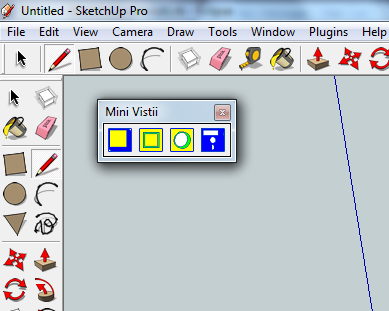
                        The colours came as a bit of a shock but after a few seconds I warmed to them. I love the retro feel, ESPECIALLY the 5 1/4 inch floppy. What a pleasant surprise! First time I've seen Sketchup used for 2D too

                        1 條回覆 最後回覆 回覆 引用 0
                        • N 離線
                          noelwarr
                          最後由 編輯

                          Looking good AND retro!


                          icons.png

                          1 條回覆 最後回覆 回覆 引用 0
                          • N 離線
                            noelwarr
                            最後由 編輯

                            My head's about to explode.

                            1 條回覆 最後回覆 回覆 引用 0
                            • S 離線
                              Scott M
                              最後由 編輯

                              @noelwarr said:

                              My head's about to explode.

                              I hope its not the icons

                              https://www.youtube.com/user/ecabinetstips

                              1 條回覆 最後回覆 回覆 引用 0
                              • N 離線
                                noelwarr
                                最後由 編輯

                                Hey guys. Well, this is really starting to come together. I guess you could say that we now have a solid foundation upon which to build. I'd bore you to bits with what the plugin does, how it does it and what it could do but I think I'll just sit back for the time being and wait for the questions to come.

                                There are a few minor issues with it not being an extention and not propperly integrated into the toolbar but I think I've earned a rest. The point is it works and I am now doing ALL my CNC work with it.

                                Big shout out to Scott for the icons and look forward to answering any questions. I'll be posting photos of CNC jobs on my Google+ stream so you know where to find me

                                todo list
                                ..make it an extention
                                ..improve ui (show/hide toolpaths, etc)
                                ..get more files into the cnc folder (Especially a template one)
                                ..get assemblies working (I tried but my head exploded)
                                ..automatic toolpath/hole generation

                                1 條回覆 最後回覆 回覆 引用 0
                                • N 離線
                                  noelwarr
                                  最後由 編輯

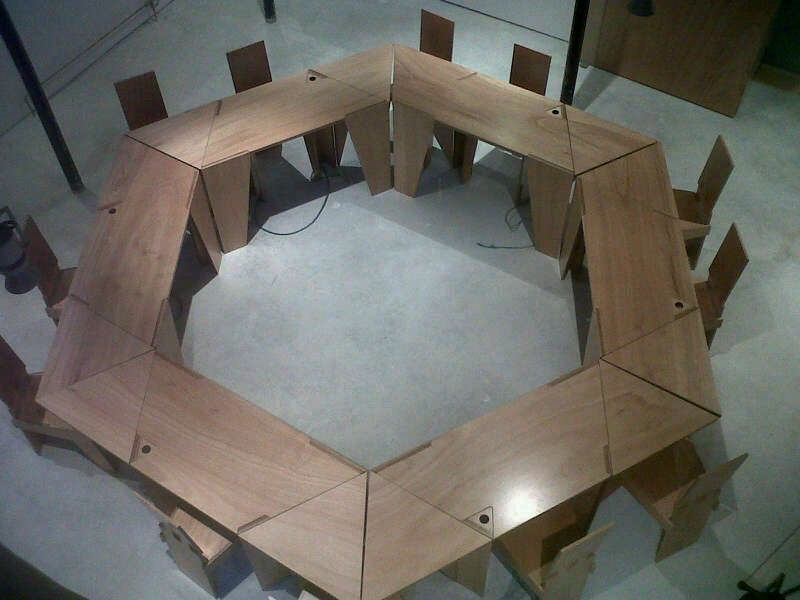
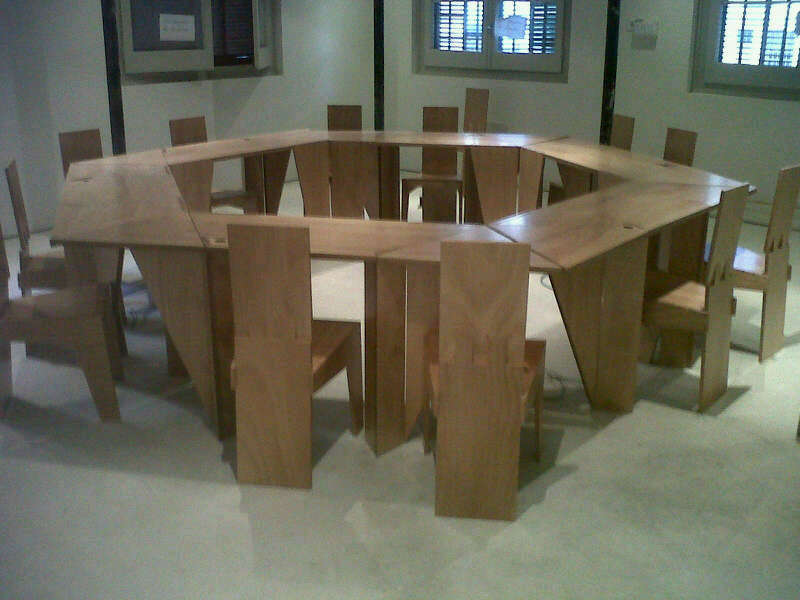
                                  100% Sketchup CAM. 100% minivistii


                                  IMG-20120518-WA0001.jpg


                                  IMG-20120518-WA0002.jpg

                                  1 條回覆 最後回覆 回覆 引用 0
                                  • T 離線
                                    tim
                                    最後由 編輯

                                    Seriously? Those are real tables and chairs made directly from SU output? Very cool!

                                    1 條回覆 最後回覆 回覆 引用 0
                                    • N 離線
                                      noelwarr
                                      最後由 編輯

                                      Well, I'm not sure what you mean by "directly". There is nothing automatic about the process. All toolpaths have to be specified. But yes, it's all done within the Sketchup UI. From Sketchup to CNC.

                                      1 條回覆 最後回覆 回覆 引用 0
                                      • C 離線
                                        chrisadww
                                        最後由 編輯

                                        Hello
                                        I am in the cabinet business and have used my Thermwood model 45 5' x 10' for the last four years. I use sketchup for all design work and convert skp surfaces to 2d toolpaths by exporting them to dxf. Layers are then created to identify tools, cutting depths etc. in the dxf. The Thermwood then converts these layers to G code.
                                        Is a plug in available to automatically save selected surfaces to a 2d plane?
                                        Thanks
                                        Chris
                                        adwwinc.com

                                        1 條回覆 最後回覆 回覆 引用 0
                                        • S 離線
                                          Scott M
                                          最後由 編輯

                                          @chrisadww said:

                                          Hello
                                          I am in the cabinet business and have used my Thermwood model 45 5' x 10' for the last four years. I use sketchup for all design work and convert skp surfaces to 2d toolpaths by exporting them to dxf. Layers are then created to identify tools, cutting depths etc. in the dxf. The Thermwood then converts these layers to G code.
                                          Is a plug in available to automatically save selected surfaces to a 2d plane?
                                          Thanks
                                          Chris
                                          adwwinc.com

                                          Try this plugin http://rhin.crai.archi.fr/rld/plugin_details.php?id=753

                                          https://www.youtube.com/user/ecabinetstips

                                          1 條回覆 最後回覆 回覆 引用 0
                                          • beginnerB 離線
                                            beginner
                                            最後由 編輯

                                            Hi Guys,

                                            This is the 19th September 2012 Grand Design - Series 7 Episode 4 with CNC in action...
                                            http://www.channel4.com/programmes/grand-designs/4od#3414075
                                            CNC + REVIT = BUILDING 😄

                                            I wonder if that could be done with SU - I assume it could...
                                            CNC + SketchUp = BUILDING 💭

                                            They are using MultiCam 1000 Series
                                            http://www.multicam.com/eng/Products/1000series.html

                                            I'm not sure if you can watch outside UK - maybe you could use some proxy servers to 'overcome the hurdle'... 😉

                                            PS. I'm watching the topic closely 😄

                                            Regards, SU 'beginner'

                                            1 條回覆 最後回覆 回覆 引用 0
                                            • 1
                                            • 2
                                            • 3
                                            • 4
                                            • 5
                                            • 5 / 5
                                            • 第一個貼文
                                              最後的貼文
                                            Buy SketchPlus
                                            Buy SUbD
                                            Buy WrapR
                                            Buy eBook
                                            Buy Modelur
                                            Buy Vertex Tools
                                            Buy SketchCuisine
                                            Buy FormFonts

                                            Advertisement