sketchucation logo sketchucation
    • Login
    Oops, your profile's looking a bit empty! To help us tailor your experience, please fill in key details like your SketchUp version, skill level, operating system, and more. Update and save your info on your profile page today!
    Mac User? | Join the Rayscaper Beta for Mac Learn More

    [Plugin] FullScreen v5.1.3 (25 April 2024)

    Scheduled Pinned Locked Moved Plugins
    285 Posts 79 Posters 463.1k Views 80 Watching
    Loading More Posts
    • Oldest to Newest
    • Newest to Oldest
    • Most Votes
    Reply
    • Reply as topic
    Log in to reply
    This topic has been deleted. Only users with topic management privileges can see it.
    • pilouP
      pilou
      last edited by

      A futur hit! β˜€

      Frenchy Pilou
      Is beautiful that please without concept!
      My Little site :)

      1 Reply Last reply
      Reply Quote 0
      • A
        Anton_S
        last edited by

        Update 3.0.2: A bunch of minor fixes and improvements

        1 Reply Last reply
        Reply Quote 0
        • F
          feodos
          last edited by

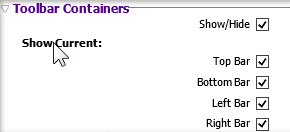
          • in the new dialog window there is no toolbar Containers
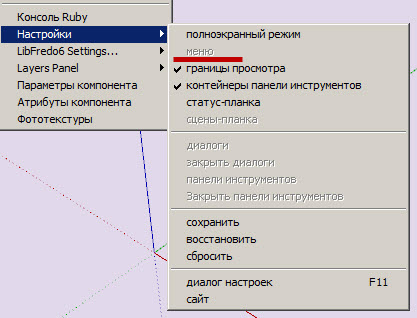
          • the button of the menu isn't active

          1.jpg


          2.jpg

          1 Reply Last reply
          Reply Quote 0
          • P
            Pherim
            last edited by

            Can this simply be updated via the Plugin store? It says in the description that the old version needs to be removed. And what about AMS Library, will this be installed by the Plugin Store, too? I Can't find it in there.

            1 Reply Last reply
            Reply Quote 0
            • A
              Anton_S
              last edited by

              @pherim said:

              Can this simply be updated via the Plugin store? It says in the description that the old version needs to be removed.

              I tested coping and pasting the new version over the original version and found that replacing the new plugin over the original one will not affect the plugin, but there will be unused content inside the plugin's folder. Deleting the original version is not required, but you may if you want to be organized. I changed the description back to normal.

              @pherim said:

              And what about AMS Library, will this be installed by the Plugin Store, too? I Can't find it in there.

              Added it to the plugin store.

              Thanks for suggestions.

              1 Reply Last reply
              Reply Quote 0
              • A
                Anton_S
                last edited by

                @feodos said:

                In the new dialog window there is no toolbar Containers

                What do you mean there is not toolbar containers, there is! I removed an option where you could show/hide current toolbar container because not much users use these options anyways. They just show/hide them all at once.

                @feodos said:

                the button of the menu isn't active

                The menubar can be shown/hidden only when SketchUp is fullscreen! Set SU fullscreen, and then you'll be able to show/hide menubar. Hover the cursor over the menu item, and the description will be displayed in the status bar. It clearly states that the option works with main window set fullscreen only!

                1 Reply Last reply
                Reply Quote 0
                • A
                  Anton_S
                  last edited by

                  New update 3.0.3

                  • Minor dialog and menu optimizations.
                  • Added the set/remove menubar option back. Press the ALT key to set/remove menu bar.
                  • Requires AMS Library 1.0.2 or later
                  1 Reply Last reply
                  Reply Quote 0
                  • Rich O BrienR
                    Rich O Brien Moderator
                    last edited by

                    Nice one Anton.

                    Download the free D'oh Book for SketchUp πŸ“–

                    1 Reply Last reply
                    Reply Quote 0
                    • CadFatherC
                      CadFather
                      last edited by

                      Thank you for the update Anton - this plugin is fantastic.

                      but...could the ALT be optional (or assignable)? on my machine it conflicts with some native keyboard shortcuts (move, or follow me tool + alt) - of course also other custom ones.

                      1 Reply Last reply
                      Reply Quote 0
                      • A
                        Anton_S
                        last edited by

                        I will add customizing shortcuts soon.

                        Sorry about the ALT thing πŸ˜†

                        1 Reply Last reply
                        Reply Quote 0
                        • A
                          Anton_S
                          last edited by

                          Perhaps for now, you can change the shortcut yourself:

                          1. Open ams_WindowsSettings/main.rb
                          2. Scroll down to line 434
                          3. Change 'menu' to 'f12' or whatever key you prefer.
                          4. Save, and restart SU.
                          1 Reply Last reply
                          Reply Quote 0
                          • CadFatherC
                            CadFather
                            last edited by

                            Thank You, Master Anton! πŸ˜„ β˜€

                            1 Reply Last reply
                            Reply Quote 0
                            • A
                              Anton_S
                              last edited by

                              3.5.0 Dec 15, 2013

                              • Added customizable shortcuts, thanks to CadFather.
                              • Added drag, clip, snap dialog.
                              • Added dialog clear borders option.
                              • Changed default set/remove menu shortcut key from ALT to F12.
                              1 Reply Last reply
                              Reply Quote 0
                              • L
                                laudhi
                                last edited by

                                sketchup always freeze when i make a rectangle and select the face,right click and press R
                                I tried without any other plugin.......

                                (sketchup make,windows 7 x64)
                                btw,thanxz for the plugin..... πŸ˜„

                                1 Reply Last reply
                                Reply Quote 0
                                • A
                                  Anton_S
                                  last edited by

                                  Thank you for the report laudhi.

                                  I found and fixed it. Download the latest version of AMS Library.

                                  1 Reply Last reply
                                  Reply Quote 0
                                  • L
                                    laudhi
                                    last edited by

                                    @anton_s said:

                                    Thank you for the report laudhi.

                                    I found and fixed it. Download the latest version of AMS Library.

                                    thanks Anton_S,now everything is running smoothly without any problems with other plugins 😍

                                    i love the floating window....

                                    1 Reply Last reply
                                    Reply Quote 0
                                    • A
                                      Anton_S
                                      last edited by

                                      3.6.0 Jan 29, 2014

                                      • Figured out a way to keep all shortcuts working while the menu bar is removed. The fancy shortcuts sections and the show/hide menu bar option were removed. They are no longer required! πŸ˜„
                                      • Fixed the get screen resolution function in AMS library. Now, it will return the size of all monitors combined. This fixes an issue where the dialog could not be moved to another screen.
                                      • Simplified and improved stuff.
                                      1 Reply Last reply
                                      Reply Quote 0
                                      • CadFatherC
                                        CadFather
                                        last edited by

                                        Master Anton strikes again - thanks!

                                        1 Reply Last reply
                                        Reply Quote 0
                                        • U
                                          unearthed
                                          last edited by

                                          Thanks for this plugin Anton, it's arguably the number 1 plugin for me as it enables me to quickly clear my screen for online client presentations. The only thing is could the floating black dialog be made smaller?

                                          Growplan - People ∩ Plants ∩ Place

                                          windows 7 64b, 4GB RAM, SU 8.0.16846
                                          Gimp, QGIS, Vectorworks 12, Bricscad 11

                                          1 Reply Last reply
                                          Reply Quote 0
                                          • A
                                            Anton_S
                                            last edited by

                                            @cadfather said:

                                            Master Anton strikes again - thanks!

                                            Thank you, CadFather!

                                            @unearthed said:

                                            Thanks for this plugin Anton, it's arguably the number 1 plugin for me as it enables me to quickly clear my screen for online client presentations. The only thing is could the floating black dialog be made smaller?

                                            I'm glad you like it. πŸ˜„ I've been thinking about making another collapsible on top, that would collapse/uncollapse all other collapsibles. Perhaps this feature could be available in the next release. Thanks for suggestion!


                                            1 Reply Last reply
                                            Reply Quote 0

                                            Hello! It looks like you're interested in this conversation, but you don't have an account yet.

                                            Getting fed up of having to scroll through the same posts each visit? When you register for an account, you'll always come back to exactly where you were before, and choose to be notified of new replies (either via email, or push notification). You'll also be able to save bookmarks and upvote posts to show your appreciation to other community members.

                                            With your input, this post could be even better πŸ’—

                                            Register Login
                                            • 1
                                            • 2
                                            • 3
                                            • 4
                                            • 5
                                            • 6
                                            • 7
                                            • 8
                                            • 14
                                            • 15
                                            • 6 / 15
                                            • First post
                                              Last post
                                            Buy SketchPlus
                                            Buy SUbD
                                            Buy WrapR
                                            Buy eBook
                                            Buy Modelur
                                            Buy Vertex Tools
                                            Buy SketchCuisine
                                            Buy FormFonts

                                            Advertisement