Now cannot hold shift and zoom in and out with mouse wheel?
-
Really don't know as we can do it without holding any key

-
That was my point. Seems kind of silly to add more work to something as simple as scrolling the wheel.
-
On my Mac I just use a generic 3 button wheel mouse and Sketchup works just fine. The Apple mice often times don't work the way you'd expect them to.
Do you have Magic Trackpads too, or just mice?
-
I have an old Logitec trackpad, I don't like to shake my arm.
-
Hi folks.
My answer was how to set a regular 3 button mouse to work correctly on SketchUp (SU) on a Mac but the general idea applies also for a Windows PC.
When I first installed SU on my iMac in 2006, the Mighty Mouse (MM), that came with that model, would not allow orbiting when pressing the roller.
I went to the Mouse Control Panel and set the center button (the scroll ball) to act as button 3 when pressed. After that, the MM behaved liked any ordinary 3 buttons mouse and exactly like SU on my work Windows PC.
This allows me to:
-
Zoom by rolling the ball (wheel on non MM mice) in a vertical motion.
-
Orbit by pressing the ball (the whole mouse in the case of the MM).
-
Pan by pressing the ball and the SHIFT key at the same time.
Just ideas.
-
-
I use my MacBook Pro a lot while I am out using Sketchup. I used to bring a mouse with me until I discovered that you can hold down "control" and "command" at the same time to start an orbit. Add "shift" in there and you get a pan. Now I never use my mouse with my Mac! This also works with the Magic Trackpad.
-
Has anyone found a solution to the OPs question? The reason you hold shift while zooming is to lock an object along an axis to move an object to another location and often zooming in and out is the quickest way to the other location.I am sure alot you do this without realizing. I used to do this all the time on a pc and i really miss it now on the mac. It seams like holding shift modifies the scroll direction to horizontal an a mac. It seems like a solution would be to make horizontal scrolling zoom in and out in sketchup but i am at loss as for how to go about that. Any ideas on how to get it working?
-
I just purchased a new laptop (HP Envy) with a multi-touch trackpad. Is there an equivalent to the mac "command + Ctrl" trick that will work to orbit and pan? I have tried combinations of ctrl + alt + shift but nothing is working so far.
-
I'm confused, you got an HP or a mac? ctrl-cmd pan and orbit on a mac and you want to do that on a windows machine? If so, it is to press down on the scroll wheel. That is orbit. Then add shift to it and its pan.
Is that what you meant?
-
Sorry...maybe this will clarify what i'm looking to do.
I would like to have the option to work in sketchup without a mouse and still have a decent level of productivity. Specifically at times when there it is not convienent or there is not room to whip out a wireless mouse...for example, when i'm riding the bus into work, on a plane, etc. I found out on this post and through other research that Sketchup developed a work around for MAC users that didn't have a center button on their mouses so that they could pan and orbit by holding down ctrl, command, and shift keys instead of pressing down a center mouse button. For mac users, the added benefit is that they can use the same key combinations with their trackpads. What i'm hoping for is a similar solution for PC users.
Any ideas?
-
I think unless you have a multi touch trackpad on your PC Laptop, you're out of luck... The whole trick on the mac is based around the gesture (two finger) scrolling...
A lot of the new PC laptops coming out have multitouch, but I haven't played with one yet to know if Sketchup supports it.
-
I cannot believe how many unhelpful replies there are on this thread.
The reason for this thread- as has been stated- is that you want to hold shift a lot while zooming in and out, not to modify the command (OBVIOUSLY) but to lock on an axis- I do this constantly on my PC at work.
The problem is, on a mac, when you hold shift, the scroll wheel stops zooming-
Has anyone found a solution yet?
-- I have a mac at home and I'd love for my workflow to be the same.
-
Actually, I think there are a few good solutions in there. Don't forget everyone here is volunteering to help each other out with problems. Using the trackpad on the Mac is fantastic, and a great way to use Sketchup.
To answer your question directly:
When using the scroll wheel on the PC, AND pushing shift to lock an inference does work at the same time, on the Mac, pressing the shift key during a zoom operation using an external mouse with a wheel does cause the zoom operation to stop. If you do it with the Mac trackpad, you can zoom and press shift at the same time.
It looks like this is by design, I cannot see any way to change this.
My recommendation, use the arrow keys to lock an inference, not the shift key. Left and right are red and green, and up or down is blue.
If that's not acceptable, a 3D Connexion 3D mouse is a great way to be able to zoon during any command.
Lastly, you could just adapt to what is a really minor change. I use Mac's and PC's all the time. Some with trackpads, some with mice, some with 3D Mice. They all have their advantages and disadvantages. Rather than letting a minor detail slow you down, learn to work around it and you'll become a better modeler for it.
Does this help?
-
@unknownuser said:
I think unless you have a multi touch trackpad on your PC Laptop, you're out of luck... The whole trick on the mac is based around the gesture (two finger) scrolling...
A lot of the new PC laptops coming out have multitouch, but I haven't played with one yet to know if Sketchup supports it.
eric.. gotta disagree with you here..
two-finger-scrolling zooms.. sketchup doesn't have a gesture for orbiting on mac (a couple of other apps do have this ability and it super sweet but....)
anyway, the control-cmmd shortcut on mac is a legacy thing in sketchup dating back to when everyone seemed to think "oh.. macs? ..psshh.. you can only use one button mice on those toys"
on mac, you can press and hold control-command then orbit with the left mouse button (i.e.- temporary orbiting in the same way middle mice button usually function in sketchup..)
but it still comes in very handy and i'm glad the devs haven't removed it.. if you're working on a mactop (
 ), you zoom with the two-finger scroll and orbit with these keys.. i'm equally comfortable drawing with a trackpad as i am with a mouse..
 -
I am not sure what part you're disagreeing with, it sounds like you're agreeing with me...

-
@caleb said:
I cannot believe how many unhelpful replies there are on this thread.
The reason for this thread- as has been stated- is that you want to hold shift a lot while zooming in and out, not to modify the command (OBVIOUSLY) but to lock on an axis- I do this constantly on my PC at work.
The problem is, on a mac, when you hold shift, the scroll wheel stops zooming-
Has anyone found a solution yet?
-- I have a mac at home and I'd love for my workflow to be the same.
no.. you can't do this on mac.. you can do it on mac if you're using a trackpad..
[off:10j9bm8q](and that's not the real solution anyway.. the real solution is to be able to press a mod key, such as tab, then let go of it but the axis lock is maintained.. and, you should be able to do this on any vector.. not just x,y,z.. but, i'm sure there will be some people to come in and tell me.. "no, sketchup works perfect.. you're stupid" )[/off:10j9bm8q]
-
@unknownuser said:
I am not sure what part you're disagreeing with, it sounds like you're agreeing with me...
you said "The whole trick on the mac is based around the gesture (two finger) scrolling..."
the dude was talking about orbiting.. **(see below)
gestures on mac laptops have nothing to do with orbiting in sketchup..
(they should... they could.. but they dont)anyway.. he's looking for a modifier key(s) on windows that will invoke the temporary orbit feature.. is there one?
(because if there isn't, it sounds basically impossible to draw with any sort of finesse on a pc laptop without a mouse)
EDIT-
here's sketchup 4 quick reference card.. notice the mouse options.. i don't have an old reference card for windows so if anyone does, look for anything like this on there.. (the newer quick ref cards don't show this feature even though they still work)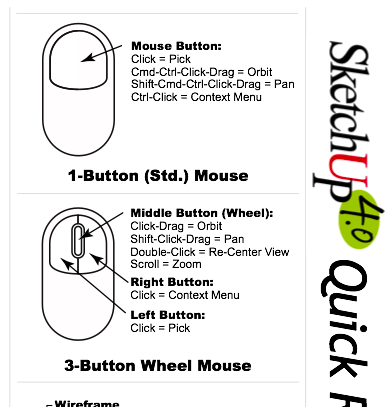
**hmm.. actually, maybe it's me that is confused.. i don't know if youre talking to the OP from a year ago or the dude that recently bumped the thread with an offtopic question.. eric, for sake of keeping me less confused, would you mind using the quote feature of these forums so we can see who you're talking to or give us some more context surrounding your reply? thanks

-
@unknownuser said:
My recommendation, use the arrow keys to lock an inference, not the shift key. Left and right are red and green, and up or down is blue.
oh.. hey.. that's actually a great suggestion.. (one that i definitely wasn't aware of)..
it may take some getting used to (like anything else) but once you got it.. you got it..
[edit].. confusing thread.. two separate conversations/topics woven together lol..
-
oh.. for the trackpad parts of this thread, let's not forget we don't need a laptop to utilize their features.. we have this option as well..
those things are sweet







Advertisement