sketchucation logo sketchucation
    • Login
    Oops, your profile's looking a bit empty! To help us tailor your experience, please fill in key details like your SketchUp version, skill level, operating system, and more. Update and save your info on your profile page today!
    Mac User? | Join the Rayscaper Beta for Mac Learn More

    [Plugin] SplitUp

    Scheduled Pinned Locked Moved Plugins
    38 Posts 20 Posters 87.1k Views 20 Watching
    Loading More Posts
    • Oldest to Newest
    • Newest to Oldest
    • Most Votes
    Reply
    • Reply as topic
    Log in to reply
    This topic has been deleted. Only users with topic management privileges can see it.
    • B
      baiduaiya
      last edited by

      Thanks a lot๏ผbut๏ผŒ why can't I download this thing?

      1 Reply Last reply
      Reply Quote 0
      • TIGT
        TIG Moderator
        last edited by

        @baiduaiya said:

        Thanks a lot๏ผbut๏ผŒ why can't I download this thing?
        Why can't I lick my elbow ?
        You tell me why you can't download it - or at least what difficulties you are experiencing...
        Can you see the .rb file link on the first page ?
        Click it and download the one file and then install it, as per the instructions...
        If you cannot see the link but there's a note about Ad-Blockers... disable 'ad-blocking' and/or 'do-not-follow' add-ons for SCF site so that you can see attachments - in the members' ToS that you agreed to when you joined one of your promise was not to use ad-blockers when visiting the site. This is because we are almost entirely funded by advertising and no one will pay to place ads if no one is reading them!
        Let us know what was wrong...

        TIG

        1 Reply Last reply
        Reply Quote 0
        • S
          smicha
          last edited by

          Is it possible to add extra parameters to the plugin to work separately in RGB directions? Let's say I have a cube and I want to divide each of its plane into quads. 5x5x5 works great - simply select a cube and use the plugin with '5' as a value. But now I'd like the cube to be cut into 6x4x3 as depicted on the screenshot.
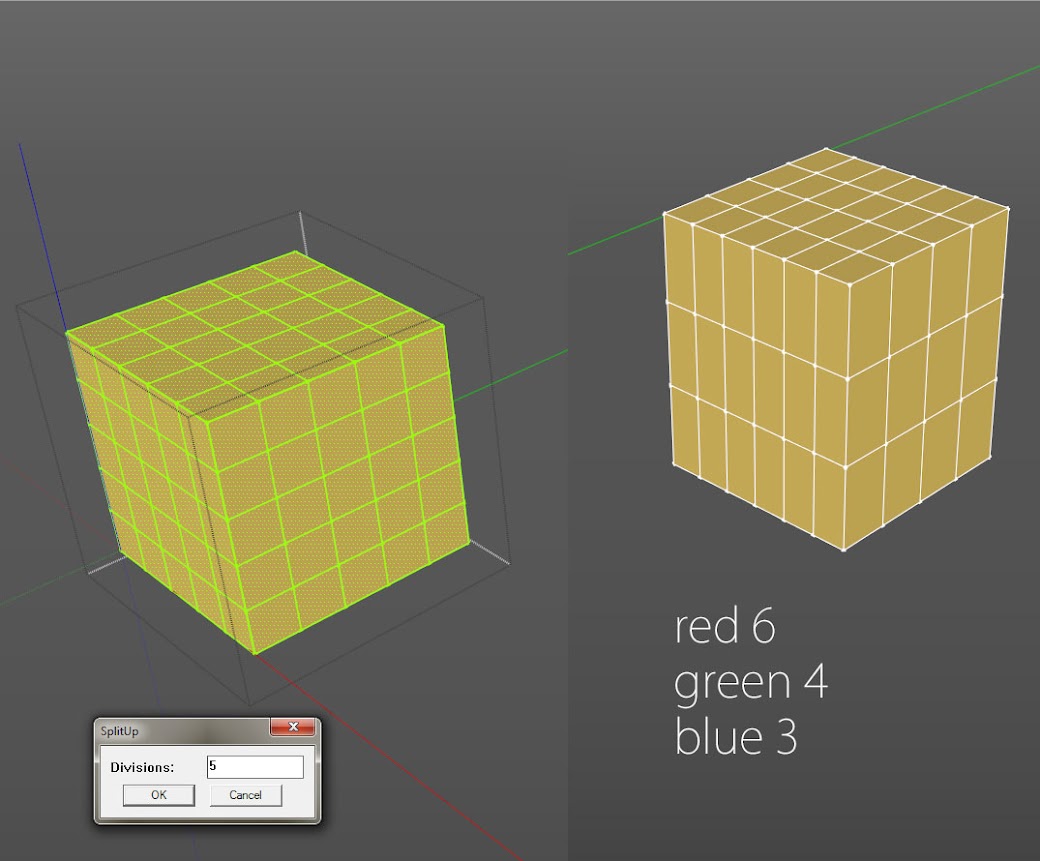
          https://lh6.googleusercontent.com/-gAQ5KTT-sh4/UTRTspfiJoI/AAAAAAAAC8E/vHPOXJJmQuA/s1040/splitup.jpg

          1 Reply Last reply
          Reply Quote 0
          • TIGT
            TIG Moderator
            last edited by

            I think Thomthom has some tools in his Edges set ?
            Have you look at that...
            Of course doing the simple splits as you show is easy enough using native copy/array tools and auto-splitting of crossing edges... ๐Ÿ˜•

            TIG

            1 Reply Last reply
            Reply Quote 0
            • Rich O BrienR
              Rich O Brien Moderator
              last edited by

              @unknownuser said:

              @unknownuser said:

              is easy enough

              Sure ๐Ÿ˜„
              Select "face X" Copy move / 3
              Select "face Y" Copy move / 4
              select "face Z" Copy move / 6
              not a big deal ๐Ÿ˜„

              Internal faces. Make one more shift+click to subtract face from selection then perfect ๐Ÿ˜Ž

              Download the free D'oh Book for SketchUp ๐Ÿ“–

              1 Reply Last reply
              Reply Quote 0
              • pilouP
                pilou
                last edited by

                @unknownuser said:

                is easy enough

                Sure ๐Ÿ˜„
                Select "face X" Copy move / 3
                Select "face Y" Copy move / 4
                select "face Z" Copy move / 6
                not a big deal ๐Ÿ˜„
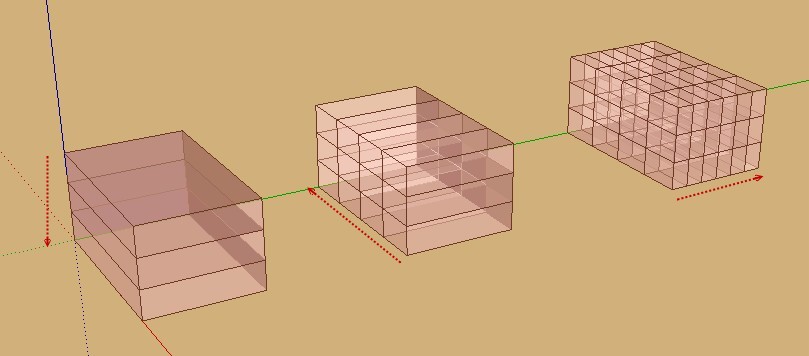
                643.jpg

                Frenchy Pilou
                Is beautiful that please without concept!
                My Little site :)

                1 Reply Last reply
                Reply Quote 0
                • pilouP
                  pilou
                  last edited by

                  @unknownuser said:

                  Internal faces.

                  If not wanted yes ๐Ÿ˜„

                  else Remove inner faces ๐Ÿ˜‰
                  but

                  Curiously the Remove inner faces seems don't yet works! ๐Ÿ˜ฎ

                  Maybe icompatibility with another plug ?

                  Frenchy Pilou
                  Is beautiful that please without concept!
                  My Little site :)

                  1 Reply Last reply
                  Reply Quote 0
                  • S
                    smicha
                    last edited by

                    TIG, Pilou, Rich,

                    Thanks for your comments but this was not my question. I just did it manually in even simpler way. This would be great to have 3 parameters in input in the plugin.

                    1 Reply Last reply
                    Reply Quote 0
                    • JQLJ
                      JQL
                      last edited by

                      Hi Tig and Rich,

                      Thanks for this addition to SU arsenal.

                      To improve on what you already have, is it somehow possible to make the plugin work also on holes created by "hole cutting components"?

                      Best regards,

                      JQL

                      www.casca.pt
                      Visit us on facebook!

                      1 Reply Last reply
                      Reply Quote 0
                      • romboutR
                        rombout
                        last edited by

                        Hi guys, tried this plugin again since quite a while. Im still runnin gold SU 8. For me on mac the plugin 'crashes' a lot. with low numbers it works until i try it from about the 3rd time. The mesh start to flikker and SU stops working.

                        im running os 10.6.8, its a old lady

                        1 Reply Last reply
                        Reply Quote 0

                        Hello! It looks like you're interested in this conversation, but you don't have an account yet.

                        Getting fed up of having to scroll through the same posts each visit? When you register for an account, you'll always come back to exactly where you were before, and choose to be notified of new replies (either via email, or push notification). You'll also be able to save bookmarks and upvote posts to show your appreciation to other community members.

                        With your input, this post could be even better ๐Ÿ’—

                        Register Login
                        • 1
                        • 2
                        • 1 / 2
                        • First post
                          Last post
                        Buy SketchPlus
                        Buy SUbD
                        Buy WrapR
                        Buy eBook
                        Buy Modelur
                        Buy Vertex Tools
                        Buy SketchCuisine
                        Buy FormFonts

                        Advertisement

