sketchucation logo sketchucation
    • 登入
    Oops, your profile's looking a bit empty! To help us tailor your experience, please fill in key details like your SketchUp version, skill level, operating system, and more. Update and save your info on your profile page today!
    🔌 Easy Offset | Offset selected faces in SketchUp in positive and negative offsets. Download

    [Plugin] Slicer5

    已排程 已置頂 已鎖定 已移動 Plugins
    336 貼文 82 Posters 311.5k 瀏覽 81 Watching
    正在載入更多貼文
    • 從舊到新
    • 從新到舊
    • 最多點贊
    回覆
    • 在新貼文中回覆
    登入後回覆
    此主題已被刪除。只有擁有主題管理權限的使用者可以查看。
    • guanjinG 離線
      guanjin
      最後由 編輯

      Thank you TIG
      QQ截图20120121184810.jpg
      未命名.jpg

      I come from China, is to learn

      1 條回覆 最後回覆 回覆 引用 0
      • guanjinG 離線
        guanjin
        最後由 編輯

        Want to smooth the edges the better!!
        未命名.jpg

        I come from China, is to learn

        1 條回覆 最後回覆 回覆 引用 0
        • TIGT 離線
          TIG Moderator
          最後由 編輯

          The more facets that the sliced object has the smoother the edges of the slices...

          TIG

          1 條回覆 最後回覆 回覆 引用 0
          • TIGT 離線
            TIG Moderator
            最後由 編輯

            Guanjin
            Could you post your Chinese lingvo file [zipped] for other fellow users to benefit from - it's only fair - the rest of the tool is freely shared... 😕

            TIG

            1 條回覆 最後回覆 回覆 引用 0
            • TIGT 離線
              TIG Moderator
              最後由 編輯

              Here's v5.12 http://forums.sketchucation.com/viewtopic.php?p=374969#p374969
              Extra traps added for 'non-instances' within slice-collections [e.g. when slotting after editing].
              Code CONSTANTS added for optional menu-location/single-submenu.
              The lingvo files are now all UFT-8 encoded, to avoid problems when copying.
              Typos in the FR lingvo file corrected, the correct PT Portuguese lingvo is now included.

              TIG

              1 條回覆 最後回覆 回覆 引用 0
              • guanjinG 離線
                guanjin
                最後由 編輯

                Yes, I posted on there?

                I come from China, is to learn

                1 條回覆 最後回覆 回覆 引用 0
                • B 離線
                  Bertier
                  最後由 編輯

                  massively awesome !

                  1 條回覆 最後回覆 回覆 引用 0
                  • TIGT 離線
                    TIG Moderator
                    最後由 編輯

                    Thanks to Guanjin here's the Chinese lingvo file.
                    Unzip it and put it into the TIG-Slicer subfolder in the Plugins folder...TIG-SlicerZH-CN-lingvo.zip
                    It will be included in the zipped package, with future updates too...

                    TIG

                    1 條回覆 最後回覆 回覆 引用 0
                    • TIGT 離線
                      TIG Moderator
                      最後由 編輯

                      Here's v5.13 http://forums.sketchucation.com/viewtopic.php?p=374969#p374969
                      The latest Chinese lingvo file is now included in the set.
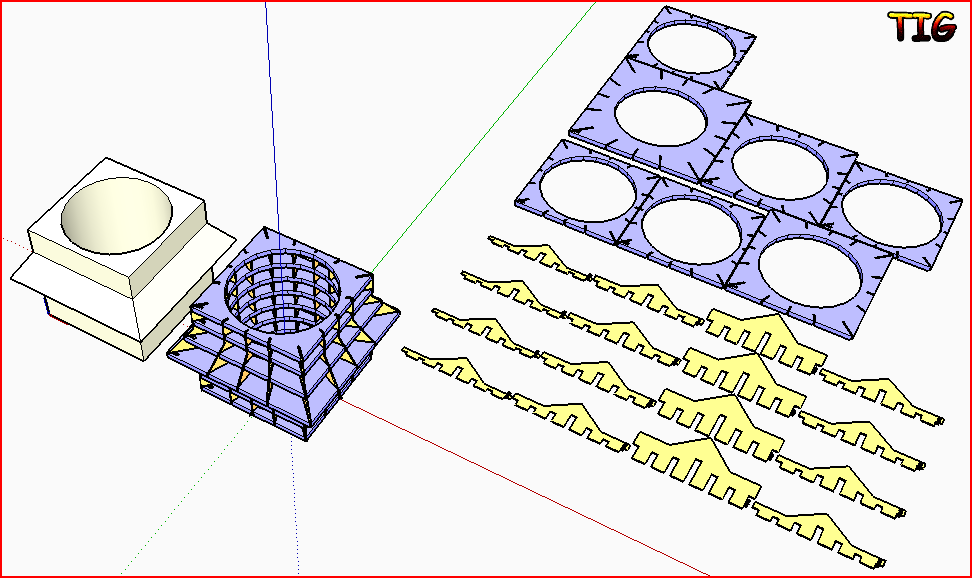
                      The RZ solutions have been improved: now less prone to error with complex shapes made when the ORIGIN is within the bounding-box of the sliced-object: useful when making horizontal Z[blue] slotted-ribs with R[amber] radially arranged slotted-spars in the vertical [rotate the slice-object onto its 'nose', if you want to transpose the rib/spar arrangements]...s5-13.PNG
                      TIG

                      1 條回覆 最後回覆 回覆 引用 0
                      • utilerU 離線
                        utiler
                        最後由 編輯

                        TIG, this is not a plugin that I would use often but it is soooo neat I can't help playing with it!!!

                        Cheers!! 👍

                        Just Curious...

                        1 條回覆 最後回覆 回覆 引用 0
                        • guanjinG 離線
                          guanjin
                          最後由 編輯

                          @tig said:

                          Here's v5.13 http://forums.sketchucation.com/viewtopic.php?p=374969#p374969
                          The latest Chinese lingvo file is now included in the set.
                          The RZ solutions have been improved: now less prone to error with complex shapes made when the ORIGIN is within the bounding-box of the sliced-object: useful when making horizontal Z[blue] slotted-ribs with R[amber] radially arranged slotted-spars in the vertical [rotate the slice-object onto its 'nose', if you want to transpose the rib/spar arrangements]...[attachment=0:spns2k8l]<!-- ia0 -->s5-13.PNG<!-- ia0 -->[/attachment:spns2k8l]

                          TIG: very kind of you! Update so fast! 👍 👍 👍

                          I come from China, is to learn

                          1 條回覆 最後回覆 回覆 引用 0
                          • gillesG 離線
                            gilles
                            最後由 編輯

                            XXXXX?
                            Thank you Sir.

                            " c'est curieux chez les marins ce besoin de faire des phrases "

                            1 條回覆 最後回覆 回覆 引用 0
                            • E 離線
                              erinbanwell
                              最後由 編輯

                              I am using v5.11. I have been getting a variety of results when trying to slice really complicated geometry. I will slice and get a full crash complete with bug splat error report, sometimes it will look like it has finished but there will only be text in the very far distance, sometimes it will slice and "grey out" with xyz lines no longer visible. I did try making the object bigger x 10 and that seemed to help a lot. Thanks again! I'm working with a laser cutter, and this is really amazing!

                              1 條回覆 最後回覆 回覆 引用 0
                              • TIGT 離線
                                TIG Moderator
                                最後由 編輯

                                Without seeing the sliced-object I can't say... is there something more complex in one direction that another ?
                                Are you doing slotting as well as slicing in one step?
                                If you omit the slotting what happens ?
                                It you use Slotter later on the set what happens etc etc ??

                                If you make fewer slices [increased thickness/spacing] what happens ?

                                Very complex slicing will take time, especially when slotted...

                                Can you post a screenshot or two ?

                                TIG

                                1 條回覆 最後回覆 回覆 引用 0
                                • guanjinG 離線
                                  guanjin
                                  最後由 編輯

                                  @erinbanwell said:

                                  currently experiencing a bugsplat when I try to make a x,y slice, but just x or just y works fine and takes about 3 mins to process. what do you think TIG?

                                  I use normal, too much may cause you to slice, long time! Try a small model, sliced 😒 😒

                                  I come from China, is to learn

                                  1 條回覆 最後回覆 回覆 引用 0
                                  • TIGT 離線
                                    TIG Moderator
                                    最後由 編輯

                                    As said, slicing large models takes a long time... think before you slice... 😒

                                    TIG

                                    1 條回覆 最後回覆 回覆 引用 0
                                    • E 離線
                                      erinbanwell
                                      最後由 編輯

                                      currently experiencing a bugsplat when I try to make a x,y slice, but just x or just y works fine and takes about 3 mins to process. what do you think TIG?
                                      I also am experiencing an error where the model will suddenly dissappear leaving only the x,y,z red,blue, green lines. The slicer plugin seems to be finished at this point. If I try to use the orbit tool, the x,y,z lines will disappear too. If i close the window at this point it will ask me if I want to save the file. If I save the file, and reopen it, it stays in the exact same state: No model, no xyz reference lines, and none of the tools work. I have tried this probably about 50-60 times. If I leave it alone completely, it never finishes on it's own. My last try was over 12 hours. Any help? I could post the file if that helps. Thanks again.

                                      1 條回覆 最後回覆 回覆 引用 0
                                      • M 離線
                                        miki71ita
                                        最後由 編輯

                                        Because of this... TIG what do you think about adding a counter or a countdown to your code: Sketchup.status_text=@msg+"Slicing..." + counter 🎉 💭

                                        1 條回覆 最後回覆 回覆 引用 0
                                        • TIGT 離線
                                          TIG Moderator
                                          最後由 編輯

                                          Adding a status-bar counter will slow down processing.
                                          It already tells you at which stage it's at, so its changing status-bar does confirm that it is running...
                                          A counter would show progress, but if Sketchup becomes unresponsive and there's a 'white-out' the counter stops changing, which then leads users to incorrectly assume that it's broken, when in fact it's continuing and has just stopped updating the display!
                                          It's a long standing gripe that Sketchup does this, one day we might get a built-in progress-bar method that updates the display and properly prevents 'white-outs'... 😒

                                          TIG

                                          1 條回覆 最後回覆 回覆 引用 0
                                          • M 離線
                                            miki71ita
                                            最後由 編輯

                                            TIG are you sure?..Did you try a normal numeric counter?.. Others Slicing-Plugin do it and it never stops or crashes... I can show you that code, if you want... They use a normal numeric variable-counter. ❓

                                            1 條回覆 最後回覆 回覆 引用 0
                                            • 1
                                            • 2
                                            • 8
                                            • 9
                                            • 10
                                            • 11
                                            • 12
                                            • 16
                                            • 17
                                            • 10 / 17
                                            • 第一個貼文
                                              最後的貼文
                                            Buy SketchPlus
                                            Buy SUbD
                                            Buy WrapR
                                            Buy eBook
                                            Buy Modelur
                                            Buy Vertex Tools
                                            Buy SketchCuisine
                                            Buy FormFonts

                                            Advertisement