[Plugin]Hole on Solid tool v1.6.3 upadate Jan 09, 2012
-
Hi,david.
Thanks for your reply.
I will write the annotation about the solid in sketchup must be Group/Component.
TAK2HATA
-
Tak2Hata,
I've had only a little success in using your tool in my actual project. I'm trying to 'drill' eight holes, on a circular pattern, through a simple wheel shape.
I am guessing that the tool can't "drill" using my grouped "drill" shapes. In my case, this is the eight 1/2" discs that are floated above the surface of the wheel to be drilled (there was no response when I selected the grouped "drill" shapes.)
I ungrouped them, and only then was able to make one hole. And that would be OK - I could do it one at a time - but Sketchup crashed as soon as I tried to make the second hole. I managed to save it after one hole was drilled, but each time I restart and try again, it crashes.
I also of course noticed that after my first test use of your hole-in-solid tool, I no longer see the floating menu. I have been selecting your plugin from the menu, but the only indication it is on is the text in the bar at bottom of drawing.
Any suggestions?
Thanks - Dave
-
Hi,Dave.
Please uploade the model of that problem.Thanks.
-
@tak2hata said:
Hi,Dave.
Please uploade the model of that problem.Thanks.
Tak,
Thanks for the offer to help. File is uploaded.
I no longer see the "tear-off menu" for your plugin, though it responds as if it should still be working. It has always been the case that I never know if it's going to "punch" a hole until either it does so, or it crashes. Should it be capable of punching a group of holes through the selected solid face? And how does the user know when a face of that solid has been successfully selected?
Mahalo - Dave
this one crashes or does nothing when I try to make any more holes.
-
Your component is not solid.
Also there are lots of bad geometries.
Redraw from scratch is a one minute job then this works. -
Hi,Dav.
Gilles said opinion,I think so ,too.And I tested the boolean operation on sketchup.It could not be drilled because it is not solid.
I will consider this problem in future.But it will take longer time.
You said no longer seeing "tear-off menu".
Delete this plugin from your plugins folder.
Never mind for never use my plugins.
-
@tak2hata said:
Hi,Dav.
Gilles said opinion,I think so ,too...It could not be drilled because it is not solid...Not solid? Did you orbit the wheel, and notice it has two holes punched in it (one in center, the other being one of the eight 1/2" ones, both punched using your plugin? (What defines 'solid,' if that isn't solid?)
I don't know what Gilles means by "bad geometry," perhaps it needs to be punished. I drew this as a 'solid of revolution,' that is, by drawing the upper half of the wheel's cross-section, and extruding it along a circular path, using the follow-me tool. The default circle SU draws (and which I followed) is 24-sided, so this results in some 'jagginess.' That imprecision wouldn't matter in my view, because my "simple plan" was to pdf and email this drawing to some casting shops to get rough quotes: they would glance at the drawing, want to know the overall diameter and the thinnest section, estimate the weight, and they'd be done with it.
So I started from scratch yesterday and mostly repeated what I had done before, to refresh my memory of how I'd drawn the thing. Most of the same problems recurred. I could not successfully specify a 7" radius for the 'follow-me' circle, for example, but was able to mouse-click to meet the wheel's 14" diameter. I had to do a temporary construction of a couple of rectangles in order to convince SU to draw the center-hole on the red axis, which otherwise couldn't be selected at any view. But this time, the hole plugin worked, for whatever reason, one hole at a time, but the tool palette seems gone forever.
-
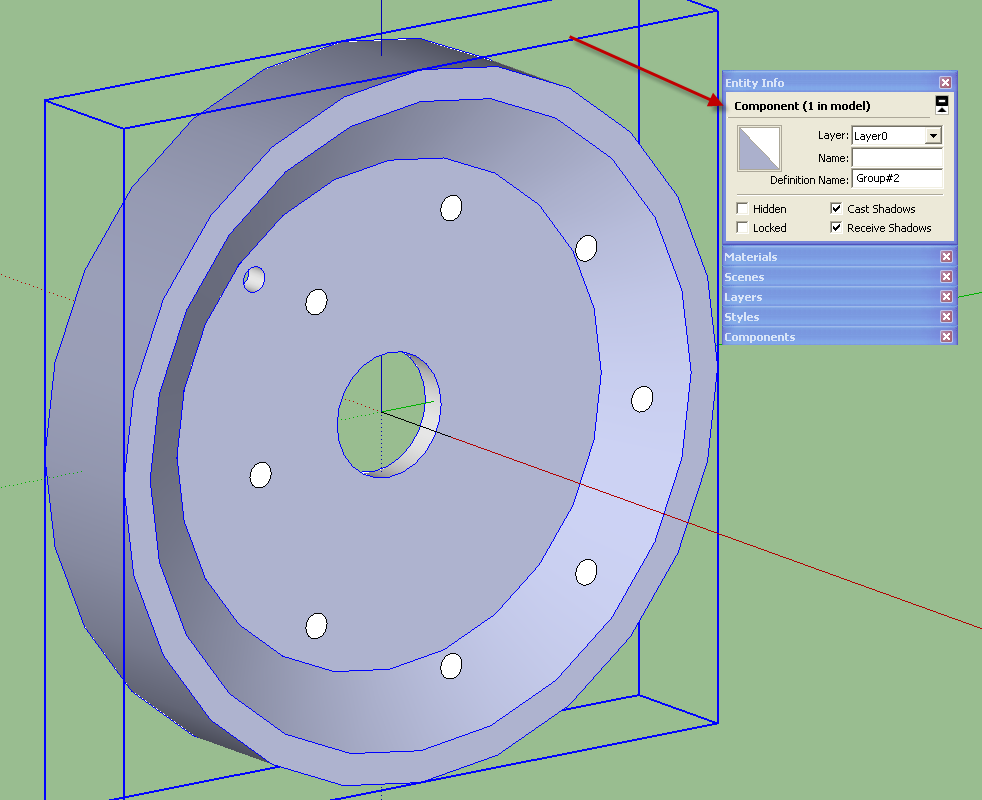
It isn't solid or SketchUp would show it as Solid Component. There are quite a number of internal faces which make it not a solid. If you look at the wheel in X-ray face style and with Hidden Geometry turned on you'll see all the "bad" geometry.
The simple definition of a solid component or group in SketchUp is that every edge borders exactly two faces, no more and no less.
You seem to be ignoring the assistance that I and several others have tried to provide in your related thread.

-
Dave R,
Please have a look at the attached redo. I've never used xray views so not sure if you mean that's part of how you assess "solid" vs "not solid" (solid = "no leaks?"). I'd never paid much attention to "entity info" heretofore, but that looks like it's the yes/no indicator of solidity or lack thereof?
Anyway, I went to my previous iteration and looked at it to compare with the newer one, and to guess at what I should be/am seeing when using Xray view settings. Recall that both versions were rotationally-extruded, with the first following the default 24-sided circle; I think that's the source of what's being called "bad geometry," but maybe that was gilles' verdict just because it's jaggy. OTOH, the attached version should be essentially the same, though differently-meshed, since it's extruded following a 100-sided circle vs. 24.
If it's a question of "leaks," I don't know where those would be. Both that version and the new were "solid enough" to punch with the plugin tool - though the first one got all crashy after the first hole was punched, the second version didn't.
-
This is good geometries you can compare your model with, note that all the holes were made at a time with Hole on solid.
This takes me less than 5 min.You may update your profile to newbie.
-
The geometry of your wheel this time is correct.
-
@unknownuser said:
I think that's the source of what's being called "bad geometry," but maybe that was gilles' verdict just because it's jaggy.
This is not about jaggy, in your first model there are lots of unneeded faces lines etc... preventing to create a solid,that was what I meant saying bad geometries.
-
Hi,pants.
You "no longer" use this "tear-off menu".
Wake up from bad dream.I will consider this problem in real.
Good bye.
-
@dave r said:
The geometry of your wheel this time is correct.
Thanks - though I still don't know why there'd be a difference between the two, other than the 24-side circle vs the 100-side later version I used. Meh...time to move on. Appreciate your input.
-
@tak2hata said:
Hi,pants.
You "no longer" use this "tear-off menu".
Wake up from bad dream.I will consider this problem in real.
Good bye.
I can't tell if you're revoking my seat, or fixing the plugin, but thanks for the plugin anyway, since it's doing what it should do in the later version of my simple drawing.
-
@gilles said:
...
This takes me less than 5 min.You may update your profile to newbie.
Oh, yeah, I'll get right on that change to "newbie" - anything to get more of your detailed, patient explanations.
-
@pants said:
@dave r said:
The geometry of your wheel this time is correct.
Thanks - though I still don't know why there'd be a difference between the two, other than the 24-side circle vs the 100-side later version I used. Meh...time to move on. Appreciate your input.
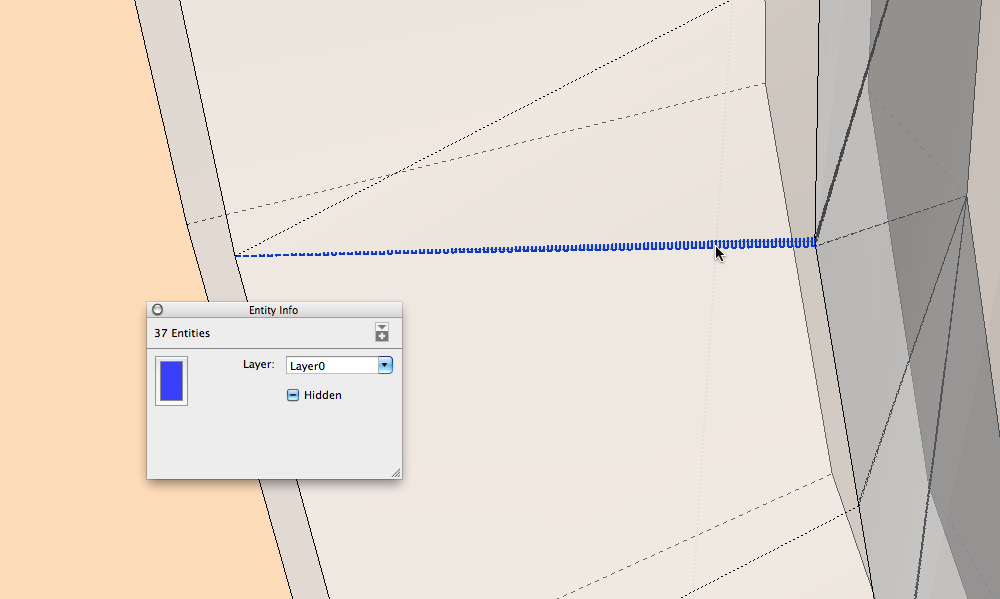
If you turn on hidden geometries and X-ray you will see the problem ( picture).
Your wheel = 1712 entities, the same wheel well drawn = 484 entities
-
@pants said:
@dave r said:
The geometry of your wheel this time is correct.
Thanks - though I still don't know why there'd be a difference between the two, other than the 24-side circle vs the 100-side later version I used. Meh...time to move on. Appreciate your input.
You must have done something different between the two wheels because as several of us showed you, there are many internal faces and edges in the first one.
By the way, you probably don't need 100 sides. I don't know if you even looked at the examples I made for your other thread but I used less than 48 sides and the wheel looks fine.
-
I find the fixing method for the problem.
But it will be performance decrement.
The Pants's model includes very jaggy faces.
Intermediate will not do that.
This script work on the model, when remove the one of adjustment function from my script.
But It will become lower probability to creating hole.
So I make it as T2H_Hole_On_Solid2Beta.
Now I make new icon and adjust to extension class.
It will be shown future.
But I can not understand the man says "I no longer see tear_off menu" ,he still intend to keep using tear-off menu.
It is strange!,isn't it?GoodBye.
-
@pants said:
Dave R,
I'd never paid much attention to "entity info" heretofore, but that looks like it's the yes/no indicator of solidity or lack thereof?
x-ray and back edges have nothing to do with whether geometry is solid or not. you cannot use solid specific plugins, or SUs own internal solid editing tools, if geometry (groups and components) are not solid - a definition that essentially means watertight, with no interior (or exterior) lines or faces that disturb the geometry.
x-ray and back edges can help you see where there may be an error, but it won't tell you if something is solid or not. look for the solid solver plugin to help automate correcting bad solids.
FWIW, it looks like you imported that first wheel, rather than creating it directly in sketchup.





Advertisement