[Plugin] TextureSwapper v1.1 20111112
-
Yes, the names must be the same - but if you rename a completely different image-file in the IN folder with the original name it'll replace OK on 'IN'. The only caveat is that the 'aspect-ratio' of the image's w/h should be equivalent - unless of course you want distorted results...
-
Thank you! This should come in hand with some older models that I wanted to retexture! Thanks again TIG and CadFather for this plugin!
-
Hi TIG,
Love this plugin - fantastic! Ive had a play with it on a couple of files and mostly have had perfect results. However there is a file that Ive run this on where not all of the textures are exported? After Ive run the plugin it says its exported 51 textures but there are only 33 in the folder? Do you have any idea why this would happen?
Thanks
Sam -
If some of your Materials use the exact same name for their texture-file you will get fewer .jpg/.png files exported than Materials processed.
For example, you might have 3 'glass-brick' materials that all happen to use 'glass_brick123.png', so there will be more materials processed than texture files made.
It should affect the result as when each Material's texture file is added back the same file can get reused by several materials.
It's quite possible that the one texture-file is used in several Materials - for example you might have the texture set to use different sizes in different Materials, or apply a 'color' over it or even have different transparency settings...
However, if the 3 glass-brick materials are exactly the same in all respects, then tools lie=ke MaterialConsolidator will reduce the Materials list back to have used just one - so if so then use that before using this tool...
The worst result is if you have three materials using a texture with the same name that's actually completely different! But that's housekeeping and commonsense. So never use non-specific texture names like 'texture1.png' as somewhere along the line they'll be another material using a texture with that name that's not remotely similar
-
Hi TIG,
Thanks for coming back. Totally understand about not using the same names and that materials that use the same map wont export different maps. Ive opened several of the materials whose maps don't export using the plugin. If I go to open them in photoshop through the material palet it opens the temp folder and the files have the following names:C/\Users\CHRIS~1.GWY\AppData\Local\Temp\txjv9jiw.jpg
C/\Users\chris.gwyther\Desktop\Breakthrough book cover.jpg
S/\Level 3\Design Team\Design Reference\3D\Models\Furniture\Espresso Machine LaCimbali\1B Model Library\Library Built by Ryan\Equipment\lcd-display-screen.jpgNot sure why it has that name but its appears to be the address that the original material is stored or first used? We work on a network and work on both Mac and PC (which seems to add some issues). Could the file name be too long to save? Ive tried saving it to my (mac) desktop but still no joy. Do you think this is resolvable or is this just another PC / Mac issue.
Any ideas? Thanks again.Sam
-
Just tried re-saving a couple of files on the mac from photoshop and get an error message telling me that the file name isn't valid so I know why they wont save now using TextureSwapper but do you know if there's any way around this in terms of how the materials are created? Im guessing the answer is probably no, as Im sure its something thats written into SU. It seems that any materials that have been created on mac dont have this massive long name, but the PC ones do. Hope you can help . . .
-
If you edit a texture it gets saved to a temp folder, depending on your OS...
However, if you export textures using this tool the file name is kept and the file goes into the common folder ??
-
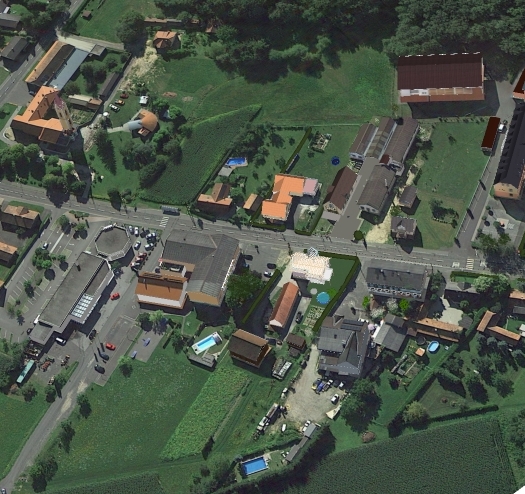
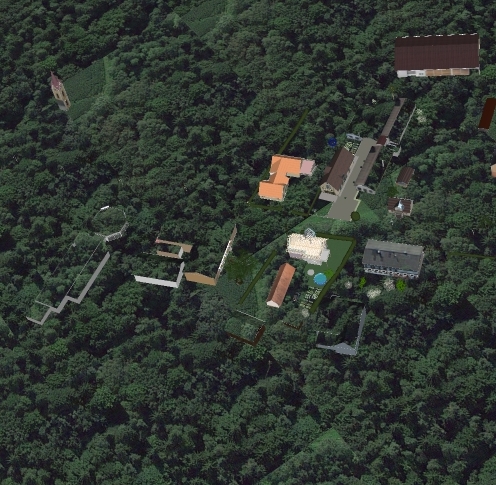 hello Tig
First off all thank you for all the great tools
i try to make my textures smaller with the software Jpgmini and texture swapper
but my snapshots have after this all the same texture ?
Texture names are unik the model is 90 mb
The jpegmini software works well but the import see only the first snapshot ?Thanks for helb
See below wath swapper make with my Map
-
I am not exactly clear what your problem is...
Have you tried Fixing issues under Model Info > Statistics ?
Have you tried Purging under the same option?Do the various materials have 'simple names' ?
Are these names 'related' etc...
What is the connection between the failing ones ?
etc -
Hello Tig
Fast service here
You see the 1 picture with a lot of grass the 2 picture shows only one forest texture over all
The material are google earth snapshots they are groups
the names are Google Earth Snapshot#66
some materials have a hidden line betweenThanks for help
-
Were some of the 'gray' roofs etc in the original, using the default-material ?
Which is now taking a textured material ?I am still unclear about what you are swapping with what...
Does giving these default-material faces a real color help ?
-
Hello Tig
I try to have the same textures like in picture 1
I use the Swapper only to make the picture folder smaller
The Software Jpegmini compress the 90 MB to an 29 Mb i save 70 Mb in the model.
The Material size and resolution are the same like bevor.
I Think the proplem is the name i have to rename all.
I Will report you the result in some days Thanks for all at the moment
esense3d -
Hi,
Is there a chance This Plugin doesn´t work any more in sketchup 2018?
I can´t start it any more. Thank you for your help, Best, -
There have been changes to the Ruby version used by SketchUp since the last release of this extension, so I'd say there is more than a fair chance that it won't function as expected.
-
Works fine for me in v2018/v2019, but remember it is 8 years old is somewhat clunky !
Install from the PluginStore's RBZ...
https://sketchucation.com/pluginstore?pln=TextureSwapperIt's not 'signed', so your Extension Loading Policy needs to be set to 'Unrestricted'.
Its Toolbar might need to be activated to be able to click-to-run...
Here's a synopsis of how it works...
Your model contains textured materials.
You run the 'OUT' option.
Everything is written to your a subfolder in your default user's folder - that is typically your 'Documents' folder.
A subfolder is made named thus "/ModelName_TexturesOUT".
The 'OUT'put.
If now contains all of those materials' textures' image-files, saved using their files extension - e.g. "Bricks.jpg".If you want to reuse modified versions of these textures in your model, copy them into a subfolder in the same parent folder, named say "/ModelName_TexturesIN" subfolder.
You can now edit any of those image-files, retaining their names.
Alternatively overwrite an image-file using another image, keeping the exact same name [note it is case-sensitive].Now you can use the 'IN' option.
All image-files in the "/ModelName_TexturesIN" subfolder are analyzed.
If your model 'ModelName' contains a material using any of the textures named in that folder [note it is case-sensitive and the image-file must be the same 'type' - e.g. .JPG or .PNG], then that material's texture is replaced by the current equivalent in the "/ModelName_TexturesIN" subfolder.So reasons for it to fail are the IN file isn't made.
There are mismatches in the image-file names between the OUT / IN subfolders.
The IN images' file-types don't match the textures' names in the materials' definitions.
Also note the exact destination of these folders; the default folder is set up in our preferences, but some plugins might interfere with that.
So to check what it is, use this in the Ruby Consul:
Dir.pwd+ <enter> -
HI, today I was able to reinstall the textureswapper, I don´t know why I succedded, but now it works.
Sorry, this is not very helpfull to learn about the issue I encountered.Best,






Advertisement