sketchucation logo sketchucation
    • 登入
    Oops, your profile's looking a bit empty! To help us tailor your experience, please fill in key details like your SketchUp version, skill level, operating system, and more. Update and save your info on your profile page today!
    🔌 Smart Spline | Fluid way to handle splines for furniture design and complex structures. Download

    Way to make grooves or reveals?

    已排程 已置頂 已鎖定 已移動 SketchUp Discussions
    sketchup
    32 貼文 12 Posters 11.2k 瀏覽 12 Watching
    正在載入更多貼文
    • 從舊到新
    • 從新到舊
    • 最多點贊
    回覆
    • 在新貼文中回覆
    登入後回覆
    此主題已被刪除。只有擁有主題管理權限的使用者可以查看。
    • C 離線
      cuttingedge
      最後由 編輯

      I worked on joinery company and most of the time offset or copying lines can outline the groove. and do a joint-push pull all at the same time.

      Once one groove is outlined, copy or array to as many as required. quick select by doing a crossing in parallel front or side view. then joint push-pull to give it a uniform recess.

      this works with curved faces as well.

      1 條回覆 最後回覆 回覆 引用 0
      • R 離線
        rv1974
        最後由 編輯

        @unknownuser said:

        Seems multiface-offset by Remus + inverse selection by Tig

        • Joint PushPull by fredo 6 can make some tricks in 3 clicks 😉

        http://forums.sketchucation.com/download/file.php?id=87095

        Windowizer would do it with one OK click (bonus: material separation)

        1 條回覆 最後回覆 回覆 引用 0
        • J 離線
          jmqrsq
          最後由 編輯

          Has this been solved with a plugin yet? If so could someone kindly point me to the download? Thank you!

          1 條回覆 最後回覆 回覆 引用 0
          • pbacotP 離線
            pbacot
            最後由 編輯

            @jmqrsq said:

            Has this been solved with a plugin yet? If so could someone kindly point me to the download? Thank you!

            If you look back in the thread a few ideas were discussed. Profile builder for one. There's not a one-shot solution, I don't think. What I was imagining was more of line(s) on surface(s) , select,run ruby, default setting box (depth and width), OK, and --boom --grooves in surface(s), no cleanup or other steps to do.

            MacOSX MojaveSketchUp Pro v19 Twilight v2 Thea v3 PowerCADD

            1 條回覆 最後回覆 回覆 引用 0
            • R 離線
              rv1974
              最後由 編輯

              IMO The lack of efficient rock solid groove maker is one of the narrowest bottle necks (in SU-ArchViz field). I requested it over 9000 times here and there but no luck. Would gladly buy it for sure.

              1 條回覆 最後回覆 回覆 引用 0
              • srxS 離線
                srx
                最後由 編輯

                Maybe the Inverse of Lattice Maker http://sketchucation.com/forums/viewtopic.php?p=244981#p244981

                ...and with boolean tools you make groovs 😄

                www.saurus.rs

                1 條回覆 最後回覆 回覆 引用 0
                • srxS 離線
                  srx
                  最後由 編輯

                  And there is also Bevel Maker https://youtu.be/ye4mcp0TPy8

                  www.saurus.rs

                  1 條回覆 最後回覆 回覆 引用 0
                  • R 離線
                    rv1974
                    最後由 編輯

                    None of mentioned above work with preselected edges (THE only edges I want to be grooved).
                    The only combo that more or less 'holds the water' is S4U Frame Maker+ Booltools 2,
                    but still, there's a lot of space for improvement.

                    1 條回覆 最後回覆 回覆 引用 0
                    • pilouP 離線
                      pilou
                      最後由 編輯

                      Maybe this can help you...
                      Sdmitch has made an X,Y "Inflator" component(s)
                      Ask him!
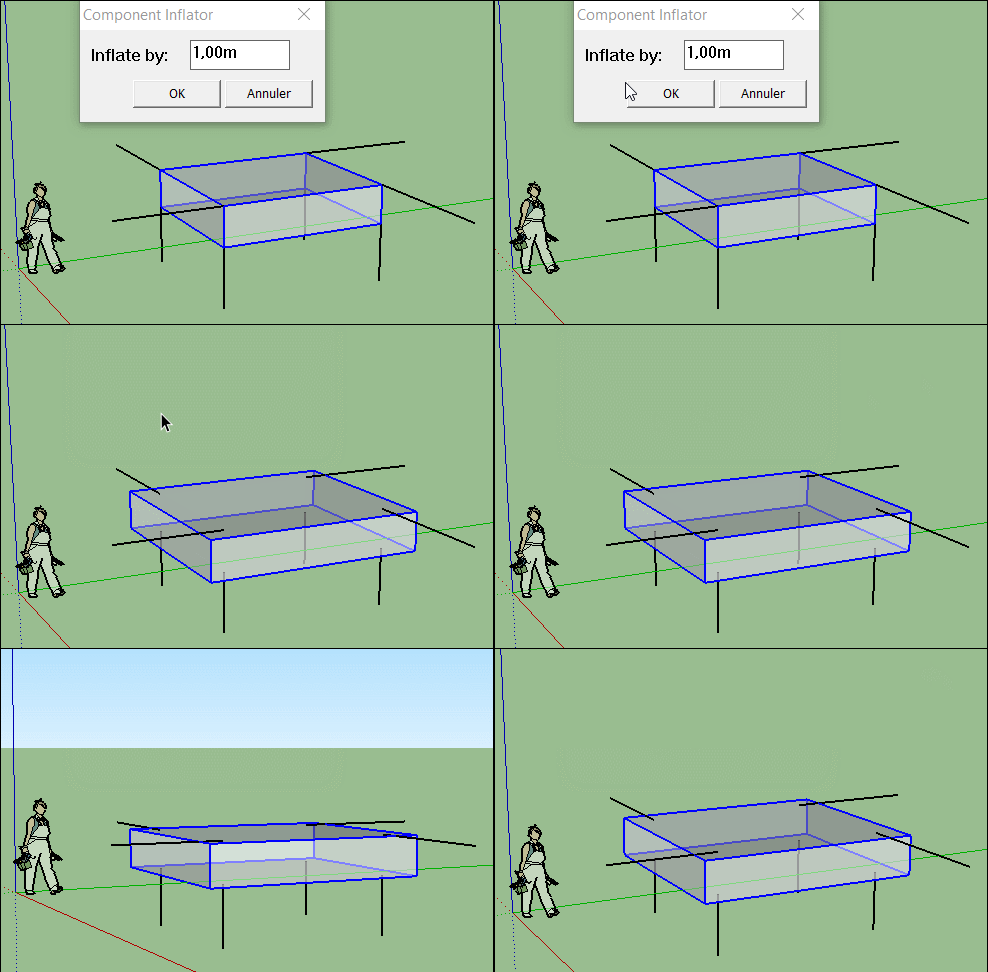
                      GIF_inflator.gif

                      Frenchy Pilou
                      Is beautiful that please without concept!
                      My Little site :)

                      1 條回覆 最後回覆 回覆 引用 0
                      • R 離線
                        rv1974
                        最後由 編輯

                        How does this relate to groove making?

                        1 條回覆 最後回覆 回覆 引用 0
                        • pilouP 離線
                          pilou
                          最後由 編輯

                          @unknownuser said:

                          How does this relate to groove making?

                          About the first post #1
                          If you copy the original component, launch the plug Inflator, Copy in Place then explode...
                          Seems you must have the result asked ?
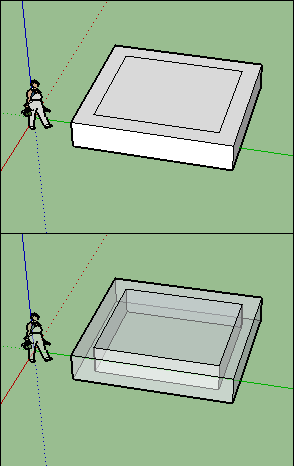
                          GIF_inflator3.gif

                          Frenchy Pilou
                          Is beautiful that please without concept!
                          My Little site :)

                          1 條回覆 最後回覆 回覆 引用 0
                          • T 離線
                            txhoyt
                            最後由 編輯

                            @srx said:

                            And there is also Bevel Maker https://youtu.be/ye4mcp0TPy8

                            Do you have any idea where to find this plugin!?

                            1 條回覆 最後回覆 回覆 引用 0
                            • 1
                            • 2
                            • 2 / 2
                            • 第一個貼文
                              最後的貼文
                            Buy SketchPlus
                            Buy SUbD
                            Buy WrapR
                            Buy eBook
                            Buy Modelur
                            Buy Vertex Tools
                            Buy SketchCuisine
                            Buy FormFonts

                            Advertisement
