Using DropBox and symbolic links with SketchUp.
-
@Shanna:
Theoretically, you should have no problem with either of your questions.
I was just going to mention that many of the plugins have been updated to play nice with Sketchup 2013 and if you use the Sketchucation Plugin Store utility, it should be relatively simple to load your favorite items.
As for Windows 8, it is still windows core program, just a different interface. -
@mitcorb said:
@Shanna:
Theoretically, you should have no problem with either of your questions.
I was just going to mention that many of the plugins have been updated to play nice with Sketchup 2013 and if you use the Sketchucation Plugin Store utility, it should be relatively simple to load your favorite items.
As for Windows 8, it is still windows core program, just a different interface.Thanks, looks like it would make the most sense to do a new install of the plgins to make sure i have the most up to date versions for 13. I am currently only using one computer for all of my work so I dont think i need to do the drop box thing for my plugins but if I do get a desktop do you think it iwll work the same with 13 as it did in the example for 8? I am guessing that the plugin store utility still puts the plugins into the plugin folder and if i move the bluging folder to dropbox and follow the intstructions for pointing sketchup to that folder I should be good. I was just wondeing if anyone had done this yet with 13? Also, i did not see my favorite Lib Fredo plugins in the plugin utility.... is that because his plugins require that because his require something else to be installed prior to using his plugins?
Thanks for your help!
-
As far as I know and as it appears in this link, Fredo6's Libfredo file is still separate. It is at version 5 according to the link.
http://sketchucation.com/resources/pluginstore?pln=LibFredo6In case you need to look, click on the drop down "Resources" on the black bar above and click on PluginStore. You can search by the criteria at the top of that page. Just check Fredo6 in the drop list. Hope this helps.
-
Hah,
I've been using a similar mouse configuration for the past 4 years, I was in pain with my index and middle finger orbiting and panning too much. I second that the thumb solution is very very good!

But in my case, I am still using the old style corded mouse with a ball! (I found it in my Dad's basement) and it's just super comfortable! And since it has a PS2 connector (remember those?) I found a USB to PS2 adapter. Works perfectly!
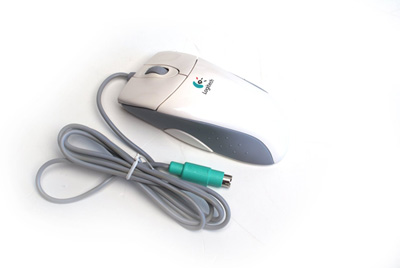
My Logitech Mouseman + Yeahhhh!
http://www.amazon.com/Logitech-M-CW47-Ergonomic-Connection-Compatible/dp/B004XJ4VP4/ref=pd_sim_sbs_e_1USB to PS2 Adapter:
http://dx.com/p/usb-to-ps-2-cable-adapter-15cm-length-45594(maybe this topic should be split into "pride in cool hardware configurations"

@unknownuser said:
@chris fullmer said:
I still can't live without a middle button to hold down for orbiting in SU.
get a mouse with a thumb button(s)… thank me later
zoom while orbiting... your index finger is on the left button way more often.. faster/more flow-ey / more comfortable drawing..
-
there are several threads on this issue now and i just realized i never posted my solution to using dropbox as a source for plugins to enable synchronization between multiple machines.
I figured it out shortly after our conversation here and another post, so thanks again guys!
THE COMMAND THAT WORKED FOR ME in cmd.exe
mklink /J "C:\Users\rachristman\AppData\Roaming\SketchUp\SketchUp 2014\SketchUp\plugins" "D:\Dropbox\SketchUp Resources_SU Plugins\Plugins"
I am not sure if /D did not work because i was linking from
 to d: but the /J did the trick. FULLY OPERATIONAL mklink, directory junction, is reading the plugins folder from my drop box as soon as i open Sketchup 2014.
THE PROCESS:
i had "successfully" created a symbolic link in cmd using mklink, however the tutorial thread i used had differing syntax. it took a while to determine that i had to use BOTH the existing path AND the new path in the mklink command as well as using "" around the paths. this was not mentioned in this post:
http://sketchucation.com/forums/viewtopic.php?f=15%26amp;t=40866 (this post did not work for me)so i found some other references concerning the syntax:
http://www.sevenforums.com/customization/149054-symbolic-folder-linking.htmli will also share the info i came across while attempting this
windows file junctions and symbolic links:
http://devtidbits.com/2009/09/07/windows-file-junctions-symbolic-links-and-hard-links/links description:
http://devtidbits.com/2009/09/07/windows-file-junctions-symbolic-links-and-hard-links/syncronize two windows folders in real time:
http://superuser.com/questions/65524/how-do-i-synchronise-two-folders-in-real-time-in-windows-7 -
FYI
i just read that the quotes are needed if you have any spaces in the path.






Advertisement