[Plugin]Export Collada with texture names 1.2b [30/9/11]
-
This plugin allows to export the whole model or the selection to Collada file format while preserving/restoring the the texture's original file and the material's screen names.
This is useful since SketchUp's Collada exporter creates generic names which don't allow to identify materials anymore when you want to use the file in another software.
SketchUp also creates new textures images for each face with distorted texture coordinates; however these won't receive the original material's name.
If you need specific export options (from SketchUp's options dialog), feel free to edit theoptions_hash.
Unfortunately, SketchUp also creates generic material names (%(#000000)[<auto>1]) when you import Collada files into SketchUp.Version: 1.2b
Date: 30.09.2011
Usage:
(Menu) File -> 'Export Collada with texture names'
-
FANTASTIC!! I just started using the dae export option and the texture renaming is extremely frustrating! Thank you!!
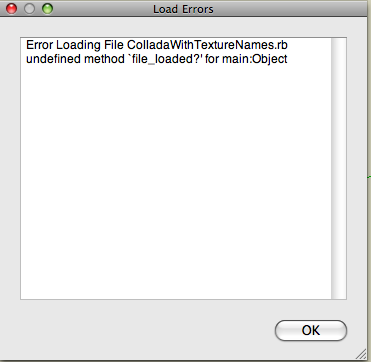
EDITED TO ADD- Unfortunately it does not work for me. I get an "Error Loading" warning. I have the latest FREE version of SU 8... and I am running it on a Mac using OS 10.5. I tried it to see if it works in earlier versions but even though it shows up in the menu in SU 6, it does not respond... but does not give a error loading warning though.
Hope it works for other folks.
-
It works for me - on Windows. I wonder if there is anything on the Mac...
-
Hi,
file_loaded is a method that almost all scripts use. Do you have any other plugins that show this error?
In your SketchUp/Tools folder should exist a file "sketchup.rb" where line 41 defines file_loaded. Maybe it's something else but I don't know what it could be.
If you see it in SU6, can you open the ruby console before running it? -
Aerilius,
...you didn't
require "sketchup"Your plugin is loading before sketchup.rb, which is why it's a good idea to require "sketchup" in your plugins.
-
You need to have the text
require 'sketchup.rb'* at the very start of the script's code [outside of any module/class/def]... because those methods "file_loaded()/file_loaded?()" are defined by that script*; often there's no problem when you forget to 'require' it because some other script has already 'required' it before yours loads and it only needs to be required/loaded just once for it to be available to all scripts thereafter... BUT if not [e.g. your script loads early or there are few scripts loading or no others require it either!] you'll get that error
So add it around line #27 ! -
Error; #<NoMethodError; private method `gsub' called for nil;NilClass>
/Library/Application Support/Google SketchUp 8/SketchUp/Plugins/ColladaWithTextureNames.rb;66;in `run'
/Library/Application Support/Google SketchUp 8/SketchUp/Plugins/ColladaWithTextureNames.rb;140
moding line 66 gets rid of that and it runs,
ref_dir = "#{( ENV['TMPDIR'] || ENV['TMP'] || ENV['TEMP'] ).gsub(/\\/,'/')}/skp_cwtn"however, it's not clearing the temp directory so on second run I get.
 Error; #<Errno;;ENOTEMPTY; Directory not empty - /var/folders/lN/lNON23AjHxezeYON7yETPU+++TI/-Tmp-//skp_cwtn>
/Library/Application Support/Google SketchUp 8/SketchUp/Plugins/ColladaWithTextureNames.rb;72;in `delete'
/Library/Application Support/Google SketchUp 8/SketchUp/Plugins/ColladaWithTextureNames.rb;72;in `run'
/Library/Application Support/Google SketchUp 8/SketchUp/Plugins/ColladaWithTextureNames.rb;140
but it does make the files... even though showing these errors.
on re-import some of the faces have been reversed and some of the materials only show up after draw event...I hadn't added
require 'sketchup'yet, but I think it's mainly a path issue on mac...
john -
The last trap sorts out PC and MAC variants...
The baldDir.delete(ref_dir)
WILL fail IF the directory contains files... so use
Dir.entries(ref_dir).each{|f| next if f=='.' or f=='..' File.delete(File.join(ref_dir, f)) }if Dir.entries(ref_dir)[2] Dir.delete(ref_dir)
This WILL delete any folder as it 'empties' it first...
EDIT: typo fixed
-
-
...and something else I find odd, a new Material folder was created and populated with materials, but none of these are in the 'undeleted' tmp Dir.
To clarify:
If I remove the 'tmp' Dir from the system. Start SU, open a drawing and RC, and then use this plugin.I get a .dae and a populated Materials folder and I also have a new tmp Dir with the same materials inside, and the no method error.
if I then open a second drawing and use this plugin again I get another .dae and another populated Materials folder, bur the tmp Dir does not add these new materials and I get another no method error for Dir.
I don't understand....
john
-
I fixed all issues above (hope now it's right).
I also added that the plugin prefers the material's screen name as long as it's not generic.
This time I must have forgotten the require Sketchup. Thanks to all for the tips.@driven: It works with
Dir.foreach(d){|f| }
and
Dir.entries(d)[2] -
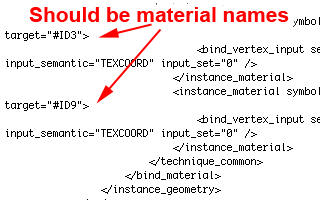
It works now, but when I checked the material names after importing them in Blender and Poser they are being renamed again.
There are no other plugins loaded into SU8... I just downloaded 8 and this is the first Ruby I added.
-
-
Excellent plugin (and initiative), Aerilius!
There seems to be a small problem with the texture paths though:
<init_from>**Boxes_MaterialTest/**C:/Users/ABC/Desktop/Boxes_MaterialTest/_Asphalt_Stamped_Brick_1.jpg</init_from>
As you can see it seems to add the name of the exported DAE file to the texture path. Once I've removed that I can easily import the DAE file with textures in Lumion

-
@unknownuser said:
Once I've removed that I can easily import the DAE file with textures in Lumion :thumb:
the folder does stop all the texture being scattered over you desktop, so maybe putting the dae file into it programatically would be better...
john
-
<init_from>daetest/C:/Users/TIG/Desktop/daetest/Palm14x.png</init_from>
should be either
<init_from>C:/Users/TIG/Desktop/daetest/Palm14x.png</init_from>
or for a [better] more general solution where the dae has its images in a folder 'kept with it' even when moved
<init_from>daetest/Palm14x.png</init_from>
The code is readily tweaked thus
fileNames.each{|old,new| colladaContent.gsub!(old,new) **colladaContent.gsub!(/#{dir+'/'}/,'')** }to remove the unneeded path... -
Thanks for that, TIG - the textures work great now without the need to manually edit the paths!
Any idea how to preserve the original SketchUp material names in the DAE file?
-
@morten said:
Any idea how to preserve the original material names in the DAE file?
That's what I've been working on (while I hadn't read all new posts here). I've also found the mistake myself and fixed it (I had mixed up the file base name and full path).
So now the plugin not only replaces texture file names, but also the material's screen names. It wasn't simple because collada has several different material names (<material>, <instance_material>) that are scattered over the whole file.@driven said:
maybe putting the dae file into it programatically would be better
So you mean to put the collada file into the same folder where the textures are? I understand how that would be useful, for now I did only modify the contents of the dae and kept the file structure how SketchUp produced it.
-
@aerilius said:
So you mean to put the collada file into the same folder where the textures are? I understand how that would be useful, for now I did only modify the contents of the dae and kept the file structure how SketchUp produced it.
Indeed it could be useful however note that it would be rather unusual. Most of the exporting packages I know place the materials into a subfolder under where the model file is. Would it not cause confusion rather than ease of use? When exporting, most (experienced) users create a folder to collect all exported files and subfolders anyway.
-
@aerilius said:
I've also found the mistake myself and fixed it (I had mixed up the file base name and full path). So now the plugin not only replaces texture file names, but also the material's screen names.
Hmm, after replacing your Ruby script with the latest version, the imported DAE object appears without textures in both Blender and Lumion.
I'm testing a simple box with 1 brick material + 1 default white material on the inside of the box, and as far as I can tell, there's still a slight discrepancy between the material names throughout the DAE file:
<instance_material symbol="[Brick_Rough_Tan]" target="#ID5">
<instance_material symbol="Material3" target="#ID15">
...
<triangles count="12" material="Material2">
<triangles count="12" material="Material3">
The texture re-appears if I replace "Material2" with "[Brick_Rough_Tan]", so it's almost working.





Advertisement