sketchucation logo sketchucation
    • 登入
    Oops, your profile's looking a bit empty! To help us tailor your experience, please fill in key details like your SketchUp version, skill level, operating system, and more. Update and save your info on your profile page today!
    🔌 Smart Spline | Fluid way to handle splines for furniture design and complex structures. Download

    [Plugin] Solids Trim and Keep (Pro Only)

    已排程 已置頂 已鎖定 已移動 Plugins
    34 貼文 12 Posters 31.6k 瀏覽 12 Watching
    正在載入更多貼文
    • 從舊到新
    • 從新到舊
    • 最多點贊
    回覆
    • 在新貼文中回覆
    登入後回覆
    此主題已被刪除。只有擁有主題管理權限的使用者可以查看。
    • GaieusG 離線
      Gaieus
      最後由 編輯

      How could I overlook this plugin??? 😮

      Thanks Jim!!! 👍

      Gai...

      1 條回覆 最後回覆 回覆 引用 0
      • R 離線
        RODRIGOLEE
        最後由 編輯

        Hi,
        its works to SketchUp 2014????

        1 條回覆 最後回覆 回覆 引用 0
        • TIGT 離線
          TIG Moderator
          最後由 編輯

          @rodrigolee said:

          Hi,
          its works to SketchUp 2014????
          Install it in v2014 Pro and try it... report back...

          TIG

          1 條回覆 最後回覆 回覆 引用 0
          • R 離線
            RODRIGOLEE
            最後由 編輯

            @tig said:

            @rodrigolee said:

            Hi,
            its works to SketchUp 2014????
            Install it in v2014 Pro and try it... report back...

            Someone tried to install the v2014 before? Isnt working with me.

            1 條回覆 最後回覆 回覆 引用 0
            • Dave RD 離線
              Dave R
              最後由 編輯

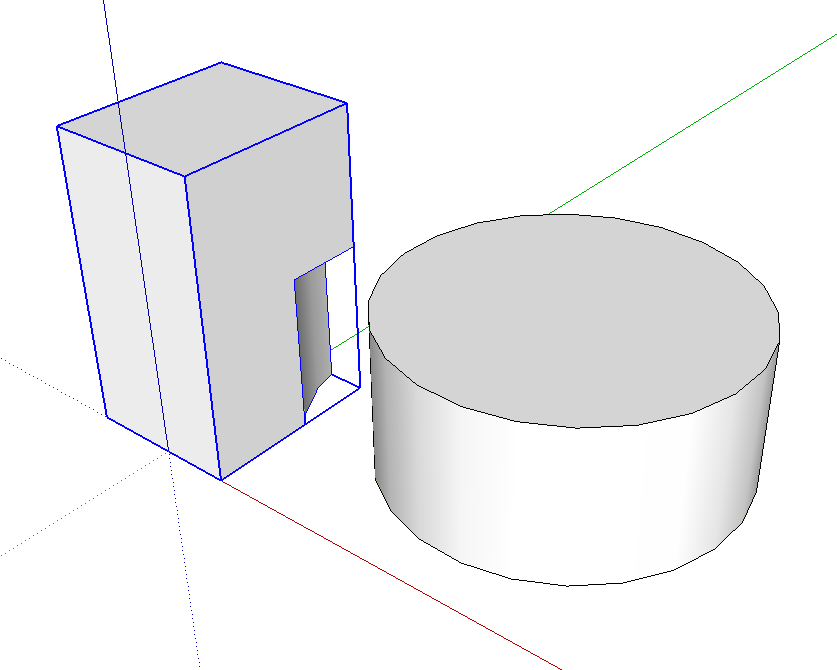
              This was done just a moment ago with Trim and Keep in SU2014. I would have to conclude the plugin works. Are you using SU2014 Pro? Your profile still shows you are using SU8.
              Screenshot - 7_10_2014 , 4_34_01 AM.png

              Etaoin Shrdlu

              %

              (THERE'S NO PLACE LIKE)

              G28 X0.0 Y0.0 Z0.0

              M30

              %

              1 條回覆 最後回覆 回覆 引用 0
              • TIGT 離線
                TIG Moderator
                最後由 編輯

                The Plugin does works fine with all SketchUp versions [>=8].

                Note that it runs from a 'Tools' menu item - 'Trim & Keep'...

                However, it does have one glitch...
                It always works fine with Solid Component-Instances, BUT it fails if the second picked object is a Solid Group.

                See the Ruby Console errors...

                This fail/error is sidestepped if you have other some other script loading which itself adds a group.definition method.

                A simple fix is to either also have one of those other scripts loading, OR to edit the jf_trim_and_keep.rb file using a plain-text editor like Notepad/Notepad++/TextWrangler [NEVER a wordprocessor!]...

                Add this extra code on the very end of the file's text and save it, restart Sketchup and try using the tool on Solid Groups again - it will then work fine with Solid Component-Instances AND Groups:

                class Sketchup;;Group
                    unless Sketchup;;Group.method_defined?(;definition)
                        def definition()
                          if self.entities.parent.instances.include?(self)
                            return self.entities.parent
                          else
                            Sketchup.active_model.definitions.each{|definition|
                                return definition if definition.instances.include?(self)
                            }
                          end
                          return nil # This should never happen !
                        end
                    end#if
                end#class


                TIG

                1 條回覆 最後回覆 回覆 引用 0
                • Dave RD 離線
                  Dave R
                  最後由 編輯

                  Maybe that's it. The poster might be using groups instead of components. I didn't ask that because this plugin was written to work on components and keep them components after modifying them.

                  @unknownuser said:

                  This plugin allows you to trim a Component and have all instances update as well.

                  If the object getting trimmed is a group, there's no reason not to use the Trim tool from the Solid Tools set.

                  Etaoin Shrdlu

                  %

                  (THERE'S NO PLACE LIKE)

                  G28 X0.0 Y0.0 Z0.0

                  M30

                  %

                  1 條回覆 最後回覆 回覆 引用 0
                  • TIGT 離線
                    TIG Moderator
                    最後由 編輯

                    Unfortunately it does allow you to click on a Group, which causes the issue without a group.definition method available...
                    This tool does still have a use with Solid Groups, because then its result maintains the same name etc, the native tool messes up... it's renamed 'Difference'... and of course it loses its other properties like layer ?

                    TIG

                    1 條回覆 最後回覆 回覆 引用 0
                    • Dave RD 離線
                      Dave R
                      最後由 編輯

                      True, although I'm hoping for a change in that behavior along with the conversion from components to groups in the near future.

                      Etaoin Shrdlu

                      %

                      (THERE'S NO PLACE LIKE)

                      G28 X0.0 Y0.0 Z0.0

                      M30

                      %

                      1 條回覆 最後回覆 回覆 引用 0
                      • E 離線
                        ebelg2000
                        最後由 編輯

                        I was wondering if there is a way to add this plugin to the main toolbar. Thanks.

                        1 條回覆 最後回覆 回覆 引用 0
                        • Dave RD 離線
                          Dave R
                          最後由 編輯

                          There isn't a toolbar for it. I use this plugin frequently, though, and set up a keyboard shortcut for it. That's better for me than another toolbar button.

                          Etaoin Shrdlu

                          %

                          (THERE'S NO PLACE LIKE)

                          G28 X0.0 Y0.0 Z0.0

                          M30

                          %

                          1 條回覆 最後回覆 回覆 引用 0
                          • E 離線
                            ebelg2000
                            最後由 編輯

                            Thanks Dave

                            1 條回覆 最後回覆 回覆 引用 0
                            • A 離線
                              AdventurousConifer
                              最後由 編輯

                              This is a real time saver. I'm using Sketchup 2017 on a Mac and notice that I have to reinstall this extension every time I restart Sketchup. Do you have any tips on making it stay installed?

                              1 條回覆 最後回覆 回覆 引用 0
                              • Dave RD 離線
                                Dave R
                                最後由 編輯

                                @adventurousconifer said:

                                This is a real time saver. I'm using Sketchup 2017 on a Mac and notice that I have to reinstall this extension every time I restart Sketchup. Do you have any tips on making it stay installed?

                                How did you install it? What directory did you install it into? My guess is you aren't installing it in the correct location.


                                Etaoin Shrdlu

                                %

                                (THERE'S NO PLACE LIKE)

                                G28 X0.0 Y0.0 Z0.0

                                M30

                                %

                                1 條回覆 最後回覆 回覆 引用 0
                                • 1
                                • 2
                                • 2 / 2
                                • 第一個貼文
                                  最後的貼文
                                Buy SketchPlus
                                Buy SUbD
                                Buy WrapR
                                Buy eBook
                                Buy Modelur
                                Buy Vertex Tools
                                Buy SketchCuisine
                                Buy FormFonts

                                Advertisement
