[Plugin] QuadFaceTools
-
hmm... so are you getting no tooltips at all when you hover over the buttons? Because there are tooltips...
-
OK they're back. After restart. I know this has happened before... Sorry for the bother. I've been getting somewhere with it now.
-
Hi!
I can't load a plug-in on the first page. It because of new design of a site?
Win7 x64, Chrome. -
@ruck said:
Hi!
I can't load a plug-in on the first page. It because of new design of a site?

Yes - that's a big fail on account of the new site. I'll let the admins know.
Meanwhile - download here: https://bitbucket.org/thomthom/quadface-tools/wiki/Download
-
@thomthom said:
Meanwhile - download here: https://bitbucket.org/thomthom/quadface-tools/wiki/Download
Thanks for the fast help!
Also forgive my English
-
Okay, I'm seriously confused here. Only managed to get this work once and all other attempts to repeat the process failed ever since. What do I do wrong?
- Creating a sandbox plane. 50x50 meters, if size matters anyhow.
- Converting sandbox to QuadTools quads.
- Copying the plane nearby.
- Texturing original plane. Texture is set to 50m, so it does not repeat.
- Entering original plane group and copying UV coordinates.
So far so good, paste button is now active.
- Entering copied plane group and pasting UV coordinates.
- Nada.
I tried all kinds of various methods for conversion - exploded, grouped, did whatnot. Something I noticed is sometimes sandbox quads are turned into triangles when converted and sometimes they are not?!
Help

-
Do the tools work with SketchUp V7?
Do I need any other plugins/ scripts for them to work?Thank you.

-
Yes.
Just follow the instructions on the page that appear when you click the Download button and you'll be all set.
-
A quad face property is when the diagonal edge on a non planar 4 sided object has soften and smooth property on and the cast shadow property off.
Sent from my iPad
-
Ok, so I replied to a post that has now disappeared so it looks like I just blurted out random crap.
But for that mystery guy see above....

Sent from my iPad
-
@dickorama said:
Okay, I'm seriously confused here. Only managed to get this work once and all other attempts to repeat the process failed ever since. What do I do wrong?
- Creating a sandbox plane. 50x50 meters, if size matters anyhow.
- Converting sandbox to QuadTools quads.
- Copying the plane nearby.
- Texturing original plane. Texture is set to 50m, so it does not repeat.
- Entering original plane group and copying UV coordinates.
So far so good, paste button is now active.
- Entering copied plane group and pasting UV coordinates.
- Nada.
I tried all kinds of various methods for conversion - exploded, grouped, did whatnot. Something I noticed is sometimes sandbox quads are turned into triangles when converted and sometimes they are not?!
Help
Didn't notice this until now. Still having problems?
Got a sample model? -
Unfortunately I get this error message when SU7 starts:
"can't convert nil into StringError Loading File tt_quadface.rb
can't convert nil into String"I don't know what this means so I can't use it.
-
Have tt_quadface.rb in the root of the plugins folder?
It should not reside in a folder within the plugin folder as per the footprint in the first post.
-
Open the Ruby Console (Window > Ruby Console) and enter:
load 'tt_quadface.rb'. Report back the whole error.(Btw, can you post a screenshot of your Plugins folder?)
-
> load 'tt_quadface.rb'
/Library/Application Support/Google SketchUp 7/SketchUp/Plugins/tt_quadface.rb;20; warning; already initialized constant PLUGIN
/Library/Application Support/Google SketchUp 7/SketchUp/Plugins/tt_quadface.rb;21; warning; already initialized constant PLUGIN_ID
/Library/Application Support/Google SketchUp 7/SketchUp/Plugins/tt_quadface.rb;22; warning; already initialized constant PLUGIN_NAME
/Library/Application Support/Google SketchUp 7/SketchUp/Plugins/tt_quadface.rb;23; warning; already initialized constant PLUGIN_VERSION
/Library/Application Support/Google SketchUp 7/SketchUp/Plugins/tt_quadface.rb;24; warning; already initialized constant PLUGIN_AUTHOR
/Library/Application Support/Google SketchUp 7/SketchUp/Plugins/tt_quadface.rb;27; warning; already initialized constant PATH_ROOT
/Library/Application Support/Google SketchUp 7/SketchUp/Plugins/tt_quadface.rb;28; warning; already initialized constant PATH
/Library/Application Support/Google SketchUp 7/SketchUp/Plugins/tt_quadface.rb;29; warning; already initialized constant PATH_ICONS
Error; #<LoadError; no such file to load -- TT_Lib2/core.rb>
/Library/Application Support/Google SketchUp 7/SketchUp/Plugins/TT_QuadFaceTools/core.rb;9;in `require'
/Library/Application Support/Google SketchUp 7/SketchUp/Plugins/TT_QuadFaceTools/core.rb;9
/Library/Application Support/Google SketchUp 7/SketchUp/Tools/extensions.rb;36;in `require'
/Library/Application Support/Google SketchUp 7/SketchUp/Tools/extensions.rb;36;in `load'
/Library/Application Support/Google SketchUp 7/SketchUp/Plugins/tt_quadface.rb;41;in `register_extension'
/Library/Application Support/Google SketchUp 7/SketchUp/Plugins/tt_quadface.rb;41
(eval);540;in `load'
(eval);540
Error; #<LoadError; /Library/Application Support/Google SketchUp 7/SketchUp/Plugins/TT_QuadFaceTools/core.rb;9;in `require'; no such file to load -- TT_Lib2/core.rb>
(eval);540
/Library/Application Support/Google SketchUp 7/SketchUp/Plugins/TT_QuadFaceTools/core.rb;9
/Library/Application Support/Google SketchUp 7/SketchUp/Tools/extensions.rb;36;in `require'
/Library/Application Support/Google SketchUp 7/SketchUp/Tools/extensions.rb;36;in `load'
/Library/Application Support/Google SketchUp 7/SketchUp/Plugins/tt_quadface.rb;41;in `register_extension'
/Library/Application Support/Google SketchUp 7/SketchUp/Plugins/tt_quadface.rb;41
(eval);540;in `load'
(eval);540
It appear that you do not have the required TT_lib2 installed.
-
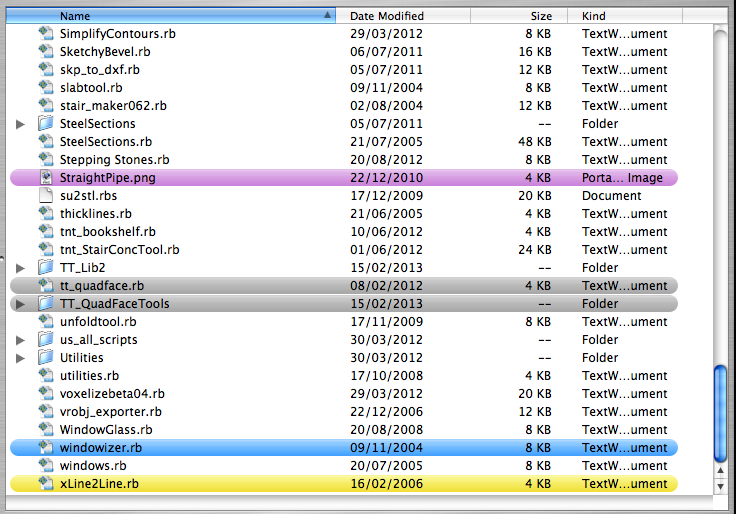
Apologies, I have included it - TT_lib2 - then taken a screenshot of the plugins folder (see attached)
and another report of the whole error (see attached txt file)many thanks.
-
DELETED: new post (see below)
-
@daforum said:
Apologies, I have included it - TT_lib2
Are you sure it's installed correctly?
Do you by any chance have a TT_Lib2 folder inside an TT_Lib2 folder?
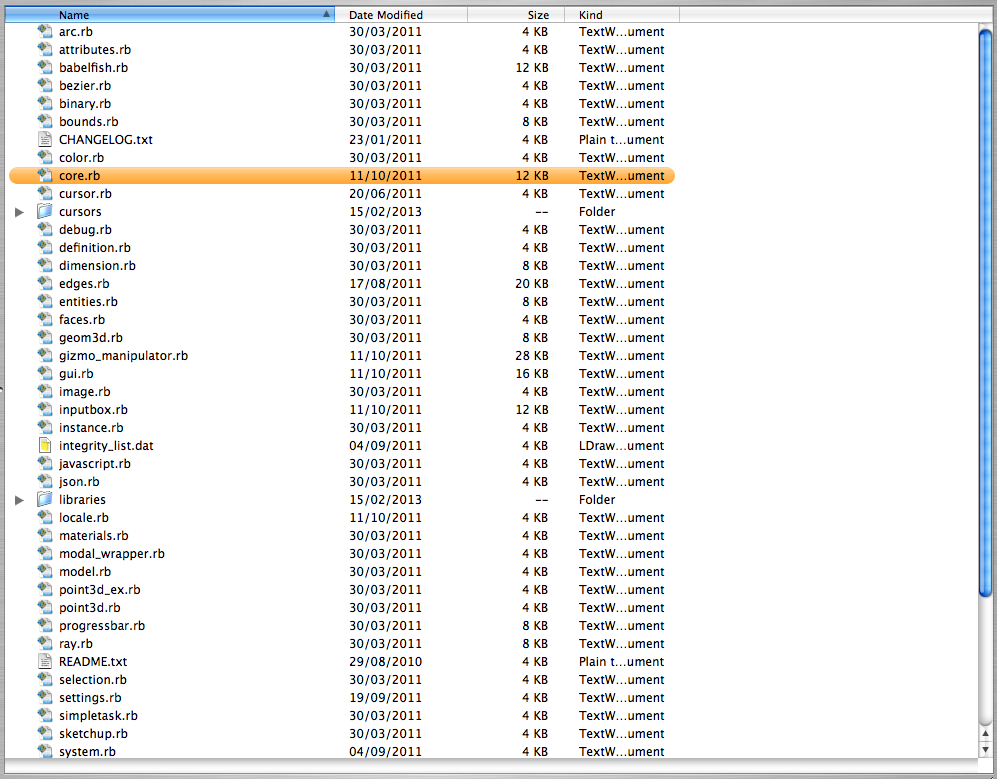
Can you post a screenshot of where the core.rb file inside TT_Lib2 lies? (Screenshot that includes the full path.) -
Here's a screenshot of the TT_Lib2 folder (can't display it all as my screen isn't big enough)
and I haven't got the folder inside another TT_Lib2 folder.The full file path is this:
Macintosh HD/ Library/ Application Support/ Google Sketchup 7/ Sketchup/ plugins/ TT_Lib2/ core.rb
-
That is very strange. I have no idea what is going on here.
...I've noticed lately there's been lots of OSX users with problems due to not sufficient permissions to the plugins folder. Though I'm not really familiar with what they did or what errors they where getting...



Hello! It looks like you're interested in this conversation, but you don't have an account yet.
Getting fed up of having to scroll through the same posts each visit? When you register for an account, you'll always come back to exactly where you were before, and choose to be notified of new replies (either via email, or push notification). You'll also be able to save bookmarks and upvote posts to show your appreciation to other community members.
With your input, this post could be even better 💗
Register Login


Advertisement