sketchucation logo sketchucation
    • 登入
    Oops, your profile's looking a bit empty! To help us tailor your experience, please fill in key details like your SketchUp version, skill level, operating system, and more. Update and save your info on your profile page today!
    🔌 Smart Spline | Fluid way to handle splines for furniture design and complex structures. Download

    [Plugin] QuadFaceTools

    已排程 已置頂 已鎖定 已移動 Plugins
    673 貼文 116 Posters 544.6k 瀏覽 116 Watching
    正在載入更多貼文
    • 從舊到新
    • 從新到舊
    • 最多點贊
    回覆
    • 在新貼文中回覆
    登入後回覆
    此主題已被刪除。只有擁有主題管理權限的使用者可以查看。
    • thomthomT 離線
      thomthom
      最後由 編輯

      @unknownuser said:

      What would be incredible is that once unwrapped and the colors show problem areas you could then adjust verts to alleviate this distortion.

      Can you elaborate on this one? Maybe some screens or illustrations.

      Thomas Thomassen — SketchUp Monkey & Coding addict
      List of my plugins and link to the CookieWare fund

      1 條回覆 最後回覆 回覆 引用 0
      • PixeroP 離線
        Pixero
        最後由 編輯

        What would be great is if the original and the unwrapped faces were "linked" so when manipulating vertices on the flat object you could directly see its effect on the original object.

        1 條回覆 最後回覆 回覆 引用 0
        • thomthomT 離線
          thomthom
          最後由 編輯

          @pixero said:

          What would be great is if the original and the unwrapped faces were "linked" so when manipulating vertices on the flat object you could directly see its effect on the original object.

          How would this manipulation affect the original mesh?

          Thomas Thomassen — SketchUp Monkey & Coding addict
          List of my plugins and link to the CookieWare fund

          1 條回覆 最後回覆 回覆 引用 0
          • PixeroP 離線
            Pixero
            最後由 編輯

            Not the mesh. The UVs. Kind of like when you edit texture in a component and all the rest gets updated in real time.
            WYSIWYG

            1 條回覆 最後回覆 回覆 引用 0
            • thomthomT 離線
              thomthom
              最後由 編輯

              @pixero said:

              Not the mesh. The UVs. Kind of like when you edit texture in a component and all the rest gets updated in real time.
              WYSIWYG

              Interesting. However, I don't think I can hook into the native mapper.
              Did you mean that if you remapped the unwrapped grid with the UV Map tool it'd update?

              How about a context menu item "Update" which would update the source?

              Thomas Thomassen — SketchUp Monkey & Coding addict
              List of my plugins and link to the CookieWare fund

              1 條回覆 最後回覆 回覆 引用 0
              • PixeroP 離線
                Pixero
                最後由 編輯

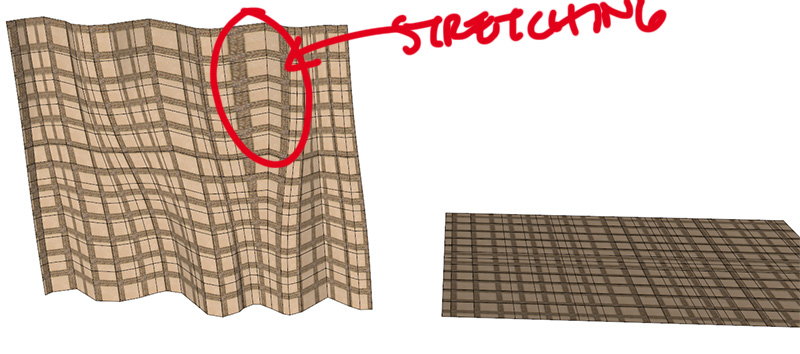
                For example. If you have a object that have the UVs stretched from the default mapping with your tool.
                If you then edited the position of the vertices on the unwrapped object you should see how that effects the original objects mapping. Preferably in real time.
                stretching.jpg

                1 條回覆 最後回覆 回覆 引用 0
                • thomthomT 離線
                  thomthom
                  最後由 編輯

                  Right, so a tool that let you move the vertices of the unwrapped grid - and simultaneously updates the source mesh.
                  It's an interesting idea.

                  Ideally I'd wish that the unwrapped mesh resembled more the original mesh, in terms of shape - but it's not a task I'm able to take on right now.

                  (Though if anyone else got any ideas. then join in on BitBucket! 😉 )

                  Thomas Thomassen — SketchUp Monkey & Coding addict
                  List of my plugins and link to the CookieWare fund

                  1 條回覆 最後回覆 回覆 引用 0
                  • J 離線
                    jorge2011
                    最後由 編輯

                    @thomthom said:

                    @jorge2011 said:

                    for example, how to apply texture to that?

                    Select the material you want to use from the Material Browser. Then pick the U and V axis.
                    I noticed that in the model you posted, no material was selected - I'm guessing this was your issue?

                    ok

                    the latest version works best.

                    but very simple example.

                    How do I apply texture to a cylinder?
                    Material applies only to a portion of the cylinder.

                    and on the other surface not apply.

                    What am I doing wrong?


                    05.skp

                    1 條回覆 最後回覆 回覆 引用 0
                    • thomthomT 離線
                      thomthom
                      最後由 編輯

                      @jorge2011 said:

                      How do I apply texture to a cylinder?
                      Material applies only to a portion of the cylinder.

                      Like any other mesh, pick a U and V axis.
                      Did you have part of the cylinder selected? I had no problems mapping it.
                      Maybe some screenshots of what you are doing? Or a video?

                      @jorge2011 said:

                      and on the other surface not apply.

                      It is not a Quad mesh. All the edges on that surface is soft + smooth.

                      Thomas Thomassen — SketchUp Monkey & Coding addict
                      List of my plugins and link to the CookieWare fund

                      1 條回覆 最後回覆 回覆 引用 0
                      • PixeroP 離線
                        Pixero
                        最後由 編輯

                        @thomthom said:

                        Right, so a tool that let you move the vertices of the unwrapped grid - and simultaneously updates the source mesh.
                        It's an interesting idea.

                        Maybe a tool that for "onMouseMove" updates UVs while moving vertices?
                        Or "onLButtonUp" for semi live update?

                        1 條回覆 最後回覆 回覆 引用 0
                        • J 離線
                          jorge2011
                          最後由 編輯

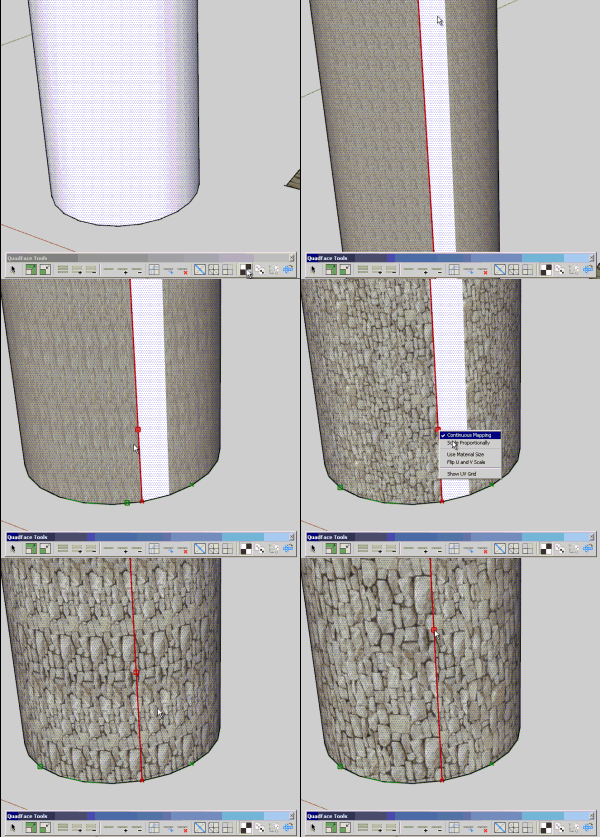
                          is odd, thom. When I apply a material to the cylinder not working properly.
                          the problem is with the "continuous mapping"
                          Am I doing something wrong?
                          Untitled02.gif

                          1 條回覆 最後回覆 回覆 引用 0
                          • thomthomT 離線
                            thomthom
                            最後由 編輯

                            That is odd. I can't reproduce that at all. Can you post that sample model you used in that video? So I can see what might be the difference between it and my test model.

                            Thomas Thomassen — SketchUp Monkey & Coding addict
                            List of my plugins and link to the CookieWare fund

                            1 條回覆 最後回覆 回覆 引用 0
                            • thomthomT 離線
                              thomthom
                              最後由 編輯

                              I see in the video that the origin of the V axis (indicated by the green X) isn't where it should be. Though I do not understand why. I can't make that happen on my test models...

                              Thomas Thomassen — SketchUp Monkey & Coding addict
                              List of my plugins and link to the CookieWare fund

                              1 條回覆 最後回覆 回覆 引用 0
                              • J 離線
                                jorge2011
                                最後由 編輯

                                this is the model

                                http://forums.sketchucation.com/viewtopic.php?f=323&t=39442&start=120#p359462

                                1 條回覆 最後回覆 回覆 引用 0
                                • J 離線
                                  jorge2011
                                  最後由 編輯

                                  @thomthom said:

                                  I see in the video that the origin of the V axis (indicated by the green X) isn't where it should be. Though I do not understand why. I can't make that happen on my test models...

                                  can you explain a little more?

                                  1 條回覆 最後回覆 回覆 引用 0
                                  • dereiD 離線
                                    derei
                                    最後由 編輯

                                    Hello thomthom, do you have any answer related to the error I mentioned here http://forums.sketchucation.com/viewtopic.php?f=323&t=39442&start=75#p358895 ? Now it happens every time I start SU. I don't know why at first happened only on second instance.

                                    DESIGNER AND ARTIST DEREI.UK

                                    1 條回覆 最後回覆 回覆 引用 0
                                    • gillesG 離線
                                      gilles
                                      最後由 編輯

                                      I get similar result than Jorge with a simple cylinder.

                                      " c'est curieux chez les marins ce besoin de faire des phrases "

                                      1 條回覆 最後回覆 回覆 引用 0
                                      • thomthomT 離線
                                        thomthom
                                        最後由 編輯

                                        @unknownuser said:

                                        Hello thomthom, do you have any answer related to the error I mentioned here http://forums.sketchucation.com/viewtopic.php?f=323&t=39442&start=75#p358895 ? Now it happens every time I start SU. I don't know why at first happened only on second instance.

                                        You still get that? I thought I'd fixed it in 0.4.1 ...

                                        Can you do a load 'tt_quadface.rb' again and report back the error message?

                                        You're using SU8, right? (Updated Maintenance release 1?)

                                        And TT_Lib2 version ... ?

                                        Thomas Thomassen — SketchUp Monkey & Coding addict
                                        List of my plugins and link to the CookieWare fund

                                        1 條回覆 最後回覆 回覆 引用 0
                                        • thomthomT 離線
                                          thomthom
                                          最後由 編輯

                                          @gilles said:

                                          I get similar result than Jorge with a simple cylinder.

                                          I cannot reproduce this at all. Here's what happen when I try to map the cylinder with continuous mapping: http://www.youtube.com/watch?v=aAWK4TcGn2E

                                          I tried all modes, and with the faces selected and nothing selected...

                                          Can you post a screenshot or video?

                                          Thomas Thomassen — SketchUp Monkey & Coding addict
                                          List of my plugins and link to the CookieWare fund

                                          1 條回覆 最後回覆 回覆 引用 0
                                          • gillesG 離線
                                            gilles
                                            最後由 編輯

                                            I got this.


                                            UV.png

                                            " c'est curieux chez les marins ce besoin de faire des phrases "

                                            1 條回覆 最後回覆 回覆 引用 0
                                            • 1
                                            • 2
                                            • 3
                                            • 4
                                            • 5
                                            • 33
                                            • 34
                                            • 1 / 34
                                            • 第一個貼文
                                              最後的貼文
                                            Buy SketchPlus
                                            Buy SUbD
                                            Buy WrapR
                                            Buy eBook
                                            Buy Modelur
                                            Buy Vertex Tools
                                            Buy SketchCuisine
                                            Buy FormFonts

                                            Advertisement