[Plugin] 2D Wall Section Tool v1.1 20110903
-
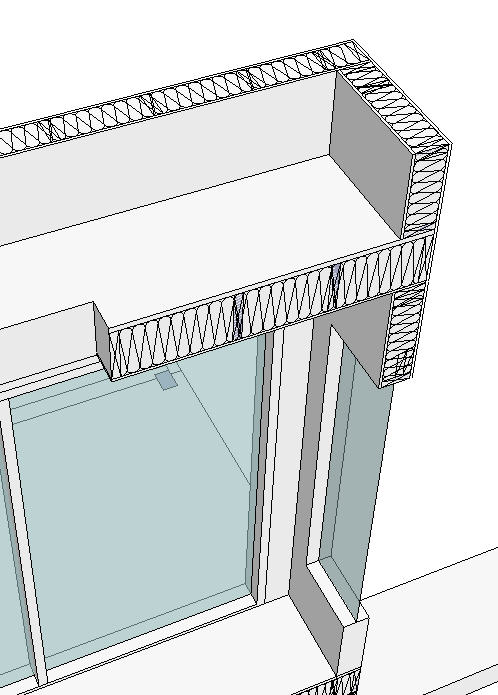
I recently completed my first set of working drawing using SketchUp and Layout. This is a 2D wall section tool, which grew out of the need to show more detail in cross sections, particularly once they were imported into Layout. This tool should help users that do working drawings in Layout using wood framed construction.
My first attempt WallSectionTool1.rb served its purpose for a simple transfer of a wall section from SU to LO. However it failed to take into account that sections are also Viewrelated. Hence this newer version tries to fill in some of those gaps. Because sections can either horizontal or vertical I have also given this newer version a new name: 2DSectionTool.rb Since the only difference between a wall and a floor section is fundamentally a change in lumber and insulation thickness, I have combined both into one ruby.
Here is a more detailed explanation:This new 2DSectionTool.rb creates a 2D Vertical or Horizontal Sections, using Standard North American Lumber dimensions. and Architectural Material Symbol.
- Choose: View (Top, Front, Right, Back, Left) this tells 2DSectionTool's in what view its STUFF is going to be drawn.
- Click: 2 Pick Points. This tells 2DSectionTool's at what location the STUFF is going to be drawn.
- 2DSectionTool: Can draw its STUFF over top of existing 3D Section Elements.
2DSectionTool: Can't read your intentions. Be sure to change the settings in the dialog box before using this tool.
"The Default": 2DSectionTool's draws: a 2D Vertical Section using, 2x6 Studs, Dbl. plates, Batt Insulation, with default 1/2" Interior and Exterior finishes, in Front View.
If you choose 2 vertical pick points (one above the other), "The Default" will be drawn, vertically.
If you choose 2 horizontal Pick Points (one left, the other to the right), "The Default" will be drawn, horizontally.
Before using 2DSectionTool, always decide if your Section is going to be a Vertical Section using Front, Right, Back, or Left Views.
Or Horizontal Section, which uses the Top View.Make the appropriate setting changes first, otherwise you may end up deleting unintended geometry.
2DSectionTool: will also draw walls or floors at any angle. It depends on your 2nd Click, if your 2nd Click is not vertical or horizontal, your section will be drawn at the angle between Click 1 and Click 2.Example: You may want to Insulate only: Turn Draw Insulation ON, Turn all other Draw functions OFF. Now use 2DSectionTool to Insulate a Rafter Section assembly.
2DSectionTool will also always automatically create a layer named "Layer0section" on which it draws the section stuff, hence it wont stick to any other existing 3d geometry your model may contain. When you have finished using 2DSectionTool it will by default go back to activate Layer0.
Important: If your not using SketchUp to produce working drawing in conjunction with Layout this plugin wont be of any use to you. I'm looking forward for some feedback, I'm not entirely sure if combining both wall and floor section into one tool is better than separating it into 2 parts?
Also depending on geographical location not all exterior walls maybe be entirely of wood construction , in which case there is room to add brick veneer or rain screen principle type walls, to this script.
-
Hi, tomot:
This looks to be an interesting innovation. Hopefully some of the 6 who have downloaded it at this point can provide their thoughts, soon. -
Hi tomot, thank you for your generosity. I'm interested in how your working drawings turned out; are you able to post a few images of what you did?

-
tomot,
first and foremost, thanks for a new plugin! however, the information provided is scant. would you mind explaining exactly what it does? it would be nice if you included pictures and, ideally, a video as many plugin authors do.
-
-
@utiler said:
Hi tomot, thank you for your generosity. I'm interested in how your working drawings turned out; are you able to post a few images of what you did?
yes!...https://picasaweb.google.com/106866428107458120008/HaunerAddition
-
Tomot
Very nice and proffesional drawings.
dtr Architect
-
Yep, Nice house.
Will try your plugin as well. -
very nice! i had created a whole set of 2D dynamic components to do the walls, ceilings, doors, windows, etc sectionals. i'll definitely post some feedback.
-
Tig: Thanks for fixing my link
-
tomot, nice clean set of Working Drawings. I look forward to trying out that ruby for sections. gullfo, I look forward experiencing your 2d dynamic components.
I just am finishing my 4th set of Working drawings... still alot to learn though, but I am enjoying doing them in SU/LO.
aloha
red -
thanks a lot, although wood framed houses are virtually non existant in my country.
-
@aceshigh said:
thanks a lot, although wood framed houses are virtually non existant in my country.
If you do working drawings, and have an idea for a wall section for construction in your country, I'm happy to have have look at your idea, email me!
cheers!
-
I've always loved this plugin for construction drawings.
Any updates or further developments? Works oddly in 2014. -
Why do I keep getting this message:
Error Loading File 2DSectionTool.rb
Error: #<LoadError: cannot load such file -- examples/linetool.rb>
C:/Program Files (x86)/SketchUp/SketchUp 2014/Tools/RubyStdLib/rubygems/core_ext/kernel_require.rb:45:inrequire' C:/Program Files (x86)/SketchUp/SketchUp 2014/Tools/RubyStdLib/rubygems/core_ext/kernel_require.rb:45:inrequire'
C:/Users/Sexypox/AppData/Roaming/SketchUp/SketchUp 2014/SketchUp/Plugins/2DSectionTool.rb:25:in `<top (required)>' -
your profile says your on v8, but the error says your on v2014?
did you just copy it across?
this plugin requires another v8 plugin, called 'linetool.rb' that was part of the old google ruby example scripts...
your message says Error: #<LoadError: cannot load such file -- examples/linetool.rb>
both will need updating for v2014...
-
Yes I'm using su2014. I installed the 2D Wall Section Tool v1.1 from the pluginstore and i also installed the Example Ruby Scripts from the extentions warehouse but i keep getting the error. Im assuming i installed updated version of both.
Only thing I can think of is that when i install the example ruby scripts, it places a su_examples folder and a su_examples.rb in sketchup 2014 plugin folder. I thought of deleting the su_ from the name but I really know nothing about thses things -
somewhere in the scripts for this plugin will be
require 'examples/linetool.rb'...
adding the su_ prefix to that may work...
i.e.require 'su_examples/linetool.rb'...
john -
Thank....I tried that and now Im getting a new message
Error Loading File 2DSectionTool.rb
Error: #<NameError: uninitialized constant LineTool>
C:/Users/Sexypox/AppData/Roaming/SketchUp/SketchUp 2014/SketchUp/Plugins/2DSectionTool.rb:27:in `<top (required)>' -
Here's the full fix to make this plugin work in v2015...
Install the
su_examples.rbfile from EW.
You can deactivate its Extension, because this plugin will require thelinetool.rbfrom the subfolder as it needs it...Use Notepad++ [or a similar plain-text editor] to edit the plugin's file
2dSectionTool-1.rb- as follows, about line #24...` require 'sketchup.rb'
$exStrings = LanguageHandler.new("examples.strings") unless $exStrings
require '**su_**examples/linetool.rb'class TwoDSectionTool < **Sketchup::Examples::**LineTool`
The bold text shows the additions/insertions...
The$exStringsis set up here because it might not get set early enough otherwise, and generate a load-error.
In the newer "examples", the examples subfolder is now prefixed with su_, so correct that path.
The LineTool is now a class defined within the Examples module, which in turn is within the Sketchup module - so its 'full path' needs defining.Save the changes to the file and restart SketchUp...
This fix will work - although the plugin itself is somewhat clunky and it ill-advisedly uses global-variables etc; and the bald reuse of the linetool is not used as the examples file intended !








Advertisement